
การแนะนำ
This manual provides essential information for the setup, operation, maintenance, and troubleshooting of your Jamo 5.1 Home Theater System. This system includes two S 809 Floorstanding Speakers, one S 83 CEN Center Channel Speaker, two S 803 Bookshelf Speakers, and one S 810 SUB 10" Subwoofer. Designed for immersive audio experiences, this system is Dolby Atmos ready, offering enhanced sound for compatible content.
การตั้งค่า
1. การแกะกล่อง
Carefully remove all components from their packaging. Verify that all speakers are present and undamaged:
- 2x Jamo S 809 Floorstanding Speakers
- 1x Jamo S 83 CEN Center Channel Speaker
- 2x Jamo S 803 Bookshelf Speakers
- 1x Jamo S 810 SUB 10" Subwoofer
- Power cables for subwoofer
- ตะแกรงลำโพง
2. การวางตำแหน่งลำโพง
Optimal speaker placement is crucial for the best audio experience. Consider your listening area and room acoustics.

Jamo S 809 Floorstanding Speakers: Place these as your front left and right channels, equidistant from your primary listening position and the display. They should be angled slightly inward towards the listener.
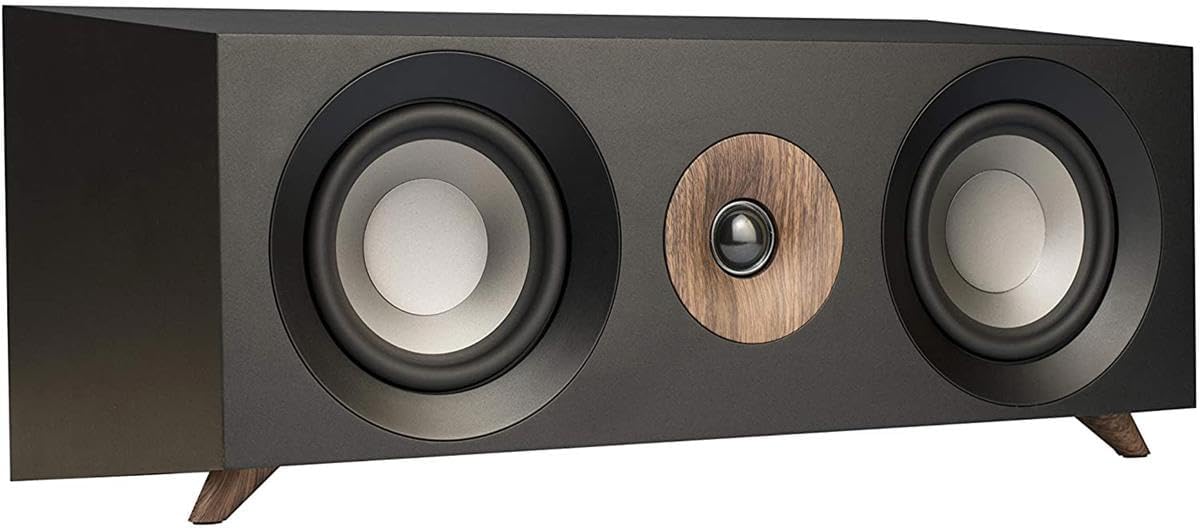
Jamo S 83 CEN Center Channel Speaker: Position this speaker directly above or below your television or projection screen, centered with the display. This speaker handles dialogue and on-screen sound effects.

Jamo S 803 Bookshelf Speakers: Use these as your surround left and right channels. Place them to the sides or slightly behind your main listening position, at or slightly above ear level. Ensure they are angled towards the listening area.

Jamo S 810 SUB 10" Subwoofer: Experiment with placement. Common locations include a corner of the room or along the front wall near the floorstanding speakers. Corner placement often enhances bass output. Avoid placing it directly in the middle of a wall.
3. การเชื่อมต่อ
Before making any connections, ensure your AV receiver and all audio components are powered off and unplugged from the wall outlet.
- สายลำโพง: Connect appropriate gauge speaker wire from your AV receiver's speaker terminals to the corresponding binding posts on each speaker. Ensure positive (+) terminals on the receiver connect to positive (+) terminals on the speakers, and negative (-) to negative (-). Incorrect polarity will result in poor sound quality.
- S 809 Dolby Atmos Ready: The S 809 floorstanding speakers feature integrated connection points on top for seamless integration with optional Jamo S 8 ATM Dolby Atmos elevation speakers (sold separately). If using S 8 ATM modules, connect them to the dedicated terminals on top of the S 809 speakers, and then connect the S 809's main input to your receiver. This design routes the Atmos signal through the floorstander, simplifying wiring.
- การเชื่อมต่อซับวูฟเฟอร์: Connect an RCA cable from your AV receiver's LFE (Low-Frequency Effects) or Subwoofer Pre-Out jack to the LFE input on the Jamo S 810 SUB subwoofer. Then, connect the subwoofer's power cable to a wall outlet.
- การเพิ่มพลังเริ่มต้น: Once all connections are secure, plug in your AV receiver and subwoofer, then power them on. Follow your AV receiver's instructions for initial setup, including speaker calibration (e.g., setting speaker sizes, distances, and levels).
คำแนะนำการใช้งาน
1. การทำงานพื้นฐาน
- เปิด/ปิดเครื่อง: Power on your AV receiver and the Jamo S 810 SUB subwoofer. The subwoofer typically has an auto-on feature that activates when an audio signal is detected.
- การเลือกแหล่งที่มา: Select the desired audio/video source on your AV receiver (e.g., Blu-ray player, streaming device, game console).
- การควบคุมระดับเสียง: Adjust the master volume on your AV receiver. The subwoofer's volume should be set to blend seamlessly with the main speakers, not to overpower them.
2. Dolby Atmos Experience
To experience Dolby Atmos, ensure you have:
- An AV receiver capable of decoding Dolby Atmos.
- Dolby Atmos-encoded content (e.g., Blu-ray discs, streaming services).
- Optional Jamo S 8 ATM Dolby Atmos elevation speakers connected to your S 809 floorstanding speakers.
Your AV receiver will automatically detect and process Dolby Atmos signals, directing the overhead effects to the S 8 ATM modules (if installed) for a three-dimensional sound experience.
การบำรุงรักษาและการดูแล
Proper care will ensure the longevity and performance of your Jamo Home Theater System.
- การทำความสะอาด: Use a soft, dry cloth to wipe down the speaker cabinets. Avoid abrasive cleaners, solvents, or harsh chemicals, as these can damage the finish.
- ลูกกรง: The magnetic grilles can be removed for cleaning or for a different aesthetic. Handle them gently to avoid bending or damaging the fabric.
- การจัดวาง: Avoid placing speakers in direct sunlight, near heat sources, or in areas with high humidity. Ensure adequate ventilation around the subwoofer.
- การเชื่อมต่อ: Periodically check speaker wire connections to ensure they remain secure. Loose connections can lead to signal loss or degraded sound quality.
การแก้ไขปัญหา
If you encounter issues with your Jamo Home Theater System, refer to the following common problems and solutions:
| ปัญหา | สาเหตุที่เป็นไปได้ / วิธีแก้ไข |
|---|---|
| No sound from any speaker |
|
| No sound from a specific speaker |
|
| เสียงผิดเพี้ยนหรือไม่ชัดเจน |
|
| ซับวูฟเฟอร์ไม่สร้างเสียงเบส |
|
| Poor surround sound or Dolby Atmos effect |
|
ข้อมูลจำเพาะ
Below are the general specifications for the Jamo 5.1 Home Theater System components:
| คุณสมบัติ | ข้อมูลจำเพาะ |
|---|---|
| ยี่ห้อ | จาโม |
| หมายเลขรุ่น | S 809, S 810 SUB, S 83 CEN, S 803 |
| Speaker Types Included | Floorstanding, Center Channel, Bookshelf, Subwoofer |
| การกำหนดค่าระบบ | 5.1 Channel Home Theater Pack |
| Power Handling (System) | 120W / 240W (Continuous/Peak) |
| อิมพีแดนซ์ | 8 โอห์ม |
| การตอบสนองความถี่ | 37Hz - 26kHz (+/- 3dB) |
| ความไวต่อความรู้สึก | 90เดซิเบล |
| เส้นผ่านศูนย์กลางวูฟเฟอร์ | 5 inches (Aluminized Polyfiber) |
| เส้นผ่านศูนย์กลางทวีตเตอร์ | 25 mm (1 inch Soft Dome) |
| เส้นผ่านศูนย์กลางซับวูฟเฟอร์ | 10 นิ้ว |
| กำลังขับของซับวูฟเฟอร์ | 150วัตต์ |
| ประเภทตู้ปิด | MDF with Bass Reflex (Front-firing slot port) |
| เทคโนโลยีการเชื่อมต่อ | อุปกรณ์เสริม (แบบมีสาย) |
| น้ำหนักสินค้า | 92.5 ปอนด์ (ระบบทั้งหมด) |
ข้อมูลการรับประกัน
Your Jamo 5.1 Home Theater Pack is covered by a Jamo 5 Year Limited Warranty. This warranty covers defects in materials and workmanship under normal use. Please retain your proof of purchase for warranty claims. For specific terms and conditions, refer to the warranty card included with your product or visit the official Jamo webเว็บไซต์.
สนับสนุน
For further assistance, technical support, or to inquire about additional Jamo products and accessories, please visit the official Jamo webเว็บไซต์หรือติดต่อฝ่ายบริการลูกค้าของพวกเขา
คุณสามารถค้นหาข้อมูลเพิ่มเติมและผลิตภัณฑ์ได้ที่ Jamo Store on Amazon.