
1. บทนำ
This manual provides essential instructions for the safe and efficient operation, maintenance, and troubleshooting of your Bialetti Gioia Espresso Coffee Machine. Please read it thoroughly before first use and keep it for future reference.
The Bialetti Gioia is designed to deliver authentic Italian espresso using exclusively original Bialetti aluminum capsules. Its compact and elegant design makes it suitable for any kitchen environment.

Image: The Bialetti Gioia Espresso Coffee Machine in black, dispensing coffee into a glass cup.
2. ข้อมูลด้านความปลอดภัย
- ควรวางเครื่องไว้บนพื้นผิวที่มั่นคงและเรียบเสมอ
- ห้ามจุ่มเครื่อง สายไฟ หรือเสียบปลั๊กลงในน้ำหรือของเหลวอื่นๆ
- เก็บให้พ้นจากมือเด็ก
- ถอดปลั๊กเครื่องออกจากเต้าเสียบไฟก่อนทำความสะอาดหรือเมื่อไม่ได้ใช้งานเป็นเวลานาน
- Use only original Bialetti aluminum capsules. Using other capsules may damage the machine and void the warranty.

Image: Important notice indicating that the machine functions exclusively with Bialetti aluminum capsules.
3. การตั้งค่า
3.1 การเติมถังเก็บน้ำ
- ถอดถังเก็บน้ำออกจากด้านหลังของเครื่อง
- Fill the tank with fresh, potable water. Do not exceed the 'MAX' fill line.
- Carefully place the water tank back into its position on the machine.
Note: No official product videos were found in the provided data. If available, a video demonstrating water tank filling would be embedded here.
3.2 การเชื่อมต่อเครื่องจักร
- เสียบปลั๊กไฟเข้ากับเต้ารับไฟฟ้าที่เหมาะสม
Note: No official product videos were found in the provided data. If available, a video demonstrating power connection would be embedded here.
3.3 รอบการทำความสะอาดเบื้องต้น
Before first use, or after a long period of inactivity, perform a cleaning cycle:
- ตรวจสอบให้แน่ใจว่าถังน้ำเต็มแล้ว
- Press the power button (red button) to turn on the machine. Wait until both coffee buttons (green lights) are steadily lit, indicating the machine is ready.
- Place an empty cup under the dispenser.
- Do NOT insert a capsule during this operation.
- Press and hold both coffee buttons simultaneously for 5 seconds. The machine will start a cleaning cycle, dispensing hot water. The cycle will terminate automatically.
Note: No official product videos were found in the provided data. If available, a video demonstrating the initial cleaning cycle would be embedded here.
4. คู่มือการใช้งาน
4.1 การชงกาแฟ
- Ensure the water tank is filled and the machine is powered on and ready (green lights on coffee buttons are steady).
- Lift the lever to open the capsule compartment.
- Insert one original Bialetti aluminum capsule into the compartment.
- ปิดคันโยกให้แน่น
- Place a cup on the removable cup rest under the dispenser.
- Press either the short coffee button or the long coffee button to start brewing.
- The machine will automatically stop dispensing when the selected volume is reached.

ภาพ: ภาพระยะใกล้ view of espresso being dispensed into a glass cup from the Bialetti Gioia machine.

Image: The control panel of the Bialetti Gioia, featuring the power button and two coffee selection buttons.
4.2 Customizing Coffee Volume
The machine allows you to customize the quantity of coffee dispensed for both short and long coffee options:
- Follow steps 1-5 for making coffee (Section 4.1).
- Press and hold the desired coffee button (short or long).
- Release the button when the desired coffee volume is reached in your cup. The machine will remember this setting for future brews with that button.
5. การบำรุงรักษา
5.1 การทำความสะอาดรายวัน
- Empty and rinse the used capsule drawer and drip tray daily. The capsule drawer can hold up to 8 used capsules.
- เช็ดด้านนอกของตัวเครื่องด้วยผ้านุ่มdamp ผ้า ห้ามใช้สารทำความสะอาดที่มีฤทธิ์กัดกร่อนหรือตัวทำละลาย
- ควรล้างถังเก็บน้ำเป็นประจำ
5.2 การขจัดตะกรัน
Regular descaling is crucial for maintaining machine performance and coffee quality. Refer to the full product manual for detailed descaling instructions and recommended descaling solutions. Typically, descaling should be performed every 3-6 months depending on water hardness and usage.
6 การแก้ไขปัญหา
| ปัญหา | สาเหตุที่เป็นไปได้ | สารละลาย |
|---|---|---|
| เครื่องไม่เปิดขึ้น | ไม่มีแหล่งจ่ายไฟ | ตรวจสอบว่าสายไฟเสียบเข้ากับเต้ารับและตัวเครื่องอย่างแน่นหนาหรือไม่ |
| No water is dispensed during initial setup or cleaning. | Air bubble in the pump. | Repeatedly raise and lower the water tank to help prime the pump and facilitate water flow. |
| กาแฟไม่ร้อนพอ | เครื่องไม่ร้อนเต็มที่ | Wait until the green lights on the coffee buttons are steadily lit before brewing. |
| การไหลของกาแฟช้าหรือติดขัด | Machine needs descaling or capsule is not inserted correctly. | Perform a descaling cycle. Ensure the capsule is correctly placed and the lever is fully closed. |
7. ข้อมูลจำเพาะ
- ยี่ห้อ: เบียเล็ตติ
- แบบอย่าง: Gioia (012900070/SC)
- สี: สีดำ
- ขนาด (ยาว x กว้าง x สูง): 34 x 9.5 x 22 ซม.
- น้ำหนัก: 3.4 กิโลกรัม
- คุณสมบัติพิเศษ: Thermal (Thermoblock system)
- ประเภทเครื่องชงกาแฟ: เครื่องชงกาแฟเอสเพรสโซ
- แรงดันปั๊ม: 20 บาร์
- ความจุถังน้ำ: 0.5 ลิตร
- Used Capsule Drawer Capacity: มากถึง 8 แคปซูล
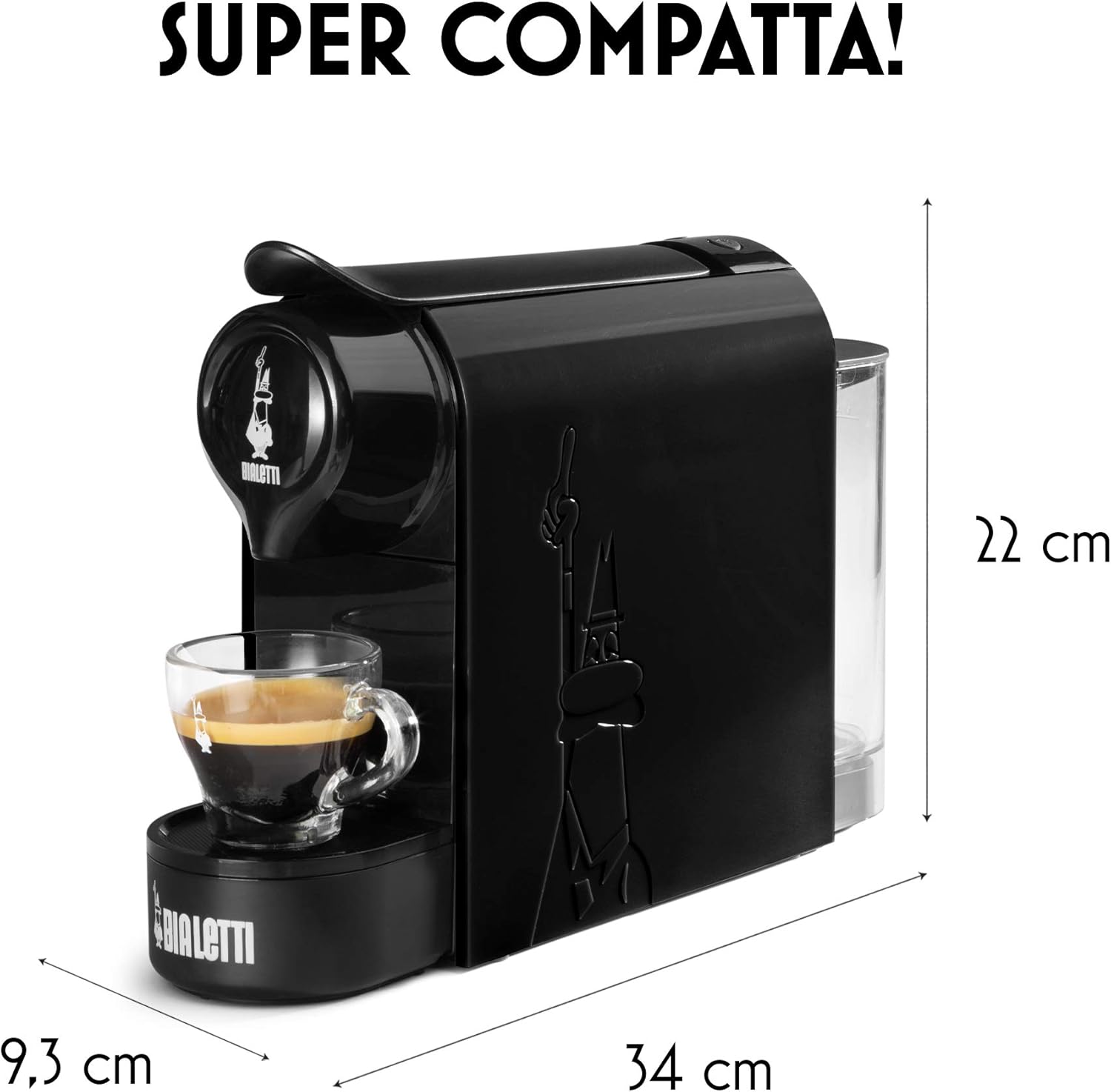
Image: Dimensions of the Bialetti Gioia Espresso Coffee Machine.
8. การรับประกันและการสนับสนุน
For warranty information, product registration, or technical support, please refer to the official Bialetti website or contact Bialetti customer service directly. Keep your proof of purchase for any warranty claims.
You can visit the official Bialetti store for more information: Bialetti Store