
การแนะนำ
Welcome and thank you for choosing the cellularline TABLE STAND. This universal holder is designed to provide a stable and adjustable viewing experience for your smartphones and tablets. Its compact and foldable design ensures portability and convenience, making it an ideal accessory for various settings.
คุณสมบัติผลิตภัณฑ์
- Compact and foldable for easy portability.
- Two adjustable heights for vertical and horizontal viewการไอเอ็นจี
- Metal finishes combined with anti-slip and anti-scratch rubber backing.
The TABLE STAND is engineered for versatility, allowing you to position your device optimally for various activities, from video calls to media consumption.
เนื้อหาแพ็คเกจ
- 1 x cellularline TABLE STAND Universal Holder
โปรดตรวจสอบให้แน่ใจว่าอุปกรณ์ทุกชิ้นครบถ้วนก่อนแกะกล่อง
คำแนะนำการตั้งค่า
- กางขาตั้งออก: Gently unfold the stand from its compact, folded position. The base and the device support arm will extend.

Image: The cellularline TABLE STAND shown in its folded, compact state, ready for transport or storage.

Image: The cellularline TABLE STAND fully unfolded, supporting a smartphone in a vertical orientation.
- ปรับความสูงและมุม: The stand features an adjustable arm. Carefully extend or retract the arm to achieve your desired viewing height. The device support can also be tilted to adjust the viewมุมอิง

ภาพ: ด้านหนึ่ง view of the stand illustrating the adjustable arm, which allows for various height settings.
- วางอุปกรณ์ของคุณ: Position your smartphone or tablet onto the support cradle. The anti-slip rubber backing will help secure your device.

Image: A smartphone is shown resting securely on the stand's cradle, highlighting the anti-slip surface that prevents movement.
The stand is designed for both vertical and horizontal device orientation.
คำแนะนำการใช้งาน
The cellularline TABLE STAND is straightforward to operate:
- แนวตั้ง Viewการลง: Place your smartphone or tablet vertically on the stand for portrait mode viewing, ideal for reading or video calls.
Image: A smartphone is positioned vertically on the stand, demonstrating its use for portrait viewการไอเอ็นจี
- แนวนอน Viewการลง: Rotate your device to a horizontal position for landscape mode viewing, suitable for watching videos or gaming.
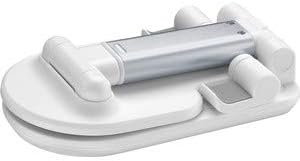
Image: A tablet is displayed horizontally on the stand, showcasing its functionality for landscape viewการไอเอ็นจี
- Adjusting for Stability: Ensure the stand is placed on a flat, stable surface. The anti-slip base provides additional grip.
The stand's design allows for easy access to charging ports and buttons on most devices.
การดูแลรักษา
- การทำความสะอาด: เช็ดฐานวางด้วยผ้าแห้งนุ่มๆ สำหรับคราบฝังแน่น ให้ใช้ผ้าชุบน้ำหมาดๆ เช็ดเบาๆamp สามารถใช้ผ้าแล้วเช็ดให้แห้งทันที
- หลีกเลี่ยงสารเคมีที่รุนแรง: Do not use abrasive cleaners, solvents, or strong detergents, as these may damage the finish or rubber components.
- พื้นที่จัดเก็บ: When not in use, fold the stand into its compact form for easy storage and to protect it from dust.
Proper care will ensure the longevity and optimal performance of your TABLE STAND.
การแก้ไขปัญหา
- ปัญหา: ขาตั้งดูไม่มั่นคง
- สารละลาย: Ensure the stand is fully unfolded and placed on a flat, level surface. Check that your device is centered on the support cradle.
- Issue: Device slips on the support.
- สารละลาย: Verify that the anti-slip rubber backing is clean and free from debris. Ensure your device is properly seated.
- Issue: Difficulty adjusting the height/angle.
- สารละลาย: Apply gentle, firm pressure when adjusting. The joints are designed to hold position securely. Do not force adjustments.
If you encounter issues not listed here, please contact cellularline customer support.
ข้อมูลจำเพาะผลิตภัณฑ์
| คุณสมบัติ | รายละเอียด |
|---|---|
| ยี่ห้อ | เซลลูลาร์ไลน์ |
| แบบอย่าง | TABLESTANDW |
| ขนาดสินค้า | 9 x 17.5 x 3 ซม. (พับ) |
| น้ำหนัก | 100 กรัม |
| วัสดุ | Satin Steel, Rubber |
| สี | สีขาว |
| อุปกรณ์ที่รองรับ | สมาร์ทโฟนแท็บเล็ต |
| ประเภทการติดตั้ง | โต๊ะวางของ |
| คุณสมบัติเพิ่มเติม | Adjustable height, Foldable, Anti-slip, Anti-scratch |
| แบตเตอรี่ที่จำเป็น | เลขที่ |
ข้อมูลการรับประกันและการบริการลูกค้า
The cellularline TABLE STAND comes with a standard manufacturer's warranty. Please refer to the warranty card included in your product packaging for specific terms and conditions.
For technical support, product inquiries, or warranty claims, please visit the official cellularline webเว็บไซต์หรือติดต่อฝ่ายบริการลูกค้าของพวกเขา
หมายเหตุ: โปรดเก็บหลักฐานการซื้อไว้เพื่อใช้ในเรื่องการรับประกัน