
1. บทนำ
This manual provides essential instructions for the safe and efficient operation of your CanMixs Smartwatch V101. Please read this manual thoroughly before using the device and retain it for future reference. The Smartwatch V101 is designed to monitor various health and fitness metrics, provide notifications, and assist with daily activities.
2. สินค้าหมดview
The CanMixs Smartwatch V101 features a full touch screen and offers a range of functionalities including health and sports monitoring, IP68 waterproofing, and smart notifications.
คุณสมบัติหลัก:
- Full Touch Screen Interface
- Health Monitoring: Heart Rate, Sleep Duration, Temperature, Calories Burned
- Sports Monitoring: Multiple Sports Modes, Step Count, Distance
- ระดับการกันน้ำ IP68
- Call, SMS, and App Message Notifications
- การควบคุมเพลง
- อายุการใช้งานแบตเตอรี่ยาวนานขึ้น
- Alarm Clock, Sedentary Reminder, Remote Shutter, Find Phone

ภาพ: เหนือview of the Smartwatch V101 displaying its various functions and features.
3. การตั้งค่า
3.1 การชาร์จอุปกรณ์
Before initial use, fully charge your Smartwatch V101. The device features a built-in USB charging metal strip. To charge:
- Gently remove one side of the strap to expose the USB metal strip.
- Insert the metal strip end into any standard USB charging port (e.g., computer USB port, USB wall adapter, power bank).
- หน้าจอของนาฬิกาจะแสดงไฟแสดงสถานะการชาร์จ โดยปกติการชาร์จเต็มจะใช้เวลา 1-1.5 ชั่วโมง
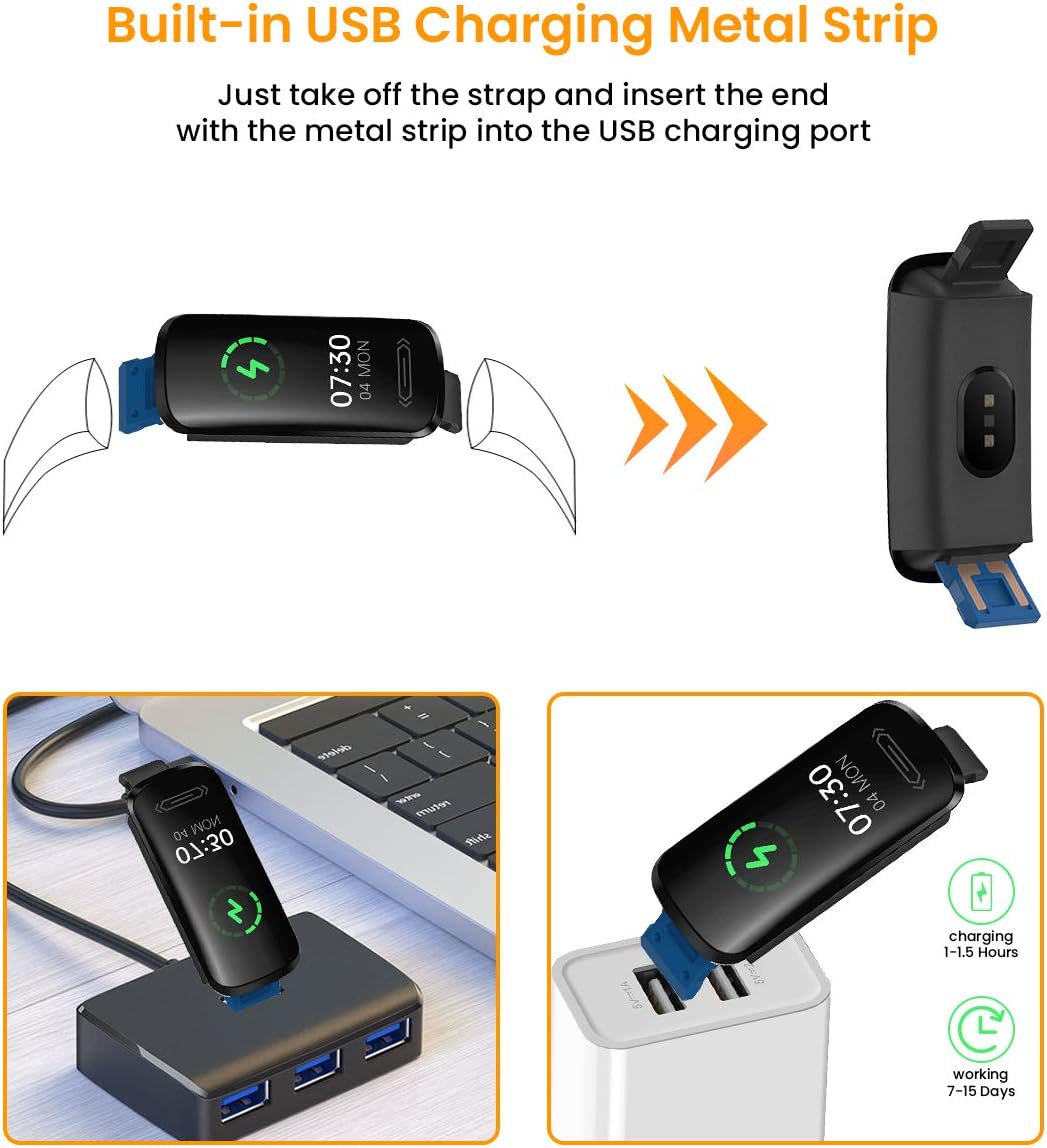
Image: Instructions for charging the Smartwatch V101 using its integrated USB connector.
3.2 การติดตั้งและการจับคู่แอป
To unlock the full potential of your smartwatch, download and install the companion application on your smartphone. The app is compatible with both Android and iOS devices.
- ดาวน์โหลดแอป: ค้นหา the official companion app (refer to the packaging or quick start guide for the exact app name) in your smartphone's app store (Google Play Store for Android, Apple App Store for iOS).
- สร้างบัญชี: Open the app and follow the on-screen instructions to create a user account.
- เปิดใช้งานบลูทูธ: ตรวจสอบให้แน่ใจว่าได้เปิดใช้งาน Bluetooth บนสมาร์ทโฟนของคุณแล้ว
- จับคู่อุปกรณ์: In the app, navigate to the device pairing section. Select your Smartwatch V101 from the list of available devices. Confirm the pairing request on both your phone and the smartwatch if prompted.
- การอนุญาติ: Allow necessary permissions (e.g., location, notifications) for the app to function correctly.
4. คู่มือการใช้งาน
4.1 การนำทางพื้นฐาน
- ปลุกหน้าจอ: Raise your wrist or press the side button to wake the screen.
- ปัดขึ้น/ลง: เลื่อนดูเมนูและการแจ้งเตือน
- ปัดไปทางซ้าย/ขวา: Access different functions or widgets (e.g., heart rate, steps, weather).
- แตะ: เลือกสินค้าหรือยืนยันการดำเนินการ
- กดแบบยาว: May activate certain functions or change watch faces.
4.2 การตรวจติดตามสุขภาพ
The Smartwatch V101 provides continuous monitoring of several health metrics.
- เครื่องวัดอัตราการเต้นของหัวใจ: The watch continuously tracks your heart rate. Swipe to the heart rate interface to view ข้อมูลแบบเรียลไทม์และแนวโน้มในอดีตภายในแอป
- การติดตามการนอนหลับ: Wear the watch to bed for automatic sleep tracking. It records sound sleep and light sleep durations. View การวิเคราะห์การนอนหลับอย่างละเอียดในแอปพลิเคชันที่ใช้งานร่วมกัน
- การวัดอุณหภูมิ: To measure wrist skin temperature, ensure the monitoring switch is enabled in the app settings. The watch will display temperature readings. Note: This feature is for reference only and not intended for medical diagnosis.

Image: Heart Rate and Sleep Monitoring features of the Smartwatch V101.

Image: Wrist skin temperature measurement interface and notification display on the Smartwatch V101.
โหมดกีฬา 4.3 โหมด
The smartwatch supports multiple sports modes to track your workouts effectively.
- เข้าถึงโหมดกีฬา: Swipe on the watch face until you find the sports mode icon, then tap to enter.
- เลือกกิจกรรม: Choose from activities like Run, Cycle, Indoor Run, Plank, and more.
- เริ่ม/หยุด: Tap to start tracking your activity. Tap again to pause or long-press to end the session.
- ข้อมูล Review: View real-time data on the watch and detailed summaries in the app after your workout.
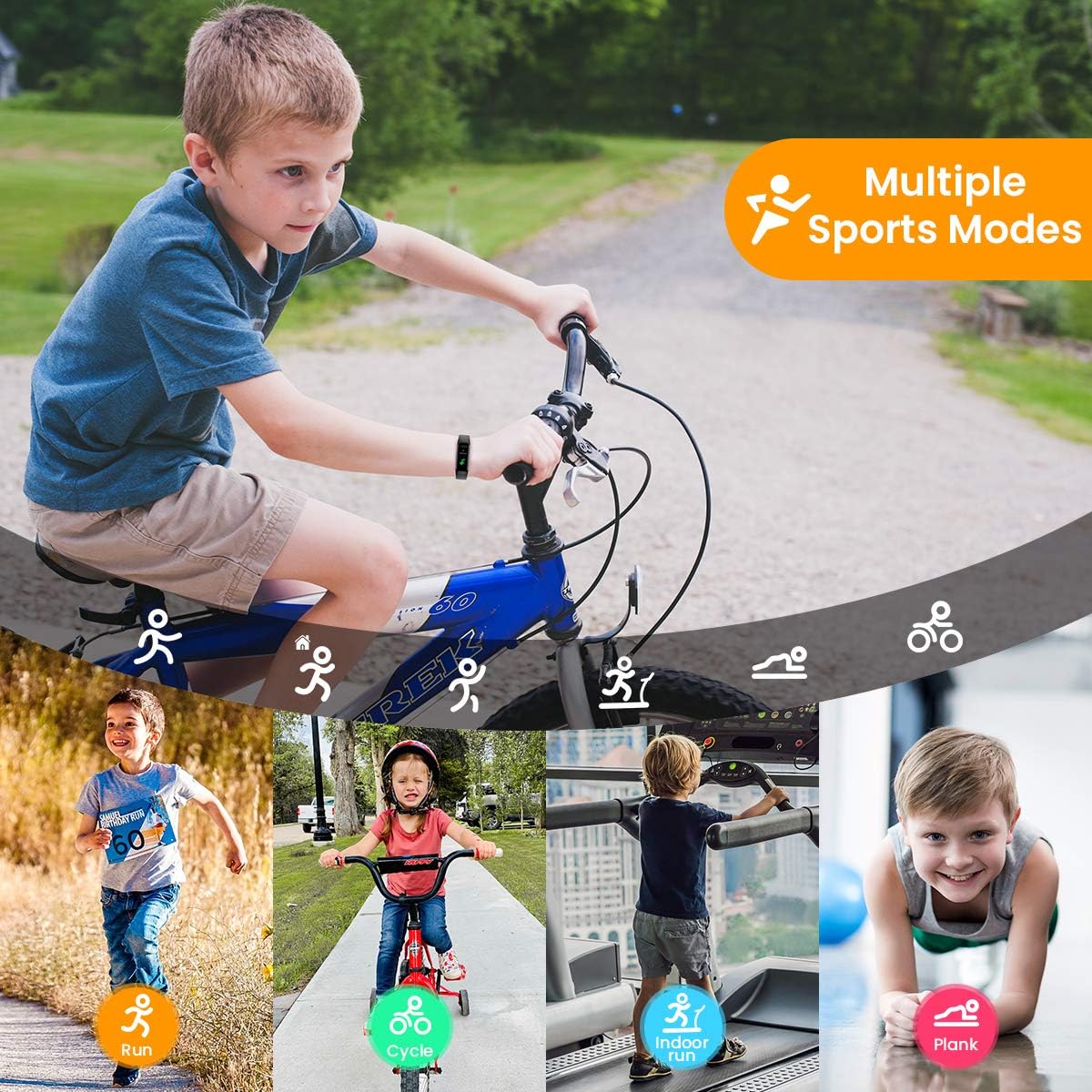
Image: The Smartwatch V101 tracking various sports activities.
4.4 การแจ้งเตือน
Receive call, SMS, and app message notifications directly on your wrist.
- Ensure the watch is paired with your smartphone and the app has notification permissions.
- Enable specific app notifications within the companion app settings.
- Incoming notifications will cause the watch to vibrate and display the message content.
4.5 ความต้านทานน้ำ (IP68)
The Smartwatch V101 has an IP68 waterproof rating, meaning it is resistant to dust and can withstand immersion in water up to 1.5 meters for up to 30 minutes.
- Suitable for daily use, including hand washing, rain, and showering.
- Can be worn for swimming in shallow water.
- Not suitable for diving, snorkeling, hot showers, or saunas, as steam and high pressure water can compromise the seal.

Image: The IP68 waterproof capability of the Smartwatch V101, shown during swimming.
5. การบำรุงรักษา
Proper maintenance ensures the longevity and optimal performance of your smartwatch.
- การทำความสะอาด: ทำความสะอาดนาฬิกาและสายนาฬิกาด้วยผ้านุ่มๆ เป็นประจำamp ผ้า. หลีกเลี่ยงการใช้สารเคมีรุนแรงหรือวัสดุกัดกร่อน
- การอบแห้ง: หลังจากโดนน้ำ โปรดตรวจสอบให้แน่ใจว่านาฬิกาแห้งสนิทก่อนชาร์จหรือใช้งานเป็นเวลานาน
- การดูแลแบตเตอรี่ Avoid fully discharging the battery frequently. Charge the device when the battery level is low. Store the device in a cool, dry place if not used for extended periods, and charge it periodically to prevent deep discharge.
- หลีกเลี่ยงอุณหภูมิที่สูงหรือต่ำเกินไป: อย่านำนาฬิกาไปวางไว้ในที่ที่มีอุณหภูมิร้อนจัดหรือเย็นจัดเกินไป เพราะอาจทำให้แบตเตอรี่และชิ้นส่วนภายในเสียหายได้
6 การแก้ไขปัญหา
- นาฬิกาไม่เปิด: Ensure the watch is fully charged. Connect it to a USB power source for at least 10 minutes.
- ไม่สามารถจับคู่กับสมาร์ทโฟนได้:
- ตรวจสอบให้แน่ใจว่าเปิดใช้งาน Bluetooth บนโทรศัพท์ของคุณแล้ว
- ตรวจสอบให้แน่ใจว่านาฬิกาอยู่ในระยะของโทรศัพท์ของคุณ
- รีสตาร์ททั้งนาฬิกาและโทรศัพท์ของคุณ
- Check if the app has necessary permissions.
- ลืมอุปกรณ์ในการตั้งค่าบลูทูธของโทรศัพท์ของคุณและลองจับคู่ใหม่อีกครั้ง
- ข้อมูลสุขภาพที่ไม่ถูกต้อง:
- ตรวจสอบให้แน่ใจว่าสวมนาฬิกาให้พอดีกับข้อมือ ไม่แน่นหรือหลวมเกินไป
- ทำความสะอาดเซ็นเซอร์ที่ด้านหลังของนาฬิกา
- หลีกเลี่ยงการเคลื่อนไหวมากเกินไปในระหว่างการวัด
- ไม่ได้รับการแจ้งเตือน:
- ตรวจสอบการเชื่อมต่อบลูทูธ
- Check app notification settings on both the watch app and your phone's system settings.
- ตรวจสอบให้แน่ใจว่าแอปกำลังทำงานอยู่เบื้องหลังในโทรศัพท์ของคุณ
7. ข้อมูลจำเพาะ
| คุณสมบัติ | รายละเอียด |
|---|---|
| ชื่อรุ่น | วี101 |
| ยี่ห้อ | สามารถผสม |
| ขนาดจอแสดงผล | 0.96 นิ้ว |
| ประเภทจอภาพ | อโมเลด |
| เทคโนโลยีการเชื่อมต่อ | บลูทูธ |
| มาตรฐานการสื่อสารไร้สาย | บลูทูธ |
| ความต้านทานต่อน้ำ | IP68 |
| น้ำหนัก | 22 กรัม |
| ขนาดสินค้า | 5 x 2 x 1.2 ซม. |
| ประเภทแบตเตอรี่ | ลิเธียมโพลีเมอร์ (รวม 1 ชิ้น) |
| เข้ากันได้กับ | สมาร์ทโฟน |
| การติดตามสุขภาพ | Heart Rate Monitor, Sleep Duration, Temperature, Calories Burned |
| การติดตามกิจกรรม | Distance, Step Count, Multisport Tracker |
8. การรับประกันและการสนับสนุน
CanMixs products are designed for reliability and performance. For specific warranty details, please refer to the warranty card included with your product or visit the official CanMixs website. If you encounter any issues or require technical assistance, please contact CanMixs customer support through the contact information provided on the official webบรรจุภัณฑ์ไซต์หรือผลิตภัณฑ์
Please have your product model (V101) and purchase date ready when contacting support.