
1. บทนำ
Thank you for choosing the FEELWORLD FT6 FR6 5.5 Inch Wireless Video Transmission Monitor. This device integrates a high-quality HD monitor with a wireless video transmission system, offering enhanced mobility and flexibility for professional video production. The FT6 acts as the transmitter, and the FR6 functions as the receiver, providing a reliable solution for monitoring on set. This manual will guide you through the setup, operation, and maintenance of your new monitor system.
2. ข้อมูลด้านความปลอดภัย
- อย่าวางอุปกรณ์ไว้ในที่ที่มีฝนหรือความชื้น เพื่อป้องกันอันตรายจากไฟไหม้หรือไฟฟ้าช็อต
- Avoid disassembling the unit. Refer servicing to qualified personnel only.
- Use only the specified power adapter (12V 1.5A) or compatible F970 batteries.
- เก็บอุปกรณ์ให้ห่างจากสนามแม่เหล็กแรงสูง
- ตรวจสอบให้แน่ใจว่ามีการระบายอากาศที่เหมาะสมเพื่อป้องกันภาวะความร้อนมากเกินไป
3. เนื้อหาบรรจุภัณฑ์
ตรวจสอบว่ารายการทั้งหมดที่ระบุไว้ด้านล่างนี้รวมอยู่ในแพ็คเกจของคุณ:
- 1x FEELWORLD FT6 Wireless Monitor (Transmitter)
- 1x FEELWORLD FR6 Wireless Monitor (Receiver)
- สาย Micro HDMI 1 เส้น
- 2x ม่านบังแดด
- 1x Hot Shoe Mount
- 4x Transmission Antenna
- สายเคเบิล Type-C เป็น USB จำนวน 1 เส้น
- 1x ที่จับ
- สกรู 2x
- 1x สายคล้องคอ
- 1x 1/4 C-ring Screw
- 1x Small Carrying Case
- 1x คู่มือผู้ใช้

4. สินค้าหมดview
The FEELWORLD FT6 FR6 system consists of two 5.5-inch monitors, one configured as a transmitter (FT6) and the other as a receiver (FR6). Both units feature a 1920x1080 Full HD IPS touchscreen display, offering a 1000:1 contrast ratio and Rec.709 color gamut for accurate image representation. The system supports 4K HDMI input and loop-out, making it compatible with a wide range of DSLR and mirrorless cameras.

คุณสมบัติที่สำคัญ ได้แก่:
- การส่งสัญญาณไร้สาย: Up to 800ft (250m) range with ultra-low latency of 0.07s.
- จอแสดงผลความละเอียดสูง: 5.5-inch 1920x1080 IPS screen with 500nit brightness.
- การควบคุมหน้าจอสัมผัส: Intuitive menu navigation and function adjustments.
- รองรับ 3D LUT: Load up to 50 custom 3D LUTs via Type-C to USB.
- การตรวจสอบ HDR: Supports HDR signals for enhanced clarity and detail.
- Dual Battery Plates: Accommodates two F970 batteries for extended operation and hot-swapping.
- เครื่องมือตรวจสอบระดับมืออาชีพ: Includes Waveform, Vectorscope, Histogram, Focus Assist, False Color, Nine Grid, Exposure, Zoom, Image Flip, Embedded Audio, and Anamorphic Mode.
5. การตั้งค่า
5.1 การติดตั้งเสาอากาศ
Screw the four provided transmission antennas onto the designated ports on both the FT6 (transmitter) and FR6 (receiver) units. Ensure they are securely fastened for optimal signal transmission.
5.2. การเปิดเครื่อง
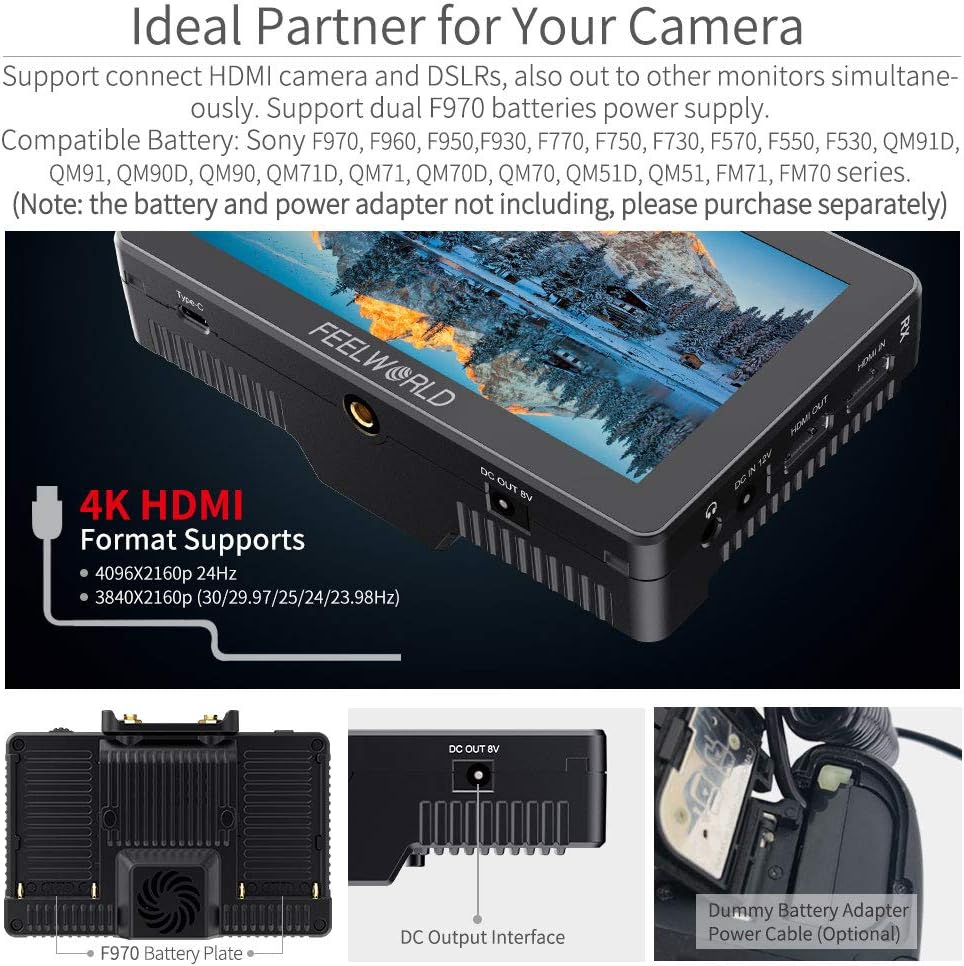
The FT6 FR6 monitors can be powered by either a DC 12V power adapter (not included) or two F970 series batteries (not included). The monitors feature dual battery plates, allowing for continuous power by hot-swapping batteries.

To switch between batteries during operation, double-tap the battery icon displayed on the upper right corner of the monitor screen. The system will switch to the other battery after approximately 3 seconds.
5.3. Connecting to Your Camera
Use the provided Micro HDMI cable to connect your camera's HDMI output to the HDMI IN port on the FT6 (transmitter). If you need to loop out the signal to another monitor, connect an HDMI cable from the HDMI OUT port on the FR6 (receiver) to your external monitor.
5.4. Sunshade Installation
Attach the sunshade to the monitor to improve screen visibility in bright outdoor conditions. The sunshade clips onto the monitor's frame.

6. คู่มือการใช้งาน
6.1. เปิด/ปิดเครื่อง
Press and hold the power button located on the side of the monitor to turn the device on or off.
6.2. Touchscreen Controls
The FT6 FR6 monitors feature an intuitive touchscreen interface. Double-tap the screen to open the main menu. Swipe gestures allow for quick adjustments:
- Swipe up/down on the right side: Adjust volume.
- Swipe up/down on the left side: Adjust backlight.
- Swipe left/right: Access shortcut menus or switch between functions.

6.3. Wireless Pairing and Channel Selection
The FT6 and FR6 units are designed for automatic pairing. If manual pairing is required, use the WPS pairing function. There are 11 signal channels available for selection to ensure stable transmission.

For optimal performance, select a channel with minimal interference. The system provides real and stable pictures, crucial for professional monitoring.
6.4. Advanced Monitoring Features
The monitor includes a suite of professional tools to assist with exposure, focus, and framing:
- ลูท 3D: Load custom Look-Up Tables to preview ฟู่ของคุณtage with specific color grades.
- Waveform/Vectorscope/Histogram: Analyze video signals for accurate exposure and color balance.
- โฟกัสช่วย: เน้นบริเวณที่ต้องการโฟกัส เพื่อการโฟกัสที่แม่นยำยิ่งขึ้น
- สีเท็จ: แสดงระดับการรับแสงโดยใช้การซ้อนทับสี
- ตารางเก้าช่อง: Assists with composition using a rule-of-thirds grid.

6.5. Video Playback and Monitoring
The system supports various video formats including 1080P60, 1080P50, 1080i60, 1080i50, and 4K HDMI formats (4096x2160p 24Hz, 3840x2160p 30/29.97/25/24/23.98Hz). The low latency of 0.07s ensures real-time monitoring.
7. การบำรุงรักษา
- การทำความสะอาด: Use a soft, dry cloth to clean the monitor screen and body. For stubborn smudges, a slightly damp cloth with a mild cleaning solution can be used, ensuring no liquid enters the device.
- พื้นที่จัดเก็บ: เมื่อไม่ใช้งาน ควรเก็บจอภาพไว้ในกระเป๋าใส่จอภาพในที่แห้งและเย็น หลีกเลี่ยงแสงแดดโดยตรงและอุณหภูมิที่สูงหรือต่ำเกินไป
- การดูแลแบตเตอรี่ If using F970 batteries, ensure they are charged regularly and stored properly to prolong their lifespan.
8 การแก้ไขปัญหา
- Cannot turn on the monitor:
Ensure you are using the standard 12V 1.5A power adapter or fully charged F970 batteries. - Noise during recording:
Long press the "<" button to decrease the volume to near zero. This can help avoid noise during recording. Long pressing ">" increases the volume. - Monitor displays "no signal":
- ลองใช้สาย HDMI อื่น
- Connect the monitor's HDMI input to a computer to verify if the monitor receives a signal.
- Check your camera's output signal settings and confirm that the monitor supports the camera's output signal format.
- Focus peak displays information on the monitor:
Turn off the "HDMI Information Display" option under the "HDMI Settings" tab in the menu system. This will prevent additional information from being shown when focus peak is active.
9. ข้อมูลจำเพาะ
| คุณสมบัติ | ข้อมูลจำเพาะ |
|---|---|
| ยี่ห้อ | FEELWORLD |
| ชื่อรุ่น | FT6 FR6 |
| ขนาดหน้าจอ | 5.5 นิ้ว |
| ปณิธาน | 1920 x 1080 (FHD 1080p) |
| ความสว่าง | 500 ซีดี/ตรม. |
| อัตราส่วนคอนทราสต์ | 1000:1 น. |
| Viewอิงแองเกิล | 80 องศา |
| ประเภทจอภาพ | จอแอลซีดี |
| อัตราส่วนภาพ | 16:9 น. |
| ระยะการส่งสัญญาณไร้สาย | 800ft (approx. 250m) |
| ความหน่วงเวลา | 0.07วินาที |
| พอร์ต HDMI | 2 (Input/Output) |
| กำลังไฟเข้า | กระแสตรง 12 โวลต์ |
| คุณสมบัติเพิ่มเติม | 3D LUT, HDR, Touchscreen |
| อุปกรณ์ที่รองรับ | Various DSLR cameras with compatible HDMI options |
| ขนาดสินค้า (ลึก x กว้าง x สูง) | ลึก 1.57 นิ้ว x กว้าง 3.9 นิ้ว x สูง 5.8 นิ้ว |
10. การรับประกันและการสนับสนุน
FEELWORLD provides a 1-year warranty for the FT6 FR6 Wireless Video Transmission Monitor. For any technical assistance or support inquiries, please contact FEELWORLD's official customer service. US local after-sales support is available to address your needs.