
Walfront COB-61DR
Walfront COB-61DR Crane Push Button Switch User Manual
Model: COB-61DR | Brand: Walfront
การแนะนำ
This manual provides essential information for the safe and efficient installation, operation, and maintenance of the Walfront COB-61DR Crane Push Button Switch. Please read this manual thoroughly before use to ensure proper functionality and safety.
ข้อมูลด้านความปลอดภัย
Adherence to safety guidelines is paramount when working with electrical equipment. Failure to follow these instructions may result in injury or equipment damage.
- Always ensure power is disconnected from the equipment before performing any installation, wiring, or maintenance procedures.
- The switch features a self-resetting mechanism and robust mechanical interlocking for secure operation. Do not attempt to bypass these safety features.
- This device is equipped with an emergency stop function. Familiarize yourself with its location and operation for immediate cessation of activity in critical situations.
- Ensure all wiring is performed by qualified personnel in accordance with local electrical codes and product specifications.
- This product is designed for industrial applications. Only trained and authorized personnel should install and service this equipment.
สินค้าเกินview
The Walfront COB-61DR is a durable and reliable push button switch specifically engineered for controlling crane and hoist movements. Its robust construction and thoughtful design ensure stable and safe performance in demanding industrial environments.
คุณสมบัติหลัก
- เพิ่มความปลอดภัย: Features self-resetting performance and a robust mechanical interlocking mechanism for secure operation.
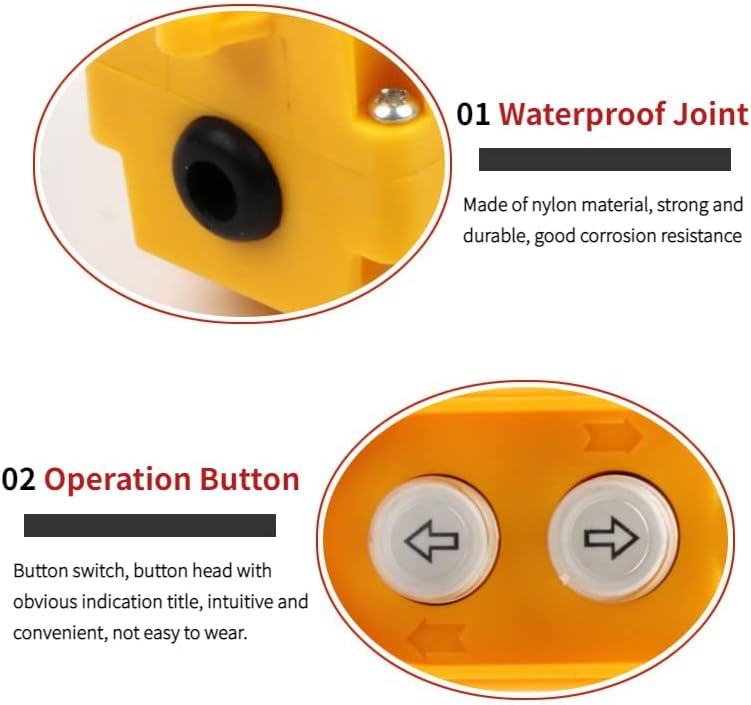
- การออกแบบที่ทนทาน: The hoist switch shell is crafted from high-quality ABS plastic, ensuring a sleek appearance and a sturdy structure that withstands daily industrial use.
- การป้องกัน: Equipped with a rubber cable sleeve and strip, this switch offers excellent sealing and performance for long-lasting durability, protecting against environmental factors.
- การใช้งานที่หลากหลาย: Ideal for small cranes, electric hoists, and other lifting equipment, simplifying control circuits and enhancing mechanical strength.
- หยุดฉุกเฉิน: Includes an emergency stop switch for immediate and safe operation cessation, crucial for any industrial setting.
ส่วนประกอบ



ข้อมูลจำเพาะ
| ข้อมูลจำเพาะ | ค่า |
|---|---|
| รุ่นสินค้า | COB-61DR |
| วัสดุของเปลือกหอย | พลาสติก ABS |
| ผลิตภัณฑ์ปัจจุบัน | 5เอ/2เอ |
| ปริมาณสินค้าtage | DC200V / AC380V |
| ความจุ | 30 ยูเอฟ |
| Applicable Frequency | AC 50Hz/60Hz |
| ระดับการป้องกัน | IP65 (Rain-proof, water-proof, dust-proof) |
| น้ำหนักสินค้า | 13 ออนซ์ |
| ขนาดสินค้า | ขนาด 0.39 x 0.39 x 0.39 นิ้ว (โดยประมาณ) |
| เปลี่ยนสไตล์ | สวิตซ์ปุ่มกด |

การติดตั้งและการตั้งค่า
Installation of the Walfront COB-61DR switch must only be performed by qualified electricians or technicians. Ensure all local electrical codes and safety regulations are strictly followed.
คำแนะนำในการเดินสายไฟ
- ตัดการเชื่อมต่อไฟฟ้า: Before beginning any installation, ensure all power to the equipment and circuit is completely disconnected and locked out.
- ระบุสายไฟ: Identify the control circuit wires for your crane or hoist system (e.g., Up, Down, Common, Emergency Stop, etc.).
- เปิดซีasing: Carefully open the switch casing to access the internal terminals.
- เชื่อมต่อสายไฟ: Connect the corresponding control wires to the designated terminals inside the switch. Refer to the wiring diagram provided with your specific crane or hoist system for accurate terminal assignments.
- การเชื่อมต่อที่ปลอดภัย: Ensure all electrical connections are tight, secure, and properly insulated to prevent short circuits or loose contacts.
- ปิด Casing: ปิดสวิตช์ casing, ensuring the rubber cable sleeve is correctly seated to maintain the IP65 protection rating against dust and water ingress.
- ทดสอบฟังก์ชันการทำงาน: Reconnect power and carefully test the switch functionality to confirm correct operation of all buttons.
คำเตือน: Incorrect wiring can lead to equipment malfunction, electric shock, or serious injury. If you are unsure about any step, consult a professional electrician or technician.
คำแนะนำการใช้งาน
The COB-61DR switch is designed for intuitive and straightforward control of crane and hoist movements.
การทำงานพื้นฐาน
- To initiate upward movement of the hoist/crane, press and hold the button marked with an ลูกศรชี้ขึ้น. Release the button to stop the movement.
- To initiate downward movement of the hoist/crane, press and hold the button marked with a downward arrow. Release the button to stop the movement.
- All operational buttons are self-resetting, meaning they automatically return to their neutral (off) position when released.
หยุดฉุกเฉิน
In the event of an emergency, unexpected equipment behavior, or any unsafe condition, immediately press the designated emergency stop button (if present and wired into your system). This action will cut power to the controlled equipment, bringing it to an immediate halt.
การซ่อมบำรุง
Regular and proper maintenance will ensure the longevity, reliability, and safe operation of your Walfront COB-61DR switch.
- การทำความสะอาด: Periodically wipe the exterior of the switch with a clean, soft, damp cloth. Do not use abrasive cleaners, harsh chemicals, or solvents, as these can damage the ABS plastic casing.
- การตรวจสอบภาพ: Regularly inspect the switch casing for any signs of physical damage, cracks, excessive wear, or deformation. Check the cable entry point to ensure the rubber sleeve is intact and properly seated, maintaining IP65 protection.
- การเชื่อมต่อไฟฟ้า: With the power disconnected, periodically inspect all electrical connections inside the switch to ensure they remain tight and free from corrosion. This task should only be performed by qualified personnel.
- การทดสอบการทำงาน: Periodically test the functionality of all push buttons, including the emergency stop, to confirm they operate smoothly and correctly.
คำเตือน: Do not attempt to open or repair the sealed internal components of the switch unless you are a qualified technician. Tampering with the device may void the warranty and compromise its safety features and protection rating.
การแก้ไขปัญหา
If you encounter any issues with your Walfront COB-61DR switch, refer to the following common problems and their potential solutions. Always ensure power is disconnected before inspecting wiring.
| ปัญหา | สาเหตุที่เป็นไปได้ | สารละลาย |
|---|---|---|
| Switch does not respond | No power to the control circuit; Loose or disconnected wiring; Emergency stop engaged; Internal component failure. | Check the main power supply and circuit breaker. Inspect all wiring connections (with power off). Ensure the emergency stop button is disengaged. If the problem persists, consult a qualified technician. |
| ปุ่มกดรู้สึกแข็งหรือเหนียว | Accumulation of dirt, dust, or debris; Mechanical wear or damage. | Clean the exterior of the buttons and surrounding areas. If the issue persists, the internal mechanism may require professional inspection or replacement. |
| การทำงานแบบไม่สม่ำเสมอ | Loose or corroded wiring connections; Faulty internal contact. | With power off, inspect and secure all wiring connections. Check for any signs of corrosion. If the problem continues, professional diagnosis and repair are recommended. |
แอปพลิเคชั่น
The Walfront COB-61DR Crane Push Button Switch is a versatile control device suitable for a wide range of industrial applications that require precise and reliable control of lifting mechanisms.
- Small Cranes
- รอกไฟฟ้า
- General Industrial Cranes
- Various Lifting Equipment and Machinery


การรับประกันและการสนับสนุน
Walfront products are manufactured to high-quality standards. For specific warranty information regarding your COB-61DR switch, please refer to the documentation included with your purchase or contact Walfront customer service directly.
For technical support, product inquiries, or to explore other Walfront products, please visit the official Walfront store:
Ask a question about this manual
Ask about setup, troubleshooting, compatibility, parts, safety, or missing instructions. Manuals+ will review the question and use this page’s manual context to help answer it.