
CIGMAN CM-701
CIGMAN Laser Level CM-701 Instruction Manual
รุ่น : CM-701
การแนะนำ
The CIGMAN CM-701 Laser Level is a versatile and precise tool designed for various leveling and alignment tasks in construction, home improvement, and DIY projects. Featuring 3x360° green laser lines, self-leveling capabilities, and a long-lasting rechargeable battery, it provides accurate and efficient operation for both professionals and homeowners.
สิ่งที่รวมอยู่
Your CIGMAN CM-701 Laser Level package includes the following components:
- 1x CM-701 Laser Level Tool
- กระเป๋าพกพา 1 ใบ
- 1x Magnetic "L" Base
- 1x Mini Tripod Base
- 1x รีโมทคอนโทรล
- แผ่นเป้าเลเซอร์ 1 ชิ้น
- สายเคเบิล Type-C 1x
- 1x คู่มือผู้ใช้

การตั้งค่า
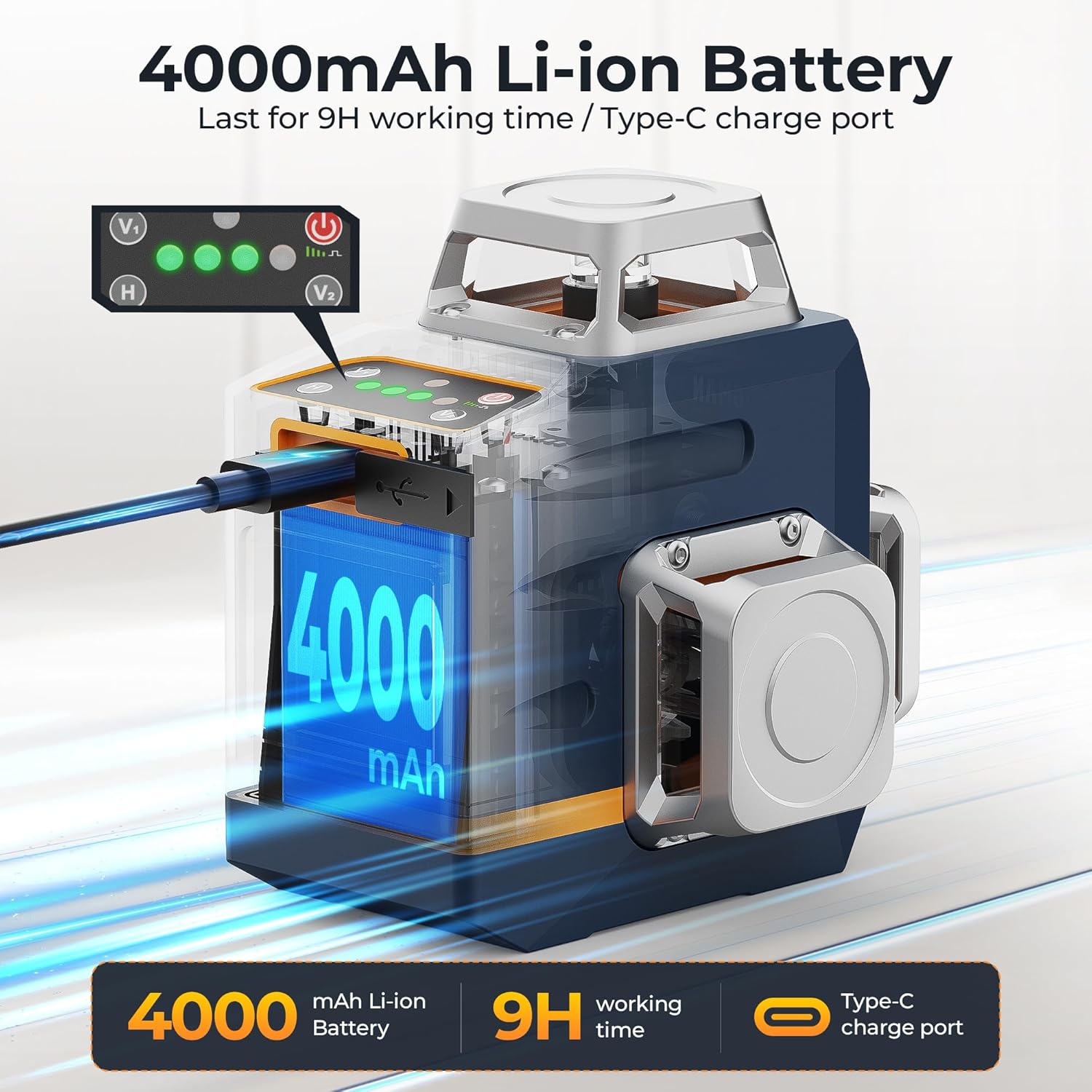
Before first use, ensure the device is fully charged. Connect the provided Type-C cable to the charging port on the laser level and to a compatible USB power source (e.g., power bank, laptop, wall adapter).
The laser level can be mounted in various ways depending on your task:
- Mini Tripod Base: เพื่อให้วางได้อย่างมั่นคงบนพื้นผิวเรียบ
- Magnetic "L" Base: Attach to metal surfaces or use with a screw for wall mounting.
- Standard Tripod: The device features a 1/4" tripod thread for compatibility with standard tripods.

Video 1: Official CIGMAN CM701 Laser Level overview, demonstrating its features and setup.
โหมดการทำงาน
The CIGMAN CM-701 offers multiple operating modes to suit different applications.
1. โหมดปรับระดับอัตโนมัติ
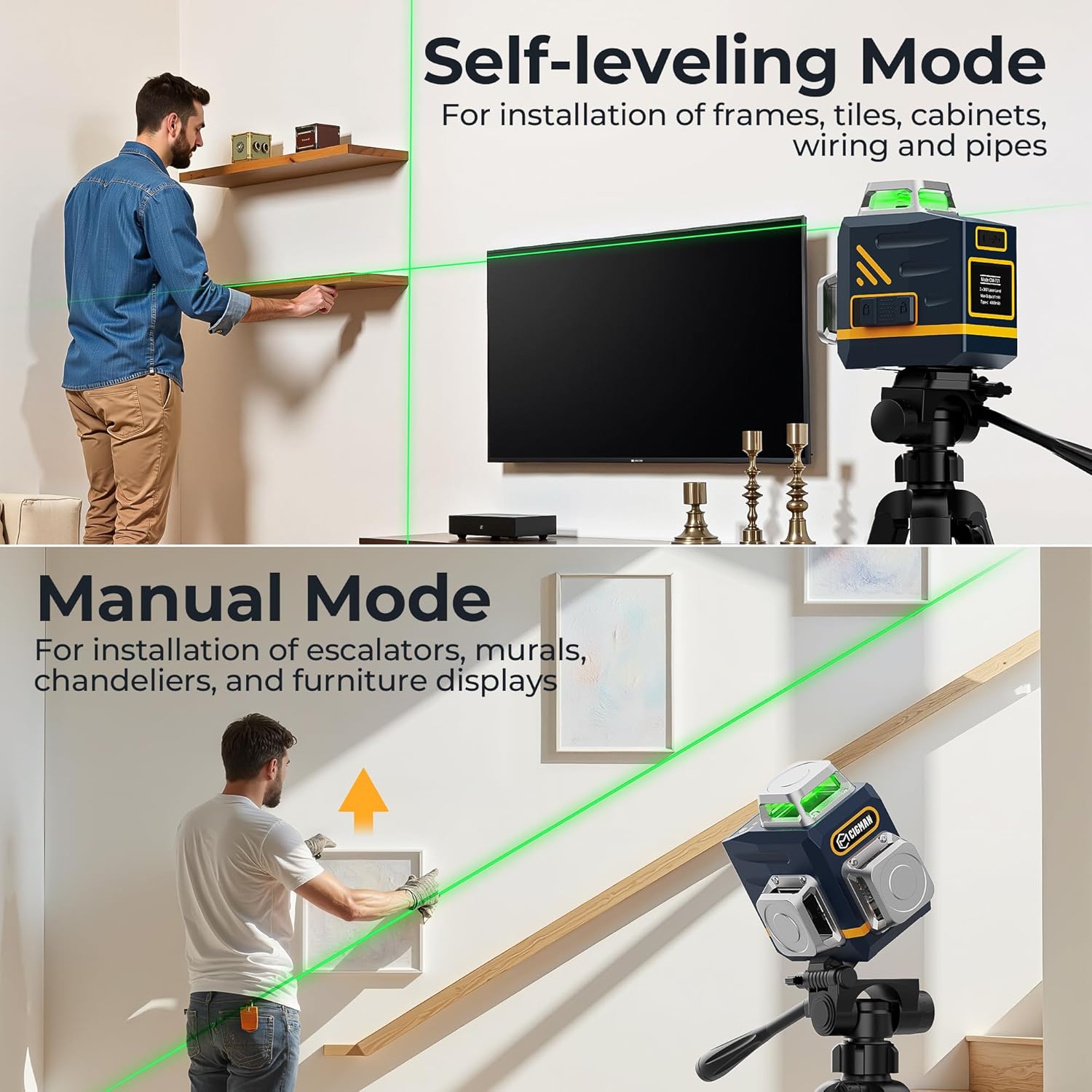
For precise leveling, slide the pendulum lock to the unlocked position. The device will automatically level itself within ±4°. If the device is outside this range, the laser lines will flash to indicate it cannot self-level. This mode is ideal for installing frames, tiles, cabinets, and general alignment where perfect horizontal or vertical lines are required.
2. โหมดแมนนวล
To activate manual mode, keep the pendulum lock in the locked position and long-press the power button. In this mode, you can project laser lines at any angle, which is useful for installing escalators, murals, chandeliers, or creating diagonal lines. The laser lines will flash periodically to remind you that it is not self-leveling.
3. โหมดพัลส์
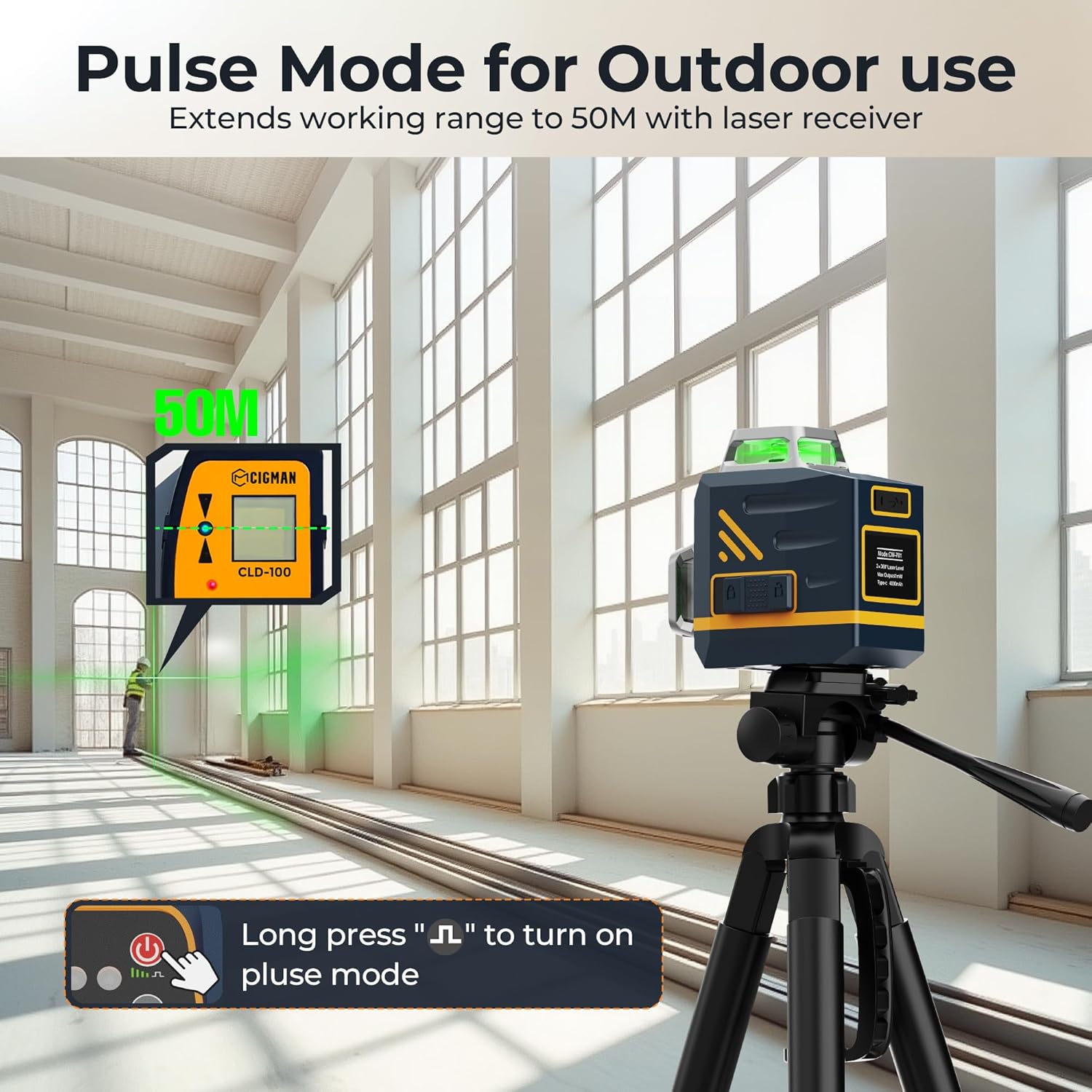
For outdoor use or when working over longer distances (up to 50m), activate pulse mode by long-pressing the pulse button. This mode enhances the visibility and range of the laser lines, especially when used with a compatible laser receiver (not included). It is suitable for larger job sites or outdoor applications.
4. Laser Line Selection
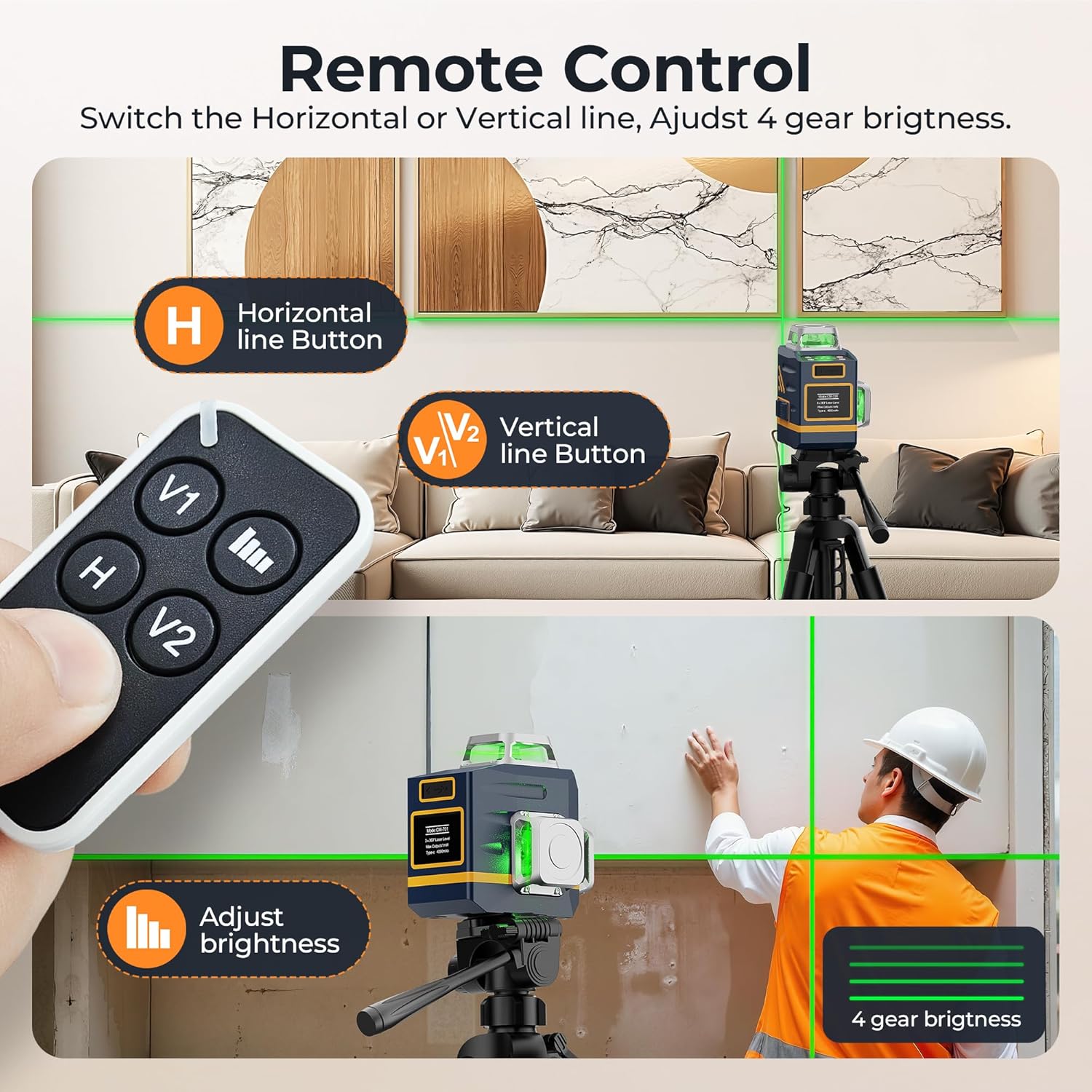
The CM-701 features 12 ultra-bright laser lines, providing 3x360° full coverage. Use the H (Horizontal) and V (Vertical) buttons on the device or remote control to toggle specific laser lines on or off, allowing you to customize the projection based on your needs.

5. Remote Control & Brightness Adjustment
The included remote control allows for convenient adjustment of laser lines and brightness from a distance. Use the V1, H, and V2 buttons to select desired laser planes. The brightness adjustment button allows you to cycle through 4 gear brightness settings, which can extend battery life for longer projects.
ข้อมูลแบตเตอรี่
The CIGMAN CM-701 is powered by a built-in 4000mAh rechargeable Li-ion battery, providing extended operation time. The Type-C charging port supports fast and versatile charging from various power sources.
ข้อมูลจำเพาะ
| คุณสมบัติ | คำอธิบาย |
|---|---|
| ยี่ห้อ | ซิกแมน |
| หมายเลขรุ่น | ซีเอ็ม-701 |
| คลาสเลเซอร์ | คลาส II กำลังส่งออก <1 มิลลิวัตต์ |
| เส้นเลเซอร์ | 3x360° Green Cross Line (1 Horizontal, 2 Vertical) |
| ความแม่นยำ | ± 0.5 มม. / ม |
| ช่วงปรับระดับตัวเอง | ±4° |
| ระยะการทำงาน | 30m (50m with laser receiver in pulse mode) |
| แบตเตอรี่ | 4000mAh Rechargeable Li-ion |
| พอร์ตชาร์จ | ประเภทซี |
| ระดับการป้องกันน้ำและฝุ่น (IP) | IP54 (ทนฝุ่นและน้ำ) |
| วัสดุ | โลหะ |
| น้ำหนักสินค้า | 0.8 กิโลกรัม (1.76 ปอนด์) |
| ขนาดสินค้า | ยาว 3.78 นิ้ว x กว้าง 2.87 นิ้ว |
การซ่อมบำรุง
To ensure the longevity and accuracy of your CIGMAN Laser Level, follow these maintenance guidelines:
- การทำความสะอาด: เช็ดเครื่องเบาๆงamp cloth. Do not use abrasive cleaners or solvents. Keep the laser windows clean for optimal performance.
- พื้นที่จัดเก็บ: Store the laser level in its portable bag in a cool, dry place when not in use. Avoid extreme temperatures and direct sunlight.
- การดูแลแบตเตอรี่ ควรชาร์จแบตเตอรี่เป็นประจำ แม้ว่าจะไม่ได้ใช้งานบ่อย เพื่อรักษาสภาพแบตเตอรี่ให้ดีอยู่เสมอ หลีกเลี่ยงการปล่อยให้แบตเตอรี่หมดเกลี้ยงเป็นเวลานาน
- การจัดการ: Handle the device with care. Avoid dropping it or subjecting it to strong impacts, as this can affect its calibration.
การแก้ไขปัญหา
If you encounter issues with your CIGMAN Laser Level, refer to the following common troubleshooting tips:
- เส้นเลเซอร์กระพริบ: In self-leveling mode, flashing lines indicate the device is outside its self-leveling range (±4°). Adjust the position of the laser level until it is on a more level surface. In manual mode, flashing lines are normal and indicate it is not self-leveling.
- ไม่มีเส้นเลเซอร์: Ensure the device is powered on and the pendulum lock is in the correct position for the desired mode. Check the battery level and recharge if necessary.
- Weak Laser Lines: Adjust the brightness setting using the remote control or device buttons. Ensure the working environment is not excessively bright. For outdoor use, activate pulse mode and consider using a laser receiver.
- เส้นที่ไม่ถูกต้อง: Ensure the device is on a stable surface and within its self-leveling range (if in self-leveling mode). Avoid strong vibrations during operation. If persistent, the device may require recalibration (refer to the full user manual for advanced calibration procedures or contact customer support).
ข้อมูลด้านความปลอดภัย
This CIGMAN Laser Level is a Class II laser product with a power output of <1mW. Adhere to the following safety precautions:
- อย่าทำ จ้องมองตรงไปยังลำแสงเลเซอร์
- อย่าทำ จงใจส่องลำแสงเลเซอร์ไปที่บุคคลอื่นหรือพื้นผิวสะท้อนแสง
- หลีกเลี่ยงการวางอุปกรณ์ไว้ในอุณหภูมิหรือความชื้นที่สูงเกินไป
- เก็บให้พ้นจากมือเด็ก
การรับประกันและการสนับสนุน
For detailed warranty information, technical support, or service inquiries, please refer to the complete User Manual provided with your product or visit the official CIGMAN website. A digital version of the user manual is available at: คู่มือการใช้งาน (PDF).
Ask a question about this manual
Ask about setup, troubleshooting, compatibility, parts, safety, or missing instructions. Manuals+ will review the question and use this page’s manual context to help answer it.