
Goshyda KX-T6001CID
Goshyda KX-T6001CID Big Button Corded Telephone User Manual
Model: KX-T6001CID | Brand: Goshyda
การแนะนำ
Thank you for choosing the Goshyda KX-T6001CID Big Button Corded Telephone. This manual provides detailed instructions to help you set up, operate, and maintain your new telephone. Please read this manual thoroughly before use to ensure proper functionality and to take full advantage ของคุณสมบัติของมัน
ข้อมูลด้านความปลอดภัย
- อย่าให้โทรศัพท์โดนน้ำหรือความชื้น
- Avoid placing the telephone in direct sunlight or near heat sources.
- Use only the provided telephone line cord.
- อย่าพยายามเปิดหรือซ่อมโทรศัพท์ด้วยตนเอง โปรดส่งต่อโทรศัพท์ให้กับช่างผู้ชำนาญการเท่านั้น
- เก็บให้พ้นจากมือเด็ก
เนื้อหาแพ็คเกจ
ตรวจสอบว่ามีรายการทั้งหมดอยู่ในแพ็คเกจ:
- 1 x เครื่อง
- 1 x Telephone Base Unit
- สายหูฟัง 1 เส้น
- สายโทรศัพท์ 1 เส้น
- 1 x คู่มือผู้ใช้

Image: The Goshyda KX-T6001CID telephone, showing the base unit, handset, and coiled cord.
สินค้าเกินview
Familiarize yourself with the main components and controls of your telephone.

ภาพ: ด้านหน้า view of the telephone, highlighting the LCD display, large numeric keypad, and function buttons.
Keypad and Display:
- แป้นตัวเลข (0-9, *, #): For dialing phone numbers.
- จอแสดงผล LCD: แสดงหมายเลขผู้โทร เวลา วันที่ และตัวเลือกเมนู
- ปุ่ม M1/M2: One-touch memory dialing keys.
- SET/STORE Button: Used for entering settings menu and saving entries.
- ปุ่มขึ้น/ลง: Navigate through menu options or adjust volume.
- RING Button: Adjust ringer volume.
- ปุ่ม VOL: Adjust earpiece/speaker volume.
- FL/BRT (Flash/Brightness) Button: Flash function for call waiting, also adjusts LCD brightness.
- REDIAL Button: Redials the last dialed number.
- H.F (Hands-Free) Button: เปิดใช้งานโหมดลำโพงสนทนา

ภาพ: ภาพระยะใกล้ view of the large, easy-to-read buttons on the telephone's keypad.
การตั้งค่า
1. Connecting the Telephone:
- Connect one end of the coiled handset cord to the handset and the other end to the handset jack on the left side of the telephone base unit.
- Connect one end of the telephone line cord to the LINE jack on the back of the telephone base unit.
- เชื่อมต่อปลายอีกด้านหนึ่งของสายโทรศัพท์เข้ากับแจ็คโทรศัพท์ที่ผนัง
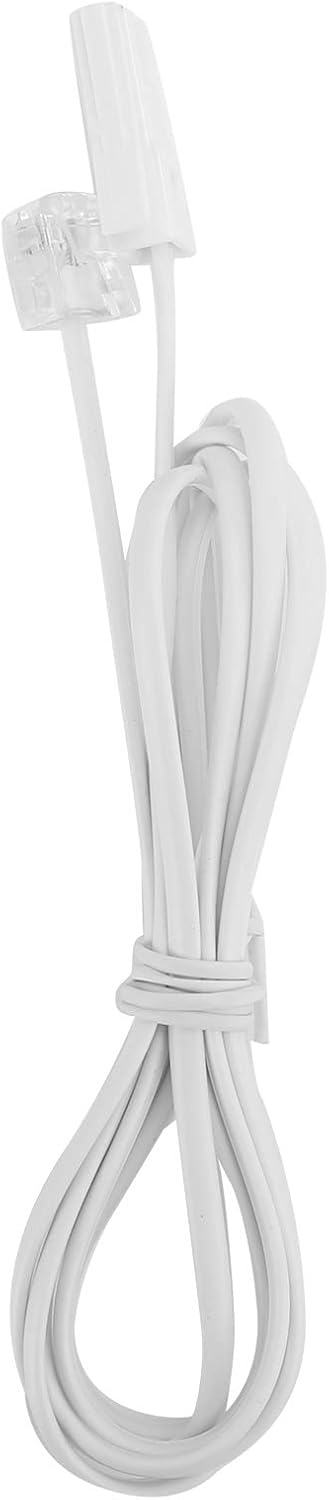
Image: The telephone line cord, used to connect the phone to the wall jack.
2. การตั้งค่าเริ่มต้น:
Upon initial connection, the LCD display may prompt you to set the date and time. Follow the on-screen instructions using the UP และ ลง buttons to adjust values and the SET/ร้านค้า ปุ่มเพื่อยืนยัน
คำแนะนำการใช้งาน
การโทร:
- ยกหูโทรศัพท์หรือกด HF button for speakerphone.
- กดหมายเลขโทรศัพท์ที่ต้องการโดยใช้แป้นตัวเลข
- รอให้สายเชื่อมต่อ
- หากต้องการวางสาย ให้วางหูโทรศัพท์หรือกดปุ่ม HF ปุ่มอีกครั้ง
รับสาย:
เมื่อโทรศัพท์ดัง ให้ยกหูโทรศัพท์ขึ้นหรือกดปุ่ม HF ปุ่มที่จะตอบ
โทรซ้ำ:
ยกหูฟังขึ้นหรือกด HFแล้วกดปุ่ม ซ้ำ ปุ่มโทรออกหมายเลขล่าสุด
Using Memory Keys (M1/M2):
การจัดเก็บหมายเลข:
- ยกหูฟังขึ้นหรือกด HF.
- กด SET/ร้านค้า.
- กดหมายเลขโทรศัพท์ที่คุณต้องการบันทึก
- กด SET/ร้านค้า อีกครั้ง.
- กดอย่างใดอย่างหนึ่ง M1 or M2 to save the number to that memory key.
การโทรจากหน่วยความจำ:
ยกหูฟังขึ้นหรือกด HF, then press either M1 or M2 to dial the stored number.
คุณสมบัติ
- DTMF/FSK Dual System Caller ID: Supports both DTMF and FSK caller ID systems for displaying incoming call information.

Image: The telephone's display, showing its capability for DTMF/FSK dual system caller ID function.
- FLASH Time Adjustment: Adjustable FLASH time (90/95/100/120/180/300/600/1000ms) for compatibility with various PBX systems or call waiting services.
- 16 Ringtone Options: Choose from 16 different ringtones.

Image: The telephone with graphic elements suggesting a choice of 16 ringtones.
- Adjustable LCD Brightness: Five levels of LCD screen brightness adjustment for optimal viewการไอเอ็นจี
- 3 Alarm Clock Functions: Set up to 3 different alarm clocks, each with unique alarm sounds.
- 10 Groups of Dual Key Memory: Store up to 10 frequently called numbers using dual-key memory functions.
- 1-99 Hours Do Not Disturb Function: Set a "Do Not Disturb" period from 1 to 99 hours.
การซ่อมบำรุง
- ทำความสะอาดโทรศัพท์ด้วยผ้าเนื้อนุ่มและแห้งamp ผ้า ห้ามใช้สารทำความสะอาดที่มีฤทธิ์กัดกร่อนหรือตัวทำละลาย
- Keep the telephone away from dust and extreme temperatures.
- ตรวจสอบให้แน่ใจว่าสายไฟไม่พันกันหรือถูกหนีบเพื่อป้องกันความเสียหาย
การแก้ไขปัญหา
| ปัญหา | สาเหตุที่เป็นไปได้ | สารละลาย |
|---|---|---|
| ไม่มีเสียงสัญญาณโทรศัพท์ | สายโทรศัพท์ถูกตัดการเชื่อมต่อหรือชำรุด | Check all cable connections. Try a different telephone line cord. Test the wall jack with another phone. |
| ไม่สามารถโทรออกหรือรับสายได้ | Line issue, or phone is in "Do Not Disturb" mode. | Verify phone line service. Check if "Do Not Disturb" is active and disable it. |
| ไม่แสดงหมายเลขผู้โทร | Caller ID service not subscribed or incompatible system. | Contact your telephone service provider to ensure Caller ID service is active. |
| จอแสดงผลสลัวหรือว่างเปล่า | LCD brightness setting is too low. | Adjust the LCD brightness using the FL/BRT button or menu settings. |
ข้อมูลจำเพาะ
| คุณสมบัติ | รายละเอียด |
|---|---|
| แบบอย่าง | KX-T6001CID |
| ยี่ห้อ | Goshyda |
| วัสดุ | อะคริโลไนไตรล์ บิวทาไดอีน สไตรีน (ABS) |
| สี | สีขาว |
| พิมพ์ | โทรศัพท์แบบมีสาย |
| ประเภทผู้โทรออก | ปุ่มกดเดียว |
| การระบุหมายเลขผู้โทร | Yes (DTMF/FSK Dual System) |
| เวลาแฟลช | 90/95/100/120/180/300/600/1000ms |
| ริงโทน | 16 ตัวเลือก |
| ความสว่างของจอ LCD | ปรับได้ 5 ระดับ |
| ฟังก์ชั่นปลุก | 3 กลุ่ม |
| ฟังก์ชั่นหน่วยความจำ | 10 groups of dual key memory |
| ห้ามรบกวน | 1-99 ชั่วโมง |
| น้ำหนักสินค้า | 481 กรัม |
| ขนาด (กว้าง x ยาว x สูง) | 10 x 10 x 10 millimeters (approximate) |
| แหล่งพลังงาน | Battery Powered (likely referring to LCD/memory backup, as corded phones are line-powered for basic functions) |
การรับประกันและการสนับสนุน
This Goshyda product is covered by a standard manufacturer's warranty. For specific warranty details, please refer to the documentation included with your purchase or contact Goshyda customer support.
For technical assistance or further inquiries, please contact Goshyda customer service through their official webไซต์หรือข้อมูลการติดต่อที่ให้มาพร้อมกับผลิตภัณฑ์ของคุณ
เอกสารที่เกี่ยวข้อง - KX-T6001CID
 |
Aibecy KX-T504 Desktop Telephone Instruction Manual Instruction manual for the Aibecy KX-T504 corded desktop telephone. Includes specifications, package contents, and usage instructions. |
 |
User Manual: Aibecy KX-T433 Mini Desktop Corded Landline Phone User manual and setup guide for the Aibecy KX-T433 Mini Desktop Corded Landline Phone, featuring mute, pause, redial, and adjustable ring volume. |
 |
คู่มือการใช้งานโทรศัพท์ไร้สาย Panasonic คู่มือการใช้งานสำหรับโทรศัพท์ไร้สายและเครื่องตอบรับอัตโนมัติดิจิตอลของ Panasonic ครอบคลุมรุ่นต่างๆ เช่น KX-TGD510 และ KX-TGD530 ครอบคลุมการตั้งค่า คุณสมบัติ การแก้ไขปัญหา และข้อมูลจำเพาะ |
 |
คู่มือการซ่อมบำรุงระบบตอบรับอัตโนมัติไร้สายดิจิตอล Panasonic - ซีรีส์ KX-TGE คู่มือการบริการฉบับสมบูรณ์สำหรับระบบตอบรับโทรศัพท์ไร้สายดิจิตอล Panasonic ครอบคลุมรุ่นต่างๆ เช่น KX-TGE240, KX-TGE260, KX-TGE270 และ KX-TGEA20 ครอบคลุมข้อมูลจำเพาะทางเทคนิค แผนผังวงจร การแก้ไขปัญหา และรายการอะไหล่สำหรับโทรศัพท์ที่รองรับบลูทูธเหล่านี้ |
 |
คู่มือการใช้งานระบบโทรศัพท์แบบครบวงจร Panasonic KX-TSC11W/KX-TSC11B คู่มือการใช้งานฉบับสมบูรณ์สำหรับระบบโทรศัพท์แบบครบวงจร Panasonic KX-TSC11W และ KX-TSC11B ครอบคลุมการตั้งค่า การใช้งานขั้นพื้นฐานและขั้นสูง การแสดงหมายเลขผู้โทร สมุดโทรศัพท์ และการแก้ไขปัญหา |
 |
คู่มือการใช้งานโทรศัพท์ไร้สาย Panasonic Official operating instructions manual for Panasonic cordless telephone systems, including models with digital answering machines. Covers setup, operation, answering system, caller ID, and troubleshooting for models like the KX-TGD510 and KX-TGD530 series. |
Ask a question about this manual
Ask about setup, troubleshooting, compatibility, parts, safety, or missing instructions. Manuals+ will review the question and use this page’s manual context to help answer it.