
1. บทนำ
Thank you for choosing the Selvim WiFi Mini Projector. This portable movie projector offers 1080P compatibility, a large 200-inch display, Bluetooth audio, and a 60,000-hour LED lamp life. It is designed for versatile connectivity with devices such as TV sticks, HDMI, USB, laptops, PS4, and iOS/Android smartphones. This manual provides detailed instructions for setup, operation, and maintenance to ensure you get the best experience from your projector.
2. เนื้อหาบรรจุภัณฑ์
กรุณาทำเครื่องหมายในช่องสำหรับรายการต่อไปนี้:
- Selvim WiFi Mini Projector
- รีโมทคอนโทรล (ไม่รวมแบตเตอรี่)
- สายไฟ
- สาย HDMI
- AV Cable (3-in-1 RCA to 3.5mm jack)
- ผ้าเช็ดเลนส์
- สกรูเท้าปรับระดับได้
- คู่มือการใช้งาน
3. สินค้าหมดview
The Selvim Mini Projector features a compact design with multiple connectivity options and user-friendly controls.
3.1 หน้าและหลัง View
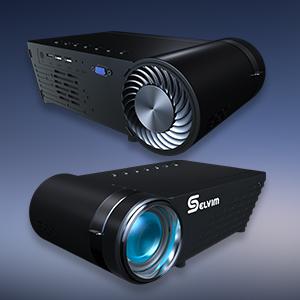
ภาพ: ด้านหน้าและด้านหลัง view of the Selvim Mini Projector, highlighting its compact design and various ports.
3.2 พอร์ตและปุ่มควบคุม
- ตัวรับสัญญาณ IR: สำหรับสัญญาณควบคุมระยะไกล
- พอร์ต HDMI: Connect to HDMI-enabled devices (laptops, game consoles, TV sticks).
- USB1/USB2 Ports: Connect USB storage devices or power compatible streaming sticks.
- AV/AUX Input: Connect devices using the included AV cable.
- พอร์ต VGA: เชื่อมต่อกับคอมพิวเตอร์ที่มีพอร์ต VGA
- ช่องต่อสัญญาณเสียงออก (3.5 มม.): เชื่อมต่อลำโพงภายนอกหรือหูฟัง
- กำลังไฟเข้า: เชื่อมต่อสายไฟ
- วงแหวนโฟกัส: Adjust for image clarity.
- การแก้ไขคีย์สโตน: Adjust image shape (±15 degrees).
- On-device Control Buttons: Navigate menus and adjust settings directly on the projector.

Image: The rear panel of the Selvim Mini Projector, clearly showing the HDMI, USB, AV, AUX, and VGA ports for multi-device connectivity.
4. การตั้งค่า
4.1 การจัดวางและขนาดหน้าจอ
Position the projector on a stable surface or mount it using a tripod or ceiling mount. The recommended projection distance is 2-5 meters (approximately 6.5-16.4 feet) for a screen size of 50-200 inches.
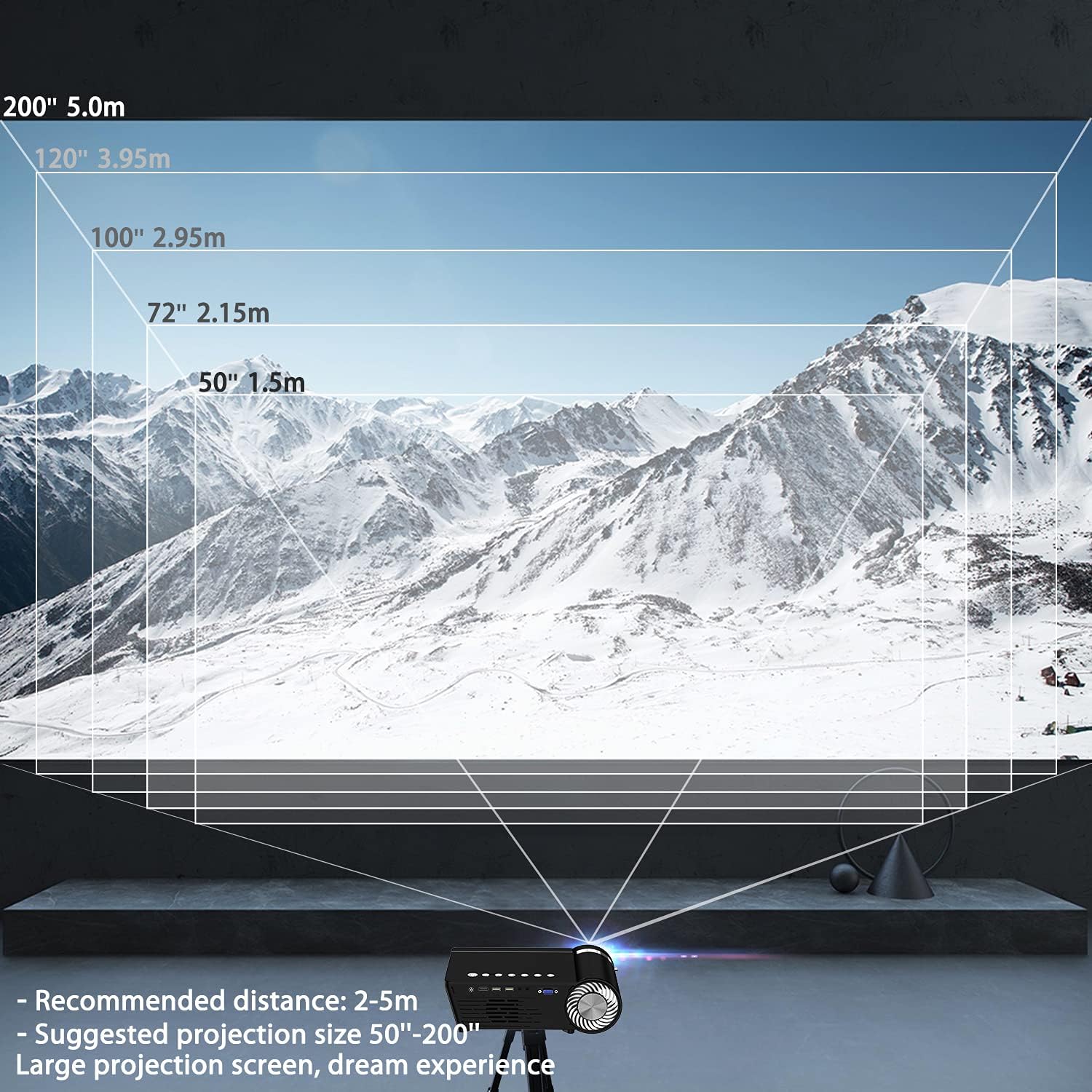
Image: A diagram illustrating recommended projection distances (1.5m for 50", 2.15m for 72", 2.95m for 100", 3.95m for 120", 5.0m for 200") for various screen sizes.
4.2 การเชื่อมต่อสายไฟ
เชื่อมต่อสายไฟเข้ากับช่องเสียบสายไฟของโปรเจ็กเตอร์ แล้วจึงเสียบเข้ากับเต้ารับไฟฟ้า
4.3 การปรับโฟกัสและคีย์สโตน
After powering on, adjust the focus ring on the lens until the image is clear. Use the keystone correction dial to correct any trapezoidal distortion, ensuring the projected image is rectangular.

Image: A visual representation of how focus and keystone adjustments affect the projected image, showing a blurry image being sharpened by focus and a trapezoidal image being corrected to a rectangle by keystone.
4.4 ตัวเลือกการเชื่อมต่อ
โปรเจ็กเตอร์รองรับการเชื่อมต่อทั้งแบบมีสายและไร้สายหลากหลายรูปแบบ:
- ช่องต่อ HDMI: Connect your laptop, game console, or streaming device via an HDMI cable.
- ยูเอสบี: เสียบแฟลชไดรฟ์ USB เพื่อเล่นสื่อ fileโดยตรงเลย
- AV/VGA: Use the provided AV cable or a VGA cable for older devices.
- Bluetooth 5.0: เชื่อมต่อลำโพงบลูทูธภายนอกหรือหูฟังเพื่อคุณภาพเสียงที่ดีขึ้น
- การเชื่อมต่อ WiFi: For screen mirroring from iOS and Android devices.

Image: The Selvim Mini Projector connected wirelessly to Bluetooth 5.0 headphones and earbuds, illustrating stable signal transmission and a superior stereo experience.
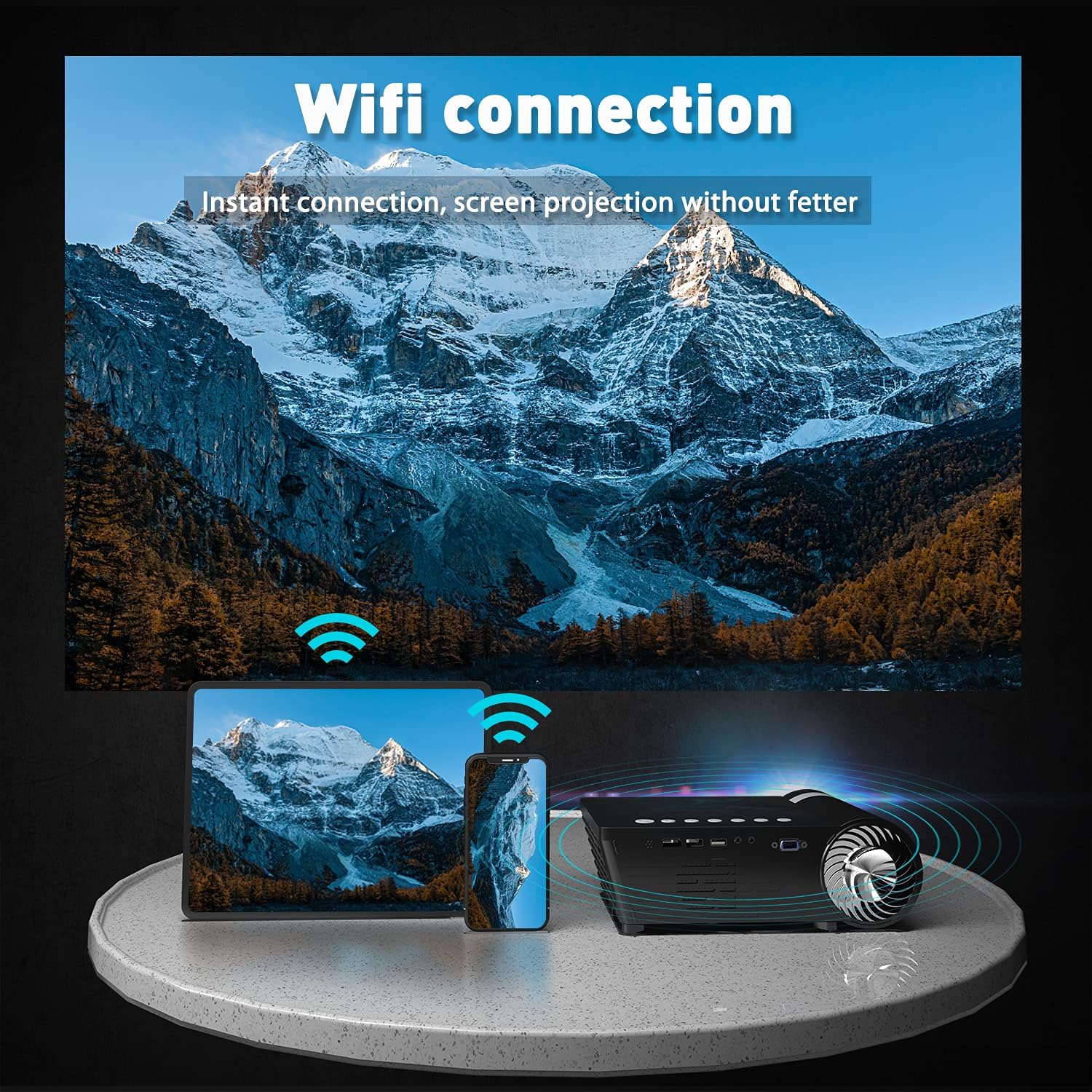
Image: The Selvim Mini Projector demonstrating WiFi connection for instant screen projection from a smartphone and tablet.
5. คู่มือการใช้งาน
5.1 การควบคุมขั้นพื้นฐาน
Use the included remote control or the buttons on top of the projector to navigate the menu, select input sources, and adjust settings.

Image: A four-panel image showing the projector's main menu, remote control interaction, and options for iOS and Android screen mirroring.
5.2 การเลือกแหล่งที่มาของอินพุต
From the main menu, select the desired input source (HDMI, USB, AV, VGA, or Miracast for screen mirroring) using the remote or projector buttons.
5.3 การมิเรอร์หน้าจอไร้สาย (iOS/Android)
วิธีสะท้อนหน้าจอสมาร์ทโฟนหรือแท็บเล็ตของคุณ:
- Select 'Miracast' or 'iOS Display' / 'Android Display' from the projector's main menu.
- On your mobile device, go to WiFi settings and connect to the projector's WiFi network (e.g., 'PROJECTOR-XXXX').
- เปิด web browser on your mobile device and enter the IP address displayed on the projector screen (e.g., 192.168.49.1).
- บน webpage, select 'WiFi AP' and then 'Scan' to find your home WiFi network.
- Connect your mobile device to your home WiFi network.
- Ensure your mobile device is connected to the same WiFi network as the projector.
- For iOS, activate 'Screen Mirroring' from your Control Center and select the projector. For Android, use the 'Screen Cast' or 'Wireless Display' function.
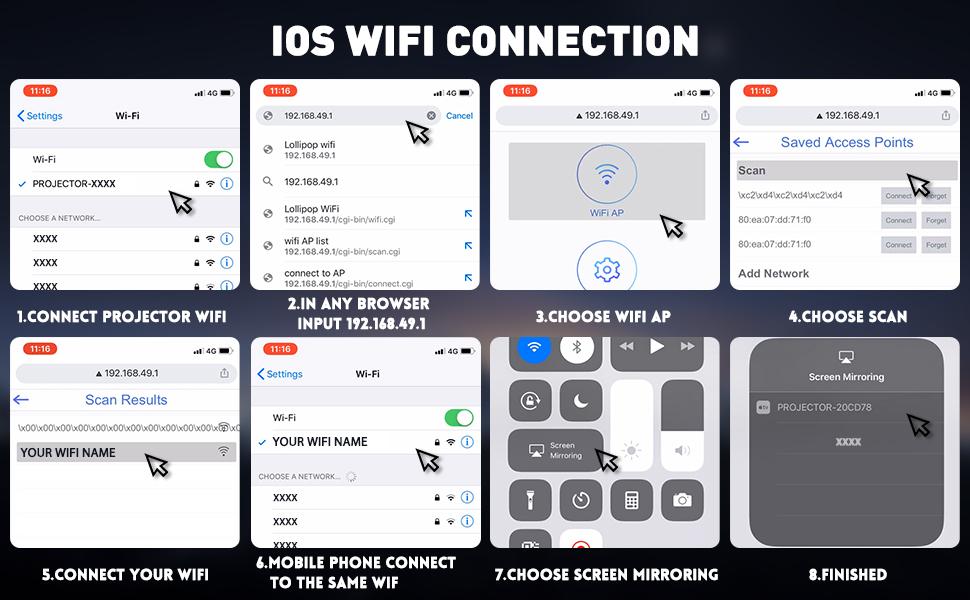
Image: A detailed eight-step visual guide demonstrating how to connect an iOS device to the Selvim Mini Projector for screen mirroring via WiFi.
5.4 การจับคู่เสียงผ่านบลูทูธ
To pair with a Bluetooth audio device:
- ตรวจสอบให้แน่ใจว่าลำโพงหรือหูฟังบลูทูธของคุณอยู่ในโหมดจับคู่
- On the projector, navigate to the 'Sound' settings menu.
- Select 'Bluetooth On' and then 'Scan Device'.
- Choose your Bluetooth device from the list to pair.
6. การบำรุงรักษา
6.1 การทำความสะอาดเลนส์
Regularly clean the projector lens using the provided cleaning cloth or a soft, lint-free cloth. Avoid abrasive materials that could scratch the lens.

Image: A cutaway diagram showing the multi-layer glass lens of the Selvim Mini Projector, emphasizing its optical quality.
6.2 ระบบทำความเย็น
The projector features an efficient cooling system with multiple fans to dissipate heat and ensure a long lamp life. Ensure the ventilation vents are not blocked during operation.
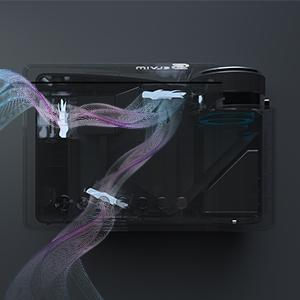
Image: An internal diagram of the Selvim Mini Projector showing the airflow and cooling system, designed to maintain optimal operating temperature.
6.3 LED แอลamp ชีวิต
โปรเจ็กเตอร์ใช้หลอดไฟ LEDamp with an impressive lifespan of up to 60,000 hours, providing years of reliable use.
7 การแก้ไขปัญหา
- ไม่มีรูป: Check power connection, input source selection, and cable connections. Ensure the lens cap is removed.
- ภาพเบลอ: Adjust the focus ring. If edges are blurry, adjust keystone correction. Ensure the projection distance is within the recommended range.
- ไม่มีเสียง: Check volume settings on both the projector and the source device. Ensure external speakers are properly connected or Bluetooth is paired correctly.
- ปัญหาเกี่ยวกับการสะท้อนหน้าจอ: Ensure both the projector and your mobile device are connected to the same WiFi network. For iOS, verify Screen Mirroring is active. For Android, check 'Screen Cast' or 'Wireless Display' settings. Some apps or content may be protected and not allow mirroring.
- ความร้อนสูงเกินไป: Ensure ventilation vents are clear and not obstructed. Operate the projector in a well-ventilated area.
8. ข้อมูลจำเพาะ
| ยี่ห้อ | เซลวิม |
| แบบอย่าง | B08RYTXVY8 |
| ความละเอียดการแสดงผลสูงสุด | 1920 x 1080 (1080P Compatible) |
| เทคโนโลยีการเชื่อมต่อ | Bluetooth, HDMI, USB, VGA |
| คุณสมบัติพิเศษ | Wi-Fi ในตัว พกพาได้ ไร้สาย |
| น้ำหนักสินค้า | 3.91 ปอนด์ |
| ขนาดแพ็คเกจ | 12.76 x 8.86 x 5 นิ้ว |
| แอลอีดีแอลamp ชีวิต | 60,000 ชั่วโมง |
| Keystone Correction | ±15 องศา |
9. การรับประกันและการสนับสนุน
For warranty information or technical support, please refer to the contact details provided with your purchase or visit the official Selvim webไซต์ โปรดเก็บใบเสร็จรับเงินไว้เป็นหลักฐานการซื้อสำหรับการเรียกร้องการรับประกัน