
1. บทนำ
This manual provides instructions for the proper setup, operation, and maintenance of your Decdeal J900 USB Wired Gaming Mouse. Please read this manual thoroughly before using the product to ensure optimal performance and longevity.
2. คุณสมบัติของผลิตภัณฑ์
- DPI ที่ปรับได้: Supports 800/1600/2400/3200/4800/6400 DPI settings for precise control.
- ไฟแบ็คไลท์ RGB: Features 7 programmable RGB backlight modes for customizable visual effects.
- การออกแบบตามหลักสรีรศาสตร์: Engineered for comfortable hand feel, reducing fatigue during extended use.
- Honeycomb Hollow Design: Promotes ventilation and cooling, preventing hot hands and palms.
- ปลั๊กแอนด์เพลย์: USB powered, no additional drivers required for operation.
- สวิตช์ที่ทนทาน: มาพร้อมสวิตช์ที่รองรับการคลิกได้ถึง 20 ล้านครั้ง

รูปที่ 2.1: โปรด้านข้างfile of the Decdeal J900 mouse, detailing its ergonomic design, maximum 6400 DPI, customizable RGB lighting, 5G laser sensor, and 1000Hz polling rate for responsive performance.
3. การตั้งค่า
- Unpack the Decdeal J900 USB Wired Gaming Mouse from its packaging.
- ค้นหาพอร์ต USB ที่พร้อมใช้งานบนคอมพิวเตอร์ของคุณ (เดสก์ท็อปหรือแล็ปท็อป)
- เสียบขั้วต่อ USB ของเมาส์เข้ากับพอร์ต USB
- The mouse is plug-and-play; no additional software or drivers are required for basic functionality. The operating system will automatically detect and install the necessary components.
4. คู่มือการใช้งาน
4.1. การปรับ DPI
The Decdeal J900 mouse features six adjustable DPI levels to suit various tasks and preferences. The DPI can be cycled through using the dedicated DPI button located on the top of the mouse, behind the scroll wheel.
- Press the DPI button to cycle through the available settings: 800, 1600, 2400, 3200, 4800, and 6400 DPI.
- Each DPI level may correspond to a specific LED color indicator (refer to Figure 4.1 for details).

Figure 4.1: This diagram shows the six adjustable DPI levels (800, 1600, 2400, 3200, 4800, 6400) of the Decdeal J900 mouse, indicating how to cycle through them.
4.2. โหมดไฟแบ็คไลท์ RGB
The mouse offers 7 programmable RGB backlight modes. These modes can be changed using the RGB light mode switch located on the underside of the mouse.
- Flip the mouse over to locate the RGB light mode switch.
- Press the switch to cycle through different lighting effects, including Rainbow, DPI Color Breath, Keep Light On, Close, Random Leisure, Random Sleep, and Random Sport modes.
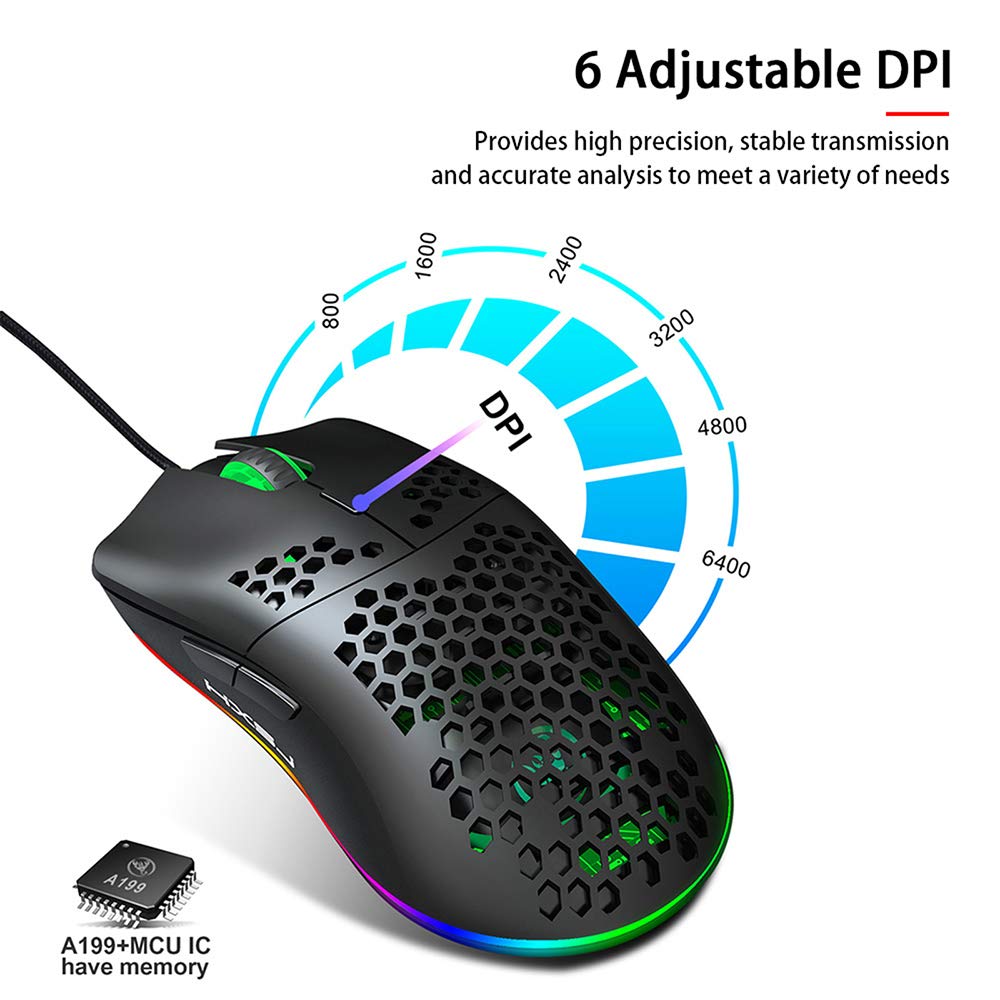
Figure 4.2: A hand is shown pressing the dedicated RGB light mode switch located on the underside of the Decdeal J900 mouse, demonstrating how to change lighting effects.

Figure 4.3: This image illustrates the adjustable DPI settings and various LED light modes available on the Decdeal J900 mouse.
5. การบำรุงรักษา
To ensure the longevity and optimal performance of your Decdeal J900 mouse, follow these maintenance guidelines:
- การทำความสะอาด: ใช้ผ้านุ่มและแห้งเช็ดพื้นผิวของเมาส์ สำหรับสิ่งสกปรกฝังแน่น ให้เช็ดเบาๆamp สามารถใช้ผ้าเช็ดทำความสะอาดได้ เพื่อไม่ให้ความชื้นเข้าไปในชิ้นส่วนภายใน หลีกเลี่ยงสารเคมีรุนแรงหรือน้ำยาทำความสะอาดที่มีฤทธิ์กัดกร่อน
- การดูแลสายเคเบิล: Avoid bending or twisting the USB cable excessively. Do not pull the cable to disconnect the mouse; always grasp the USB connector.
- พื้นที่จัดเก็บ: เมื่อไม่ใช้งาน ควรเก็บเมาส์ไว้ในที่สะอาดและแห้ง หลีกเลี่ยงอุณหภูมิที่สูงหรือต่ำเกินไป และแสงแดดโดยตรง
6 การแก้ไขปัญหา
If you encounter issues with your Decdeal J900 mouse, refer to the following common solutions:
- เมาส์ไม่ตอบสนอง:
- ตรวจสอบให้แน่ใจว่าได้เสียบสาย USB เข้ากับพอร์ต USB ของคอมพิวเตอร์อย่างแน่นหนาแล้ว
- ลองเชื่อมต่อเมาส์กับพอร์ต USB อื่น
- รีสตาร์ทเครื่องคอมพิวเตอร์ของคุณ
- ทดสอบเมาส์บนคอมพิวเตอร์เครื่องอื่นเพื่อตรวจสอบว่าปัญหาอยู่ที่เมาส์หรือคอมพิวเตอร์
- ค่า DPI ไม่เปลี่ยนแปลง:
- ตรวจสอบให้แน่ใจว่าคุณกดปุ่มปรับ DPI ที่ถูกต้อง
- Check if the mouse is properly connected and powered.
- ไฟ RGB ไม่ทำงาน/เปลี่ยนสี:
- Verify the RGB light mode switch on the underside of the mouse is being pressed correctly.
- Ensure the mouse is receiving power via the USB connection.
7. ข้อมูลจำเพาะ
| ยี่ห้อ | เด็คดีล |
| แบบอย่าง | เจ 900 |
| เทคโนโลยีการเชื่อมต่อ | สาย USB |
| เทคโนโลยีตรวจจับการเคลื่อนไหว | ออฟติคอล |
| DPI ที่ปรับได้ | 800/1600/2400/3200/4800/6400 |
| แสงไฟแบ็คไลท์ | RGB (7 โหมด) |
| การวางแนวมือ | มือขวา |
| ขนาดสินค้า | 15 x 10 x 5 ซม. |
| น้ำหนักสินค้า | 150 กรัม |
| ระบบปฏิบัติการที่รองรับ | ลินุกซ์, วินโดวส์ 7, วินโดวส์ XP (และเวอร์ชันที่ใหม่กว่า) |

Figure 7.1: An exploded diagram of the Decdeal J900 mouse, revealing its internal components such as the left button, Gundam 6400DPI sensor, transparent roller, ten-million-life microswitch, PCB circuit board, tail logo, RGB marquee glow ring, hollow base, and UPE foot sticker.
8. การรับประกันและการสนับสนุน
The Decdeal J900 USB Wired Gaming Mouse comes with a standard manufacturer's warranty. For specific warranty terms, duration, and support inquiries, please refer to the warranty card included with your product or contact Decdeal customer service directly. Keep your purchase receipt as proof of purchase for warranty claims.