
1. บทนำ
This manual provides essential instructions for the proper setup, operation, and maintenance of your Coredy Replacement Charging Dock Station. Please read this manual thoroughly before use and retain it for future reference.
The Coredy Replacement Charging Dock Station is designed to provide a reliable charging point for compatible Coredy robot vacuum cleaners, ensuring your device is always ready for operation.
2. ข้อมูลด้านความปลอดภัย
- Dry Location Use Only: This charging dock is intended for indoor use in dry environments. Do not expose it to water or moisture.
- อะแดปเตอร์ไฟฟ้า: The charging dock requires a compatible power adapter, which is sold separately. Ensure you use the correct adapter specified for your Coredy robot vacuum cleaner model.
- การจัดวาง: Place the charging dock on a hard, level surface against a wall, ensuring there are no obstacles within 3 feet (1 meter) in front of the dock and 1.5 feet (0.5 meters) on either side.
- เด็กและสัตว์เลี้ยง: Keep the charging dock and its power cord out of reach of children and pets to prevent accidents.
- ความเสียหาย: Do not use the charging dock if it is damaged. Contact Coredy support for assistance.
3. เนื้อหาบรรจุภัณฑ์
ตรวจสอบว่ามีรายการทั้งหมดอยู่ในแพ็คเกจของคุณ:
- Coredy Replacement Charging Dock Station (x1)
บันทึก: The power adapter for the charging dock is sold separately and is not included in this package.
4. การตั้งค่า
- เลือกตำแหน่ง: Select a suitable indoor location for the charging dock. It should be placed against a wall on a hard, level surface. Ensure there is at least 3 feet (1 meter) of clear space in front of the dock and 1.5 feet (0.5 meters) on either side to allow the robot vacuum to easily dock.
- เชื่อมต่อพลังงาน: Insert the power adapter (sold separately) into the power port on the back of the charging dock. Plug the other end of the power adapter into a wall outlet.
- ไฟแสดงสถานะพลังงาน: Once connected to power, the indicator light on the charging dock should illuminate, signaling that it is ready.
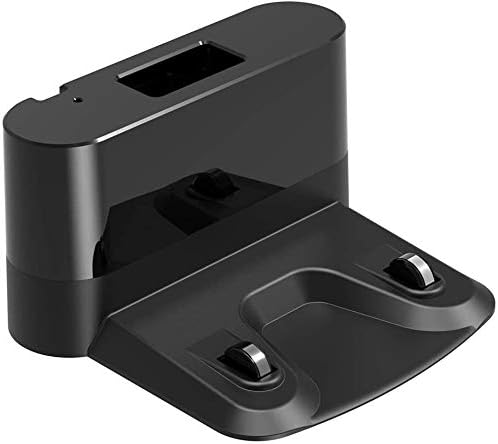
มุมเอียง view of the black Coredy Replacement Charging Dock Station, showing its compact design and charging contacts.
5. การดำเนินการ
The Coredy robot vacuum cleaner will automatically return to the charging dock when its battery is low or when a cleaning cycle is complete. Ensure the charging dock remains powered on and unobstructed for seamless operation.
- การเชื่อมต่อด้วยตนเอง: If needed, you can manually place the robot vacuum onto the charging dock, aligning its charging contacts with those on the dock.
- ไฟแสดงสถานะการชาร์จ: Refer to your specific Coredy robot vacuum cleaner's manual for details on its charging indicator lights. Typically, a light on the robot will change to indicate charging status.
6. การบำรุงรักษา
To ensure optimal performance and longevity of your charging dock:
- การทำความสะอาด: Periodically wipe the charging contacts on the dock and the robot vacuum with a clean, dry cloth to remove any dust or debris that may interfere with charging.
- พื้นที่จัดเก็บ: If storing the charging dock for an extended period, unplug it from the power outlet and store it in a cool, dry place.
7 การแก้ไขปัญหา
If your robot vacuum is not charging or docking correctly, consider the following:
- การเชื่อมต่อไฟฟ้า: Ensure the charging dock's power adapter is securely plugged into both the dock and a working wall outlet.
- สิ่งกีดขวาง: Check for any objects blocking the path to the charging dock or the dock itself.
- หน้าสัมผัสการชาร์จ: Clean the charging contacts on both the dock and the robot vacuum.
- ความเข้ากันได้: Verify that your robot vacuum model is compatible with this charging dock.
- แบตเตอรี่หุ่นยนต์: Consult your robot vacuum's manual for battery-related troubleshooting.
8. ข้อมูลจำเพาะ
| ยี่ห้อ | คอรีดี้ |
| รุ่นที่รองรับ | R300, R380, R400, R550, R650, R580, R750, G800, G850 Robot Vacuum Cleaners |
| ส่วนประกอบที่รวมอยู่ | Charging Dock (Power Adapter Sold Separately) |
| น้ำหนักสินค้า | 8.8 ออนซ์ |
| ขนาดแพ็คเกจ | 9.69 x 8.62 x 4.45 นิ้ว |
9. การรับประกันและการสนับสนุน
For warranty information or technical support, please refer to the documentation included with your original Coredy robot vacuum cleaner or visit the official Coredy webไซต์ โปรดเก็บใบเสร็จรับเงินไว้เป็นหลักฐานการซื้อสำหรับการเรียกร้องการรับประกัน