
1. บทนำ
This manual provides essential instructions for the safe and efficient use of your Airmaster Electric Heater Attachment Model 78966. Please read this manual thoroughly before installation and operation, and retain it for future reference. This attachment is designed to convert a compatible blower into a lightweight, portable indoor electric heater.

รูปที่ 1: ด้านหน้า view of the Airmaster Electric Heater Attachment. This image shows the compact design of the heater attachment, featuring its metal grille, power cord, and the red warning label on top.
2. คำแนะนำด้านความปลอดภัยที่สำคัญ
Failure to follow these safety instructions may result in fire, electric shock, injury, or property damage. Always exercise caution when operating electrical heating devices.
- คำเตือน: ผลิตภัณฑ์นี้อาจทำให้คุณสัมผัสสารเคมีต่างๆ รวมถึงตะกั่ว ซึ่งรัฐแคลิฟอร์เนียทราบว่าก่อให้เกิดมะเร็งและข้อบกพร่องแต่กำเนิดหรืออันตรายต่อระบบสืบพันธุ์อื่นๆ หากต้องการข้อมูลเพิ่มเติม โปรดไปที่ www.P65Warnings.ca.gov.
- อันตราย: High temperatures. Do not cover or obstruct the front of this heater. Maintain clear space around the heater to prevent fire hazards.
- คำเตือน: Risk of electric shock. Do not open. Refer servicing to qualified personnel.
- Ensure the heater is securely attached to the blower before operation.
- ห้ามใช้งานเครื่องทำความร้อนด้วยสายไฟหรือปลั๊กที่ชำรุด
- ห้ามใช้ในที่เปียกหรือ damp สถานที่
- ควรเก็บวัสดุไวไฟให้ห่างจากด้านหน้า ด้านข้าง และด้านหลังของเครื่องทำความร้อนอย่างน้อย 3 ฟุต (0.9 เมตร)
- ถอดปลั๊กฮีตเตอร์เมื่อไม่ใช้งาน
3. คุณสมบัติของผลิตภัณฑ์
- ข้อมูลจำเพาะพลังงาน: 120V, 60Hz, 10 Amps, 1320 Watts, 4500 BTU Heating Capacity.
- Converts compatible blowers into a lightweight, portable indoor electric heater.
- Clips securely onto the front of the blower for stable attachment.
- Plugs into an outlet located on the side of the blower.
- Equipped with thermal protection for enhanced safety.
- Features an 8-inch cord with a grounded plug.
- Includes an illuminated On/Off rocker switch for easy operation.
- Ideal for heating basements, garages, job sites, home gyms, and similar indoor spaces.
4. เนื้อหาบรรจุภัณฑ์
ตรวจสอบให้แน่ใจว่าสินค้าทุกชิ้นครบถ้วนและไม่เสียหายก่อนเปิดบรรจุภัณฑ์
- 1 x Airmaster Electric Heater Attachment (Model 78966)
5. คำแนะนำในการตั้งค่า
Follow these steps to properly attach the heater to your compatible blower.
- Ensure Blower is Off: Before beginning, ensure your blower unit is turned off and unplugged from its power source.
- Position Heater Attachment: Align the Airmaster Electric Heater Attachment with the front opening of your compatible blower.
- คลิปที่ปลอดภัย: Gently push the heater attachment onto the blower until the integrated clips securely engage with the blower's housing. Ensure it is firmly seated and does not wobble.
- เชื่อมต่อสายไฟ: Take the 8-inch power cord from the heater attachment and plug it into the designated outlet located on the side of your blower unit.
- การตรวจสอบขั้นสุดท้าย: Verify that the attachment is stable and the cord is properly connected before proceeding to operation.
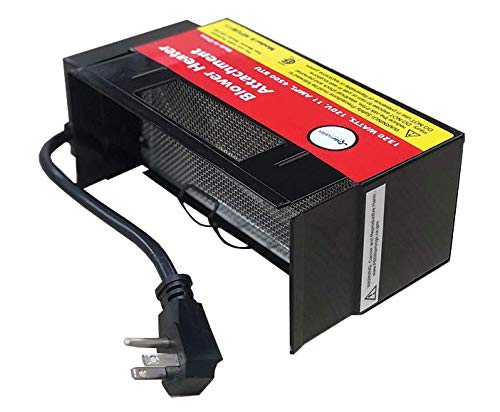
รูปที่ 2: มุม view of the Airmaster Electric Heater Attachment, highlighting the power cord and the side profile designed for blower attachment. This image illustrates the connection point for the blower.
6. คู่มือการใช้งาน
Once the heater attachment is securely installed, follow these steps to operate it.
- Plug in Blower: Plug your blower unit (with the heater attachment installed) into a standard 120V, 60 Hz electrical outlet.
- Turn On Blower: Activate your blower unit according to its own operating instructions. The blower must be running for the heater attachment to function correctly.
- เปิดใช้งานเครื่องทำความร้อน: Locate the illuminated On/Off rocker switch on the Airmaster Electric Heater Attachment. Press the switch to the "On" position. The switch will illuminate, indicating the heater is active and generating heat.
- ปรับการตั้งค่า (ถ้ามี): If your blower has adjustable fan speeds, you may adjust them to control the distribution of heated air.
- วิธีปิด: To cease heating, press the rocker switch on the heater attachment to the "Off" position. The illumination will turn off. For complete power disconnection, unplug the blower unit from the wall outlet.
7. การบำรุงรักษา
Regular maintenance ensures optimal performance and longevity of your heater attachment.
- การทำความสะอาด: Ensure the heater is unplugged and completely cool before cleaning. Use a soft, dry cloth to wipe down the exterior surfaces. Do not use abrasive cleaners or immerse the unit in water.
- Grille Inspection: Periodically check the metal grille for any dust or debris accumulation. Use a vacuum cleaner with a brush attachment to gently remove any blockages. Ensure the grille remains unobstructed for proper airflow.
- การตรวจสอบสายไฟ: Regularly inspect the power cord for any signs of damage, fraying, or cuts. If damage is found, discontinue use immediately and contact customer support.
- พื้นที่จัดเก็บ: When not in use, store the heater attachment in a cool, dry place, away from direct sunlight and moisture.
8 การแก้ไขปัญหา
โปรดดูส่วนนี้เพื่อดูวิธีแก้ไขปัญหาทั่วไป
| ปัญหา | สาเหตุที่เป็นไปได้ | สารละลาย |
|---|---|---|
| เครื่องทำความร้อนไม่เปิด |
|
|
| ไม่มีความร้อนออก |
|
|
| มีกลิ่นหรือควันผิดปกติ |
|
|
9. ข้อมูลจำเพาะ
| คุณลักษณะ | ค่า |
|---|---|
| หมายเลขรุ่น | 78966 |
| ยี่ห้อ | แอร์มาสเตอร์ |
| เล่มที่tage | 120โวลต์ |
| ความถี่ | 60 เฮิรตซ์ |
| Ampอีเรจ | 10 Amps |
| วัดtage | 1320 วัตต์ |
| ความสามารถในการให้ความร้อน | 4500 บีทียู |
| ขนาดสินค้า | 8.75 x 5 x 3.25 นิ้ว |
| น้ำหนักสินค้า | 2 ปอนด์ |
| ความยาวสายไฟ | 8 inches (with grounded plug) |
| ผู้ผลิต | แอร์มาสเตอร์ |
10. การรับประกันและการสนับสนุนลูกค้า
For warranty information, technical assistance, or to report issues with your Airmaster Electric Heater Attachment, please contact Airmaster customer support directly. Specific warranty terms and conditions may vary and are typically provided with your purchase documentation or available on the manufacturer's official webเว็บไซต์.
You can visit the Airmaster Store for more information: ร้าน Airmaster บน Amazon


