
1. บทนำ
This manual provides detailed instructions for the Symcode Portable Barcode Clip with Bluetooth. This device is designed for efficient and versatile barcode scanning, offering portability and multiple connectivity options. It can be directly clipped to the back of a smartphone, used independently via Bluetooth, or connected via a 2.4G dongle.
เนื้อหาแพ็คเกจ:
- 1x 2D Clip-Back Barcode Scanner
- สายชาร์จ 1 เส้น
- 1x คู่มือผู้ใช้
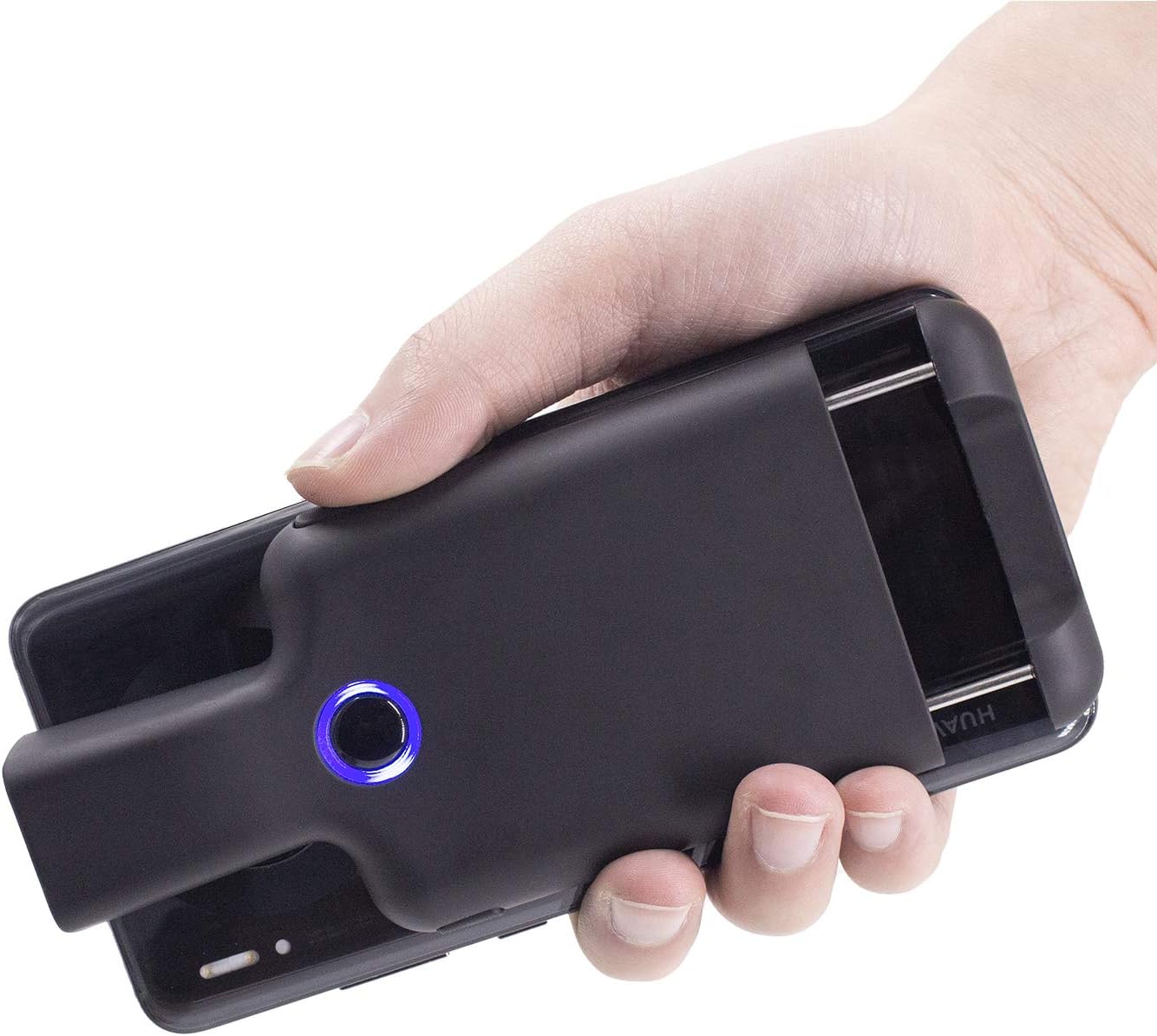
Figure 1.1: Symcode Portable Barcode Clip attached to a smartphone, demonstrating its compact design and ease of handling.
2. คุณสมบัติหลัก
- Direct Phone Attachment: Designed to clip directly onto the back of a smartphone for integrated use. Features protective flannel to prevent scratches.
- Automatic Bluetooth Connection: Bluetooth activates automatically upon powering on, simplifying the connection process.
- ความเข้ากันได้ในวงกว้าง: Works with phones, iPads, computers, and is compatible with POS systems, iOS, Android, Windows, Mac OS, and Linux. Supports US/DE/FR/IT/ES keyboard layouts.
- การออกแบบน้ำหนักเบา: Weighs approximately 90g (3.1oz) for enhanced portability.
- อายุการใช้งานแบตเตอรี่ที่ยาวนานขึ้น: Equipped with a 1600mAh rechargeable battery (some models may feature 1800mAh or 3000mAh), providing up to 7.5 hours of continuous operation or 25,000 scans on a full charge. Charging time is approximately 1.5 hours.
- Comprehensive Barcode Support: Scans most 1D and 2D barcodes, including those displayed on screens.
- 1D Barcode Types: UPC-A, UPC-E, UPC-E1, EAN-8, EAN-13, EAN-14, EAN-128, UCC128, ISBN/ISSN, CODE11, CODE32, CODE39, CODE39 Full ASCII, CODE93, CODE128, Interleaved 2 of 5, Industrial 2 of 5, Matrix 2 of 5, China Postcode, UK/Plessey, GS1, เป็นต้น
- 2D Barcode Types: QR, DataMatrix, PDF417, Aztec, Hanxin, Micro PDF417, and others.
- ปุ่มสแกนหลายปุ่ม: Features left, middle, and right scanning buttons for user convenience.
- ประหยัดพลังงาน: Automatically shuts down after 5 minutes of inactivity (configurable).
- Optional Phone Charging: Some models feature a built-in 3000mAh battery that can also charge the connected mobile phone.

Figure 2.1: Barcode scanning capabilities, including various 1D and 2D formats and challenging barcode conditions.

Figure 2.2: Physical dimensions and weight of the barcode clip.

Figure 2.3: The scanner's capability to charge a mobile phone, highlighting its built-in 3000 mAh battery.
3. การตั้งค่าเริ่มต้น
3.1 การชาร์จอุปกรณ์
Before first use, fully charge the barcode scanner. Connect the provided charge cable to the scanner's charging port and a suitable USB power source. A full charge typically takes approximately 1.5 hours. The indicator light will change to show charging status and completion.
3.2 การเปิด/ปิดเครื่อง
- การเปิดเครื่อง: Press and hold the middle scanning button until the blue signal light flashes.
- วิธีปิดเครื่อง: The scanner will automatically shut down after 5 minutes of no operation by default to conserve power. This setting can be adjusted or canceled.
4. การเชื่อมต่อและการจับคู่
4.1 การจับคู่บลูทูธ
The Symcode barcode clip connects wirelessly via Bluetooth. Follow these steps to pair it with your device:
- Activate Scanner Bluetooth: Press the middle scanning button on the barcode clip. The Bluetooth signal light will flash, indicating it is ready for pairing.
- Open Device Bluetooth Settings: On your phone, tablet, or computer, navigate to the Bluetooth settings menu. Ensure Bluetooth is turned on.
- ค้นหาและเชื่อมต่อ: ค้นหา available devices. Locate and click on "FSC-BarcodeScanner" in the list of found devices to initiate the pairing process.
- การยืนยัน: Once connected successfully, you will hear a beep from the scanner, and the blue indicator light on the left side of the scanner will remain solid (always on). The scanner will automatically reconnect to the last paired device upon restart.

รูปที่ 4.1: คำแนะนำทีละขั้นตอนสำหรับการจับคู่บลูทูธ
4.2 โหมดการเชื่อมต่อ
The scanner offers flexible connection options:
- Installed with Phone: Clip the scanner directly to the back of your smartphone for a compact, integrated scanning solution.
- Used Alone (Bluetooth): The scanner can be used as a standalone Bluetooth device, transmitting scanned data wirelessly to any compatible Bluetooth-enabled host device.
- Paired with 2.4G Dongle: For devices without Bluetooth or for a dedicated wireless connection, the scanner can be paired with a 2.4G USB dongle (sold separately or included with specific models) for use with laptops or desktop computers.

Figure 4.2: Three primary ways to use the Symcode barcode scanner.
5. คู่มือการใช้งาน
5.1 การสแกนบาร์โค้ด
To scan a barcode, point the scanner's window at the barcode you wish to read. Ensure the barcode is within the scanner's field of view. Press one of the scanning buttons to activate the scan engine. A successful scan will typically be indicated by a beep and/or a change in the indicator light.
5.2 Scanning Buttons
The scanner features three distinct scanning buttons for user convenience:
- Left Scanning Button: Located on the left side of the scanner.
- Middle Scanning Button: Located centrally on the scanner, also used for power on/off and Bluetooth activation.
- Right Scanning Button: Located on the right side of the scanner.
Any of these buttons can be used to trigger a scan.

Figure 5.1: Location and use of the three scanning buttons.
5.3 ตัวเลือกการกำหนดค่า
The scanner supports various customizations, which can typically be configured by scanning specific setup barcodes found in the full user manual (not included in this summary). These options may include:
- Automatic sensing mode
- การซ่อนอักขระบาร์โค้ด
- Adding prefixes or suffixes to scanned data
- การปรับระดับเสียง
- Setting or canceling automatic shutdown time
6. การบำรุงรักษา
6.1 การทำความสะอาด
To maintain optimal performance and appearance, clean the scanner regularly:
- ใช้ผ้าแห้งนุ่มๆ ที่ไม่มีขนเช็ดทำความสะอาดภายนอกของอุปกรณ์
- สำหรับช่องสแกน ให้ใช้ผ้าทำความสะอาดเลนส์หรือผ้าเนื้อนุ่มเช็ดเบาๆampล้างออกด้วยน้ำยาทำความสะอาดที่ไม่รุนแรงและไม่ทำให้เกิดรอยขีดข่วน หลีกเลี่ยงสารเคมีรุนแรงหรือวัสดุที่มีฤทธิ์กัดกร่อน
- ตรวจสอบให้แน่ใจว่าไม่มีของเหลวเข้าไปในช่องเปิดของอุปกรณ์
6.2 พื้นที่จัดเก็บ
When not in use, store the scanner in a cool, dry place, away from direct sunlight, extreme temperatures, and high humidity. Protect it from physical impact.
7 การแก้ไขปัญหา
This section addresses common issues you might encounter with your Symcode barcode scanner.
| ปัญหา | สาเหตุที่เป็นไปได้ | สารละลาย |
|---|---|---|
| เครื่องสแกนเนอร์ไม่สามารถเปิดเครื่องได้ | แบตเตอรี่เหลือน้อย; อุปกรณ์ทำงานผิดปกติ | Charge the scanner fully. If issue persists, contact support. |
| ไม่สามารถจับคู่ผ่านบลูทูธได้ | Scanner not in pairing mode; Bluetooth off on host device; Interference; Already paired to another device. | Ensure scanner's blue light is flashing. Turn Bluetooth off/on on host device. Move closer to host device. Disconnect from other devices. |
| เครื่องสแกนไม่สามารถอ่านบาร์โค้ดได้ | Barcode damaged/unreadable; Incorrect barcode type setting; Scanning window dirty; Insufficient lighting. | Ensure barcode is clear and flat. Check scanner's configuration for supported barcode types. Clean scanning window. Provide adequate lighting. |
| Scanned data is slow or incorrect. | Bluetooth signal interference; Incorrect keyboard layout setting; Data format issue. | Reduce distance to host device. Ensure no strong interference sources. Check keyboard layout settings (e.g., US/DE/FR). Review data formatting options. |
| Scanner automatically shuts down too quickly. | Default power-saving setting. | Refer to the full manual for instructions on how to adjust or disable the auto-shutdown timer. |
8. ข้อมูลจำเพาะ
| คุณสมบัติ | รายละเอียด |
|---|---|
| แบบอย่าง | B08R78W41N |
| เทคโนโลยีการเชื่อมต่อ | บลูทูธ (BLE, SPP, HID) |
| อุปกรณ์ที่รองรับ | Smartphone, Tablet, Computer (iOS, Android, Windows, Mac OS, Linux) |
| แหล่งพลังงาน | ใช้พลังงานจากแบตเตอรี่ |
| ประเภทแบตเตอรี่ | ลิเธียมโพลิเมอร์ (รวมอยู่ด้วย) |
| ความจุของแบตเตอรี่ | 1600mAh (some models 1800mAh/3000mAh) |
| เวลาในการชาร์จ | ประมาณ 1.5 ชั่วโมง |
| เวลาทำงานต่อเนื่อง | Up to 7.5 hours / 25,000 scans (on full charge) |
| ความละเอียดเซนเซอร์ | 648x488 พิกเซล |
| สนามเซ็นเซอร์ของ View | 66° ในแนวนอน, 50° ในแนวตั้ง |
| ความต้านทานต่อแสง | 0-10,000 ลักซ์ |
| ความต้านทานต่อแผ่นดินไหว | 1.2m (4ft) drop on cement surface |
| น้ำหนักสินค้า | 7.8 ounces (approx. 90g / 3.1oz) |
| ขนาด (โดยประมาณ) | 147mm (5.8in) length, 68mm (2.7in) width, 20.25mm (0.8in) card buckle thickness |
9. ข้อมูลการรับประกัน
Warranty details for the Symcode Portable Barcode Clip are typically provided with your purchase documentation or can be found on the official Symcode webไซต์ โปรดเก็บหลักฐานการซื้อไว้เพื่อใช้ในกรณีเรียกร้องการรับประกันใดๆ
10. การสนับสนุนลูกค้า
For further assistance, technical support, or inquiries not covered in this manual, please refer to the contact information provided with your product or visit the official Symcode website. You may also find additional resources and FAQs on their support pages.