
คอเรดี้ R580
คู่มือการใช้งานเครื่องดูดฝุ่นหุ่นยนต์ Coredy R580
รุ่น : R580
1. บทนำ
This manual provides essential information for the safe operation, maintenance, and troubleshooting of your Coredy R580 Robot Vacuum Cleaner. Please read this manual thoroughly before using the product and retain it for future reference.
The Coredy R580 is a versatile robotic vacuum cleaner designed to simplify your cleaning routine. It features powerful 2000Pa suction, Wi-Fi connectivity for app control, and compatibility with voice assistants like Amazon Alexa and Google Assistant. It supports both sweeping and mopping functions (water tank and mop cloth sold separately) and can transition seamlessly from hard floors to carpets, automatically boosting suction when needed. Its slim design allows it to clean under furniture, and it supports virtual boundaries (strips sold separately) to define cleaning areas.
2. คำแนะนำด้านความปลอดภัย
- อ่านคำแนะนำทั้งหมดก่อนใช้งานเครื่อง
- ห้ามให้เด็กเล่นกับหุ่นยนต์ ควรดูแลเด็กและสัตว์เลี้ยงขณะหุ่นยนต์ทำงาน
- โปรดใช้เฉพาะอะแดปเตอร์แปลงไฟที่ผู้ผลิตให้มาเท่านั้น
- ห้ามใช้หุ่นยนต์ในบริเวณที่มีเปลวไฟหรือวัตถุแตกหักง่าย
- โปรดตรวจสอบให้แน่ใจว่าได้ปิดหุ่นยนต์และถอดปลั๊กออกก่อนทำความสะอาดหรือบำรุงรักษา
- Do not immerse the robot or its charging dock in water.
- ควรหลีกเลี่ยงการใช้งานหุ่นยนต์บนพื้นผิวที่เปียกหรือบริเวณที่มีน้ำขัง
- Remove power cords, small objects, and loose rugs from the floor before operation to prevent entanglement.
3. เนื้อหาบรรจุภัณฑ์
เมื่อเปิดกล่อง โปรดตรวจสอบว่าสินค้าทั้งหมดที่ระบุไว้ด้านล่างครบถ้วนและอยู่ในสภาพดี:
- หุ่นยนต์ดูดฝุ่น Coredy R580
- แท่นชาร์จ
- อะแดปเตอร์แปลงไฟ
- แปรงด้านข้าง (4x)
- High Efficiency Filter (1x extra)
- รีโมทคอนโทรล
- แปรงทำความสะอาด
Note: The 300ML water tank, cleaning mop cloth, and boundary strips are sold separately and are not included in the standard package.
4. สินค้าหมดview

รูปที่ 4.1: ด้านบน view of the Coredy R580 Robot Vacuum Cleaner with an accompanying smartphone displaying the control application. The robot is black with bronze accents and features a central power button and home button.
ส่วนประกอบของหุ่นยนต์
- แผงด้านบน: Power/Clean button, Home/Recharge button, Wi-Fi indicator.
- กันชนหน้า: เซ็นเซอร์ตรวจจับการชน
- แปรงด้านข้าง: Two rotating brushes for edge and corner cleaning.
- ถังขยะ: เก็บรวบรวมเศษซาก
- แปรงหลัก: แปรงกลางสำหรับทำความสะอาดอย่างล้ำลึก
- ล้อขับเคลื่อน: สำหรับการเคลื่อนที่บนพื้นผิวที่หลากหลาย
- หน้าสัมผัสการชาร์จ: For automatic charging with the dock.
- เซ็นเซอร์หน้าผา: ตรวจจับการตกเพื่อป้องกันการตกบันได
5. การตั้งค่า
5.1 การชาร์จหุ่นยนต์
Before first use, fully charge the robot. Place the charging dock against a wall in an open, uncluttered area. Ensure there is at least 1 meter (3 feet) of clear space to the front and 0.5 meters (1.5 feet) to each side of the charging dock. Connect the power adapter to the charging dock and plug it into a wall outlet. Place the robot on the charging dock, ensuring the charging contacts align. The indicator light on the robot will show charging status.
5.2 การติดตั้งแปรงด้านข้าง
Attach the side brushes by pressing them onto the square posts at the bottom of the robot until they click into place. Ensure the brushes are securely fastened.
5.3 การเชื่อมต่อ Wi-Fi และการตั้งค่าแอป
To utilize smart features, download the Coredy app from your smartphone's app store. Follow the in-app instructions to connect your R580 to your home Wi-Fi network. Note that the robot supports 2.4 GHz Wi-Fi networks only.

Figure 5.1: The Coredy smartphone application allows users to control cleaning, monitor status, schedule cleaning, and access support.
6. การใช้งานหุ่นยนต์ดูดฝุ่น
6.1 การเริ่ม/หยุดการทำความสะอาด
- เริ่มต้นด้วยตนเอง: Press the Power/Clean button on the robot or the remote control.
- การเริ่มแอป: Use the Coredy app to initiate cleaning.
- คำสั่งเสียง: If connected to Alexa or Google Assistant, use voice commands like "Alexa, ask Coredy to start cleaning."
- To pause cleaning, press the Power/Clean button again. To send the robot back to the charging dock, press the Home/Recharge button.
โหมดทำความสะอาด 6.2 โหมด
- ทำความสะอาดอัตโนมัติ: The robot automatically cleans in a systematic pattern.
- การทำความสะอาดเฉพาะจุด: หุ่นยนต์จะทำความสะอาดพื้นที่เฉพาะตามรูปแบบเกลียว
- การทำความสะอาดขอบ: หุ่นยนต์ทำความสะอาดตามผนังและขอบเฟอร์นิเจอร์
6.3 การใช้การควบคุมด้วยเสียง
The Coredy R580 is compatible with Amazon Alexa and Google Assistant. Once connected through the Coredy app, you can use simple voice commands to start or stop cleaning.

Figure 6.1: The Coredy R580 can be controlled via voice commands through Amazon Alexa or Google Assistant for hands-free operation.
6.4 Virtual Boundary (Sold Separately)
The R580 supports virtual boundary strips to restrict the robot from entering certain areas. Place the boundary strips on the floor to create invisible barriers. The robot's specialized sensors will detect these strips and avoid crossing them.

Figure 6.2: Virtual boundary strips (sold separately) allow you to define specific areas where the robot vacuum should not clean.
6.5 Sweep and Mop Function (Accessories Sold Separately)
The R580 can perform wet-dry mopping when equipped with the optional 300ML water tank and cleaning mop cloth. Attach the water tank with the mop cloth to the robot for comprehensive cleaning on hard surface floors.
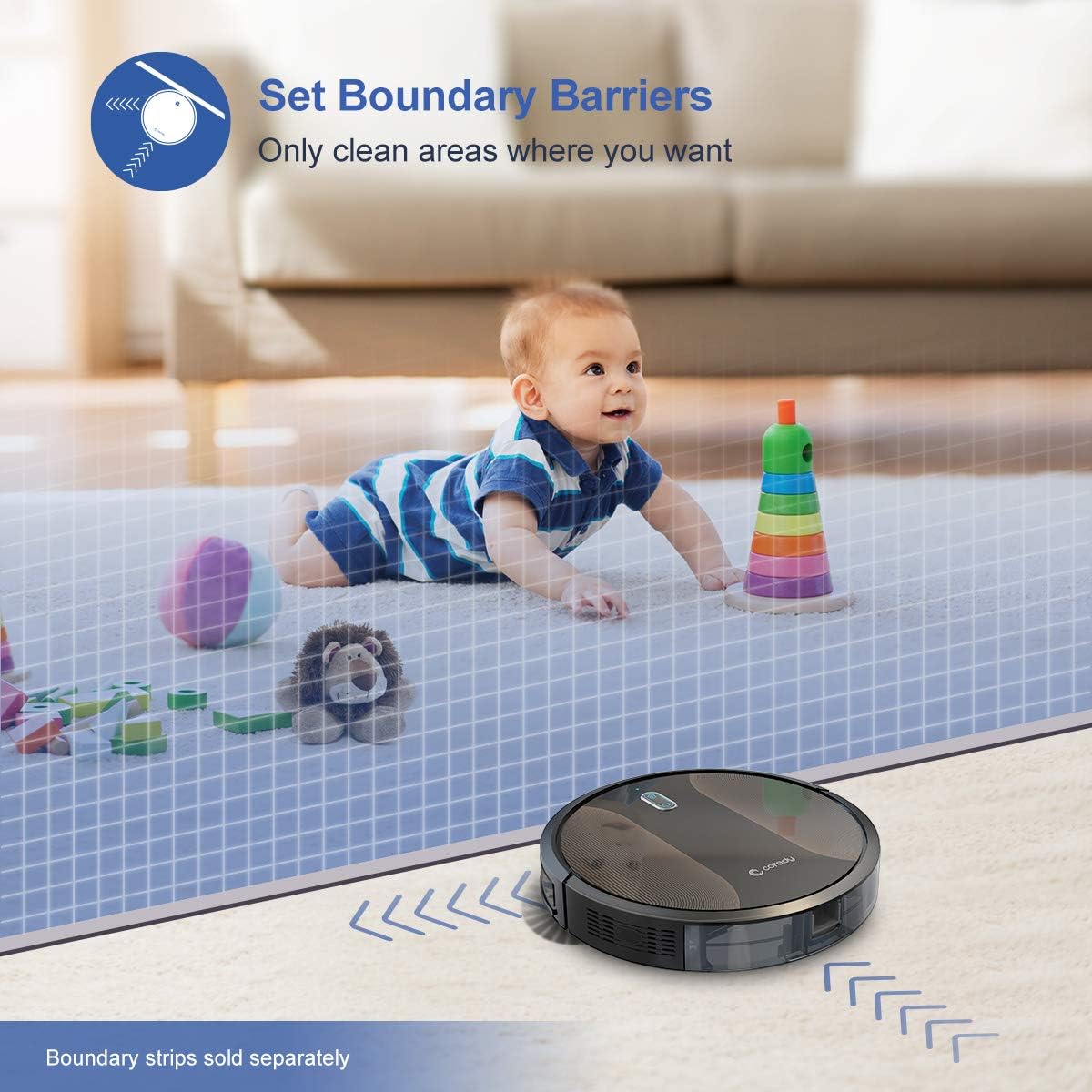
Figure 6.3: The Coredy R580 can be converted for mopping by attaching the optional water tank and mop cloth.
6.6 Boost-Intellect Technology
The robot is equipped with Boost-Intellect Technology, which automatically increases suction power when it detects carpeted surfaces, ensuring a deeper clean across different floor types.

Figure 6.4: Boost-Intellect Technology automatically adjusts suction power when the robot moves from hard floors to carpets.

Figure 6.5: The Coredy R580 provides strong suction power to effectively clean various types of debris from hard floors.
7. การบำรุงรักษา
Regular maintenance is crucial for optimal performance and longevity of your robot vacuum. Perform the following cleaning procedures regularly:
7.1 การล้างถังขยะ
Press the dustbin release button and pull out the dustbin. Open the dustbin cover and empty its contents into a trash can. It is recommended to empty the dustbin after each cleaning cycle.
7.2 การทำความสะอาดแปรงหลัก
Remove the main brush cover and lift out the main brush. Use the provided cleaning tool or a pair of scissors to remove any hair or debris tangled around the brush. Reinstall the main brush and cover.
7.3 การทำความสะอาดแปรงด้านข้าง
Periodically check the side brushes for tangled hair or debris. Gently pull them off their posts to clean. If they are worn or damaged, replace them with new ones. Push them back onto the posts until they click.
7.4 การทำความสะอาดตัวกรอง
Remove the filter from the dustbin. Tap the filter against a trash can to remove dust. Do not wash the filter with water, as this can damage it. Replace the filter every 2-3 months, or more frequently depending on usage.
7.5 การทำความสะอาดเซ็นเซอร์และหน้าสัมผัสการชาร์จ
Wipe the cliff sensors (located on the bottom of the robot) and the charging contacts (on the robot and charging dock) with a clean, dry cloth. Keeping these clean ensures proper navigation and charging.
8 การแก้ไขปัญหา
If your Coredy R580 encounters issues, refer to the following table for common problems and solutions:
| ปัญหา | สาเหตุที่เป็นไปได้ | สารละลาย |
|---|---|---|
| หุ่นยนต์ไม่เปิดขึ้น | แบตเตอรี่ต่ำ; ปิดสวิตช์ไฟ | ชาร์จหุ่นยนต์ เปิดสวิตช์ไฟหลัก |
| หุ่นยนต์ไม่ชาร์จ | หน้าสัมผัสการชาร์จสกปรก แท่นชาร์จไม่เปิด | Clean charging contacts on robot and dock; Ensure charging dock is plugged in. |
| หุ่นยนต์ติดขัดบ่อยมาก | Obstacles (cables, rugs); Cliff sensors dirty | กำจัดสิ่งกีดขวางออกจากเส้นทางการทำความสะอาด; ทำความสะอาดเซ็นเซอร์ตรวจจับขอบหน้าผา |
| ประสิทธิภาพการทำความสะอาดแย่ | ถังขยะเต็ม แปรงพันกัน ตัวกรองอุดตัน | เทถังเก็บฝุ่น; ทำความสะอาดแปรงหลักและแปรงด้านข้าง; ทำความสะอาดหรือเปลี่ยนแผ่นกรอง |
| ปัญหาการเชื่อมต่อ Wi-Fi | รหัสผ่าน Wi-Fi ไม่ถูกต้อง; เราเตอร์อยู่ไกลเกินไป; เครือข่าย 5GHz | Re-enter password; Move robot closer to router; Ensure 2.4GHz network is used. |
If the problem persists after trying the above solutions, please contact Coredy customer support for further assistance.
9. ข้อมูลจำเพาะ
| คุณสมบัติ | รายละเอียด |
|---|---|
| ยี่ห้อ | คอรีดี้ |
| แบบอย่าง | R580 |
| คุณสมบัติพิเศษ | ระบบกรอง HEPA, อุปกรณ์สำหรับสัตว์เลี้ยง, เครื่องดูดฝุ่น |
| สี | สีดำ |
| ประเภทตัวกรอง | ตลับหมึก |
| ความจุของถังขยะ | 0.3 ลิตร |
| แหล่งพลังงาน | ใช้พลังงานจากแบตเตอรี่ (รวมแบตเตอรี่ลิเธียมไอออน 1 ก้อน) |
| วิธีการควบคุม | Remote, Voice (Alexa, Google Home), App |
| ฟอร์มแฟกเตอร์ | หุ่นยนต์ |
| ขนาด (กว้าง x ยาว x สูง) | 16.89 x 13.66 x 4.57 นิ้ว |
| น้ำหนักสินค้า | 8.91 ปอนด์ |
| พลังดูด | สูงถึง 2000Pa |
| ระดับเสียง | ต่ำกว่า 65dB |
10. การรับประกันและการสนับสนุน
10.1 ข้อมูลการรับประกัน
Coredy products are manufactured to the highest quality standards. For specific warranty details regarding your R580 Robot Vacuum Cleaner, please refer to the warranty card included in your product packaging or visit the official Coredy webไซต์ โดยทั่วไปการรับประกันจะครอบคลุมถึงข้อบกพร่องในวัสดุและฝีมือการผลิตภายใต้การใช้งานปกติ
10.2 การสนับสนุนลูกค้า
If you have any questions, require technical assistance, or need to report an issue with your Coredy R580, please contact Coredy customer support. Contact information can usually be found on the official Coredy website or on the product packaging. Please have your model number (R580) and purchase information ready when contacting support.
Ask a question about this manual
Ask about setup, troubleshooting, compatibility, parts, safety, or missing instructions. Manuals+ will review the question and use this page’s manual context to help answer it.