
1. บทนำและเรื่องอื่นๆview
The Walfront BSC6048 Solar Controller is a multifunctional device designed to manage power flow from solar panels to various battery types. It supports 12V, 24V, 36V, and 48V battery systems, automatically identifying the voltage. This controller is suitable for sealed valve-regulated lead-acid, gel, liquid lead-acid, lithium iron, and ternary lithium batteries, with customizable parameters for other battery types. Its compact design ensures ease of use and storage.

รูปที่ 1.1 : ด้านหน้า view of the Walfront BSC6048 Solar Controller, showing the LCD display and USB ports.
2. คุณสมบัติหลัก
- ความเข้ากันได้กับแบตเตอรี่หลากหลายประเภท: Supports sealed valve-regulated lead-acid, gel, liquid lead-acid, lithium iron, and ternary lithium batteries.
- พารามิเตอร์ที่สามารถปรับแต่งได้: Allows for parameter customization to charge other battery types not listed by default.
- ฉบับสากลtage ความสามารถในการปรับตัว: Automatically adapts to 12V, 24V, 36V, and 48V battery systems without manual adjustment.
- ระบบระบุตัวตนอัจฉริยะ: Features intelligent recognition for truly automated control.
- ขนาดกะทัดรัดและพกพาสะดวก: Small size for easy carrying and storage, ensuring good performance in various applications.

Figure 2.1: The Walfront BSC6048 Solar Controller depicted in various usage environments, including residential solar setups and portable applications.
3. ข้อมูลจำเพาะ
| พารามิเตอร์ | ค่า |
|---|---|
| ประเภทสินค้า | ตัวควบคุมพลังงานแสงอาทิตย์ |
| วัสดุ | พลาสติกวิศวกรรม |
| กระแสไฟฟ้าที่ได้รับการจัดอันดับ | 60เอ |
| จัดอันดับการทำงานVoltage | 12V/24V/36V/48V (ตรวจจับอัตโนมัติ) |
| ปริมาณอินพุตแผงโซลาร์เซลล์tage | ≤100โวลต์ |
| การสูญเสียไฟฟ้าสถิต | ≤20มิลลิแอมป์ |
| การลดลงของแรงดันในวงจร | ≤0.3โวลต์ |
| เอาท์พุต USB | 5V/2Ax2 ก้อน |
| อุณหภูมิในการทำงาน | -20°C ถึง +55°C |
| ระดับการป้องกัน | IP30 |
| ความชื้นสัมพัทธ์ | ≤95% (ไม่กลั่นตัว) |
| ขนาดเทอร์มินัล | 4AWG/25มม.² |
| น้ำหนักสินค้า | 1.83 ปอนด์ (828 กรัม) |
| ประเภทจอภาพ | LCD หรือ LED |
4. เนื้อหาบรรจุภัณฑ์
เมื่อเปิดบรรจุภัณฑ์ โปรดตรวจสอบว่าสินค้าทั้งหมดอยู่ในบรรจุภัณฑ์และอยู่ในสภาพดี:
- 1 x Walfront BSC6048 Solar Controller
- 1 x คู่มือผู้ใช้ (เอกสารนี้)
5. การตั้งค่าและการติดตั้ง
Proper installation is crucial for the safe and efficient operation of your solar controller. Please follow these steps carefully:
- การตระเตรียม: Ensure all components (solar panels, battery bank, load, and appropriate wiring) are available and in good condition. Disconnect any power sources before beginning installation.
- การติดตั้ง: Mount the solar controller in a cool, dry, and well-ventilated area, away from direct sunlight and flammable materials. Ensure there is sufficient space around the controller for heat dissipation. The controller features mounting brackets for secure installation.
- การเชื่อมต่อแบตเตอรี่: ก่อนอื่นให้ต่อแบตเตอรี่เข้ากับขั้วแบตเตอรี่ของตัวควบคุม ตรวจสอบให้แน่ใจว่าขั้วถูกต้อง (+ ต่อกับ + และ - ต่อกับ -) ตัวควบคุมจะตรวจจับระดับแบตเตอรี่โดยอัตโนมัติtage (12V/24V/36V/48V)
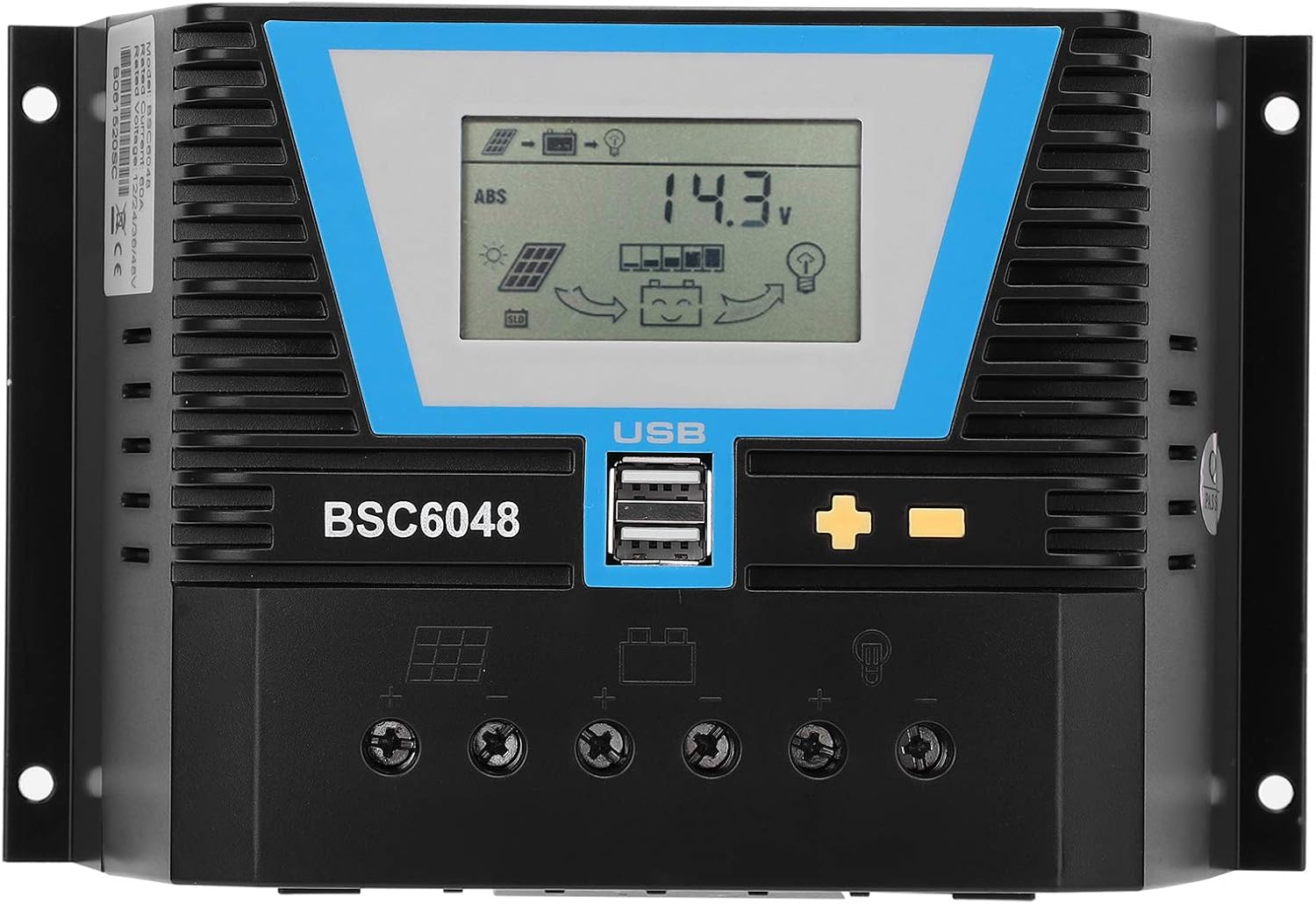
รูปที่ 5.1: ด้านหลัง view of the controller highlighting the terminal connections for solar panels, battery, and load.
- การเชื่อมต่อแผงโซลาร์เซลล์: Connect the solar panels to the controller's solar panel terminals. Again, observe correct polarity. Ensure the solar panel input voltage ไม่เกิน 100V.
- โหลดการเชื่อมต่อ: Connect your DC loads (e.g., lights, fans) to the controller's load terminals. Pay attention to polarity. The controller can manage the load output based on battery status.
- การตรวจสอบ: Double-check all connections for tightness and correct polarity. Once verified, the controller's display should illuminate, indicating proper operation.
หมายเหตุด้านความปลอดภัยที่สำคัญ: Always connect the battery to the controller BEFORE connecting the solar panels. Disconnect solar panels BEFORE disconnecting the battery. Failure to follow this order may damage the controller.
6. คู่มือการใช้งาน
The BSC6048 controller features an intuitive LCD display and control buttons for monitoring and adjusting settings.

รูปที่ 6.1: รายละเอียด view of the controller's LCD display and control buttons.
6.1. แสดงข้อมูล
The LCD display provides real-time information about your solar system, including:
- ปริมาณแบตเตอรี่tage and charge status
- Solar panel charging current
- Load discharge current
- System status indicators (charging, discharging, errors)
6.2. ปุ่มฟังก์ชัน
The controller typically has three buttons:
- Menu/Set Button: ใช้สำหรับเข้าสู่เมนูการตั้งค่าและยืนยันการเลือก
- ปุ่มขึ้น: Used to navigate through menu options or increase values.
- ปุ่มลง: Used to navigate through menu options or decrease values.
Refer to the on-screen prompts and the detailed user manual (if provided separately) for specific navigation and parameter adjustment procedures. The controller's intelligent identification function means basic operation is largely automatic.
6.3. พอร์ตชาร์จ USB
The controller is equipped with two 5V/2A USB output ports, allowing you to charge compatible electronic devices directly from the controller.
7. การบำรุงรักษา
Regular maintenance ensures the longevity and optimal performance of your solar controller.
- ความสะอาด : รักษาตัวควบคุมให้สะอาด ปราศจากฝุ่นและสิ่งสกปรก ใช้ผ้าแห้งนุ่มๆ ในการทำความสะอาด ห้ามใช้น้ำยาทำความสะอาด
- การเชื่อมต่อ: Periodically check all wiring connections to ensure they are secure and free from corrosion. Loose connections can lead to power loss or overheating.
- การระบายอากาศ : Ensure the ventilation fins are not obstructed to allow for proper heat dissipation.
- สภาพแวดล้อม : ตรวจสอบว่าสภาพแวดล้อมการทำงานยังคงอยู่ภายในช่วงอุณหภูมิและความชื้นที่กำหนด
8 การแก้ไขปัญหา
This section addresses common issues you might encounter with your solar controller.
| ปัญหา | สาเหตุที่เป็นไปได้ | สารละลาย |
|---|---|---|
| จอแสดงผลคอนโทรลเลอร์ปิดอยู่ | ไม่มีไฟจากแบตเตอรี่ หรือต่อแบตเตอรี่ไม่ถูกต้อง | Check battery connections and ensure battery has sufficient charge. Reconnect battery first, then solar panels. |
| แบตเตอรี่ไม่ชาร์จ | Solar panels not connected, insufficient sunlight, or incorrect panel polarity. | Verify solar panel connections and polarity. Ensure panels are receiving adequate sunlight. Check solar panel input voltage. |
| การโหลดไม่ทำงาน | Load disconnected, incorrect polarity, or battery voltagอีต่ำเกินไป | Check load connections and polarity. Ensure battery has sufficient charge. Some controllers automatically disconnect load when battery is low. |
| ตัวควบคุมมีความร้อนสูงเกินไป | Poor ventilation or excessive load/current. | Ensure controller is in a well-ventilated area. Check if the total current draw exceeds the controller's rated capacity (60A). |
If the problem persists after attempting these solutions, please contact Walfront customer support for further assistance.
9. การรับประกันและการสนับสนุน
Specific warranty details for the Walfront BSC6048 Solar Controller are typically provided with your purchase documentation or can be found on the official Walfront webไซต์ โปรดเก็บหลักฐานการซื้อไว้เพื่อใช้ในการเรียกร้องการรับประกัน
For technical support, troubleshooting assistance beyond this manual, or warranty inquiries, please contact Walfront customer service through their official channels. You can often find contact information on the product packaging, the Walfront brand store on Amazon, or their official webเว็บไซต์.
Visit the Walfront Store: Walfront Amazon Store