
1. บทนำ
This manual provides detailed instructions for the installation, operation, and maintenance of the Walfront SVP-912 Adjustable Voltage Protective Voltmeter. This device is designed to protect electrical equipment from damage caused by overvoltagอีและอันเดอร์โวลtage conditions in 120VAC systems. It features automatic recovery and adjustable protection parameters.
โปรดอ่านคู่มือนี้อย่างละเอียดก่อนการติดตั้งและใช้งานเพื่อให้มั่นใจถึงการทำงานที่ถูกต้องและความปลอดภัย
2. ข้อมูลด้านความปลอดภัย
คำเตือน: อันตรายจากไฟฟ้าช็อต การติดตั้งและการซ่อมบำรุงควรดำเนินการโดยบุคลากรที่มีคุณสมบัติเท่านั้น
- Always disconnect power to the circuit before installing or servicing the device.
- ตรวจสอบให้แน่ใจว่าการเชื่อมต่อสายไฟทั้งหมดมีความปลอดภัยและเป็นไปตามกฎหมายไฟฟ้าในท้องถิ่น
- ห้ามใช้งานอุปกรณ์หากพบว่าได้รับความเสียหาย
- The device is designed for indoor use in a dry environment. Avoid exposure to moisture or extreme temperatures.
- ตรวจสอบปริมาณtage and current ratings of your system are compatible with the device specifications.
3. สินค้าหมดview
The Walfront SVP-912 is a compact, DIN rail mountable voltage protective device. It features a digital display for real-time voltage monitoring and buttons for setting protection parameters. The device automatically disconnects the load when voltage exceeds or falls below set thresholds and reconnects once voltage returns to a safe range after a configurable delay.

รูปที่ 1 : ด้านหน้า view of the Walfront SVP-912 Adjustable Voltage Protective Voltmeter, showing the digital display and control buttons.

รูปที่ 2: รายละเอียด view of the SVP-912's digital display, indicating current voltage, ล้นเกินtage (Over(V)), and undervoltage (Under(V)) indicators, along with 'SET' and adjustment buttons.
4. ข้อมูลจำเพาะ
| พารามิเตอร์ | ค่า |
|---|---|
| แบบอย่าง | เอสวีพี-912 |
| จัดอันดับVoltage | 120VAC 50 / 60Hz |
| Rated Current (Optional) | 40A, 63A, 80A |
| โอเวอร์โวลtage Value Range | 130V-150V-OFF (Default: 140V) |
| โอเวอร์โวลtage ค่าการกู้คืน | Adjustable from 129V to 149V (Default: 250V - Note: Default value seems inconsistent, refer to device for actual default) |
| โอเวอร์โวลtagเวลาดำเนินการ | 0.1-10 วินาที (ค่าเริ่มต้น: 0.1 วินาที) |
| อันเดอร์โวลtage Value Range | Adjustable from 100V-80V-OFF (Default: 90V) |
| อันเดอร์โวลtage Recovery Value Range | 81V-99V (ค่าเริ่มต้น: 95V) |
| อันเดอร์โวลtagเวลาดำเนินการ | 0.1-10 วินาที (ค่าเริ่มต้น: 0.1 วินาที) |
| เวลาหน่วงในการกู้คืนความล้มเหลว | 2-512 วินาที (ค่าเริ่มต้น: 60 วินาที) |
| Delay Time after Power-On | 2-255 วินาที (ค่าเริ่มต้น: 2 วินาที) |
| การใช้พลังงาน | ≤2วัตต์ |
| Electrical Machinery Life | ≥ 4000 ครั้ง |
| การติดตั้ง | ราง DIN |
| อุณหภูมิสภาพแวดล้อมการทำงาน | -25℃ ถึง +40℃ |
| ความชื้น | <90% |
| ระดับความสูง | ≤2000ม./6561.7ฟุต |
| ขนาด | ขนาดโดยประมาณ 81 x 36 x 60 มม. (3.2 x 1.4 x 2.4 นิ้ว) |

Figure 3: Dimensional drawing of the SVP-912 device, showing measurements in millimeters and inches.
5. การติดตั้ง
The Walfront SVP-912 is designed for DIN rail mounting. Ensure the power supply to the circuit is completely disconnected before proceeding with installation.
5.1 แผนผังการเดินสายไฟ
Connect the device according to the wiring diagram provided below. The 'IN' terminals are for the incoming power supply, and the 'OUT' terminals are for the protected load. Ensure correct polarity (Neutral 'N' and Live 'L').
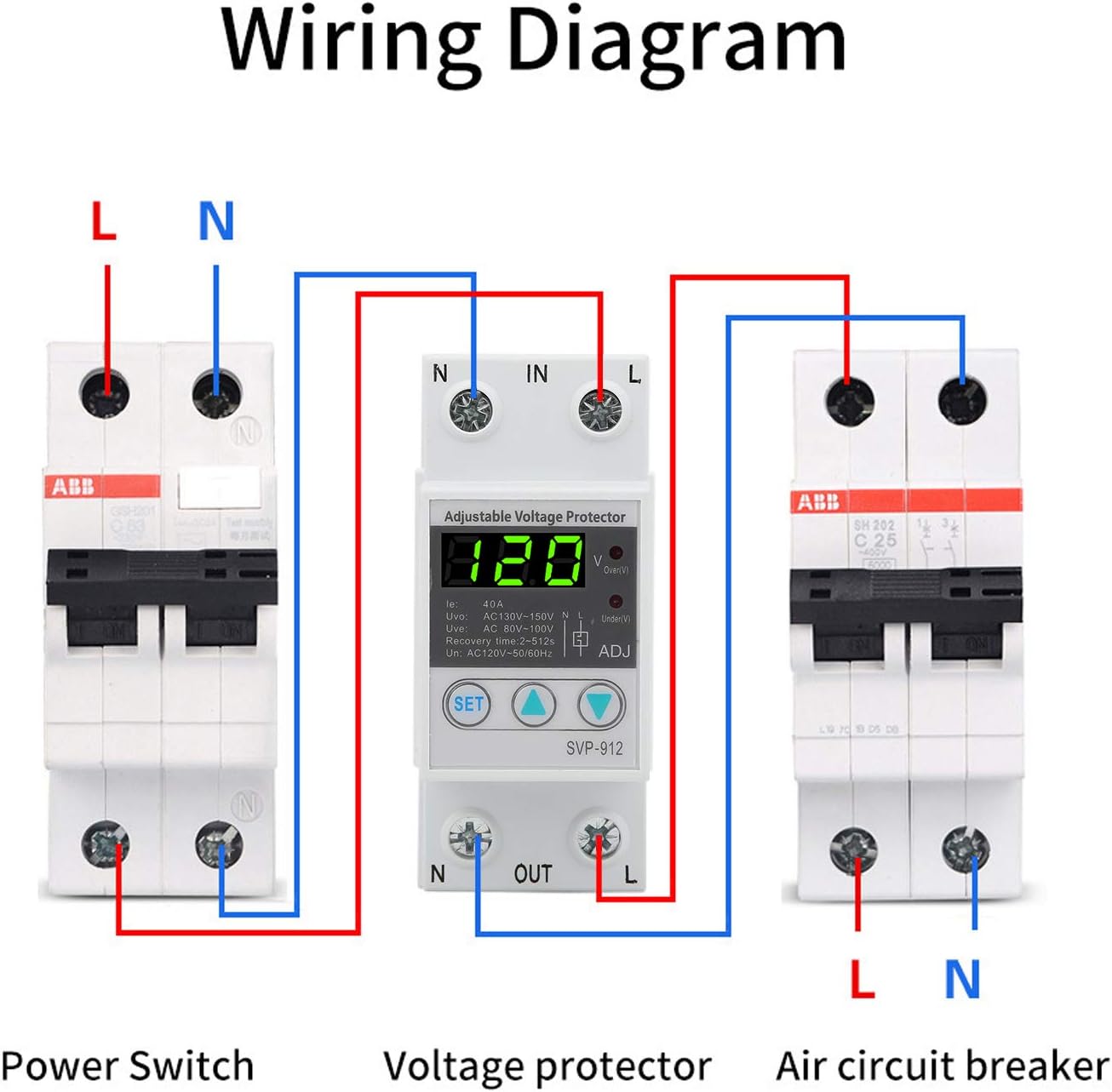
Figure 4: Wiring diagram illustrating the connection of the SVP-912 voltage protector between a power switch and an air circuit breaker, showing input (IN) and output (OUT) terminals for Live (L) and Neutral (N).
- Mount the SVP-912 onto a standard DIN rail.
- เชื่อมต่อสายไฟ (L) และสายกลาง (N) ที่เข้ามาเข้ากับขั้วต่อ 'IN'
- Connect the outgoing Live (L) and Neutral (N) wires to the 'OUT' terminals, leading to your protected load.
- Tighten all terminal screws securely to prevent loose connections and arcing.
6. การดำเนินการ
After successful installation and power-on, the device will display the current voltage. The 'SET' button and adjustment buttons are used to configure the protection parameters.
6.1 การตั้งค่าพารามิเตอร์
- กดปุ่ม ชุด button to enter the parameter setting mode. The first parameter will flash on the display.
- ใช้ ขึ้น (▲) และ ลง (▼) buttons to adjust the value of the flashing parameter.
- กด ชุด อีกครั้งเพื่อยืนยันค่าและไปยังพารามิเตอร์ถัดไป
- Repeat steps 2 and 3 for all parameters.
- After setting the last parameter, the device will automatically save the settings and return to normal operation mode. If no button is pressed for a few seconds, the device will exit setting mode without saving the current parameter change.
6.2 พารามิเตอร์ที่ปรับได้
- โอเวอร์โวลtage Value (Uvo): Sets the upper voltage limit. If the voltage exceeds this value, the device will trip.
- โอเวอร์โวลtage ค่าการกู้คืน: Sets the voltage level at which the device will attempt to reconnect after an overvoltagอีทริป
- โอเวอร์โวลtagเวลาดำเนินการ: Configures the delay before tripping on overvoltage.
- อันเดอร์โวลtage Value (Uve): Sets the lower voltage limit. If the voltage falls below this value, the device will trip.
- อันเดอร์โวลtage ค่าการกู้คืน: Sets the voltage level at which the device will attempt to reconnect after an undervoltagอีทริป
- อันเดอร์โวลtagเวลาดำเนินการ: Configures the delay before tripping on undervoltage.
- เวลาหน่วงในการกู้คืนความล้มเหลว: The delay before the device attempts to reconnect the load after a voltage fault has cleared.
- Delay Time after Power-On: The initial delay before the device connects the load after power is applied.
- Reset Method Selection: Allows selection of automatic or manual reset after a fault.
6.3 รีเซ็ตเป็นค่าโรงงาน
To restore the device to its factory default settings, refer to the specific instructions in the device's menu or consult the manufacturer's support. This function is typically accessed through a combination of button presses in the setting mode.
7. การบำรุงรักษา
The Walfront SVP-912 is designed for reliable operation with minimal maintenance. However, periodic checks are recommended to ensure optimal performance and safety.
- การตรวจสอบด้วยสายตา: Periodically inspect the device for any signs of physical damage, discoloration, or loose connections.
- การทำความสะอาด: If necessary, gently clean the exterior of the device with a dry, soft cloth. Do not use abrasive cleaners or solvents. Ensure power is disconnected before cleaning.
- สภาพแวดล้อม: Ensure the operating environment remains within the specified temperature and humidity ranges.
8 การแก้ไขปัญหา
This section addresses common issues you might encounter with the SVP-912.
| ปัญหา | สาเหตุที่เป็นไปได้ | สารละลาย |
|---|---|---|
| อุปกรณ์ไม่เปิดเครื่อง | ไม่มีแหล่งจ่ายไฟ; การเดินสายไฟไม่ถูกต้อง; ความผิดพลาดภายใน | Check power source. Verify wiring connections. If power is present and wiring is correct, the device may be faulty; contact support. |
| อุปกรณ์ตัดการทำงานบ่อยครั้ง | เล่มที่tage fluctuations outside set limits; sensitive settings. | ตรวจสอบวอลลุ่มขาเข้าtage stability. Adjust overvoltage/อันเดอร์โวลtage thresholds to be less sensitive if minor fluctuations are acceptable. |
| Load does not reconnect after a trip. | เล่มที่tage still outside recovery limits; recovery delay not expired; manual reset required. | ตรวจสอบฉบับที่tage has returned to safe range. Wait for recovery delay. If manual reset is enabled, press the appropriate button or cycle power. |
| หน้าจอแสดงระดับเสียงไม่ถูกต้องtage. | Wiring issue; internal calibration error. | Verify wiring. Compare reading with a known accurate voltmeter. If discrepancy persists, contact support. |
| ไม่สามารถเปลี่ยนแปลงการตั้งค่าได้ | Not in setting mode; buttons unresponsive. | Press the 'SET' button to enter setting mode. If buttons are unresponsive, power cycle the device. If issue persists, contact support. |
For issues not covered in this section, please contact Walfront customer support.
9. การรับประกันและการสนับสนุน
For warranty information, please refer to the documentation provided at the time of purchase or contact your seller directly. Walfront products typically come with a limited warranty covering manufacturing defects.
For technical support, troubleshooting assistance, or inquiries regarding parts and service, please contact Walfront customer service through their official webเว็บไซต์หรือข้อมูลการติดต่อที่ให้มาพร้อมกับการซื้อของคุณ