
1. บทนำ
The Carrera RC Mario Kart Yoshi Quad (Model 370200997X) is a remote-controlled vehicle designed for users aged 6 and up. This manual provides essential information for the safe and optimal use of your RC Yoshi Quad, ensuring an enjoyable experience. Please read all instructions carefully before operating the product.
2. อะไรอยู่ในกล่อง
แกะส่วนประกอบทั้งหมดออกอย่างระมัดระวัง และตรวจสอบให้แน่ใจว่ามีรายการต่อไปนี้รวมอยู่ด้วย:
- Carrera RC Yoshi Quad Vehicle
- รีโมทคอนโทรล
- 3.2V 700 mAh LiFePo4 Battery (for vehicle)
- สายชาร์จ USB
- คู่มือการใช้งาน

Image: The Carrera RC Mario Kart Yoshi Quad shown in its original retail packaging, indicating included components.
3. การตั้งค่า
3.1. การชาร์จแบตเตอรี่รถยนต์
Before first use, fully charge the vehicle's 3.2V 700 mAh LiFePo4 battery. The charging process typically takes approximately 50 minutes.
- Connect the USB charging cable to the vehicle's charging port.
- เสียบปลายอีกด้านของสาย USB เข้ากับแหล่งจ่ายไฟ USB ที่ใช้งานร่วมกันได้ (เช่น คอมพิวเตอร์ อะแดปเตอร์ติดผนัง USB พาวเวอร์แบงค์)
- The charging indicator light on the vehicle or cable will show the charging status (refer to specific indicator behavior in the quick start guide if available).
- เมื่อการชาร์จเสร็จสมบูรณ์แล้ว ให้ถอดสายเคเบิลออก

Image: The Yoshi Quad vehicle, ready for battery charging via its USB cable.
3.2. การติดตั้งแบตเตอรี่รีโมทคอนโทรล
The remote control requires batteries for operation. Please ensure you use the correct type and polarity.
- ค้นหาช่องใส่แบตเตอรี่ที่ด้านหลังของรีโมทคอนโทรล
- เปิดฝาช่องใส่แบตเตอรี่
- Insert the required batteries (e.g., AA or AAA, typically 2x) according to the polarity markings (+/-).
- ปิดฝาช่องใส่แบตเตอรี่ให้แน่น
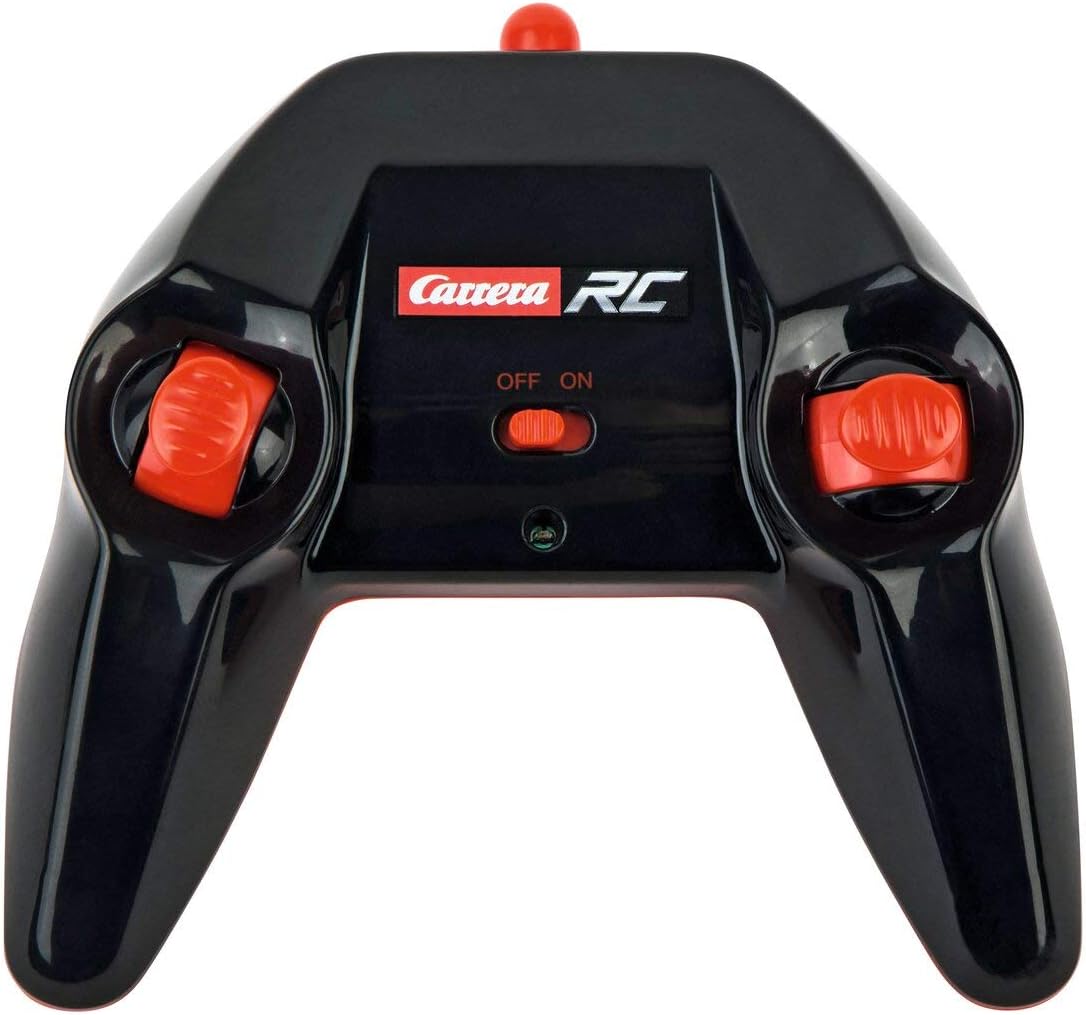
Image: The Carrera RC remote control, showing its design and controls.
3.3 การจับคู่รถยนต์และรีโมทคอนโทรล
To establish a connection between the vehicle and the remote control, follow these steps:
- Ensure both the vehicle and the remote control have fresh or fully charged batteries.
- Turn on the vehicle using its power switch.
- เปิดใช้งานรีโมทคอนโทรลโดยใช้สวิตช์เปิด/ปิด
- The vehicle and remote control should automatically pair. A successful connection is usually indicated by a solid light on both devices (refer to your quick start guide for specific light indicators).
Video: This video demonstrates the unboxing, battery installation, and initial pairing process for the Carrera RC Mario Kart Yoshi Quad.
4. คู่มือการใช้งาน
Once paired, you can begin operating your Carrera RC Yoshi Quad.
- ไปข้างหน้าไปข้างหลัง: Use the throttle trigger or joystick on the remote control to move the vehicle forward or backward.
- การบังคับเลี้ยว: Use the steering wheel or directional controls on the remote control to turn the vehicle left or right.
- ความเร็ว: The Yoshi Quad can reach speeds of up to 9 km/h. Adjust your control input for desired speed.
- พิสัย: Operate the vehicle within the specified range of the remote control to maintain connection and avoid loss of control.
ข้อควรระวังเพื่อความปลอดภัย:
- Always operate in open areas, away from people, pets, and obstacles.
- ห้ามใช้งานใกล้น้ำหรือในสภาพเปียกชื้น
- Avoid operating on public roads or near traffic.
- Supervise younger children during operation.
5. การบำรุงรักษา
5.1. การทำความสะอาด
To maintain the appearance and functionality of your RC Yoshi Quad:
- Wipe the vehicle and remote control with a soft, dry cloth after each use.
- Do not use harsh chemicals or solvents, as these can damage the plastic.
- Avoid getting water into electronic components.
5.2. การดูแลและจัดเก็บแบตเตอรี่
- Always remove batteries from the remote control if not in use for extended periods.
- Store the vehicle's LiFePo4 battery in a cool, dry place, away from direct sunlight and extreme temperatures.
- อย่าชาร์จแบตเตอรี่มากเกินไปหรือปล่อยให้แบตเตอรี่หมดจนหมดเกลี้ยง
6 การแก้ไขปัญหา
If you encounter issues with your RC Yoshi Quad, refer to the following common problems and solutions:
| ปัญหา | สาเหตุที่เป็นไปได้ | สารละลาย |
|---|---|---|
| รถไม่เคลื่อนที่ | Low or uncharged vehicle battery. แบตเตอรี่รีโมทคอนโทรลหมดหรือใส่ไม่ถูกต้อง Vehicle and remote not paired. | ชาร์จแบตเตอรี่รถยนต์ เปลี่ยน/ติดตั้งแบตเตอรี่รีโมทคอนโทรลอย่างถูกต้อง Re-pair vehicle and remote control. |
| Poor control range or intermittent connection. | การรบกวนจากอุปกรณ์ RC หรืออุปกรณ์อิเล็กทรอนิกส์อื่นๆ การดำเนินงานเกินขอบเขตที่มีผล แบตเตอรี่อ่อน | ย้ายไปอยู่ที่อื่น Operate closer to the vehicle. ชาร์จ/เปลี่ยนแบตเตอรี่ |
| รถเคลื่อนที่ช้าหรือไม่สม่ำเสมอ | แบตเตอรี่รถยนต์อ่อน มีสิ่งกีดขวางในล้อ/เพลา | ชาร์จแบตเตอรี่รถยนต์ Check and clear any obstructions. |
7. ข้อมูลจำเพาะ
| ยี่ห้อ | คาร์เรร่า |
| ชื่อรุ่น | 370200997X |
| อักขระ | โยชิ |
| ประเภทรถยนต์ | สี่เหลี่ยม |
| วัสดุ | พลาสติก |
| สี | Multicolor (predominantly Green) |
| ช่วงอายุ (คำอธิบาย) | 6 ปีขึ้นไป |
| ความเร็วสูงสุด | 9 กิโลเมตรต่อชั่วโมง |
| แหล่งพลังงาน | ใช้พลังงานจากแบตเตอรี่ |
| ประเภทแบตเตอรี่รถยนต์ | 1 Lithium-ion (3.2V 700 mAh LiFePo4) - included |
| เวลาในการชาร์จ | ประมาณ 50 นาที |
| เวลาดำเนินการ | สูงสุด 30 นาที |
| ประเภทรีโมทคอนโทรล | Radio Control (2.4 GHz) |
| ขนาด (รายการ) | 36.5 x 20.5 x 23 เซนติเมตร |
| น้ำหนัก (รายการ) | 1.06 กิโลกรัม |
| คุณสมบัติพิเศษ | ไฟกระพริบ |
| ประเทศต้นกำเนิด | จีน |
8. การรับประกันและการสนับสนุน
8.1. การรับประกันของผู้ผลิต
This Carrera RC product is covered by a การรับประกันจากผู้ผลิต 2 ปี. Please retain your proof of purchase for any warranty claims. The warranty covers defects in materials and workmanship under normal use.
8.2. การสนับสนุนลูกค้า
For technical assistance, spare parts, or warranty inquiries, please contact Carrera customer support. Refer to the contact information provided on the product packaging or the official Carrera webเว็บไซต์.