
การแนะนำ
This manual provides essential instructions for the proper use and maintenance of your Vikefon Type C Charging and Data Cable. This 1-meter cable is designed for efficient charging and high-speed data transfer between your Type C enabled devices and compatible power sources or computers.

Image: The Vikefon Type C Charging and Data Cable, featuring a standard USB-A connector on one end and a reversible USB-C connector on the other.
คุณสมบัติผลิตภัณฑ์
- USB Connector Quality: Ensures reliable charging and high-speed data transmission.
- กำลังขับ: Supports up to 5V, 3 Amp เพื่อการชาร์จอย่างรวดเร็ว
- เข้ากันได้สากล: Fully compatible with all Type C mobile devices for fast charging and syncing.
- Reversible USB Type-C Connector: Allows for quick and easy connections in any orientation.
- การออกแบบที่ทนทาน: Features intricate nylon braiding for enhanced durability and longevity, outlasting standard cables.
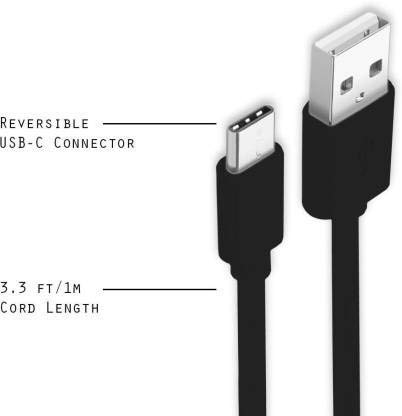
Image: A diagram illustrating the reversible nature of the USB-C connector and the cable's 1-meter (3.3 ft) cord length.
การตั้งค่า
- ระบุตัวเชื่อมต่อ: The cable has a standard USB-A connector on one end and a smaller, oval-shaped USB Type-C connector on the other.
- เชื่อมต่อกับแหล่งจ่ายไฟ/คอมพิวเตอร์: Insert the USB-A end of the cable into a compatible USB port on a wall adapter, power bank, car charger, or computer.
- เชื่อมต่อกับอุปกรณ์: Insert the USB Type-C end into the charging/data port of your smartphone, tablet, or other Type C enabled device. The USB Type-C connector is reversible, so it can be inserted in either orientation.
- ตรวจสอบการเชื่อมต่อ: Ensure both ends are securely connected. Your device should indicate that it is charging or connected for data transfer.
คำแนะนำการใช้งาน
การชาร์จอุปกรณ์ของคุณ
- Connect the USB-A end of the cable to a compatible USB power adapter (e.g., wall charger, car charger, power bank).
- Connect the USB Type-C end to your device's charging port.
- Ensure the power adapter is plugged into a live power outlet. Your device should begin charging.
การถ่ายโอนข้อมูล
- เสียบปลายสาย USB-A เข้ากับพอร์ต USB บนคอมพิวเตอร์ของคุณ
- Connect the USB Type-C end to your device.
- On your device, you may receive a prompt asking to allow data access or to select a USB connection mode (e.g., "File Transfer," "MTP"). Select the appropriate option to enable data transfer.
- Your device should appear as a removable drive or media device on your computer, allowing you to transfer files.
การซ่อมบำรุง
- การจัดการที่เหมาะสม: ควรจับที่หัวต่อทุกครั้งเมื่อเสียบหรือถอดสายเคเบิล หลีกเลี่ยงการดึงที่ตัวสายเคเบิลโดยตรงเพื่อป้องกันความเสียหายต่อสายไฟภายใน
- หลีกเลี่ยงการดัด: Do not excessively bend or crimp the cable, especially near the connectors, as this can cause internal wire breakage.
- พื้นที่จัดเก็บ: Store the cable in a clean, dry place away from extreme temperatures and direct sunlight. Avoid tangling the cable.
- การทำความสะอาด: If necessary, gently wipe the cable and connectors with a dry, soft cloth. Do not use liquids or abrasive cleaners.

ภาพ: ภาพระยะใกล้ view highlighting the durable metal heads of the Vikefon Type C cable connectors, designed for anti-oxidation and corrosion resistance.
การแก้ไขปัญหา
- อุปกรณ์ไม่ชาร์จ:
- ตรวจสอบให้แน่ใจว่าปลายทั้งสองข้างของสายเคเบิลเชื่อมต่ออย่างแน่นหนา
- ตรวจสอบให้แน่ใจว่าอะแดปเตอร์แปลงไฟทำงานได้อย่างถูกต้องและเสียบเข้ากับเต้ารับที่มีกระแสไฟอยู่
- ลองใช้อะแดปเตอร์ไฟหรือพอร์ต USB อื่น
- ตรวจสอบพอร์ตชาร์จของอุปกรณ์ของคุณว่ามีสิ่งสกปรกหรือความเสียหายหรือไม่
- การชาร์จช้า:
- Ensure you are using a power adapter that supports fast charging (e.g., 3A output).
- ปิดแอปพลิเคชันพื้นหลังที่ไม่จำเป็นบนอุปกรณ์ของคุณ
- ไม่มีการถ่ายโอนข้อมูล:
- Confirm the cable is properly connected to both your device and computer.
- On your device, check the notification panel for USB options and select "File การโอนย้าย หรือ MTP
- ลองเชื่อมต่อกับพอร์ต USB อื่นบนคอมพิวเตอร์ของคุณ
- รีสตาร์ททั้งอุปกรณ์ของคุณและคอมพิวเตอร์
ข้อมูลจำเพาะ
| คุณสมบัติ | รายละเอียด |
|---|---|
| ยี่ห้อ | Vikefon |
| ชื่อรุ่น | ประเภทซี |
| หมายเลขรุ่น | ประเภท C 0129 |
| ประเภทขั้วต่อ | พอร์ต USB Type C (ตัวผู้ต่อตัวผู้) |
| ประเภทสายเคเบิล | ยูเอสบี |
| อุปกรณ์ที่รองรับ | Laptop, PC, Smartphone (e.g., Xiaomi Redmi 8A, Poco M2, Poco M2 Pro, Samsung, Motorola, Lenovo, Lava, Sony, HTC, LG, Karbonn, Maxx) |
| คุณสมบัติพิเศษ | Charging Wire, Durable, High Data Transfer Rate, High Quality, Long Length |
| อัตราการถ่ายโอนข้อมูล | ความเร็วสูงสุด 0.48 กิกะบิตต่อวินาที (480 เมกะบิตต่อวินาที) |
| เทคโนโลยีการเชื่อมต่อ | ยูเอสบี |
| ตรงตามข้อกำหนด | ไอเอสโอ |
| สี | สีดำ |
| รูปร่างรายการ | กลม |
| Outer Material Type | Rubber (with Nylon Braiding) |
| ความยาวสายเคเบิล | 1 เมตร |
การรับประกันและการสนับสนุน
Specific warranty details for the Vikefon Type C Charging and Data Cable are not provided in this manual. For information regarding warranty coverage, returns, or technical support, please refer to the product packaging or contact the manufacturer directly through their official channels.