
1. บทนำ
The rockspace AC1200 WiFi Range Extender is designed to expand your existing wireless network coverage and eliminate Wi-Fi dead zones. Utilizing dual-band technology, it supports both 2.4GHz and 5GHz bands, providing stable and high-speed connections for up to 20 wireless devices across an area of up to 2624 sq.ft. This manual provides detailed instructions for setting up, operating, and maintaining your device.

The rockspace AC1200 WiFi Range Extender expands your network coverage.
2. ข้อมูลด้านความปลอดภัย
- Do not expose the device to water, fire, or high temperatures.
- ควรหลีกเลี่ยงการวางอุปกรณ์ไว้ใกล้สนามแม่เหล็กไฟฟ้าที่มีความเข้มสูง
- Ensure proper ventilation; do not cover the device's vents.
- ใช้เฉพาะอะแดปเตอร์แปลงไฟที่ให้มากับเครื่องเท่านั้น
- เก็บให้พ้นจากมือเด็ก
3. เนื้อหาบรรจุภัณฑ์
- 1 x rockspace AC1200 WiFi Range Extender
- 1 x คู่มือการใช้งาน
4. สินค้าหมดview
The rockspace AC1200 WiFi Range Extender features a compact design with dual external antennas for enhanced signal reception and transmission. It includes a WPS button for quick setup, an Ethernet port for wired connections, and LED indicators to show device status.

ด้านหน้า view of the rockspace AC1200 WiFi Range Extender.
ไฟ LED แสดงสถานะ:
- สัญญาณไฟ LED: Indicates the strength of the signal received from the router.
- ไฟ LED WPS: ระบุสถานะการเชื่อมต่อ WPS
- ไฟ LED PWR: บ่งชี้สถานะพลังงาน
พอร์ตและปุ่ม:
- ปุ่ม WPS: เพื่อการตั้งค่าที่รวดเร็วและง่ายดายสำหรับเราเตอร์ที่รองรับ WPS
- พอร์ตอีเธอร์เน็ต: For connecting wired devices or setting up in Access Point mode.
5. การตั้งค่า
Method 1: WPS Button Setup (Recommended)
- Plug the extender into an electrical outlet near your wireless router. Wait for the PWR LED to turn solid blue.
- Press the WPS button on the extender. The WPS LED will start blinking.
- Within 2 minutes, press the WPS button on your wireless router.
- Wait for the Signal LED on the extender to turn solid blue, indicating a successful connection.
- Once connected, you can unplug the extender and relocate it to a desired location within your router's Wi-Fi range. Ensure the Signal LED remains solid blue for optimal performance.

WPS setup for quick connection.
วิธีที่ 2: Web-based Setup
- Plug the extender into an electrical outlet near your wireless router. Wait for the PWR LED to turn solid blue.
- Connect your computer or mobile device to the extender's default Wi-Fi network (e.g., 'rockspace_EXT' or 'rockspace_5G_EXT'). No password is required initially.
- เปิด web browser and enter the default IP address (e.g., 192.168.0.254) or domain name (e.g., re.rockspace.local) in the address bar.
- Follow the on-screen instructions to create an administrator password, select your router's Wi-Fi network, and enter its password.
- Once configured, the extender will restart. Reconnect your devices to the new extended Wi-Fi network (usually your original network name with '_EXT' appended).
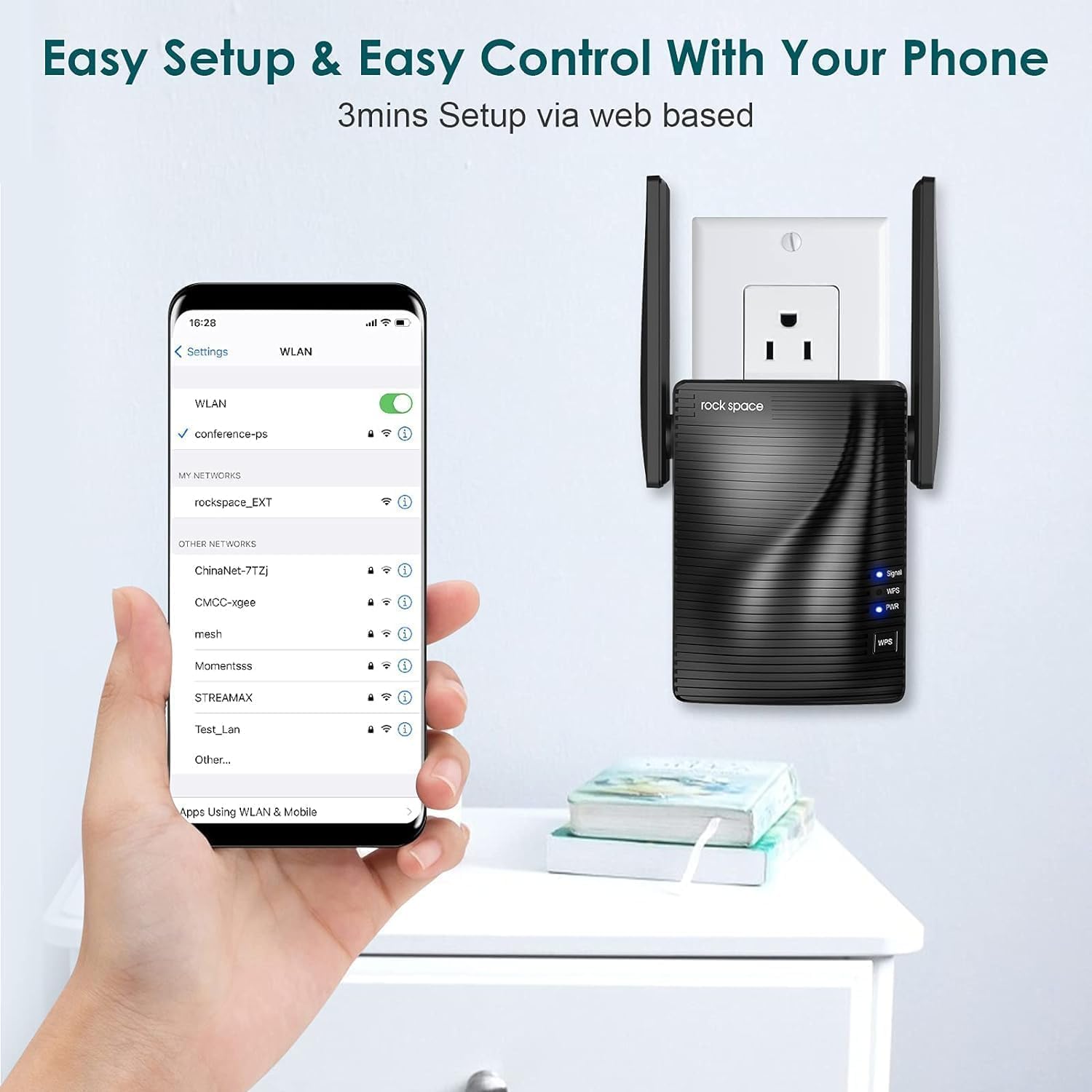
Web-based setup via smartphone.
6. โหมดการทำงาน
Repeater Mode (Default)
ในโหมด Repeater ตัวขยายสัญญาณจะเชื่อมต่อกับเราเตอร์ที่มีอยู่ของคุณแบบไร้สาย amplifies its Wi-Fi signal, extending coverage to areas with weak or no signal. This is ideal for expanding your wireless network without running new cables.
โหมดจุดเข้าใช้งาน (AP)
In AP Mode, the extender connects to your router via an Ethernet cable and creates a new wireless network. This is useful for converting a wired network connection into a wireless hotspot, providing Wi-Fi access in areas where only wired connections are available.

Access Point mode provides stable wired-to-wireless conversion.
7. การบำรุงรักษา
- ตำแหน่งที่เหมาะสมที่สุด: Place the extender halfway between your router and the Wi-Fi dead zone. Avoid physical obstructions like thick walls or large metal objects.
- อัพเดตเฟิร์มแวร์: Regularly check the rockspace official webไซต์สำหรับอัพเดตเฟิร์มแวร์เพื่อให้มั่นใจถึงประสิทธิภาพและความปลอดภัยที่เหมาะสมที่สุด
- การทำความสะอาด: เช็ดอุปกรณ์เบาๆ ด้วยผ้านุ่มและแห้ง ห้ามใช้น้ำยาทำความสะอาดหรือสเปรย์
8 การแก้ไขปัญหา
- ไม่มีไฟฟ้า: Ensure the extender is securely plugged into a working electrical outlet. Check the PWR LED.
- ไม่มีสัญญาณ/สัญญาณอ่อน: Relocate the extender closer to your main router. Ensure there are minimal obstructions between the router and the extender.
- ความเร็วอินเตอร์เน็ตช้า: This can be caused by interference, too many connected devices, or improper placement. Try adjusting antenna positions or moving the extender.
- ไม่สามารถเข้าถึง Web หน้าการจัดการ: Ensure your device is connected to the extender's Wi-Fi network. Clear your browser's cache and cookies, or try a different browser.
- ลืมรหัสผ่าน: Perform a factory reset on the extender by pressing and holding the Reset button (usually a small pinhole) for about 8-10 seconds until the LEDs flash. This will revert all settings to factory defaults.
9. ข้อมูลจำเพาะ
| คุณสมบัติ | รายละเอียด |
|---|---|
| หมายเลขรุ่น | 2020 1200RPT |
| มาตรฐานการสื่อสารไร้สาย | 802.11a/b/g/n |
| อัตราการถ่ายโอนข้อมูล | 1200 Megabytes Per Second (Mbps) |
| ระดับย่านความถี่ | ดูอัลแบนด์ (2.4GHz และ 5GHz) |
| ประเภทขั้วต่อ | RJ45 (อีเธอร์เน็ต) |
| น้ำหนักสินค้า | 10.4 ออนซ์ |
| ขนาดแพ็คเกจ | 5 x 5 x 4 นิ้ว |
10. การรับประกันและการสนับสนุน
rockspace products typically come with a standard manufacturer's warranty. For specific warranty details, technical support, or to download the latest user guide, please visit the official rockspace website or refer to the included คู่มือผู้ใช้ (PDF).