
Crumar Mojo CL
คู่มือผู้ใช้ออร์แกน Crumar Mojo Classic Double
Model: Mojo CL
การแนะนำ
This manual provides essential information for the setup, operation, maintenance, and troubleshooting of your Crumar Mojo Classic Double Manual Organ. Please read this manual thoroughly to ensure proper use and to maximize the lifespan of your instrument.
The Crumar Mojo Classic is a state-of-the-art dual-manual clonewheel organ, designed to replicate the authentic sound and feel of vintage tonewheel organs. It features a cutting-edge DSP platform and the renowned GSi VB3-II tonewheel simulation, offering a rich and responsive playing experience.
สินค้าเกินview

รูปที่ 1: มุม view of the Crumar Mojo Classic Double Manual Organ, showcasing its dual 61-key manuals and wooden end panels.

รูปที่ 2: จากบนลงล่าง view of the Crumar Mojo Classic, highlighting the layout of both 61-key manuals and the control panel above the upper manual.

รูปที่ 3: โปรด้านข้างfile view of the Crumar Mojo Classic, emphasizing the depth of the instrument and the waterfall keys.
รูปที่ 4: ระยะใกล้ view of the "Mojo Classic" illuminated logo located between the upper and lower manuals.

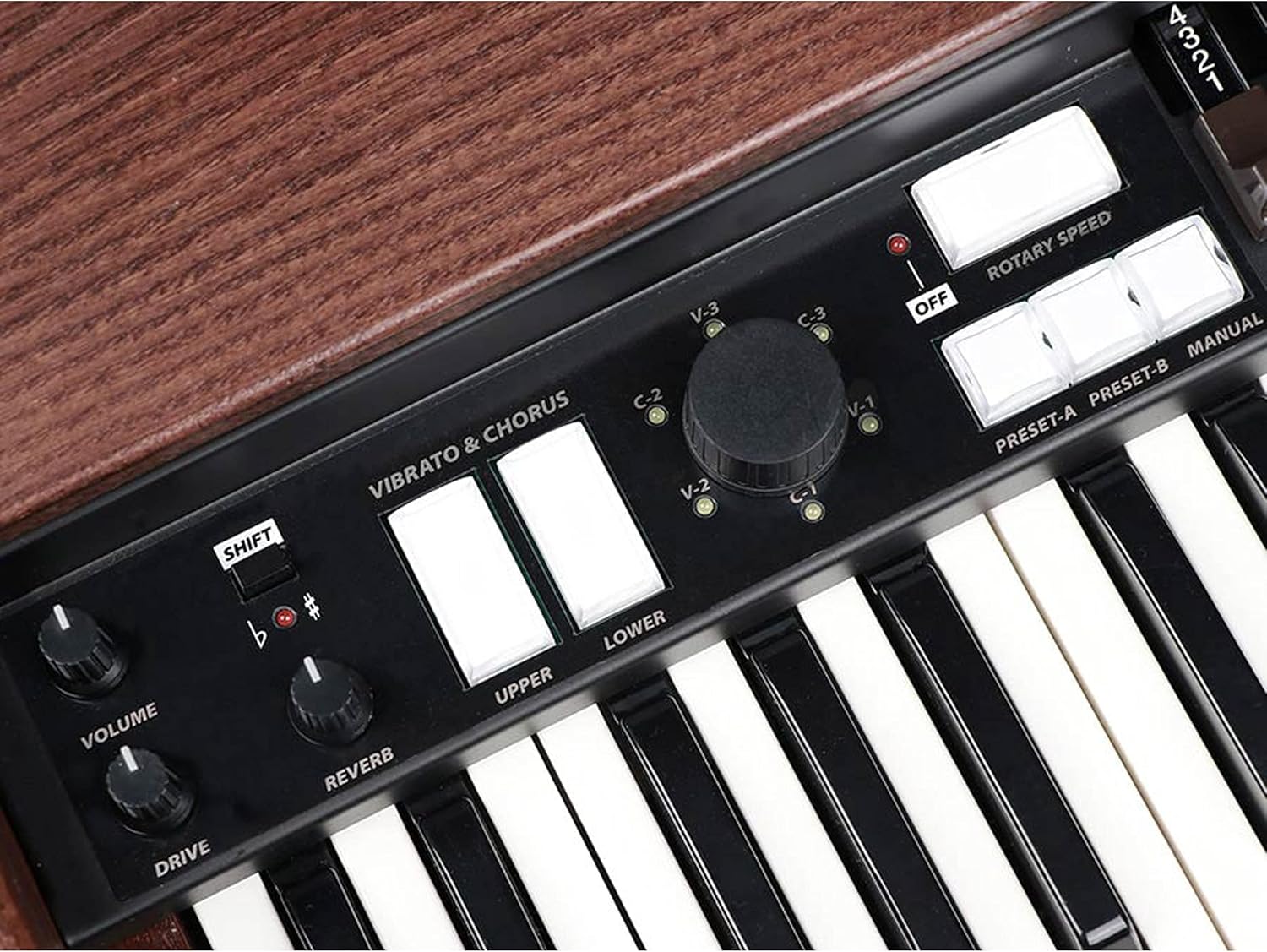
รูปที่ 5: รายละเอียด view of the control panel, showing the Vibrato & Chorus switches, Volume, Reverb, Drive knobs, and Rotary Speed controls.

Figure 6: Close-up of the drawbar sets for the upper and lower manuals, essential for shaping the organ's tone.

รูปที่ 7: รายละเอียด view of the Percussion and EQ controls, including knobs for Click, Xtalk, Perc. Vol, Balance, Distance, Bass, Middle, and Treble.

รูปที่ 8: ด้านหลัง view of the Crumar Mojo Classic, showing the various input/output ports and the Crumar branding.
การตั้งค่า
การเปิดออกและการตรวจสอบเบื้องต้น
- Carefully remove the Crumar Mojo Classic from its packaging.
- Inspect the instrument for any signs of damage that may have occurred during shipping. If damage is found, contact your dealer immediately.
- Ensure all components are present: the Mojo Classic organ, power adapter, and this user manual.
การเชื่อมต่อไฟฟ้า
- Locate the AC adapter provided with your organ.
- Connect the adapter to the power input jack on the rear panel of the Mojo Classic.
- Plug the AC adapter into a suitable wall outlet. Ensure the outlet provides the correct voltage as specified on the adapter.
การเชื่อมต่อเสียง
- The Mojo Classic features balanced stereo outputs. Connect these to your ampเครื่องขยายเสียง เครื่องผสมเสียง หรืออินเทอร์เฟซเสียง โดยใช้สายเคเบิลที่เหมาะสม
- For private practice, connect headphones to the 3.5mm or 6.35mm headphone jack.
คำแนะนำการใช้งาน
การเปิด/ปิดเครื่อง
- To power on, press the power button located on the rear panel. The display will illuminate.
- หากต้องการปิดเครื่อง ให้กดปุ่มเปิด/ปิดค้างไว้จนกว่าเครื่องจะปิดลง
Basic Tone Generation with Drawbars
- The Mojo Classic features two groups of nine drawbars for the upper and lower manuals, plus two pedal drawbars.
- Pulling a drawbar out increases the volume of its corresponding harmonic. Experiment with different combinations to create a wide range of organ tones.
- The drawbars are labeled with their harmonic numbers (e.g., 16', 8', 5 1/3', 4', etc.).
Vibrato and Chorus
- Use the Vibrato & Chorus switches to select different vibrato and chorus effects (V-1, V-2, V-3, C-1, C-2, C-3).
- These effects add depth and movement to the organ sound.
Rotary Speaker Emulation
- The Mojo Classic includes a high-quality rotary speaker emulation.
- Use the Rotary Speed switch to toggle between slow and fast rotation speeds, or turn the effect off.
Percussion and EQ
- Activate the percussion effect using the ON switch in the Percussion section.
- Adjust the percussion volume, decay, and harmonic content (e.g., Second, Third) using the dedicated controls.
- Fine-tune your sound using the Bass, Middle, and Treble EQ knobs.
การบันทึกและการเรียกคืนค่าที่ตั้งไว้ล่วงหน้า
- The Mojo Classic allows you to save and recall your preferred settings instantly. Refer to the full product manual for detailed instructions on preset management.
การซ่อมบำรุง
การทำความสะอาด
- Wipe the surface of the organ with a soft, dry cloth.
- สำหรับสิ่งสกปรกฝังแน่น ให้เช็ดออกเล็กน้อยampชุบผ้าด้วยน้ำ หลีกเลี่ยงการใช้สารเคมีรุนแรงหรือน้ำยาทำความสะอาดที่มีฤทธิ์กัดกร่อน
- Keep liquids away from the keys and control panel.
พื้นที่จัดเก็บ
- Store the organ in a cool, dry place, away from direct sunlight and extreme temperatures.
- If transporting, use a protective case to prevent damage.
การแก้ไขปัญหา
| ปัญหา | สาเหตุที่เป็นไปได้ | สารละลาย |
|---|---|---|
| ไม่มีไฟฟ้า | Power cable not connected; faulty outlet; power adapter issue. | Ensure power cable is securely connected. Test outlet with another device. Check power adapter for damage. |
| ไม่มีเสียงออก | Volume too low; audio cables disconnected; external ampปิด/ปิดเสียงเครื่องขยายเสียง | Increase organ's volume. Check all audio cable connections. Ensure external amplifier/mixer is on and not muted. |
| กุญแจไม่ตอบสนอง | Software glitch; internal connection issue. | Try restarting the organ. If problem persists, contact customer support. |
| เสียงที่ผิดปกติ | Ground loop; faulty cable; internal component issue. | Check audio cables for damage. Ensure proper grounding. If noise persists, contact customer support. |
For issues not listed here, or if troubleshooting steps do not resolve the problem, please contact Crumar customer support.
ข้อมูลจำเพาะ
| คุณสมบัติ | รายละเอียด |
|---|---|
| ชื่อรุ่น | Mojo Classic |
| หมายเลขรุ่นสินค้า | Mojo CL |
| จำนวนคีย์ | 2 x 61-key manuals |
| ประเภทกุญแจ | Waterfall keys |
| คานดึง | 2 Groups of 9 Drawbars + 2 Pedal Drawbars |
| Tonewheel Simulation | GSi VB3-II |
| ผลกระทบ | Vibrato & Chorus, Rotary Speaker Emulation, Percussion, Reverb, Drive |
| เทคโนโลยีการเชื่อมต่อ | ตัวช่วย |
| ประเภทขั้วต่อ | 3.5mm Jack or 6.35mm Jack (Headphones) |
| เอาต์พุตเสียง | Balanced Stereo Outs |
| แหล่งพลังงาน | อะแดปเตอร์ AC |
| น้ำหนักสินค้า | 51.9 ปอนด์ (23.54 กก.) |
| ขนาดสินค้า (กว้าง x ยาว x สูง) | 40.6 x 24.2 x 11.2 นิ้ว (103.1 x 61.5 x 28.4 ซม.) |
| ผู้ผลิต | ครูมาร์ |
| ASIN | B08NTMWP6V |
| หมายเลขประจำตัวการค้าโลก | 08719147451645 |
การรับประกันและการสนับสนุน
For warranty information and technical support, please refer to the official Crumar website or contact your authorized Crumar dealer. Keep your proof of purchase for warranty claims.
Online resources and frequently asked questions may also be available on the manufacturer's support pages.
Ask a question about this manual
Ask about setup, troubleshooting, compatibility, parts, safety, or missing instructions. Manuals+ will review the question and use this page’s manual context to help answer it.