
1. บทนำ
Thank you for choosing the Vivolink VLQICHR QI Wireless Charger. This device provides a convenient and efficient way to charge your QI-compatible devices without the need for cables. Please read this manual carefully before using the product to ensure proper operation and to maximize its lifespan. Keep this manual for future reference.
2. ข้อมูลด้านความปลอดภัย
- อย่าให้เครื่องชาร์จโดนน้ำ ความชื้น หรืออุณหภูมิที่สูงหรือต่ำเกินไป
- ควรหลีกเลี่ยงการทำเครื่องชาร์จตกหรือกระแทกอย่างรุนแรง
- Do not disassemble, repair, or modify the charger. This may void the warranty and pose safety risks.
- Keep the charger away from medical implants (e.g., pacemakers) to prevent potential interference.
- โปรดใช้อะแดปเตอร์และสายไฟที่ได้รับการรับรองเท่านั้นกับเครื่องชาร์จ
- Ensure there are no metal objects (e.g., coins, keys, credit cards) between the charging surface and your device during charging, as this can cause overheating or damage.
- ถอดปลั๊กเครื่องชาร์จในระหว่างที่มีพายุฝนฟ้าคะนองหรือเมื่อไม่ได้ใช้งานเป็นเวลานาน
3. เนื้อหาบรรจุภัณฑ์
กรุณาตรวจสอบแพ็คเกจสำหรับรายการต่อไปนี้:
- Vivolink VLQICHR QI Wireless Charger
- USB Power Cable (Type-C or Micro-USB, depending on model)
- คู่มือการใช้งาน (เอกสารนี้)
4. สินค้าหมดview
The Vivolink VLQICHR is a compact and efficient wireless charging solution. It features a charging surface where QI-compatible devices are placed for power transfer. An LED indicator typically signals charging status.
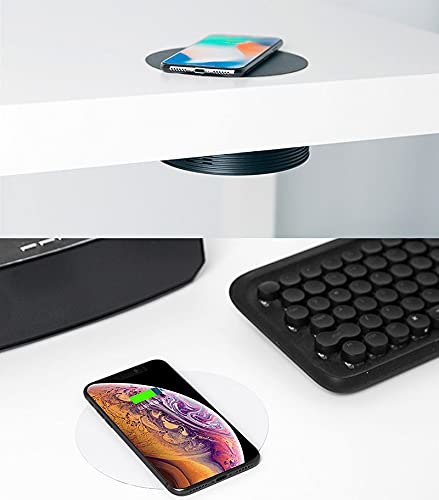
This image illustrates the Vivolink VLQICHR QI Wireless Charger in two common usage scenarios. The top portion shows a smartphone wirelessly charging on a pad seamlessly integrated into a desk surface. The bottom portion displays another smartphone charging on a separate, standalone wireless charging pad, highlighting the versatility of QI wireless charging technology.
5. การตั้งค่า
- เชื่อมต่อกับพลังงาน: Plug the provided USB power cable into the charging port on the Vivolink VLQICHR wireless charger.
- เชื่อมต่อกับแหล่งพลังงาน: Connect the other end of the USB cable to a compatible USB power adapter (not included) or a USB port on a computer. Ensure the power adapter meets the charger's power requirements (e.g., 5V/2A, 9V/1.67A for fast charging).
- เปิดเครื่อง: Once connected, the LED indicator on the charger may light up briefly to confirm it is powered on and ready for use.
6. คู่มือการใช้งาน
- สถานที่อุปกรณ์: Place your QI-compatible smartphone or other device directly onto the center of the Vivolink VLQICHR charging surface.
- ยืนยันการเรียกเก็บเงิน: The LED indicator on the charger should change color or illuminate steadily to indicate that charging has begun. Your device's screen should also show a charging icon or notification.
- ตำแหน่งที่เหมาะสมที่สุด: If charging does not start, slightly adjust the position of your device on the charging pad. Some devices may have specific coil locations that require precise alignment.
- การชาร์จเสร็จสมบูรณ์: Once your device is fully charged, remove it from the charging pad. The charger's LED indicator may change or turn off.
บันทึก: Charging speed may vary depending on the device, power adapter, and environmental conditions. Thick phone cases may interfere with wireless charging; consider removing them for optimal performance.
7. การบำรุงรักษา
- การทำความสะอาด: ถอดปลั๊กเครื่องชาร์จออกจากแหล่งจ่ายไฟก่อนทำความสะอาด ใช้ผ้าแห้งนุ่มๆ เช็ดทำความสะอาดพื้นผิว ห้ามใช้สารเคมีรุนแรงหรือน้ำยาทำความสะอาดที่มีฤทธิ์กัดกร่อน
- พื้นที่จัดเก็บ: เก็บที่ชาร์จไว้ในที่เย็นและแห้งเมื่อไม่ได้ใช้งาน
- การดูแลสายเคเบิล: Avoid bending or twisting the power cable excessively to prevent damage.
8 การแก้ไขปัญหา
- อุปกรณ์ไม่ชาร์จ:
- ตรวจสอบให้แน่ใจว่าเครื่องชาร์จเชื่อมต่อกับแหล่งจ่ายไฟที่ใช้งานได้ถูกต้อง
- ตรวจสอบว่าอุปกรณ์ของคุณรองรับมาตรฐาน QI หรือไม่
- Adjust the placement of your device on the charging pad to ensure proper alignment.
- Remove any thick phone cases or metal objects from your device.
- ลองใช้สาย USB หรืออะแดปเตอร์จ่ายไฟอื่น
- การชาร์จช้า:
- Ensure you are using a power adapter that supports the charger's fast charging capabilities (e.g., Quick Charge 2.0/3.0 or Power Delivery).
- Check for proper device alignment.
- ปิดแอปพลิเคชันที่ไม่จำเป็นบนอุปกรณ์ของคุณ
- LED indicator flashing:
- Refer to your device's specific LED indicator guide. Often, flashing indicates a foreign object detection (FOD) or improper device placement.
- Remove the device and any foreign objects, then place the device back on the charger.
9. ข้อมูลจำเพาะ
| ยี่ห้อ | วีโว่ลิงค์ |
| หมายเลขรุ่น | VLQICHR |
| ผู้ผลิต | วีโว่ลิงค์ |
| ASIN | B08NHGFYVC |
| ป้อนข้อมูล | (Typical: 5V/2A, 9V/1.67A - check product packaging for exact details) |
| เอาท์พุต | (Typical: 5W, 7.5W, 10W, 15W - check product packaging for exact details) |
| มาตรฐานการชาร์จ | QI Wireless Charging Standard |
Note: Specific input/output power ratings may vary. Please refer to the product packaging or the device itself for precise specifications.
10. การรับประกันและการสนับสนุน
Specific warranty information for the Vivolink VLQICHR QI Wireless Charger is not provided in the available product data. For detailed warranty terms, technical support, or service inquiries, please refer to the documentation included with your purchase or contact Vivolink customer support directly through their official webเว็บไซต์หรือช่องทางการติดต่อ