
1. บทนำ
The Vgate VR800 OBD2 Scanner is a powerful and user-friendly diagnostic tool designed for automotive enthusiasts and professional mechanics alike. It provides comprehensive diagnostic functions for OBD-II/EOBD compliant vehicles, enabling users to quickly identify and resolve issues related to the Check Engine Light (CEL). This manual provides detailed instructions on how to set up, operate, and maintain your VR800 scanner to ensure optimal performance and accurate vehicle diagnostics.
2. สินค้าหมดview
The Vgate VR800 is a handheld diagnostic device featuring a color LCD display, intuitive button layout, and a durable OBD-II connector cable. Its compact design allows for easy portability and use in various automotive environments.
2.1 ส่วนประกอบหลัก
- จอแสดงผล LCD สี: Provides clear and detailed diagnostic information.
- ปุ่มนำทาง: ลูกศรขึ้น ลง ซ้าย ขวา สำหรับการนำทางเมนู
- ปุ่มตกลง: ยืนยันการเลือก
- ปุ่ม I/M: Shortcut for I/M Readiness status.
- Question Mark (?) Button: Provides help and DTC lookup information.
- ปุ่มย้อนกลับ: นำทางกลับไปยังหน้าจอที่แล้ว
- ขั้วต่อ OBD-II: Connects the scanner to the vehicle's diagnostic port.
- พอร์ต USB: For software updates and data printing.

3. คุณสมบัติ
The Vgate VR800 OBD2 Scanner offers a comprehensive set of features for vehicle diagnostics:
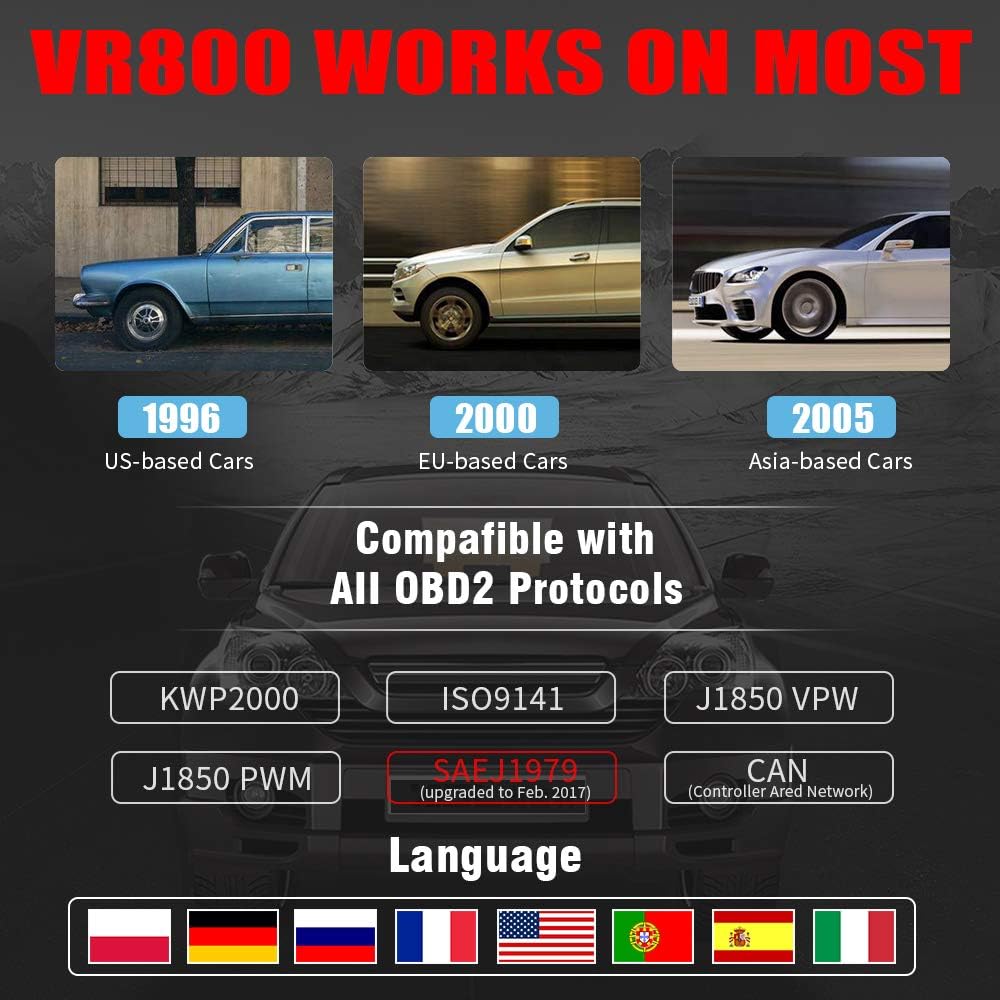
- All OBD2 Protocols Support: Compatible with ISO9141, KWP2000, J1850 PWM, J1850 VPW, and CAN protocols. Compliance with SAEJ1979 has been upgraded to the latest standards (February 2017).
- ความเข้ากันได้กับยานพาหนะที่กว้างขวาง: Works with most American vehicles manufactured after 1996, European vehicles after 2000, and Asian vehicles after 2005. Applicable to OBD-II/CAN/EOBD-compliant vehicles, including light-duty trucks (6.5T or less), SUVs, and minivans.
- Smog Check Helper (I/M Readiness): Features Red-Yellow-Green LEDs and a built-in speaker to indicate readiness status for emissions testing. Dedicated I/M and '?' shortcut keys provide quick access to readiness checks.
- Full OBD Service Modes: Quickly reads and checks Diagnostic Trouble Codes (DTCs), views freeze frame data, reads live PCM data stream, performs On-Board Monitor tests, and displays live O2 sensor test data.
- Built-in DTC Lookup Library: Allows accurate determination of the causes of the Check Engine Light.
- Accurate Battery Status Check: Reads real-time battery and voltagข้อมูลอี.
- รองรับหลายภาษา: Available in English, French, German, Italian, Spanish, Russian, Polish, and Portuguese.
- Data Logging and Printing: Supports data logging and connection to a PC for printing diagnostic data files.



4. การตั้งค่า
Follow these steps to set up your Vgate VR800 OBD2 Scanner:
- ค้นหาพอร์ต OBD-II: The OBD-II port is typically located under the dashboard on the driver's side of the vehicle. Refer to your vehicle's owner's manual if you cannot find it.
- เชื่อมต่อเครื่องสแกนเนอร์: Plug the VR800's OBD-II connector cable firmly into the vehicle's OBD-II port.
- เปิดเครื่อง: The scanner will automatically power on once connected to the vehicle's OBD-II port. No external power source or batteries are required as it draws power directly from the vehicle.
- การตั้งค่าเริ่มต้น (หากมีข้อความแจ้ง): If this is your first time using the scanner or after a factory reset, you may be prompted to select a language. Use the navigation buttons to select your preferred language and press OK.

5. คู่มือการใช้งาน
Once the scanner is connected and powered on, you can begin diagnosing your vehicle.
5.1 การใช้งานเมนู
ใช้ UP และ ลง arrow buttons to scroll through menu options. Press the OK button to select an option. Press the กลับ ปุ่มเพื่อกลับไปยังหน้าจอก่อนหน้า
5.2 การอ่านรหัสข้อผิดพลาดในการวินิจฉัย (DTCs)
- จากเมนูหลัก เลือก อ่าน DTCs.
- The scanner will display any active or pending DTCs. Each code will have a brief description.
5.3 Clearing DTCs
Warning: Clearing DTCs will erase all diagnostic trouble codes from the vehicle's computer and may reset readiness monitors. Ensure you have addressed the underlying issue before clearing codes.
- จากเมนูหลัก เลือก ล้าง DTCs.
- Confirm your selection when prompted. The scanner will attempt to clear the codes.
5.4 I/M Readiness Function
The I/M Readiness function checks if the various emissions-related systems on the vehicle are operating correctly and if they have completed their self-tests.
- กดปุ่มเฉพาะ ฉัน ปุ่มบนเครื่องสแกนเนอร์
- The display will show the status of various monitors (e.g., O2 Sensor, EVAP, Catalyst). A green light indicates ready, yellow indicates pending, and red indicates not ready or a fault.
5.5 Viewการนำข้อมูลสดมาใช้
Live Data allows you to view ข้อมูลเซ็นเซอร์แบบเรียลไทม์จากหน่วยควบคุมเครื่องยนต์ (ECU) ของรถยนต์
- จากเมนูหลัก เลือก ข้อมูลสด.
- Choose the specific data parameters you wish to view (e.g., engine RPM, vehicle speed, O2 sensor voltagจ).
5.6 การค้นหา DTC
If you have a DTC and need more information, use the built-in DTC lookup library.
- จากเมนูหลัก เลือก การค้นหา DTC หรือกดปุ่ม ? button when a DTC is displayed.
- Enter the DTC code (if not already displayed) to get a detailed description and possible causes.
5.7 ตรวจสอบสถานะแบตเตอรี่
To check your vehicle's battery voltage and status:
- จากเมนูหลัก เลือก แบตเตอรี่.
- เครื่องสแกนจะแสดงปริมาณแบตเตอรี่ปัจจุบันtage and an estimated charge percentage.
6. การบำรุงรักษา
Proper maintenance ensures the longevity and accuracy of your Vgate VR800 scanner.
- การทำความสะอาด: ใช้ผ้านุ่มและแห้งเช็ดทำความสะอาดภายนอกเครื่องสแกนเนอร์ ห้ามใช้น้ำยาทำความสะอาดที่มีฤทธิ์กัดกร่อนหรือตัวทำละลาย
- พื้นที่จัดเก็บ: เก็บเครื่องสแกนไว้ในที่สะอาดและแห้ง หลีกเลี่ยงอุณหภูมิที่สูงหรือต่ำเกินไป และแสงแดดโดยตรง
- การอัปเดตซอฟต์แวร์: Regularly check for software updates to ensure compatibility with the latest vehicle models and diagnostic protocols. Updates can typically be performed by connecting the scanner to a PC via the USB port and using the provided update software.
7 การแก้ไขปัญหา
If you encounter issues while using your Vgate VR800 scanner, refer to the following common problems and solutions:
- สแกนเนอร์ไม่เปิดเครื่อง:
- ตรวจสอบให้แน่ใจว่าได้เสียบขั้วต่อ OBD-II เข้ากับพอร์ตของรถอย่างแน่นหนาแล้ว
- Verify the vehicle's ignition is in the ON position (engine can be off).
- ตรวจสอบฟิวส์ของรถยนต์สำหรับพอร์ต OBD-II (โปรดดูคู่มือรถยนต์ของคุณ)
-
Ask a question about this manual
Ask about setup, troubleshooting, compatibility, parts, safety, or missing instructions. Manuals+ will review the question and use this page’s manual context to help answer it.