
สินค้าเกินview
The Best Choice Products Heated Shiatsu Foot Massager (Model SKY6002) is designed to provide targeted relief and relaxation for your feet, calves, and arms. This versatile device incorporates kneading, rolling, warming, and pressing functionalities to enhance circulation, alleviate tension, and promote overall wellness. Its compact design and adjustable features make it suitable for various body parts and user preferences.
คุณสมบัติหลัก
- Four Massage Techniques: Enjoy kneading, rolling, warming, and pressing for comprehensive relief targeting arches, heels, toes, and sides of your feet.
- 360-Degree Adjustable Handle: A built-in handle allows for easy carrying and serves as a stand to position the massager for feet, calves, or arms.
- Built-In Heat Therapy: Manually adjustable heated massage nodes reach up to 122°F (50°C) to stimulate stress points, boost flexibility, relieve tension, and improve circulation.
- การควบคุมแบบสัญชาตญาณ: Operate the massager using the touch screen panel or the included remote control to adjust time, heating, direction, and speed settings. An 'Auto' mode provides pre-programmed massage sessions.
- การออกแบบที่สะดวกสบาย: Features include a designated space for power cord storage, non-slip pads for stability, and a removable, machine-washable cover for hygiene.
การตั้งค่า
- แกะอุปกรณ์ออกจากกล่อง: Carefully remove the foot massager from its packaging. Ensure all components, including the remote control and power adapter, are present.
- ตำแหน่งของเครื่องนวด: Place the massager on a flat, stable surface. The 360-degree handle can be adjusted to achieve the desired angle for massaging feet, calves, or arms. Press the buttons on both sides of the handle to adjust its position.
- เชื่อมต่อพลังงาน: Plug the power adapter into the designated port on the massager. Then, plug the adapter into a standard 100-240V AC electrical outlet.
- เตรียมรีโมทคอนโทรล: If using the remote, ensure the battery tab is removed to activate it. The remote uses a CR2025 battery.
คำแนะนำการใช้งาน
การควบคุม
The massager can be operated using the touch screen control panel on the device or the included remote control. Both offer similar functionalities.
- เปิด/ปิด: เปิดหรือปิดอุปกรณ์
- อัตโนมัติ: Activates a pre-programmed massage mode.
- เวลา: Adjusts the massage duration (e.g., 5, 10, 15, 20, 25, 30 minutes). Default is 15 minutes.
- ความเร็ว: Controls the intensity/speed of the massage rollers.
- ระบบทำความร้อน : Turns the heat therapy on or off. Heated nodes reach up to 122°F (50°C).
- ทิศทาง: Changes the rotation direction of the massage rollers.
Usage for Different Body Parts
The massager is designed for versatile use on feet, calves, and arms.

Image: The foot massager is shown in three configurations: for feet, for calves, and for arms. The 360-degree handle is highlighted, demonstrating its adjustability for different massage positions.
- สำหรับเท้า: Place the massager on the floor with the handle folded down. Insert your bare feet or feet with thin socks into the massage chambers. Select your desired mode, speed, and heat settings.
- สำหรับน่อง: Adjust the 360-degree handle to prop the massager at an angle that allows you to comfortably insert your calves into the chambers. This is ideal for relieving tension in leg muscles.
- สำหรับแขน: Place the massager on a table or other elevated surface. Adjust the handle to a suitable angle and insert your forearms into the massage chambers.
การบำบัดด้วยความร้อน
The built-in heat function can be activated independently. The red lights indicate active heating nodes. The heat helps to relax muscles and improve blood flow.

ภาพ: ภาพระยะใกล้ view of the massager's control panel and foot chambers. The display shows '15' minutes and 'P1' mode. The 'Heating' button is illuminated, and red lights are visible within the foot chambers, indicating active heat therapy.
โหมดอัตโนมัติ
The massager offers various automatic modes that combine different massage techniques and intensities. Refer to the user manual for detailed descriptions of each pre-programmed mode.
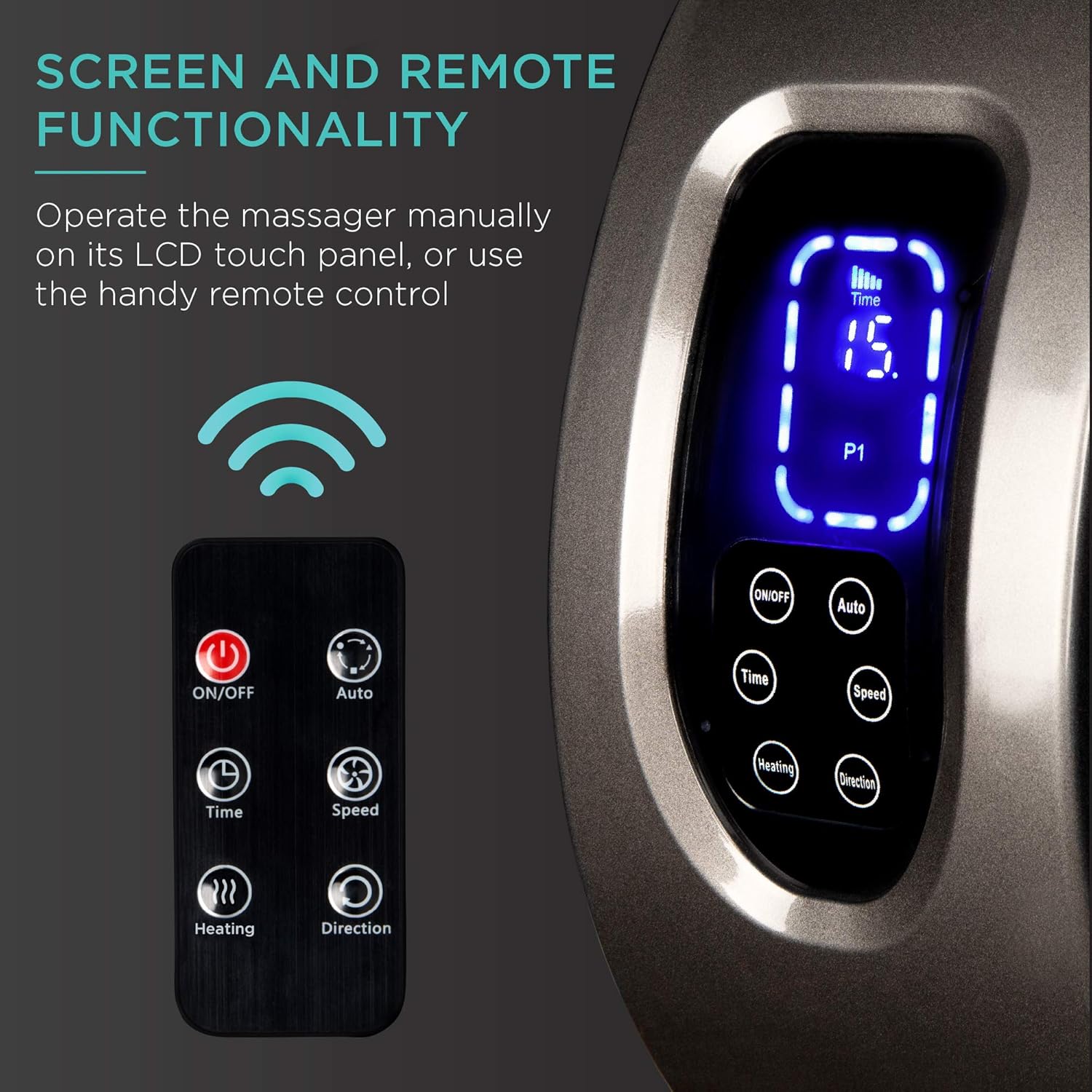
Image: The massager's control panel with an LCD screen displaying '15' minutes and 'P1' mode. Below it are buttons for ON/OFF, Auto, Time, Speed, Heating, and Direction. A remote control with similar buttons is shown next to the device.
การซ่อมบำรุง
- การทำความสะอาดฝาครอบ: The fabric covers inside the massage chambers are removable and machine-washable. Unzip the covers, remove them, and wash according to fabric care instructions. Allow to air dry completely before reattaching.
- การทำความสะอาดอุปกรณ์: เช็ดทำความสะอาดภายนอกของเครื่องนวดด้วยผ้าเนื้อนุ่มและแห้งamp ผ้า. อย่าใช้น้ำยาทำความสะอาดที่มีฤทธิ์กัดกร่อนหรือจุ่มอุปกรณ์ลงในน้ำ
- พื้นที่จัดเก็บ: Store the massager in a cool, dry place away from direct sunlight when not in use. The power cord can be neatly stored in its designated compartment.

ภาพ: รายละเอียด view of the massager's features, including the zipper for the removable and washable sleeve, the bright LCD screen, non-slip pads on the bottom, and an anti-skid pad for stability.
การแก้ไขปัญหา
- อุปกรณ์ไม่เปิด: Ensure the power adapter is securely plugged into both the massager and a working electrical outlet. Check if the power button is pressed firmly.
- ไม่มีความร้อน: Verify that the heating function is activated on the control panel or remote. Allow a few minutes for the heating elements to warm up.
- Massage Feels Too Strong/Weak: Adjust the speed settings using the control panel or remote. For air compression, adjust the intensity levels.
- เสียงที่ผิดปกติ: If the device makes unusual noises, turn it off immediately and unplug it. Contact customer support if the issue persists.
ข้อมูลจำเพาะ
- ขนาดสินค้า : 18.5"(ยาว) x 12.25"(กว้าง) x 8.6"(สูง)
- หมายเลขรุ่นสินค้า: สกาย6002
- น้ำหนักสินค้า: 14 ปอนด์
- แหล่งพลังงาน: สายไฟ
- วัสดุ: Acrylonitrile Butadiene Styrene, PMMA
- ผู้ผลิต: ผลิตภัณฑ์ทางเลือกที่ดีที่สุด
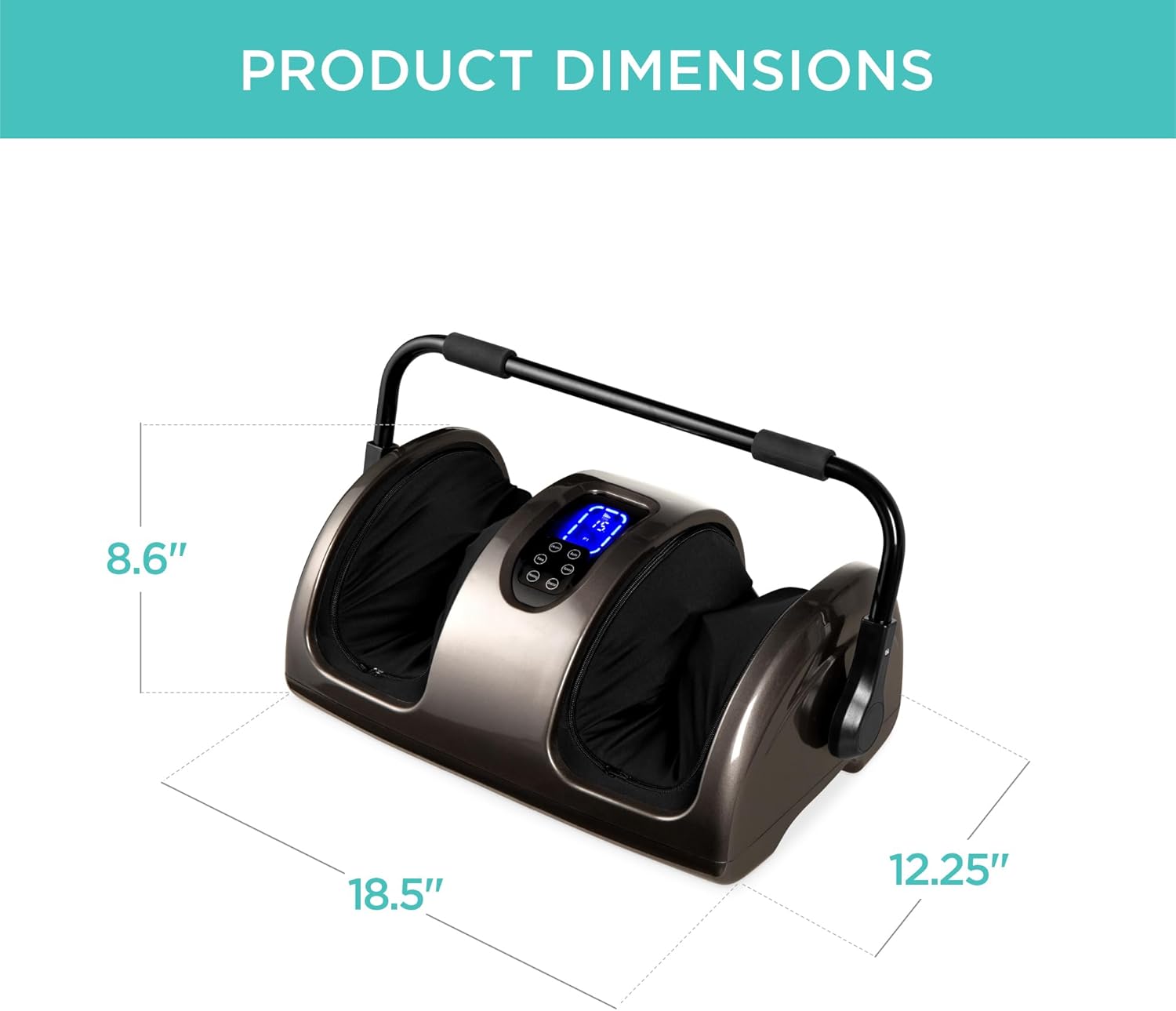
Image: A clear diagram illustrating the overall dimensions of the foot massager, indicating its length (18.5"), width (12.25"), and height (8.6").
ข้อมูลด้านความปลอดภัย
- ห้ามใช้กับแผลเปิด
- Avoid use if pregnant.
- Ensure the device is used on a flat surface to prevent tipping.
การรับประกันและการสนับสนุน
For warranty information, product support, or any inquiries, please refer to the contact details provided in your product packaging or visit the official Best Choice Products webไซต์นี้ โปรดเก็บใบเสร็จรับเงินที่ซื้อไว้เพื่อใช้เรียกร้องการรับประกัน
วิดีโอผลิตภัณฑ์อย่างเป็นทางการ
Video: A user demonstrates the foot massager, highlighting its effectiveness for flat feet, calves, and forearms. The video shows the device being used in various positions to target different muscle groups.
วิดีโอ: ผู้ใช้รายหนึ่งviews the foot massager, emphasizing its best features and ease of use. The video provides a general overview เกี่ยวกับความสามารถและประโยชน์ของผลิตภัณฑ์
Video: A user demonstrates the foot massager, focusing on its use for foot massage in the comfort of one's home. The video highlights the convenience and relaxation aspects of the device.
Video: A user provides a detailed review of the foot massager, advising potential buyers on what to consider before purchasing. The video covers various aspects of the product's performance and features.