
M0607462157251
QS-WIFI-S03 Smart Wi-Fi Switch Module User Manual
รุ่น : M0607462157251
ยี่ห้อ: ทั่วไป
1. บทนำ
This user manual provides comprehensive instructions for the installation, operation, and maintenance of the QS-WIFI-S03 Smart Wi-Fi Switch Module. This module is designed to transform traditional switches into smart Wi-Fi controlled devices, allowing for remote control of lights or compatible appliances via the "Smart Life" or "Tuya Smart" application. It supports various program options for precise timing control.
2. ข้อมูลด้านความปลอดภัย
Please read all safety warnings and installation instructions carefully before installing or operating this device. Failure to follow these instructions may result in electric shock, fire, or other injuries.
- Ensure the power supply is completely disconnected before any installation or wiring work.
- การติดตั้งควรดำเนินการโดยช่างไฟฟ้าที่มีคุณสมบัติหรือบุคคลที่มีความเข้าใจอย่างถ่องแท้เกี่ยวกับระบบไฟฟ้าเท่านั้น
- ห้ามเกินพิกัดโหลดสูงสุด 2300 วัตต์
- อุปกรณ์นี้ได้รับการออกแบบสำหรับใช้ภายในอาคารเท่านั้น
- ควรเก็บอุปกรณ์ให้ห่างจากน้ำ ความชื้น และอุณหภูมิสูง
- อย่าพยายามถอดประกอบหรือซ่อมแซมอุปกรณ์ด้วยตนเอง โปรดติดต่อช่างผู้ชำนาญการเพื่อขอรับบริการ
3. สินค้าหมดview
3.1 เนื้อหาบรรจุภัณฑ์
- 1 x QS-WIFI-S03 Smart Wi-Fi Switch Module
- 1 x คู่มือผู้ใช้ (เอกสารนี้)
3.2 คุณสมบัติผลิตภัณฑ์
- Remote control via "Smart Life" or "Tuya Smart" app.
- Scheduling and timer functions for automated control.
- รองรับการควบคุมด้วยเสียงผ่าน Amazon Alexa และ Google Home
- Compact design for easy integration into existing switch boxes.
- Supports 2.4GHz Wi-Fi (802.11 b/g/n).
3.3 การระบุส่วนประกอบ
The QS-WIFI-S03 module features clearly labeled terminals for easy wiring and an indicator light for status feedback.

รูปที่ 3.1 : ด้านหน้า view of the QS-WIFI-S03 Smart Wi-Fi Switch Module, showing the Wi-Fi Switch Module label and electrical specifications.

รูปที่ 3.2: ด้านข้าง view of the module, clearly showing the input and output terminals: L (Live input), L_OUT (Load Live output), L1 (Switched Live input), L (Live input), and N (Neutral input/output).
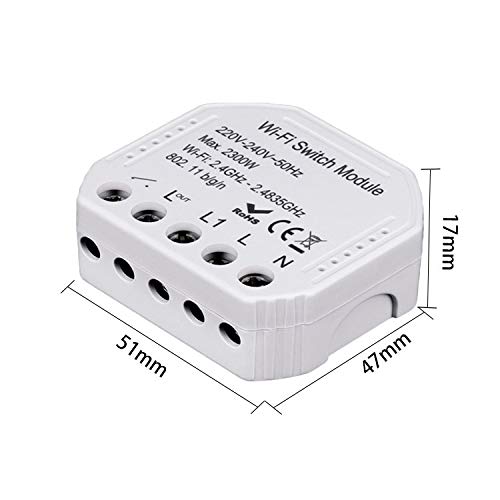
Figure 3.3: Dimensions of the QS-WIFI-S03 module, measuring approximately 51mm x 47mm x 17mm.
4. การตั้งค่าและการติดตั้ง
4.1 ก่อนที่คุณจะเริ่มต้น
- Ensure your Wi-Fi network is 2.4GHz. This module does not support 5GHz Wi-Fi.
- ดาวน์โหลดแอปพลิเคชัน "Smart Life" หรือ "Tuya Smart" จาก App Store บนสมาร์ทโฟนของคุณ (มีให้ใช้งานสำหรับ iOS และ Android)
- Have basic electrical wiring knowledge or consult a professional.
4.2 แผนผังการเดินสายไฟ
WARNING: Ensure the main power supply is turned OFF at the circuit breaker before attempting any wiring. Incorrect wiring can cause damage to the device or lead to electric shock.
The module is designed to be wired into your existing electrical circuit. The terminals are labeled as follows:
- L: Live input from the main power supply.
- N: Neutral input from the main power supply.
- L1: Switched Live input from your traditional wall switch.
- L_OUT: Live output to the load (e.g., light fixture).
- N: Neutral output to the load (shared with Neutral input).
Connect the wires according to the labels. For a single-way switch, connect the live wire from the power source to 'L', the neutral wire to 'N'. Connect the live wire from your traditional switch to 'L1'. Connect the live wire going to your light fixture or appliance to 'L_OUT' and the neutral wire to 'N'.
4.3 การติดตั้งและการจับคู่แอป
- ดาวน์โหลดแอพ: ค้นหา "Smart Life" or "Tuya Smart" in the App Store (iOS) or Google Play Store (Android) and install it.
- ลงทะเบียน/เข้าสู่ระบบ: เปิดแอปและลงทะเบียนบัญชีใหม่หรือเข้าสู่ระบบด้วยบัญชีที่มีอยู่
- เข้าสู่โหมดจับคู่: After wiring the module and restoring power, the indicator light on the module should blink rapidly (EZ Mode). If it doesn't, press and hold the reset button (or the connected physical switch if configured) for 5-10 seconds until it blinks rapidly.
- เพิ่มอุปกรณ์: In the app, tap the "+" icon in the top right corner to add a device. Select "Electrical Switch" or "Switch (Wi-Fi)" from the device list.
- เชื่อมต่อกับ Wi-Fi: Confirm the indicator light is blinking rapidly. Enter your 2.4GHz Wi-Fi network name and password.
- การจับคู่: The app will begin searching for the device. Once found, it will be added to your device list. You can then rename the device for easier identification.
5. การดำเนินการ
5.1 การควบคุมการเปิด/ปิดพื้นฐาน
Once paired, you can control the connected appliance or light directly from the Smart Life/Tuya Smart app. Simply tap the device icon to toggle its power state (on/off).
5.2 การกำหนดตารางเวลาและตัวจับเวลา
The app allows you to set up various automation rules:
- กำหนดการ: ตั้งเวลาเปิดหรือปิดอุปกรณ์ให้เฉพาะเจาะจงในแต่ละวัน หรือในบางวันของสัปดาห์
- ตัวจับเวลา: ตั้งเวลาถอยหลังเพื่อให้เครื่องปิดตัวเองหลังจากระยะเวลาที่กำหนด
- หมุนเวียน: Set the device to cycle on and off repeatedly for specific intervals.
- สุ่ม: Turn the device on or off randomly within a set time frame, useful for simulating occupancy.
5.3 การบูรณาการการควบคุมด้วยเสียง
The QS-WIFI-S03 module is compatible with popular voice assistants, allowing for hands-free control.
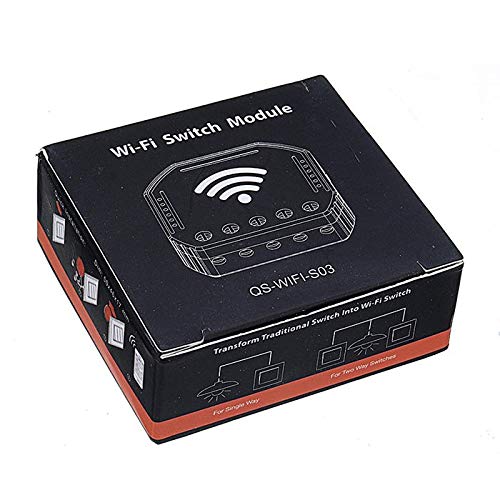
Figure 5.1: The module supports integration with Google Home and Amazon Alexa for voice control, along with schedule timer and Wi-Fi control features.
- อเมซอนอเล็กซ่า: Link your Smart Life/Tuya Smart account in the Alexa app. Once linked, you can use commands like "Alexa, turn on [Device Name]" or "Alexa, turn off [Device Name]".
- หน้าแรกของกูเกิล: Link your Smart Life/Tuya Smart account in the Google Home app. Use commands such as "Hey Google, turn on [Device Name]" or "Hey Google, turn off [Device Name]".
6. การบำรุงรักษา
The QS-WIFI-S03 Smart Wi-Fi Switch Module requires minimal maintenance. Follow these guidelines to ensure optimal performance:
- การทำความสะอาด: Disconnect power before cleaning. Wipe the exterior with a soft, dry cloth. Do not use harsh chemicals or abrasive cleaners.
- อัพเดตเฟิร์มแวร์: The Smart Life/Tuya Smart app may occasionally prompt you for firmware updates. It is recommended to perform these updates to ensure the device has the latest features and security patches.
- สภาพแวดล้อม : ตรวจสอบให้แน่ใจว่าได้ติดตั้งโมดูลในสภาพแวดล้อมที่แห้ง หลีกเลี่ยงแสงแดดโดยตรงและอุณหภูมิที่สูงหรือต่ำเกินไป
7 การแก้ไขปัญหา
If you encounter issues with your QS-WIFI-S03 module, refer to the table below for common problems and solutions.
| ปัญหา | สาเหตุที่เป็นไปได้ | สารละลาย |
|---|---|---|
| Device not connecting to Wi-Fi / Indicator light not blinking. | Incorrect Wi-Fi password; 5GHz Wi-Fi network; Device not in pairing mode; Weak Wi-Fi signal. | Ensure correct 2.4GHz Wi-Fi password. Confirm router is 2.4GHz compatible. Press and hold reset button for 5-10 seconds until light blinks rapidly. Move device closer to router. |
| อุปกรณ์ออฟไลน์ในแอป | พลังแห่งโอtage; Wi-Fi network change; Router issues. | Check power supply to the module. Verify Wi-Fi network is active. Restart your Wi-Fi router. Re-pair the device if network settings changed. |
| Connected appliance/light not responding. | Incorrect wiring; Overload; Faulty appliance. | Turn off power and re-check wiring according to Section 4.2. Ensure load does not exceed 2300W. Test the appliance directly to confirm it is working. |
| การควบคุมด้วยเสียงไม่ทำงาน | Account not linked; Incorrect device name; Internet connectivity issues. | Ensure Smart Life/Tuya Smart account is correctly linked in Alexa/Google Home app. Use the exact device name configured in the app. Check internet connection. |
8. ข้อมูลจำเพาะทางเทคนิค
| ข้อมูลจำเพาะ | ค่า |
|---|---|
| แบบอย่าง | QS-WIFI-S03 |
| ขนาด | 50*46*17มม. |
| เล่มที่tage | ไฟฟ้ากระแสสลับ 220-240V, 50Hz |
| แม็กซ์ วัดtage | 2300วัตต์ |
| บริการ Wi-Fi มาตรฐาน | 2.4GHz-2.483GHz 802.11 b/g/n |
| ประเภทการรักษาความปลอดภัย | WEP64/WPA-PSK/WPA2-PSK |
| โหมดการทำงาน | เปิดปิด |
| ประเภทการติดต่อ | เปิดปกติ |
| ประเภทเทอร์มินัล | สกรู |
| ประเภทตัวควบคุม | ไอโอเอส, แอนดรอยด์ |
| วิธีการควบคุม | แอป |
| โปรโตคอลการเชื่อมต่อ | ไวไฟ |
| สี | สีดำ |
| วัสดุ | ทองแดง ทองเหลือง สแตนเลส |
9. การรับประกันและการสนับสนุน
ผลิตภัณฑ์นี้มาพร้อมกับการรับประกันมาตรฐานจากผู้ผลิต โปรดดูเอกสารประกอบการซื้อสำหรับข้อกำหนดและเงื่อนไขการรับประกันเฉพาะ
For technical support, troubleshooting assistance, or warranty claims, please contact the retailer or manufacturer from whom you purchased the product. Keep your purchase receipt as proof of purchase.
Ask a question about this manual
Ask about setup, troubleshooting, compatibility, parts, safety, or missing instructions. Manuals+ will review the question and use this page’s manual context to help answer it.