
1. สินค้าหมดview
The MakerHawk TPA3116D2 Bluetooth 5.0 Stereo Audio Amplifier Module (Model ZK-502H) is a high-performance Class D amplifier designed for HiFi stereo audio applications. It features multiple audio input methods and robust protection mechanisms, making it suitable for various DIY audio projects and home entertainment systems.
คุณสมบัติหลัก:
- ประสิทธิภาพสูง: Utilizes the TPA3116D2 Class D amplifier IC, offering high power output with low distortion (<0.1%).
- HiFi Stereo: Dual-channel 100W (50W*2) output for clear and rich audio.
- อินพุตเสียงหลายช่อง: Supports AUX (3.5mm), Bluetooth 5.0, USB flash drive, and PC sound card input.
- เอาต์พุตอเนกประสงค์: Compatible with both active and passive speakers.
- Bluetooth 5.0: Ensures higher transmission efficiency, stability, and an extended wireless range of up to 15m (49 feet) in open spaces.
- การป้องกันที่แข็งแกร่ง: Includes short-circuit, thermal, overvoltage, อันเดอร์โวลtage, and DC protection to prevent damage.
- เป็นมิตรกับผู้ใช้: Features a potentiometer for volume adjustment with an integrated power switch.

รูปที่ 1: รายละเอียด view of the ZK-502H amplifier board, highlighting various inputs, outputs, and the TPA3116D2 chip with heatsink.

Figure 2: The assembled amplifier module, showing the volume knob and various input ports for AUX, Bluetooth, and USB.
2. เนื้อหาบรรจุภัณฑ์
ตรวจสอบว่ามีส่วนประกอบทั้งหมดอยู่ในแพ็คเกจของคุณ:
- TPA3116D2 Bluetooth 5.0 Stereo Audio Amplifier Module (ZK-502H)
- Acrylic protective casing components
- ฮาร์ดแวร์สำหรับติดตั้ง (สกรู, สแตนด์ออฟ)
- ปุ่มปรับระดับเสียง
- ไขควงเล็ก
- DC power adapter cable (optional, may vary)
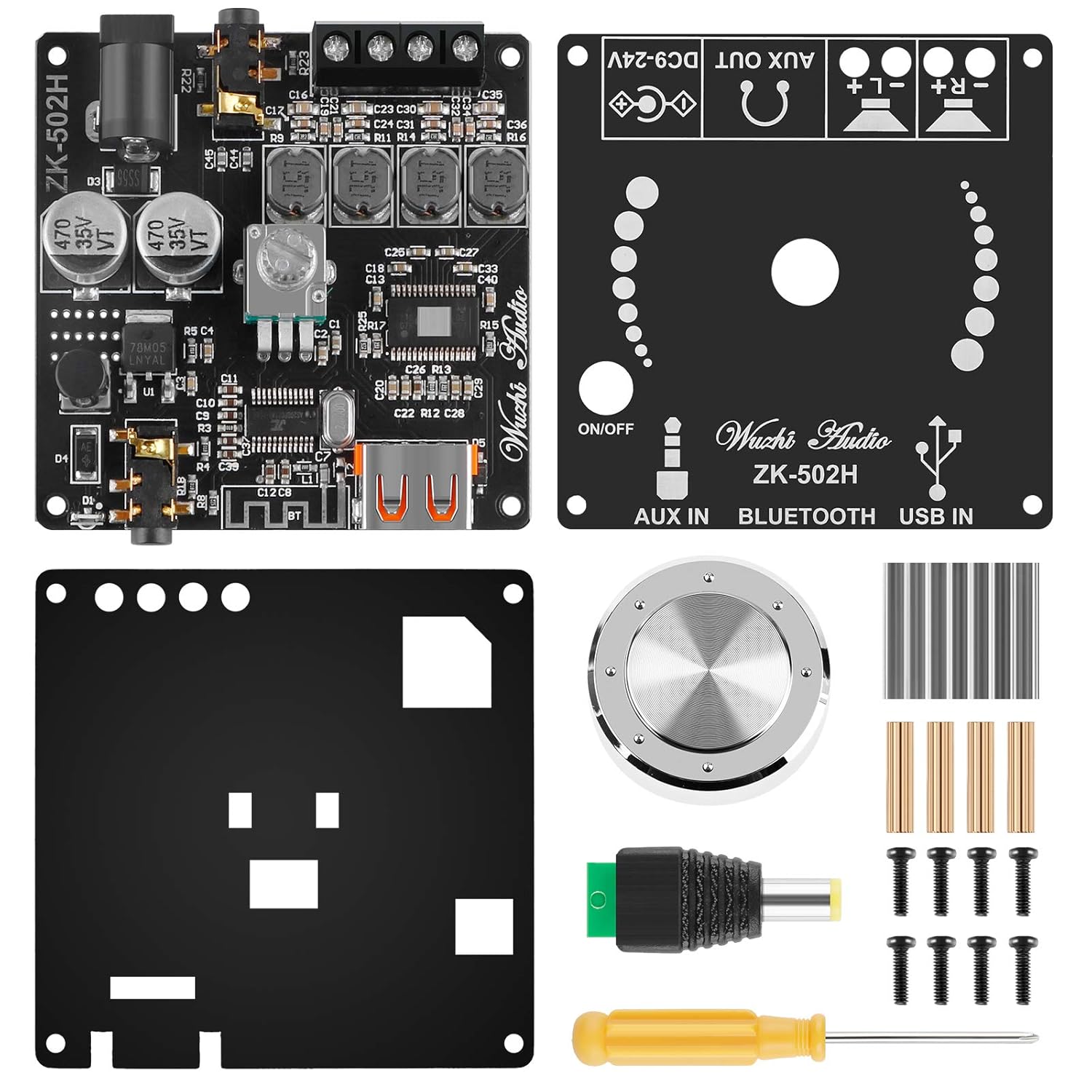
Figure 3: Contents of the ZK-502H amplifier kit, including the main board, acrylic case parts, knob, and tools.
3. คำแนะนำในการตั้งค่า
3.1 Assembly (Optional)
If your module came unassembled with an acrylic case, follow these steps:
- Carefully remove all protective films from the acrylic panels.
- Attach the standoffs to the main amplifier board using the provided screws.
- Secure the bottom acrylic panel to the standoffs.
- Mount the top acrylic panel, ensuring all cutouts align with the board's components (e.g., volume knob, ports).
- Attach the volume knob to the potentiometer shaft.
3.2 การเชื่อมต่อสายไฟ
The module requires a DC power supply between 9V and 24V. Connect the power supply to the DC input port on the board. Ensure correct polarity.
3.3 การเชื่อมต่อลำโพง
Connect your speakers to the speaker output terminals. The module supports both active and passive speakers. For passive speakers, ensure they are rated appropriately for the amplifier's output (50W per channel). Observe correct polarity for optimal sound quality.

Figure 4: Connection diagram showing how to connect audio sources (PC, USB, AUX) and speakers to the ampโมดูล lifier
4. คู่มือการใช้งาน
4.1 การเปิด/ปิดเครื่องและการควบคุมระดับเสียง
The volume potentiometer also functions as the power switch. Rotate the knob clockwise to turn on the module and increase volume. Rotate counter-clockwise to decrease volume and turn off the module.
4.2 การเลือกอินพุตเสียง
The module automatically detects and switches between input sources. Prioritize the desired input by connecting it first or disconnecting other sources.
- อินพุตบลูทู ธ : Once powered on, the module will enter Bluetooth pairing mode. ค้นหา "ZK-502H" on your device (smartphone, tablet, laptop) and pair. A confirmation sound will indicate successful pairing.
- อินพุต AUX: Connect an audio source (e.g., MP3 player, CD player) to the 3.5mm AUX IN jack.
- ช่องต่อ USB: ใส่แฟลชไดรฟ์ USB ที่มีเสียง files into the USB port. The module will automatically play the audio.
- PC Sound Card Input: Connect the module to a PC via a USB cable. The PC should recognize it as an external sound card.
5. การบำรุงรักษา
เพื่อให้มั่นใจถึงอายุการใช้งานที่ยาวนานและประสิทธิภาพการทำงานที่เหมาะสมที่สุดของคุณ ampโมดูลขยายสัญญาณ โปรดปฏิบัติตามคำแนะนำในการบำรุงรักษาดังต่อไปนี้:
- การทำความสะอาด: ใช้ผ้าแห้งนุ่มๆ เช็ดทำความสะอาดโมดูล หลีกเลี่ยงการใช้น้ำยาทำความสะอาดหรือสารละลาย
- สิ่งแวดล้อม: Operate and store the module in a dry, well-ventilated area, away from direct sunlight, high temperatures, and excessive humidity.
- การเชื่อมต่อ: Periodically check all connections (power, speakers, audio inputs) to ensure they are secure and free from corrosion.
- หลีกเลี่ยงการโอเวอร์โหลด: Do not exceed the recommended power supply voltage or speaker impedance to prevent damage to the ampชีวิต.
6 การแก้ไขปัญหา
หากคุณพบปัญหาเกี่ยวกับ amplifier module, refer to the following common problems and solutions:
| ปัญหา | สาเหตุที่เป็นไปได้ | สารละลาย |
|---|---|---|
| ไม่มีเสียงออก |
|
|
| ปัญหาการเชื่อมต่อบลูทูธ |
|
|
| เสียงเพี้ยน |
|
|
| โมดูลไม่เปิดเครื่อง |
|
|
7. ข้อมูลจำเพาะ
| ข้อมูลจำเพาะ | ค่า |
|---|---|
| หมายเลขรุ่น | ZK-502H |
| Ampชิปลิฟายเออร์ | ส.ส.ท.3116D2 |
| ช่องทางการ | 2.0 สเตอริโอ |
| กำลังขับ | 2 x 50W (Max 100W total) |
| ปริมาณอุปทานtagอี เรนจ์ | 9V - 24V กระแสตรง |
| เวอร์ชันบลูทูธ | 5.0 |
| ช่วงสาย | Up to 15m (49 feet) in open space |
| อินพุตเสียง | AUX (3.5mm), Bluetooth, USB Flash Drive, PC Sound Card |
| คุณสมบัติการป้องกัน | Short-circuit, Thermal, Overvoltage, อันเดอร์โวลtage, DC Protection |
| ขนาด (กว้าง x ยาว x สูง) | ขนาด 6 ซม. x 6 ซม. x 1.4 ซม. (ประมาณ 2.36 x 2.36 x 0.71 นิ้ว) |
| น้ำหนักสินค้า | ประมาณ 2.4 ออนซ์ |

Figure 5: The assembled amplifier module with its approximate dimensions.
8. การรับประกันและการสนับสนุน
Specific warranty information and direct support contact details are not provided within this manual. Please refer to the product packaging or the retailer's website for warranty terms and customer support options.