
Walfront 30A Solar Charge Controller User Manual
รุ่น: BSC3048
Intelligent Regulator for 12V/24V/36V/48V Battery Systems
1. บทนำ
This manual provides essential information for the safe and efficient operation of your Walfront BSC3048 Solar Charge Controller. Please read this manual thoroughly before installation and use to ensure optimal performance and longevity of the product.
1.1 ข้อควรระวังเพื่อความปลอดภัย
- ตรวจสอบให้แน่ใจว่าการเชื่อมต่อทั้งหมดถูกต้องและแน่นหนาดีแล้วก่อนที่จะจ่ายไฟ
- Do not attempt to repair or modify the controller yourself. Refer to qualified personnel.
- Install the controller in a well-ventilated, dry environment, away from direct sunlight and moisture.
- ควรต่อแบตเตอรี่ก่อนเสมอ จากนั้นจึงต่อแผงโซลาร์เซลล์ และสุดท้ายจึงต่ออุปกรณ์ไฟฟ้าที่ต้องการใช้งาน ส่วนการถอดควรทำในลำดับย้อนกลับ
- สวมอุปกรณ์ป้องกันส่วนบุคคล (PPE) ที่เหมาะสมระหว่างการติดตั้ง
2. สินค้าหมดview
The Walfront BSC3048 is an intelligent solar charge controller designed for various battery types and voltage systems (12V/24V/36V/48V). It features automatic voltage recognition and customizable parameters for flexible battery management.

รูปที่ 2.1 : ด้านหน้า view of the Walfront BSC3048 Solar Charge Controller, showing the LCD display, USB ports, and control buttons.
2.1 คุณสมบัติหลัก
- การระบุแรงดันไฟฟ้าของระบบ 12V/24V/36V/48V โดยอัตโนมัติtage.
- Compatibility with sealed, gel, flooded, lithium iron, and ternary lithium batteries.
- Customizable charging parameters for other battery types.
- Dual USB 5V/2A output for charging external devices.
- LCD display for real-time monitoring of system status.
- Integrated protection functions against overcharge, over-discharge, short circuit, and reverse polarity.
3. การติดตั้งและการตั้งค่า
Follow these steps carefully to install your solar charge controller. Incorrect wiring can damage the controller, battery, or solar panel.
3.1 ลำดับการเดินสายไฟ
- เชื่อมต่อแบตเตอรี่: เชื่อมต่อแบตเตอรี่เข้ากับขั้วแบตเตอรี่ของตัวควบคุม (ขั้วบวกต่อกับขั้วบวก ขั้วลบต่อกับขั้วลบ) ตัวควบคุมจะตรวจจับระดับแบตเตอรี่โดยอัตโนมัติtage. Ensure the battery is charged enough for the controller to recognize it.
- เชื่อมต่อแผงโซล่าเซลล์: Connect the solar panel to the controller's solar panel terminals (positive to positive, negative to negative).
- เชื่อมต่อโหลด: เชื่อมต่อโหลด DC เข้ากับขั้วต่อโหลดของตัวควบคุม (ขั้วบวกต่อกับขั้วบวก ขั้วลบต่อกับขั้วลบ)

รูปที่ 3.1: ด้านข้าง view illustrating the connection terminals for battery, solar panel, and load.
Important: Disconnect in the reverse order: first load, then solar panel, then battery.
4. การดำเนินการ
จอแสดงผล LCD 4.1 และปุ่มต่างๆ
The controller features an LCD display that shows real-time system information and two buttons for navigation and settings adjustment.

Figure 4.1: Close-up of the LCD display, showing battery voltage (e.g., 14.4V) and charging status icons.
The display typically shows battery voltage, charging current, discharging current, and various status icons (solar charging, load discharging, battery level, etc.).
4.2 Battery Type Settings
The controller supports various battery types. The default setting is for sealed lead-acid batteries. To change the battery type or customize parameters:
- Press and hold the menu button (usually the left button) for 5 seconds to enter the settings menu.
- ใช้ปุ่มนำทางเพื่อเลื่อนดูตัวเลือกต่างๆ
- Select the desired battery type (e.g., GEL, FLOODED, LI-ION, LiFePO4) or parameter to adjust.
- Confirm your selection or adjustment.
Refer to the detailed parameter table in the full manual for specific voltage settings for each battery type if customization is required.
5. การบำรุงรักษา
การบำรุงรักษาอย่างสม่ำเสมอจะช่วยให้ตัวควบคุมการชาร์จพลังงานแสงอาทิตย์ของคุณมีอายุการใช้งานยาวนานและทำงานได้อย่างมีประสิทธิภาพสูงสุด
- ความสะอาด : Keep the controller clean and free from dust. Use a dry cloth to wipe the surface.
- การเชื่อมต่อ: ตรวจสอบการเชื่อมต่อสายไฟทั้งหมดเป็นระยะๆ เพื่อความแน่นหนาและการกัดกร่อน การเชื่อมต่อที่หลวมอาจทำให้เกิดความร้อนสูงเกินไปและเกิดความเสียหายได้
- การระบายอากาศ : Ensure the installation area has adequate ventilation to prevent overheating. The controller's fins are designed for heat dissipation.
- สุขภาพแบตเตอรี่: Monitor your battery's health and electrolyte levels (for flooded batteries) as per the battery manufacturer's recommendations.
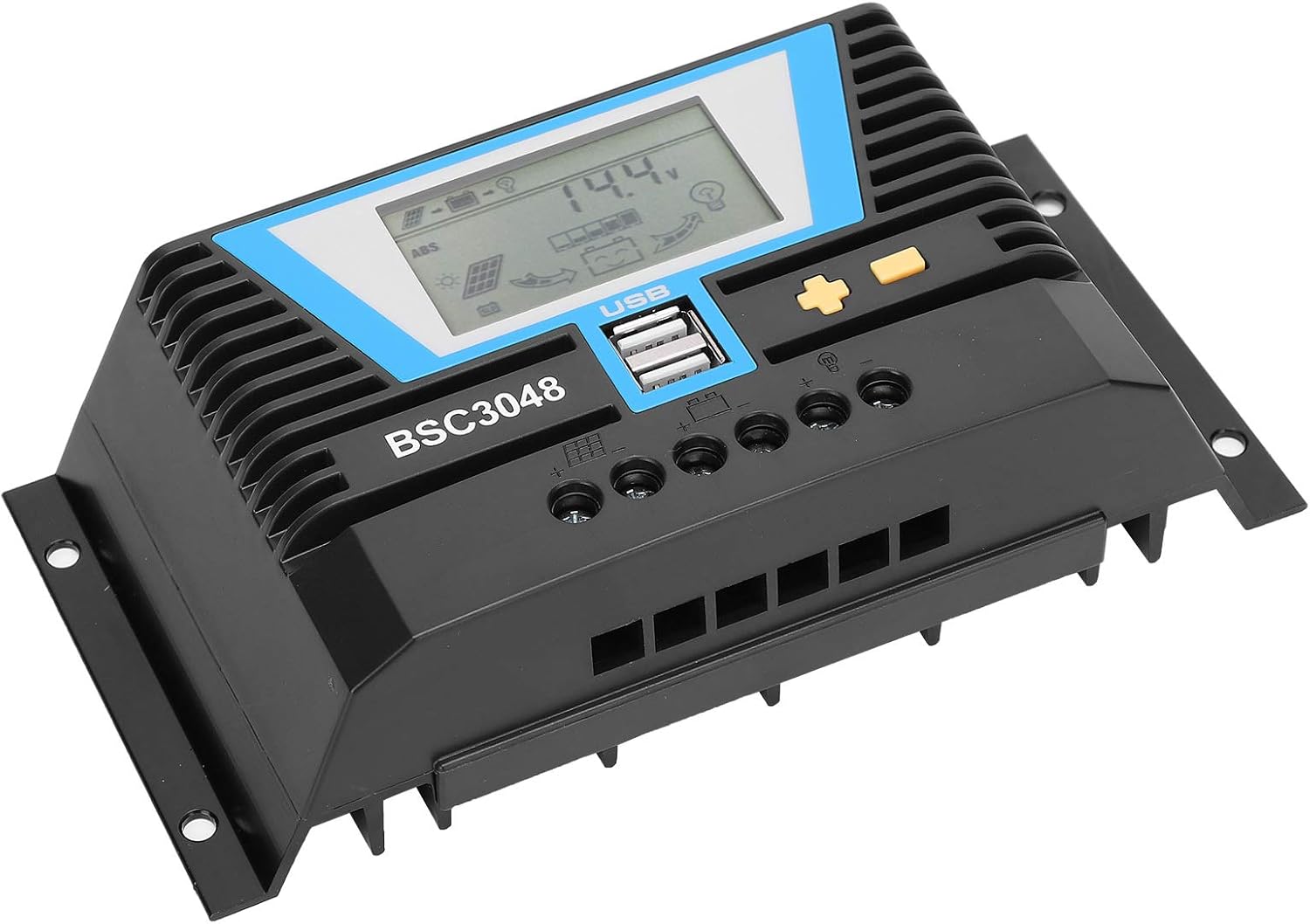
รูปที่ 5.1: มุม view highlighting the heat dissipation fins on the controller's casing.
6 การแก้ไขปัญหา
If you encounter issues with your solar charge controller, refer to the following common problems and solutions.
| ปัญหา | สาเหตุที่เป็นไปได้ | สารละลาย |
|---|---|---|
| จอแสดงผลคอนโทรลเลอร์ปิดอยู่ | แบตเตอรี่ไม่ได้เชื่อมต่อหรือระดับเสียงต่ำtage. | Check battery connections. Ensure battery voltage อยู่เหนือปริมาตรการทำงานขั้นต่ำtage. |
| แบตเตอรี่ไม่ชาร์จ | Solar panel not connected, insufficient sunlight, or faulty panel/wiring. | Check solar panel connections. Ensure adequate sunlight. Test solar panel voltage. |
| การโหลดไม่ทำงาน | Load disconnected, over-discharge protection, or faulty load. | Check load connections. Ensure battery is sufficiently charged. Test the load directly. |
| Error Code E11 (as reported by a user review). | Specific error code, possibly related to internal fault or sensor issue. | While this manual does not list specific error codes, an E11 error may indicate a system fault. Try disconnecting all power (solar, battery, load) for a few minutes, then reconnect in the correct sequence (battery first). If the error persists, contact Walfront customer support. |
7. ข้อมูลจำเพาะ
| พารามิเตอร์ | ค่า |
|---|---|
| กระแสไฟฟ้าที่ได้รับการจัดอันดับ | 30เอ |
| จัดอันดับการทำงานVoltage | 12V/24V/36V/48V (ตรวจจับอัตโนมัติ) |
| ปริมาณอินพุตแผงโซลาร์เซลล์tage | ≤100โวลต์ |
| การสูญเสียไฟฟ้าสถิต | ≤20มิลลิแอมป์ |
| การลดลงของแรงดันในวงจร | ≤0.3โวลต์ |
| เอาท์พุต USB | 5V/2Ax2 ก้อน |
| อุณหภูมิในการทำงาน | -20℃ ถึง +55℃ |
| ระดับการกันน้ำ | IP30 |
| ความชื้นสัมพัทธ์ | ≤95% ไม่มีการควบแน่น |
| ขนาดสายขั้วต่อ | 6AWG/16มม.² |
| วัสดุ | พลาสติกวิศวกรรม |
| น้ำหนักสินค้า | 1.07 ปอนด์ (484 กรัม) |
8. การรับประกันและการสนับสนุน
For warranty information and technical support, please refer to the documentation provided with your purchase or contact Walfront customer service directly. This manual does not contain specific warranty terms or contact details.
คุณสามารถเยี่ยมชมได้ที่ Walfront Store on Amazon สำหรับข้อมูลผลิตภัณฑ์เพิ่มเติม