
1. บทนำ
Thank you for choosing the Cecotec Ready Warm 8400 Bladeless Connected Heater. This manual provides essential information for the safe and efficient operation, maintenance, and troubleshooting of your new heater. Please read it thoroughly before use and keep it for future reference.

Image: The Cecotec Ready Warm 8400 Bladeless Connected Heater in a home setting, showcasinด้วยการออกแบบที่เพรียวบางและจอแสดงผลแบบดิจิทัล
2. คำแนะนำด้านความปลอดภัยที่สำคัญ
เพื่อลดความเสี่ยงจากการเกิดไฟไหม้ ไฟฟ้าช็อต หรือการบาดเจ็บ ควรปฏิบัติตามข้อควรระวังพื้นฐานเหล่านี้เสมอ:
- อ่านคำแนะนำทั้งหมดก่อนใช้เครื่องทำความร้อนนี้
- ห้ามใช้เครื่องทำความร้อนนี้กลางแจ้ง ออกแบบมาสำหรับใช้ภายในอาคารเท่านั้น
- เครื่องทำความร้อนนี้จะร้อนเมื่อใช้งาน เพื่อหลีกเลี่ยงการถูกไฟไหม้ อย่าให้ผิวหนังที่เปลือยเปล่าสัมผัสพื้นผิวที่ร้อน
- ควรเก็บวัสดุที่ติดไฟได้ง่าย เช่น เฟอร์นิเจอร์ หมอน ผ้าปูที่นอน กระดาษ เสื้อผ้า และผ้าม่าน ให้ห่างจากด้านหน้าของเครื่องทำความร้อนอย่างน้อย 1 เมตร (3 ฟุต) และควรเก็บให้ห่างจากด้านข้างและด้านหลังด้วย
- จำเป็นต้องใช้ความระมัดระวังเป็นพิเศษเมื่อเด็กหรือผู้ป่วยใช้เครื่องทำความร้อน รวมถึงทุกครั้งที่ปล่อยให้เครื่องทำความร้อนทำงานและไม่มีใครดูแล
- ควรถอดปลั๊กเครื่องทำความร้อนทุกครั้งเมื่อไม่ได้ใช้งาน
- ห้ามใช้งานเครื่องทำความร้อนใดๆ หากสายไฟหรือปลั๊กชำรุด หรือเครื่องทำความร้อนทำงานผิดปกติ ตกหล่น หรือได้รับความเสียหายในลักษณะใดๆ ก็ตาม นำเครื่องทำความร้อนกลับไปยังสถานบริการที่ได้รับอนุญาตเพื่อตรวจสอบ ปรับระบบไฟฟ้าหรือกลไก หรือซ่อมแซม
- ห้ามเดินสายไฟใต้พรม ห้ามคลุมสายไฟด้วยพรมเช็ดเท้า พรมยาว หรือวัสดุคลุมที่คล้ายกัน จัดสายไฟให้ห่างจากบริเวณที่มีคนสัญจรไปมาและบริเวณที่สายไฟจะไม่สะดุดล้ม
- ห้ามใส่หรือให้สิ่งแปลกปลอมเข้าไปในช่องระบายอากาศหรือช่องระบายอากาศ เนื่องจากอาจทำให้เกิดไฟฟ้าช็อต ไฟไหม้ หรือทำให้เครื่องทำความร้อนเสียหายได้
- เพื่อป้องกันไฟไหม้ที่อาจเกิดขึ้น ห้ามปิดกั้นช่องรับหรือระบายอากาศในลักษณะใดๆ ห้ามใช้บนพื้นผิวที่อ่อนนุ่ม เช่น เตียง เพราะช่องเปิดอาจถูกปิดกั้น
- เครื่องทำความร้อนจะมีชิ้นส่วนที่ร้อนและเกิดประกายไฟอยู่ภายใน ห้ามใช้เครื่องทำความร้อนในบริเวณที่มีการใช้หรือจัดเก็บน้ำมันเบนซิน สี หรือของเหลวไวไฟ
- ใช้เครื่องทำความร้อนนี้เฉพาะตามที่อธิบายไว้ในคู่มือนี้เท่านั้น การใช้งานอื่นใดที่ไม่ได้แนะนำโดยผู้ผลิตอาจทำให้เกิดไฟไหม้ ไฟฟ้าช็อต หรือบาดเจ็บต่อบุคคลได้
- เสียบปลั๊กเครื่องทำความร้อนเข้ากับเต้ารับ/ปลั๊กไฟที่ผนังโดยตรงเสมอ อย่าใช้กับสายไฟต่อพ่วงหรือก๊อกน้ำที่เคลื่อนย้ายได้ (เต้ารับ/ปลั๊กไฟพ่วง)
- This heater includes an automatic shut-off safety feature if it tips over.
3. สินค้าหมดview
The Cecotec Ready Warm 8400 is a bladeless, connected heater designed for efficient indoor heating. It features a digital display and touch controls for easy operation.
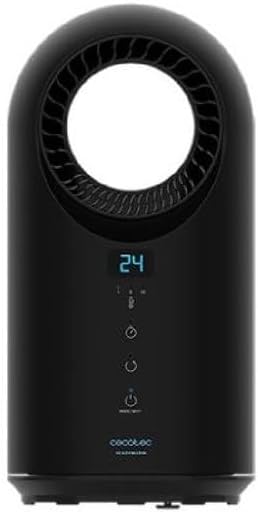
ภาพ: ด้านหน้า view of the heater, highlighting the control panel and bladeless air outlet.
แผงควบคุมและจอแสดงผล
The heater features an intuitive control panel with a digital display. The display shows the current temperature and selected settings. The touch buttons allow you to adjust settings directly on the unit.

ภาพ: รายละเอียด view of the bladeless air outlet and digital temperature display.
- จอแสดงผลดิจิตอล: Shows current temperature, timer, and mode indicators.
- ปุ่มเปิด/ปิด: เปิดหรือปิดเครื่อง
- ปุ่มโหมด: Cycles through heating modes (e.g., low, medium, high heat, fan only).
- ปุ่มปรับอุณหภูมิ: เพิ่มหรือลดอุณหภูมิที่ต้องการ
- ปุ่มตั้งเวลา: ตั้งค่าตัวจับเวลาการทำงาน
- ตัวบ่งชี้ Wi-Fi: แสดงสถานะการเชื่อมต่อ
4. การตั้งค่า
- การแกะกล่อง: นำเครื่องทำความร้อนออกจากบรรจุภัณฑ์อย่างระมัดระวัง เก็บบรรจุภัณฑ์ไว้สำหรับการจัดเก็บหรือการขนส่งในอนาคต
- การจัดวาง: Place the heater on a firm, level surface. Ensure there is at least 1 meter (3 feet) of clear space around the heater from walls, furniture, and other objects to allow for proper airflow and prevent fire hazards. Do not place it near water sources or in high humidity areas.
- การเชื่อมต่อไฟฟ้า: Plug the power cord directly into a grounded 220-240V AC electrical outlet. Do not use extension cords or power strips.
5. คู่มือการใช้งาน
5.1 การทำงานพื้นฐาน
- เปิด/ปิดเครื่อง: กดปุ่ม Power (U) on the control panel to turn the heater on or off. The digital display will illuminate when the unit is on.
- ปรับอุณหภูมิ: ใช้ปุ่มปรับอุณหภูมิ (+ / −) to set your desired room temperature. The heater will automatically adjust its heating output to maintain this temperature.
- การเลือกโหมด: Press the Mode button to cycle through available heating modes (e.g., Low Heat, High Heat) or a fan-only mode. The selected mode will be indicated on the display.

Image: User interacting with the heater's touch control panel.
5.2 ฟังก์ชั่นจับเวลา
The timer function allows you to set a specific operating duration for the heater.
- While the heater is on, press the Timer button.
- Each press will increase the operating time in increments (e.g., 1 hour, 2 hours, up to a maximum).
- The display will show the set timer duration. The heater will automatically turn off once the set time has elapsed.
5.3 Connected Features (Wi-Fi & App Control)
The Ready Warm 8400 can be controlled remotely via a smartphone application, offering enhanced convenience and scheduling options.

Image: Smartphone showing a control app, demonstrating the heater's connected functionality.
- ดาวน์โหลดแอพ: Download the official Cecotec smart home application from your device's app store (e.g., Google Play Store or Apple App Store).
- การจับคู่: Follow the in-app instructions to pair your heater with your home Wi-Fi network. Ensure your heater is within range of your Wi-Fi router.
- รีโมทคอนโทรล: Once paired, you can control the heater's power, temperature, modes, and set schedules from your smartphone, even when you are away from home.
6. การบำรุงรักษา
Regular cleaning helps maintain the heater's performance and extends its lifespan.
- ก่อนการทำความสะอาด: ควรถอดปลั๊กเครื่องทำความร้อนออกจากเต้าเสียบไฟฟ้าทุกครั้ง และปล่อยให้เย็นลงสนิทก่อนทำความสะอาด
- การทำความสะอาดภายนอก: เช็ดพื้นผิวภายนอกของเครื่องทำความร้อนด้วยผ้านุ่มๆamp ผ้า ห้ามใช้น้ำยาทำความสะอาดที่มีฤทธิ์กัดกร่อน ตัวทำละลาย หรือสารเคมีรุนแรง เพราะอาจทำให้พื้นผิวเสียหายได้
- ช่องลมเข้า/ออก: Use a soft brush or a vacuum cleaner with a brush attachment to gently remove dust and debris from the air inlets and outlets. Ensure these areas remain clear for optimal performance.
- พื้นที่จัดเก็บ: หากต้องเก็บรักษาเครื่องทำความร้อนเป็นเวลานาน ควรทำความสะอาดอย่างทั่วถึงและเก็บไว้ในบรรจุภัณฑ์เดิมในที่แห้งและเย็น
7 การแก้ไขปัญหา
หากคุณพบปัญหาเกี่ยวกับเครื่องทำความร้อน โปรดดูปัญหาทั่วไปและวิธีแก้ไขต่อไปนี้:
| ปัญหา | สาเหตุที่เป็นไปได้ | สารละลาย |
|---|---|---|
| เครื่องทำความร้อนไม่เปิด | No power supply; Power button not pressed; Safety switch activated. | Check if the power cord is securely plugged in. Ensure the wall outlet is functional. Press the Power button. Check if the heater has tipped over and reset it. |
| ไม่มีความร้อนออก | เลือกโหมดไม่ถูกต้อง การตั้งค่าอุณหภูมิต่ำเกินไป | Ensure a heating mode is selected (not fan-only). Increase the desired temperature setting above the current room temperature. |
| เครื่องทำความร้อนมีเสียงดังผิดปกติ | Obstruction in air vents; Internal component issue. | Unplug the heater and check for any obstructions in the air inlets/outlets. If the noise persists, contact customer support. |
| การเชื่อมต่อ Wi-Fi ล้มเหลว | Incorrect Wi-Fi password; Heater out of range; Router issue. | Ensure correct Wi-Fi password. Move heater closer to router. Restart router. Follow app's pairing instructions carefully. |
8. ข้อมูลจำเพาะ
| คุณสมบัติ | ข้อมูลจำเพาะ |
|---|---|
| ยี่ห้อ | เซโคเทค |
| หมายเลขรุ่น | 05371 |
| ขนาดสินค้า (กว้าง x ยาว x สูง) | 41.5 x 22 x 22.5 ซม. |
| น้ำหนัก | 2.5 กิโลกรัม |
| พลัง | 1500 วัตต์ |
| เล่มที่tage | 28 Volts (Note: Standard operating voltage for heaters is typically 110-120V or 220-240V. Please verify with product labeling.) |
| ปิดเครื่องอัตโนมัติ | ใช่ |
| จำนวนความเร็ว | 3 |
| ระดับเสียง | 10 เดซิเบล |
| คุณสมบัติพิเศษ | Bladeless, Connected (Wi-Fi) |
| ฟอร์มแฟกเตอร์ | หอคอย |
| วิธีการให้ความร้อน | พา |
| วัตถุประสงค์การใช้ | ในร่ม |
9. การรับประกันและการสนับสนุน
For technical assistance, warranty claims, or to inquire about spare parts, please contact Cecotec customer support through their official webเว็บไซต์หรือข้อมูลการติดต่อที่ให้มาพร้อมกับการซื้อของคุณ
Spare parts for this model are indicated to be available for up to 10 years from the date of purchase.
โปรดเก็บหลักฐานการซื้อของคุณไว้ในกรณีที่มีคำถามเกี่ยวกับการรับประกัน