
1. บทนำ
The Walfront SVP-912 is an advanced adjustable voltage protector designed to safeguard your electrical appliances and systems from voltage fluctuations. It provides comprehensive protection against both over-voltagอีและอันเดอร์โวลtage conditions, featuring an automatic recovery function to restore power once voltage returns to safe levels. This device also includes voltage display, adjustable protection and recovery values, and customizable action and delay times for enhanced performance and reliability.
This manual provides detailed instructions for the proper installation, operation, and maintenance of your Walfront SVP-912 voltagอีตัวป้องกัน

Figure 1: Walfront SVP-912 Adjustable Voltagอี ผู้พิทักษ์
2. ข้อมูลด้านความปลอดภัย
- แนะนำการติดตั้งอย่างมืออาชีพ: ควรให้ช่างไฟฟ้าที่มีคุณสมบัติเหมาะสมเป็นผู้ติดตั้ง เพื่อให้มั่นใจได้ว่าการติดตั้งเป็นไปตามข้อกำหนดด้านไฟฟ้าและมาตรฐานความปลอดภัยของท้องถิ่น
- ตัดการเชื่อมต่อไฟฟ้า: Always disconnect the main power supply before installing, wiring, or performing any maintenance on the device to prevent electric shock.
- การเดินสายไฟที่ถูกต้อง: Ensure all wiring connections are secure and correctly matched (Line to Line, Neutral to Neutral) as indicated in the wiring diagram. Loose connections can cause overheating or malfunction.
- สภาพแวดล้อมการทำงาน: Do not expose the device to water, excessive humidity, or extreme temperatures. Operate within specified environmental conditions.
- ความจุในการรับน้ำหนัก: Do not exceed the maximum current rating of 80A. Overloading can damage the device and connected equipment.
- การระบายอากาศ : ตรวจสอบให้แน่ใจว่ามีการระบายอากาศเพียงพอรอบๆ อุปกรณ์เพื่อป้องกันความร้อนสูงเกินไป
3. ส่วนประกอบของผลิตภัณฑ์และการแสดงผล
The Walfront SVP-912 features a clear digital display and intuitive control buttons for easy configuration and monitoring.
แผงด้านหน้า
- จอแสดงผลดิจิตอล: แสดงปริมาณแบบเรียลไทม์tage and parameter settings.
- ปุ่ม ตลท.: Used to enter the parameter setting mode and confirm selections.
- ปุ่มขึ้น (▲) Used to increase parameter values.
- ปุ่มลง (▼) Used to decrease parameter values.
- Over(V) Indicator: ส่องสว่างเมื่อเกิดการโอเวอร์วอลลุ่มtagตรวจพบเงื่อนไข e
- Under(V) Indicator: ส่องสว่างเมื่อปริมาตรต่ำกว่าปกติtagตรวจพบเงื่อนไข e
เทอร์มินัล
- IN (L, N): Input terminals for connecting the incoming power supply (Line and Neutral).
- OUT (L, N): Output terminals for connecting to the protected load (Line and Neutral).
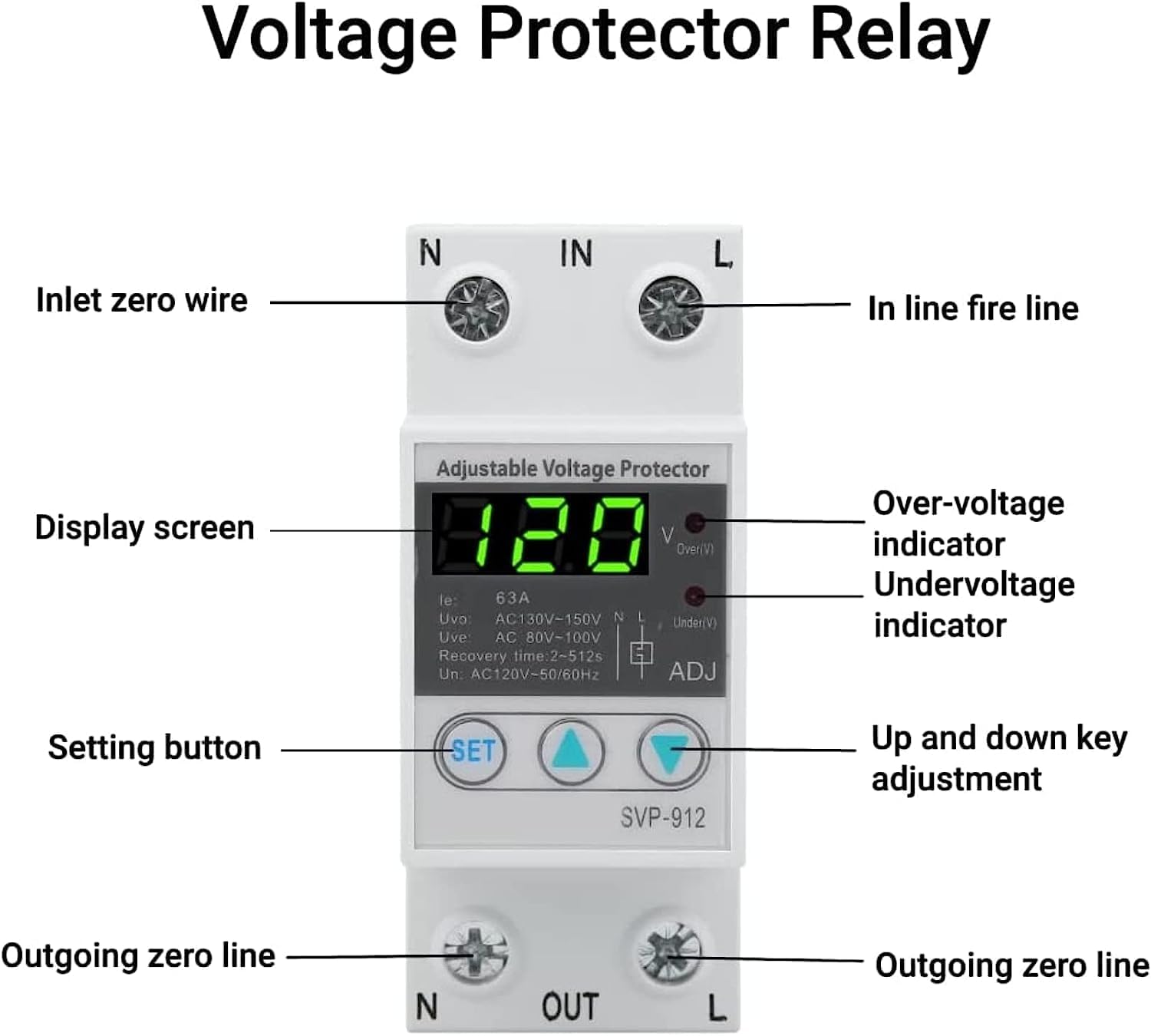
Figure 2: Front Panel Components and Labels

รูปที่ 3: ภาพระยะใกล้ของหน้าจอแสดงผลและปุ่มควบคุม
4. การตั้งค่าและการติดตั้ง
4.1 การติดตั้ง
The Walfront SVP-912 is designed for DIN rail mounting. Securely attach the device to a standard DIN rail within an electrical panel or enclosure.
4.2 แผนผังการเดินสายไฟ
Follow the wiring diagram below carefully. Ensure all connections are tight and correct to prevent electrical hazards and ensure proper device function.
- Connect the incoming Line (L) and Neutral (N) wires from your power source to the IN terminals of the protector.
- Connect the Line (L) and Neutral (N) wires leading to your protected load (appliances, circuit) to the ออก terminals of the protector.
- It is recommended to install a circuit breaker or power switch upstream of the voltage protector for additional safety and ease of maintenance.

รูปที่ 4: แผนภาพการเดินสายไฟทั่วไป
5. คู่มือการใช้งาน
5.1 การเปิดเครื่องครั้งแรก
After successful installation and wiring, turn on the main power supply. The device's digital display will illuminate and show the current real-time voltage ของระบบไฟฟ้าของคุณ
5.2 การปรับพารามิเตอร์
The Walfront SVP-912 allows you to customize various protection parameters. To enter the setting mode:
- กดปุ่มค้างไว้ ชุด button for approximately 3-5 seconds until the display starts flashing, indicating you are in setting mode.
- ใช้ ขึ้น (▲) และ ลง (▼) buttons to adjust the displayed parameter value.
- กดปุ่ม ชุด button briefly to confirm the current setting and advance to the next parameter.
- Repeat steps 2 and 3 for all parameters you wish to adjust.
- หลังจากตั้งค่าพารามิเตอร์สุดท้ายแล้ว ให้กดปุ่ม ชุด again to exit the setting mode. The device will save your settings and return to displaying the real-time voltage.
พารามิเตอร์ที่สามารถปรับได้แก่:
- Uvo (Over-voltage protection value): ฉบับที่tage threshold at which the device will trip due to over-voltage.
- Uve (Over-voltage recovery value): ฉบับที่tage level at which the device will automatically restore power after an over-voltagอีเหตุการณ์
- t-ov (Over-voltage action time): The delay before the device trips after detecting an over-voltagอีเงื่อนไข
- Uu (Under-voltage protection value): ฉบับที่tage threshold at which the device will trip due to under-voltage.
- Uue (Under-voltage recovery value): ฉบับที่tage level at which the device will automatically restore power after an under-voltagอีเหตุการณ์
- t-uv (Under-voltage action time): The delay before the device trips after detecting an under-voltagอีเงื่อนไข
- t-rd (Fault recovery delay time): The delay before the device attempts to restore power after any fault condition has cleared.
- t-pd (Power-on delay time): The delay before the device supplies power to the load after initial power-on or manual reset.
5.3 Fault Query and Factory Reset
- Fault Query: The device supports fault query functionality. Consult the full product manual (if provided separately) or contact customer support for specific instructions on how to access fault history.
- รีเซ็ตเป็นค่าเริ่มต้นจากโรงงาน: The device has a factory reset function. To perform a factory reset, typically you would press and hold a combination of buttons or a specific button for an extended period. Refer to the full product manual or contact customer support for the exact procedure.
5.4 วิดีโอสาธิตผลิตภัณฑ์
Video 1: Demonstration of an adjustable voltage current protector, showing its physical features and basic handling. Note: This video may feature a model with different voltage/current ratings (AC230V 63A) than the SVP-912 (AC120V 80A), but illustrates general device interaction.
6. การบำรุงรักษา
- การทำความสะอาด: Periodically clean the exterior of the device with a soft, dry cloth. Do not use abrasive cleaners or solvents.
- การตรวจสอบ: ตรวจสอบการเชื่อมต่อสายไฟอย่างสม่ำเสมอ เพื่อดูว่าแน่นหนาดีหรือไม่ และมีร่องรอยการสึกหรอหรือความเสียหายหรือไม่
- สภาพแวดล้อม : ตรวจสอบให้แน่ใจว่าสภาพแวดล้อมการทำงานยังคงอยู่ในช่วงอุณหภูมิและความชื้นที่กำหนด
- อัพเดตเฟิร์มแวร์: ตรวจสอบของผู้ผลิต website for any available firmware updates, if applicable.
7 การแก้ไขปัญหา
If you encounter issues with your Walfront SVP-912, refer to the following troubleshooting guide:
| ปัญหา | สาเหตุที่เป็นไปได้ | สารละลาย |
|---|---|---|
| Device does not power on or display is blank. | ไม่มีแหล่งจ่ายไฟ; การเดินสายไฟไม่ถูกต้อง; ความผิดพลาดภายใน | Check main power supply. Verify wiring connections (IN L/N). If problem persists, contact support. |
| ปริมาตรไม่ถูกต้องtage readings or device does not function correctly with 60Hz systems. | Frequency incompatibility; calibration issue. | Ensure the device is rated for your local frequency (50Hz/60Hz). If readings are consistently off, contact customer support for potential calibration or replacement. |
| Buttons are unresponsive or one button does not work. | Button malfunction; internal defect. | Attempt a factory reset (refer to section 5.3 or contact support). If buttons remain unresponsive, the device may be faulty and require replacement. |
| Device trips frequently without apparent voltagปัญหาอี | Protection parameters set too narrowly; unstable power supply; faulty device. | Review และปรับระดับเสียงเกินtagอีและอันเดอร์โวลtage protection/recovery values (Uvo, Uve, Uu, Uue) to appropriate ranges for your region. Monitor your power supply for hidden fluctuations. If problem persists, contact support. |
8. ข้อมูลจำเพาะ
- แบบอย่าง: เอสวีพี-912
- จัดอันดับVoltage: กระแสสลับ 120 โวลต์
- กระแสไฟที่กำหนด: 80เอ
- ความถี่ในการใช้งาน : 50/60เฮิรตซ์
- เกินปริมาณtage Protection Range: Adjustable (e.g., AC130V-150V N/L as seen on display)
- ภายใต้ฉบับtage Protection Range: Adjustable (e.g., AC80V-100V as seen on display)
- เวลาหน่วงการกู้คืน: Adjustable (e.g., 2-512s as seen on display)
- น้ำหนักสินค้า: 170 กรัม
- ขนาด (โดยประมาณ): 85 มม. (สูง) x 48 มม. (กว้าง) x 65 มม. (ลึก)
- ASIN: B08L9FMV92
- ความพร้อมจำหน่ายของสินค้า : November 19, 2020 (on Amazon.com.mx)

รูปที่ 5: ขนาดผลิตภัณฑ์
9. ข้อมูลการรับประกัน
Walfront products are manufactured to high-quality standards. This product comes with a standard manufacturer's warranty against defects in materials and workmanship. The specific terms and duration of the warranty may vary by region and retailer. Please retain your proof of purchase for warranty claims. For detailed warranty information, refer to the documentation included with your purchase or contact Walfront customer support.
10. การสนับสนุนลูกค้า
If you have any questions, require technical assistance, or need to report an issue with your Walfront SVP-912 voltage protector, please contact Walfront customer support. Contact information can typically be found on the product packaging, the retailer's website, or the official Walfront brand store.
When contacting support, please have your product model (SVP-912) and ASIN (B08L9FMV92) readily available.