
1. สินค้าหมดview
The SCANGRIP NOVA R is a versatile, rechargeable COB LED floodlight designed for professional use. It offers powerful illumination, a compact design, and practical features for various work environments.

รูปที่ 1 : ด้านหน้า view of the SCANGRIP NOVA R floodlight, showcasing การออกแบบที่กะทัดรัดและแข็งแรงทนทาน
คุณสมบัติหลัก:
- Rechargeable COB LED work light, providing up to 2000 lumens.
- Slim and compact design for portability and ergonomic handling.
- 5-step dimming function to adjust light output.
- Integrated magnetic bracket for flexible positioning.
- Built-in power bank with USB outlet for charging mobile devices.
- Waterproof (IP67) for use in challenging conditions.

Figure 2: The floodlight stored compactly within a tool bag, highlighting its portability.

Figure 3: The floodlight positioned on a workbench in a garage setting, ready for use.
2. ข้อมูลด้านความปลอดภัย
Please read these safety instructions carefully before using the SCANGRIP NOVA R floodlight. Failure to follow these instructions may result in electric shock, fire, or serious injury.
- Do not look directly into the light source when it is active. The intense light can cause eye damage.
- เก็บอุปกรณ์ให้ห่างจากเด็ก
- ห้ามเปิด ดัดแปลง หรือซ่อมแซมอุปกรณ์ด้วยตนเอง โปรดส่งต่ออุปกรณ์ดังกล่าวให้ช่างผู้ชำนาญการเป็นผู้ดำเนินการซ่อมแซม
- Use only the provided charging cable and charger, or a compatible certified charger.
- Do not expose the device to extreme temperatures, direct sunlight for prolonged periods, or open flames.
- Ensure the charging port cover is securely closed when not charging to maintain IP67 waterproof rating.
- Dispose of the battery responsibly according to local regulations. Do not incinerate.
3. ส่วนประกอบและการควบคุมผลิตภัณฑ์
Familiarize yourself with the different parts and controls of your NOVA R floodlight.

Figure 4: Annotated diagram highlighting key features such as the COB LED, battery indicator, dimming controls, built-in power bank, powerful magnets, and flexible stand.
Control Panel (Refer to Figure 4 and Figure 5):
- ปุ่มเปิด/ปิด: เปิด/ปิดไฟ
- ปุ่มปรับความสว่าง (+/-): Adjusts light intensity through 5 steps.
- ไฟแสดงสถานะแบตเตอรี่: แสดงระดับประจุแบตเตอรี่ปัจจุบัน
- พอร์ตเอาต์พุต USB: สำหรับชาร์จอุปกรณ์ภายนอก
- พอร์ตอินพุตการชาร์จ: For recharging the floodlight.
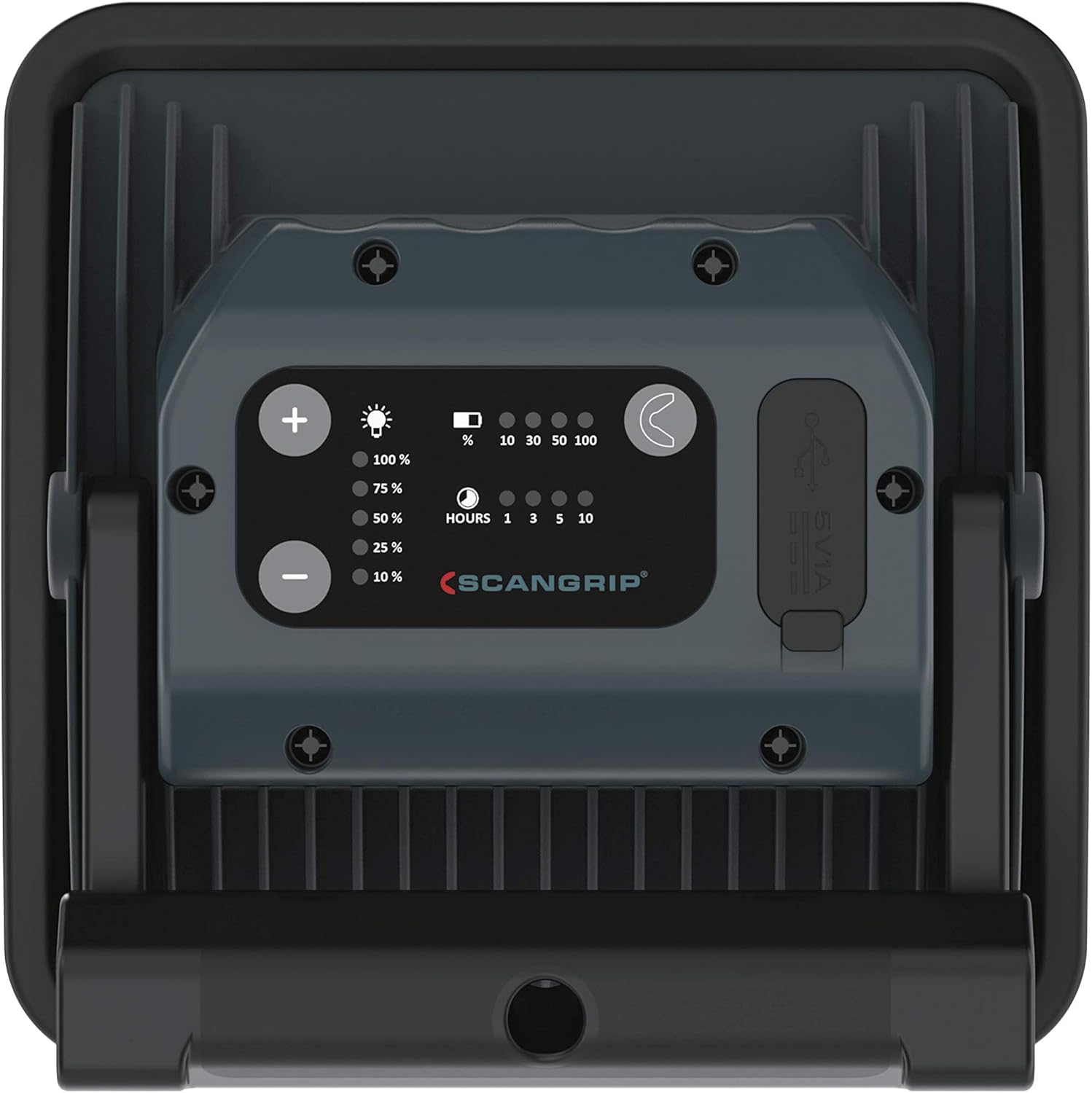
Figure 5: Close-up of the rear control panel, showing the power, dimming buttons, battery indicators, and USB ports.
4. การตั้งค่า
4.1 การชาร์จเริ่มต้น
Before first use, fully charge the NOVA R floodlight. This ensures optimal battery performance and longevity.
- Locate the charging input port on the rear of the floodlight.
- Connect the provided charging cable to the floodlight and a suitable power source (e.g., wall adapter, USB port).
- The battery indicator lights will illuminate, showing the charging progress. All lights will be solid when fully charged.
- Once fully charged, disconnect the charging cable and ensure the port cover is sealed.
4.2 Positioning the Floodlight
The NOVA R features a flexible stand and powerful built-in magnets for versatile positioning.
- Flexible Stand: Adjust the stand to tilt the light up to 160 degrees, directing illumination precisely where needed.
- แม่เหล็กในตัว: Attach the floodlight to any magnetic surface for hands-free operation. Ensure the surface is stable enough to support the light's weight.

Figure 6: The floodlight magnetically attached to a metal workbench, demonstrating its flexible positioning capabilities.
5. คู่มือการใช้งาน
5.1 Turning On/Off and Dimming
- Press the power button once to turn the floodlight on.
- Use the '+' and '-' buttons to cycle through the 5 dimming steps to achieve the desired light intensity.
- Press the power button again to turn the floodlight off.

Figure 7: A hand holding the floodlight, illustrating its ergonomic design for handheld use.

Figure 8: A user holding the floodlight to inspect a wall, demonstrating its handheld use and illumination capabilities.
5.2 การใช้งานฟังก์ชันพาวเวอร์แบงค์
The NOVA R can be used as a power bank to charge your mobile devices.
- Open the cover of the USB output port on the rear of the floodlight.
- Connect your device's USB charging cable to the floodlight's USB output port.
- Charging will begin automatically. Monitor your device's charging status.
- Once charging is complete, disconnect the cable and securely close the USB port cover.

Figure 9: The floodlight actively charging a smartphone via its built-in USB power bank function.
6. การบำรุงรักษา
6.1 การทำความสะอาด
- ตรวจสอบให้แน่ใจว่าอุปกรณ์ปิดอยู่และถอดปลั๊กออกจากแหล่งพลังงานทั้งหมดก่อนทำความสะอาด
- Wipe the exterior of the floodlight with a soft, damp ผ้า.
- ห้ามใช้น้ำยาทำความสะอาดที่มีฤทธิ์กัดกร่อน ตัวทำละลาย หรือสารเคมีรุนแรง เพราะอาจทำให้พื้นผิวเสียหายได้
- Ensure all port covers are closed after cleaning to maintain water resistance.
6.2 การดูแลและจัดเก็บแบตเตอรี่
- เพื่อยืดอายุการใช้งานแบตเตอรี่ ควรหลีกเลี่ยงการปล่อยแบตเตอรี่จนหมดบ่อยครั้ง
- If storing the floodlight for an extended period, charge it to approximately 50-70% every few months.
- เก็บอุปกรณ์ไว้ในที่แห้งและเย็น หลีกเลี่ยงแสงแดดโดยตรงและอุณหภูมิที่สูงหรือต่ำเกินไป
7 การแก้ไขปัญหา
| ปัญหา | สาเหตุที่เป็นไปได้ | สารละลาย |
|---|---|---|
| ไฟไม่เปิด | แบตเตอรี่หมดประจุ | Charge the floodlight fully. |
| แสงที่ออกมาสลัว | Low battery or dimming setting. | Recharge the battery or increase brightness using the '+' button. |
| Device not charging from USB output. | Floodlight battery is low or cable is faulty. | Ensure floodlight is sufficiently charged. Try a different USB cable. |
| Water ingress despite IP67 rating. | Port covers not properly sealed. | Always ensure all port covers are securely closed before exposure to water. If damage occurred, discontinue use and contact support. |
8. ข้อมูลจำเพาะ
| คุณสมบัติ | รายละเอียด |
|---|---|
| หมายเลขรุ่น | 03.5456สหรัฐอเมริกา |
| แหล่งกำเนิดแสง | ไฟ LED แบบ COB |
| ฟลักซ์ส่องสว่าง | สูงถึง 2000 ลูเมน |
| อุณหภูมิสี | 6000 เคลวิน |
| Dimming Steps | 5 ก้าว |
| แหล่งพลังงาน | ใช้พลังงานจากแบตเตอรี่ (รวมแบตเตอรี่ลิเธียมไอออน 1 ก้อน) |
| ปริมาณแบตเตอรี่tage | 7.3 โวลต์ |
| เวลาดำเนินการ | Up to 20 hours (depending on dimming level) |
| ฟังก์ชั่นการชาร์จ | Built-in power bank with USB output |
| วัสดุ | อลูมิเนียม |
| การป้องกันการไหลเข้า | IP67 (กันน้ำ) |
| ขนาดสินค้า | 6.42 x 2.48 x 6.42 นิ้ว |
| น้ำหนักสินค้า | 1.74 ปอนด์ |
| อุณหภูมิในการทำงาน | 14 to 104 Degrees Fahrenheit (-10 to 40 Degrees Celsius) |
9. การรับประกันและการสนับสนุน
For warranty information, technical support, or service inquiries, please refer to the official SCANGRIP webไซต์หรือติดต่อตัวแทนจำหน่ายที่ได้รับอนุญาตของคุณ
เก็บใบเสร็จรับเงินของคุณไว้เป็นหลักฐานการซื้อสำหรับการเรียกร้องการรับประกัน
ผู้ผลิต: สแกนกริป
Webเว็บไซต์: www.scanrip.com