
1. บทนำ
This manual provides instructions for the installation, operation, and maintenance of the Maxspect Jump MJ-L165 65W LED Lighting System. Please read this manual thoroughly before using the product to ensure proper function and longevity.
The Maxspect Jump MJ-L165 is an advanced LED lighting system designed for aquatic environments. It features a full-spectrum output with multi-phase color temperature technology, allowing for configuration to various color spectrums without compromising performance.
2. คุณสมบัติของผลิตภัณฑ์
- Full-Spectrum Output: Utilizes a comprehensive array of LED colors to support diverse aquatic life.
- Multi-Phase Color Temperature Technology: Enables easy adjustment of color spectrums.
- ประสิทธิภาพการใช้พลังงานสูง: Rated at 65W for effective illumination.
- การออกแบบที่กะทัดรัด: Dimensions of 8.5 x 7 x 1.5 inches and a weight of 1.8 lbs.
- การกำหนดค่า LED: Includes 6x Hyper Red, 6x Green, 6x Blue, 6x Warm White, 6x Cyan Blue, 4x Deep Blue, 2x Ultraviolet 390nm, 2x Violet 410nm, 2x Royal Blue, and 2x Cool White LEDs.
3. เนื้อหาบรรจุภัณฑ์
เมื่อแกะกล่อง โปรดตรวจสอบว่าชิ้นส่วนทั้งหมดครบถ้วนและไม่เสียหาย กล่องควรประกอบด้วย:
- Maxspect Jump MJ-L165 LED Lighting Unit
- Mounting Arm/Bracket
- อะแดปเตอร์และสายไฟ
- คู่มือการใช้งาน (เอกสารนี้)

Figure 3.1: Maxspect Jump MJ-L165 LED Lighting System with its adjustable mounting arm.
4. คำแนะนำในการตั้งค่า
4.1 การติดตั้งโคมไฟ
- Assemble the Mounting Arm: Attach the mounting arm components as shown in the diagram. Ensure all screws are tightened securely.
- วิธีติดตั้งกับตู้ปลา: Secure the mounting bracket to the rim of your aquarium. Adjust the bracket to fit the thickness of the tank glass or acrylic.
- วางตำแหน่งแสง: Connect the LED lighting unit to the mounting arm. Adjust the arm's angle and height to achieve the desired light coverage over your aquarium. Refer to the dimensions diagram for optimal positioning.
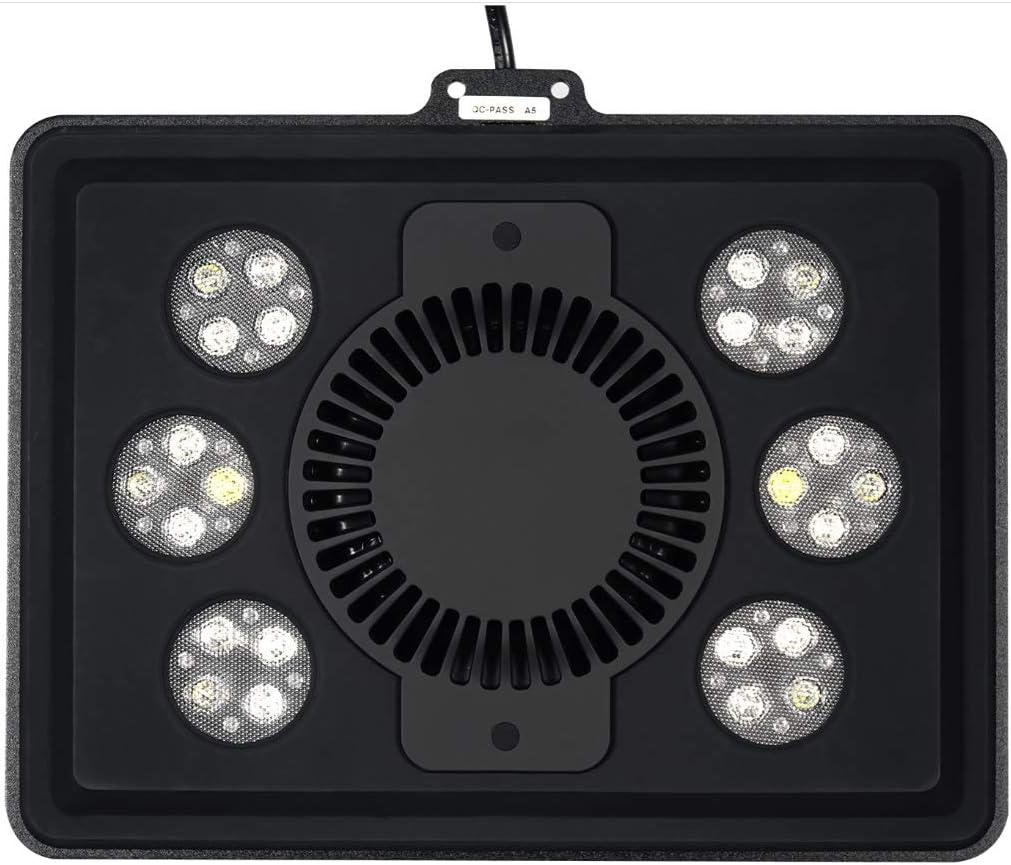
Figure 4.1: Dimensional diagram illustrating mounting options and coverage area. The light can cover an area of approximately 12 x 24 inches.
4.2 การเชื่อมต่อสายไฟ
- เชื่อมต่อสายไฟ: Insert the power cord into the designated port on the LED lighting unit.
- เสียบเข้ากับเต้าเสียบ: Plug the power adapter into a standard electrical outlet. Ensure the outlet is protected by a Ground Fault Circuit Interrupter (GFCI) for safety in aquatic environments.

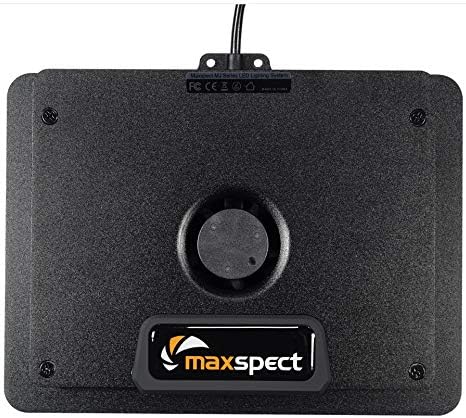
Figure 4.2: Underside of the Maxspect Jump MJ-L165, showing the cooling fan and power input connection point.
5. คู่มือการใช้งาน
5.1 การเปิด/ปิดเครื่อง
Once connected to power, the unit should power on. To turn off the unit, disconnect it from the power source. For daily operation, it is recommended to use a timer (not included) to control the light cycle.
5.2 Adjusting Light Spectrum and Intensity
The Maxspect Jump MJ-L165 allows for configuration of different color spectrums. Specific controls for spectrum and intensity adjustment are typically managed via a dedicated controller or a mobile application (if available for this model). Refer to the separate controller/app manual for detailed instructions on programming light cycles, intensity levels, and color channels.
รูปที่ 5.1: รายละเอียด view of the multi-color LED array, showcasing the various diodes responsible for the full-spectrum output.
6. การบำรุงรักษา
6.1 Cleaning the Light Fixture
- ตัดการเชื่อมต่อไฟฟ้า: ควรดึงปลั๊กเครื่องออกจากเต้ารับไฟฟ้าทุกครั้งก่อนทำการบำรุงรักษา
- ภายนอกสะอาด: ใช้แบบนุ่มๆamp cloth to wipe the exterior of the light fixture. Avoid using abrasive cleaners or solvents, as these can damage the finish or LED lenses.
- Clean Fan and Vents: Periodically inspect and clean the cooling fan and ventilation openings to ensure proper airflow. Use a soft brush or compressed air to remove dust and debris.
- Clean LED Lenses: Gently wipe the LED lenses with a soft, lint-free cloth to remove salt creep or water spots, which can reduce light output.
6.2 การตรวจสอบตามปกติ
Regularly check the power cord for any signs of damage. Ensure the mounting arm remains securely fastened to the aquarium. Address any issues promptly to prevent potential hazards.
7 การแก้ไขปัญหา
| ปัญหา | สาเหตุที่เป็นไปได้ | สารละลาย |
|---|---|---|
| ไฟไม่เปิด | ไม่มีไฟเข้า, การเชื่อมต่อหลวม, อะแดปเตอร์แปลงไฟเสีย | Check power outlet. Ensure all connections are secure. Test with another outlet. Contact support if adapter is suspected faulty. |
| แสงที่ออกมาไม่เพียงพอหรือไม่สม่ำเสมอ | Dirty LED lenses, incorrect settings, partial component failure. | Clean LED lenses as per maintenance section. Verify settings via controller/app. If problem persists, contact support. |
| Fan is noisy or not operating. | ฝุ่น/เศษสิ่งสกปรกในพัดลม พัดลมทำงานผิดปกติ | Clean fan and vents. Ensure nothing obstructs fan blades. If noise continues or fan fails, contact support. |
If you encounter issues not listed here or if the suggested solutions do not resolve the problem, please contact Maxspect customer support.
8. ข้อมูลจำเพาะ
| คุณสมบัติ | รายละเอียด |
|---|---|
| หมายเลขรุ่น | MJ-L165 |
| ยี่ห้อ | แม็กซ์สเปค |
| กำลังไฟที่กำหนด | 65วัตต์ |
| ประเภทแหล่งกำเนิดแสง | นำ |
| แหล่งพลังงาน | สายไฟ |
| พื้นที่ให้บริการ | ขนาด 12 x 24 นิ้ว (โดยประมาณ) |
| ขนาด (กว้าง x ยาว x สูง) | 8.5 x 7 x 1.5 นิ้ว |
| น้ำหนักสินค้า | 1.8 ปอนด์ (ประมาณ 816 กรัม) |
| จำนวนแหล่งกำเนิดแสง | 1 (unit) |
| รวมแบตเตอรี่ | เลขที่ |
9. การรับประกันและการสนับสนุน
For warranty information, please refer to the documentation provided with your purchase or visit the official Maxspect webไซต์ เงื่อนไขการรับประกันอาจแตกต่างกันไปตามภูมิภาคและผู้ค้าปลีก
For technical support, troubleshooting assistance, or inquiries regarding replacement parts, please contact your authorized Maxspect dealer or Maxspect customer service directly. Contact information can typically be found on the manufacturer's webเว็บไซต์.