
การแนะนำ
This manual provides essential information for the safe and efficient operation of your Walfront YX851 Automatic Power Switch Module. Please read it thoroughly before installation and use. This module is designed to automatically switch between a primary power supply and a battery, ensuring continuous power to a load and managing battery charging.
ข้อมูลด้านความปลอดภัย
- ตรวจสอบให้แน่ใจว่าแหล่งจ่ายไฟทั้งหมดถูกตัดการเชื่อมต่อก่อนการติดตั้งหรือการบำรุงรักษา
- This module operates with DC 12V. Do not exceed specified voltage หรือเรตติ้งปัจจุบัน
- Installation should be performed by qualified personnel or individuals with sufficient electrical knowledge.
- ป้องกันโมดูลจากความชื้น ฝุ่น และอุณหภูมิที่สูงหรือต่ำเกินไป
- Verify correct polarity for all connections to prevent damage to the module or connected devices.
- เก็บให้พ้นจากมือเด็ก
สินค้าเกินview
The Walfront YX851 is an automatic power switch module designed for seamless power transition and battery management. It prioritizes a primary power supply and switches to a backup battery when the primary fails, while also handling battery charging.
คุณสมบัติหลัก
- Automatic power switching between main supply and battery.
- Integrated battery charging control.
- เกินปริมาณtagอีและอันเดอร์โวลtage charging protection for the battery.
- Compact plastic construction.
ส่วนประกอบ

The module features screw terminals for easy connection of power input, battery, and load. Two relays manage the power switching logic. Indicator lights (not explicitly visible in this image but implied by "power indicator light" in the description) provide status feedback.
- ช่องเสียบอินพุต: For connecting the primary power supply.
- ขั้วแบตเตอรี่: For connecting the backup battery.
- สถานีชาร์จ: For connecting the device requiring power.
- รีเลย์: Two blue relays (SRD-12VDC-SL-C) rated for 10A 250VAC / 10A 125VAC / 10A 30VDC / 10A 28VDC.
- Potentiometers (W 203): Used for adjusting charging start and stop voltagใช่
- ไฟแสดงสถานะ: (Implied) for power and charging status.
ข้อมูลจำเพาะ
| พารามิเตอร์ | ค่า |
|---|---|
| แบบอย่าง | YX851 |
| ควบคุมฉบับtage | กระแสตรง 12 โวลต์ |
| การควบคุมกระแสไฟ | 10เอ |
| วัสดุ | พลาสติก |
| ขนาด (กxยxส) | ขนาดโดยประมาณ 69 x 48 x 18 มม. (2.7 x 1.9 x 0.7 นิ้ว) |
| ขนาดการติดตั้ง | Approx. 61 x 41mm (2.4 x 1.6in) |
| คะแนนรีเลย์ | 10A 250VAC / 10A 125VAC / 10A 30VDC / 10A 28VDC |
การติดตั้งและการตั้งค่า
Proper installation is critical for the correct functioning of the YX851 module. Refer to the wiring diagram below for connections.
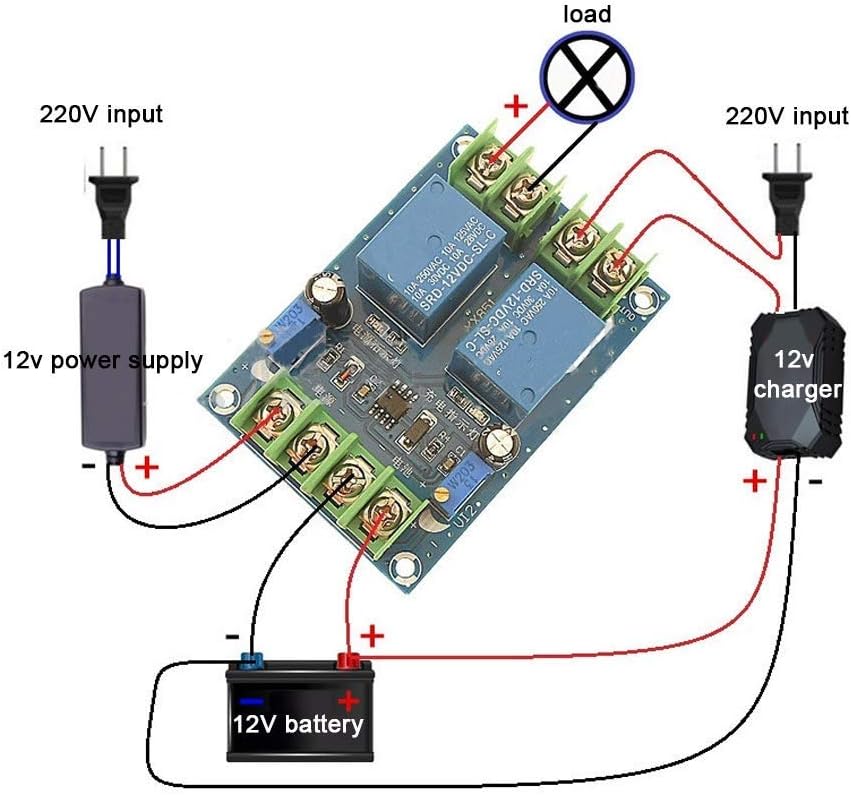
The diagram shows a typical setup where a 220V input is converted to 12V for the primary supply. A separate 12V charger is connected to the battery, and the module manages the power flow to the load.
ขั้นตอนการเดินสายไฟ
- Connect Primary Power Supply: Connect your DC 12V primary power supply to the "IN" terminals on the module, observing polarity (+ to + and - to -). Ensure the primary power supply is capable of providing sufficient current for both the load and battery charging.
- เชื่อมต่อแบตเตอรี่: Connect your 12V backup battery to the "BATTERY" terminals, observing polarity.
- เชื่อมต่อโหลด: Connect your DC 12V load to the "OUT" terminals, observing polarity.
- ตรวจสอบการเชื่อมต่อ: Double-check all wiring for correct polarity and secure connections before applying power.
การปรับพารามิเตอร์การชาร์จ
The module features two potentiometers (W 203) for adjusting the battery charging start and stop voltagใช่
- Charging Start Voltage ระเบียบข้อบังคับ: Adjust the potentiometer labeled for "charging start" (often near "充电启动" on the PCB, see Figure 3). Turning clockwise increases the voltage at which charging begins; turning counter-clockwise decreases it.
- Charging Stop Voltage ระเบียบข้อบังคับ: Adjust the potentiometer labeled for "charging stop" (often near "充电关闭" on the PCB, see Figure 3). Turning clockwise increases the voltage at which charging stops; turning counter-clockwise decreases it.
It is recommended to use a voltmeter to accurately set these thresholds according to your battery's specifications.

The bottom of the PCB provides labels for identifying the charging start and stop points, which correspond to the adjustable potentiometers on the top side.
คำแนะนำการใช้งาน
The YX851 module operates automatically based on the presence and voltage levels of the primary power supply and the connected battery.
- Primary Power Available: When the primary DC 12V power supply is connected and active, the module will prioritize this supply to power the load.
- การชาร์จแบตเตอรี่: If the primary power supply is active and the battery voltage is below the set charging stop voltage, the module will initiate charging of the battery. Charging will continue until the battery reaches the set charging stop voltage.
- Primary Power Failure: If the primary power supply fails or its voltage drops below a critical threshold, the module will automatically switch the load to be powered by the connected 12V battery. This ensures uninterrupted operation for the load.
- Primary Power Restoration: When the primary power supply is restored, the module will automatically switch the load back to the primary supply and resume battery charging if needed.
The module's indicator lights (if present) will provide visual feedback on the current power source and charging status.
การซ่อมบำรุง
- ตรวจสอบการเชื่อมต่อสายไฟทั้งหมดอย่างสม่ำเสมอ เพื่อให้แน่ใจว่าแน่นหนาและปราศจากสนิม
- รักษาโมดูลให้สะอาด ปราศจากฝุ่นและเศษขยะ ใช้ผ้านุ่มและแห้งเช็ดทำความสะอาด
- Avoid exposing the module to excessive heat, cold, or moisture.
- ตรวจสอบปริมาณแบตเตอรี่เป็นระยะtage to ensure it is within healthy operating parameters.
- อย่าพยายามเปิดโมดูล casing or modify its internal components, as this may void any potential warranty and could lead to damage or injury.
การแก้ไขปัญหา
| ปัญหา | สาเหตุที่เป็นไปได้ | สารละลาย |
|---|---|---|
| Load not receiving power | No primary power; Battery discharged; Incorrect wiring; Faulty module. | Check primary power supply; Check battery charge level; Verify all wiring connections and polarity; Contact support if module is suspected faulty. |
| แบตเตอรี่ไม่ชาร์จ | Primary power supply off or insufficient; Battery already full (above stop voltage); Incorrect charging voltage settings; Faulty battery. | Ensure primary power is active and sufficient; Adjust charging start/stop voltages; Test battery independently. |
| Module not switching automatically | Incorrect wiring; Primary power supply fluctuating; Module fault. | Re-check wiring diagram; Ensure stable primary power; Contact support. |
| ความร้อนสูงเกินไป | Overload on output; Insufficient ventilation; Short circuit. | Reduce load; Ensure adequate airflow around module; Check for short circuits in wiring or load. |
การรับประกันและการสนับสนุน
For technical assistance or inquiries regarding your Walfront YX851 Automatic Power Switch Module, please contact Walfront customer support. Refer to your purchase documentation for specific warranty terms and conditions.
You can visit the Walfront store for more information: Walfront Store on Amazon.