
การแนะนำ
The Fostex 6301DT is a compact and versatile 4-inch powered studio monitor, designed for broadcast, production facilities, mobile setups, project studios, and home recording environments. Building upon the legacy of the 6301-series, this model incorporates a D-class power amplifier and a new driver unit, featuring an energy-saving auto stand-by function. The 6301DT integrates Dante network audio capabilities, allowing playback of any two channels of Dante network audio signals, alongside traditional 1/4-inch TS analog inputs. Its ultra-rugged die-cast aluminum enclosure ensures durability for professional use.
ข้อมูลด้านความปลอดภัย
- แหล่งพลังงาน: เชื่อมต่อเครื่องเข้ากับแหล่งจ่ายไฟที่ระบุเท่านั้นtage. Ensure the power cord is securely connected.
- การระบายอากาศ : อย่าปิดกั้นช่องระบายอากาศ ตรวจสอบให้แน่ใจว่าอากาศไหลเวียนรอบเครื่องอย่างเพียงพอเพื่อป้องกันความร้อนสูงเกินไป
- ความชื้น: อย่าวางเครื่องไว้ในที่ที่มีฝน ความชื้น หรือความชื้นสูงเกินไป หลีกเลี่ยงการวางสิ่งของที่มีของเหลวบรรจุอยู่ภายในไว้บนเครื่อง
- วัตถุจากต่างประเทศ: ห้ามสอดสิ่งของใดๆ เข้าไปในช่องเปิดของอุปกรณ์
- การบริการ: แนะนำให้ติดต่อช่างผู้ชำนาญเพื่อขอรับบริการทั้งหมด อย่าพยายามเปิดหรือซ่อมแซมเครื่องด้วยตัวเอง
- การจัดวาง: Place the monitor on a stable surface. Avoid locations with excessive vibration, dust, or direct sunlight.
เนื้อหาแพ็คเกจ
ตรวจสอบว่ามีรายการทั้งหมดอยู่ในแพ็คเกจ:
- Fostex 6301DT Active Monitor Speaker
- สายไฟ IEC
สินค้าเกินview
แผงด้านหน้า

รูปที่ 1: การควบคุมแผงด้านหน้า
- ปุ่มเปิด/ปิด: Press to turn the unit ON or OFF. An LED indicator shows the power status.
- ปุ่มปรับระดับเสียง: Adjusts the output level of the monitor.
แผงด้านหลัง
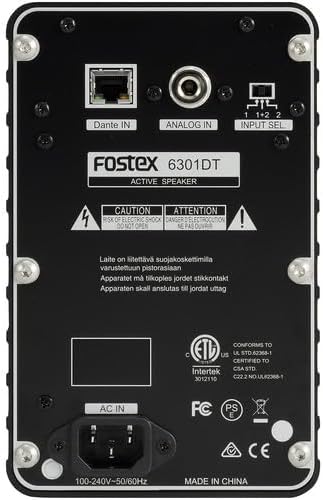
รูปที่ 2: การเชื่อมต่อแผงด้านหลัง
- Dante IN (RJ45): Connects to a Dante network for digital audio input.
- Analog IN (1/4" TS): Connects to an analog audio source using a 1/4-inch TS cable.
- สวิตช์เลือกอินพุต: Selects the audio input channel for monitoring (1, 2, or 1+2 mixed).
- AC ใน: เชื่อมต่อสายไฟ IEC ที่ให้มา
การตั้งค่า
การจัดวาง
Place the Fostex 6301DT on a stable, flat surface. For optimal sound reproduction, position the monitor at ear level and equidistant from your listening position. An optional EB-6301 mounting bracket (not included) allows for easy surface-mounting at various angles.

รูปที่ 3: อดีตampเลอการตั้งค่าแอปพลิเคชัน
การเชื่อมต่อไฟฟ้า
- Ensure the monitor's power button is in the OFF position.
- Connect the supplied IEC power cord to the AC IN port on the rear panel of the monitor.
- เสียบปลายอีกด้านหนึ่งของสายไฟเข้ากับเต้ารับไฟฟ้า AC ที่เหมาะสม
การเชื่อมต่อเสียง
The 6301DT supports both analog and Dante network audio inputs.
- อินพุตแบบอะนาล็อก: Connect your analog audio source (e.g., mixer, audio interface) to the 1/4" TS Analog IN port on the rear panel using a 1/4-inch TS cable.
- Dante Network Input: Connect an RJ45 Ethernet cable from your Dante network switch or device to the Dante IN port on the rear panel.
การดำเนินงาน
การเปิด/ปิดเครื่อง
Press the Power button on the front panel to turn the monitor ON. The power indicator LED will illuminate. Press the button again to turn the monitor OFF.
การปรับระดับเสียง
Rotate the Volume knob on the front panel clockwise to increase the output level and counter-clockwise to decrease it. Start with a low volume setting and gradually increase it to a comfortable listening level.
การเลือกอินพุต
Use the Input Select switch on the rear panel to choose the desired audio source:
- อนาล็อก: Selects the 1/4" TS analog input.
- Dante Channel 1: Monitors the first Dante audio channel.
- Dante Channel 2: Monitors the second Dante audio channel.
- Dante Channel 1+2 (Mixed): Monitors a mix of both Dante channels.
การกำหนดค่าเครือข่าย Dante
For Dante network operation, you will need to use Audinate's Dante Controller software on a computer connected to the same Dante network. This software allows you to route audio signals to the Fostex 6301DT and configure its network settings. The 6301DT supports sampling frequencies of 44.1 kHz, 48 kHz, 88.2 kHz, and 96 kHz.
การซ่อมบำรุง
- การทำความสะอาด: ใช้ผ้าแห้งเนื้อนุ่มเช็ดทำความสะอาดภายนอกจอภาพ ห้ามใช้สารทำความสะอาดที่มีฤทธิ์กัดกร่อน แว็กซ์ หรือตัวทำละลาย
- พื้นที่จัดเก็บ: หากจะจัดเก็บเครื่องเป็นเวลานาน ควรถอดปลั๊กออกและเก็บไว้ในที่แห้งและเย็น หลีกเลี่ยงแสงแดดโดยตรงและอุณหภูมิที่สูงหรือต่ำเกินไป
- การระบายอากาศ : Ensure that the ventilation openings are kept clear of dust and debris.
การแก้ไขปัญหา
| ปัญหา | สาเหตุที่เป็นไปได้ | สารละลาย |
|---|---|---|
| ไม่มีเสียงออก |
|
|
| เสียงเพี้ยน |
|
|
| ปัญหาการเชื่อมต่อ Dante |
|
|
ข้อมูลจำเพาะ

รูปที่ 4: ขนาดผลิตภัณฑ์
| คุณสมบัติ | ข้อมูลจำเพาะ |
|---|---|
| หมายเลขรุ่น | AMS-6301DT |
| ประเภทลำโพง | พาวเวอร์สตูดิโอมอนิเตอร์ |
| ขนาดลำโพง | 4 นิ้ว |
| เส้นผ่านศูนย์กลางวูฟเฟอร์ | 4 นิ้ว |
| Amplifier ประเภท | D-Class |
| กำลังขับสูงสุด | 20 วัตต์ |
| โหมดเอาต์พุตเสียง | สเตอริโอ |
| จำนวนช่องสัญญาณเสียง | 2.0 |
| เทคโนโลยีการเชื่อมต่อ | RJ45 (Dante), 1/4" TS (Analog) |
| โปรโตคอลการเชื่อมต่อ | ดันเต้ |
| รองรับ Sampความถี่ลิง | 44.1/48/88.2/96 กิโลเฮิรตซ์ |
| อัตราส่วนสัญญาณต่อเสียงรบกวน | 85 เดซิเบล |
| แหล่งพลังงาน | สายไฟ |
| วัสดุของตู้หุ้ม | อลูมิเนียมหล่อ |
| สี | สีดำ |
| ขนาดสินค้า (ลึก x กว้าง x สูง) | 4.7" x 7.5" x 4.7" |
| น้ำหนักสินค้า | 5.1 ปอนด์ |
| คุณสมบัติเพิ่มเติม | Auto stand-by function, Recessed front-panel controls |
การรับประกันและการสนับสนุน
ข้อมูลการรับประกัน
The Fostex 6301DT is covered by a การรับประกันแบบจำกัดของผู้ผลิต 1 ปีโปรดเก็บหลักฐานการซื้อไว้เพื่อใช้เรียกร้องการรับประกัน
การสนับสนุนลูกค้า
For technical assistance, troubleshooting, or warranty service, please contact American Music and Sound, the manufacturer, or your authorized Fostex dealer. Refer to the Fostex official webไซต์สำหรับข้อมูลติดต่อฝ่ายสนับสนุนล่าสุด