
1. บทนำ
The Ewent EW1538 Dual Monitor Desk Mount is designed to create an ergonomic and space-saving workspace. This gas spring-powered desk mount allows you to position two monitors (13-27 inches, 2-7 kg each) at your ideal height and viewing angle with ease. Its flexible adjustments help reduce strain on your neck, back, and shoulders, promoting a more comfortable and productive environment. The integrated cable management system keeps your workspace tidy.

Image 1.1: Ewent EW1538 Dual Monitor Desk Mount without monitors.
2. ข้อมูลด้านความปลอดภัย
Please read all instructions carefully before assembly and use. Failure to follow these instructions may result in property damage, serious injury, or death.
- ความจุน้ำหนัก: Do not exceed the maximum weight capacity of 7 kg (15.4 lbs) per monitor. Ensure your monitors are within the specified weight range.
- ขนาดจอภาพ: This mount is suitable for monitors between 13 and 27 inches.
- ความเข้ากันได้ของ VESA: Ensure your monitors have VESA mounting patterns (75x75mm or 100x100mm).
- ความหนาของโต๊ะ: Verify your desk is thick enough and structurally sound to support the combined weight of the mount and monitors.
- จุดบีบคั้น: Be aware of moving parts and potential pinch points during assembly and adjustment. Keep hands clear.
- การประกอบ: Assemble the product exactly as described in this manual. Do not modify the mount.
- เด็ก: ควรกันเด็กให้ออกห่างจากบริเวณประกอบชิ้นส่วน ชิ้นส่วนขนาดเล็กอาจเป็นอันตรายจากการสำลักได้
3. เนื้อหาบรรจุภัณฑ์
Before assembly, ensure all parts are present and undamaged. If any parts are missing or damaged, contact your retailer for assistance.
- โต๊ะทำงาน
- เสาหลัก
- ชุดแขนยึดจอภาพคู่
- แผ่นยึด VESA (2 ชิ้น)
- ชุดอุปกรณ์ฮาร์ดแวร์ (สกรู แหวนรอง ตัวเว้นระยะ)
- Allen Keys / Wrenches
- คลิปการจัดการสายเคเบิล
4. คำแนะนำในการตั้งค่า
Follow these steps to assemble and install your Ewent EW1538 Dual Monitor Desk Mount.
4.1. Attach Base to Pole
- Place the desk base on a stable surface.
- Insert the main pole into the designated slot on the desk base.
- Secure the pole to the base using the provided screws and an Allen key from underneath the base. Tighten firmly.
4.2. Attach Monitor Arm Assembly to Pole
- Slide the dual monitor arm assembly onto the main pole.
- Adjust the arm to your desired initial height and secure it by tightening the locking screw on the back of the arm assembly with an Allen key.

ภาพที่ 4.1: จบแล้วview of the monitor mount components and assembly.
4.3. Attach VESA Plates to Monitors
- วางจอภาพคว่ำหน้าลงบนพื้นผิวที่นุ่มและสะอาดอย่างระมัดระวัง
- ติดตั้งแผ่นยึด VESA ที่ด้านหลังของจอภาพแต่ละจอโดยใช้สกรูและแหวนรองที่เหมาะสมจากชุดอุปกรณ์ ตรวจสอบให้แน่ใจว่าขันสกรูแน่นดีแล้ว แต่อย่าขันแน่นเกินไป

Image 4.2: Detail of VESA plate attachment to a monitor.
4.4. Mount Monitors to Arms
- With assistance, carefully lift each monitor and slide the VESA plate attached to the monitor onto the corresponding arm bracket.
- Ensure the monitor is securely seated on the bracket. Some brackets may have a quick-release or locking mechanism; engage it if present.
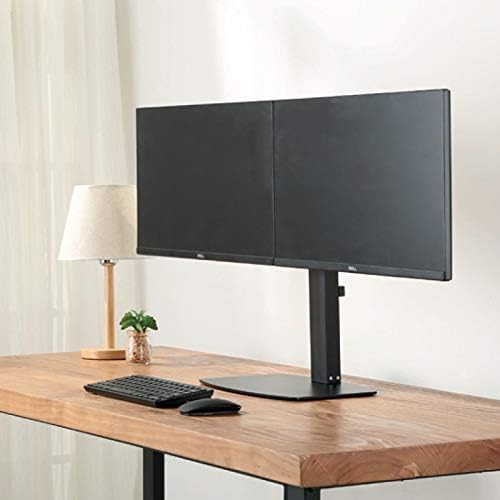
ภาพที่ 4.3: ด้านหน้า view of two monitors mounted on the desk stand.
4.5. ปรับความตึงของสปริงแก๊ส
- The gas spring tension may need adjustment to properly support your monitor's weight.
- Locate the tension adjustment screw on the arm (usually near the VESA plate or the arm pivot point).
- If the monitor sags, turn the screw clockwise to increase tension. If the monitor floats up too easily, turn the screw counter-clockwise to decrease tension. Adjust until the monitor stays in place when moved.
4.6. การจัดการสายเคเบิล
- Route your monitor cables (power, video) through the integrated cable management clips or channels on the monitor arms and down the main pole.
- This helps keep your workspace organized and prevents cable clutter.
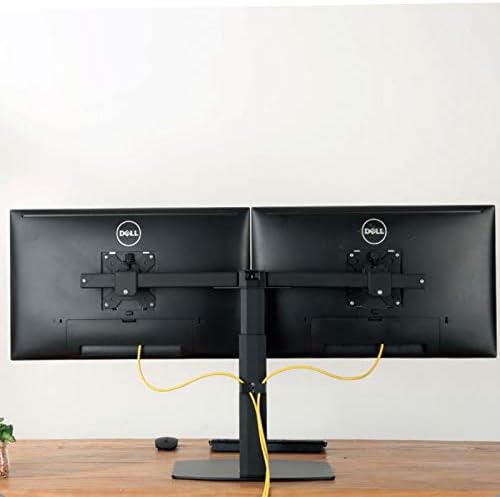
ภาพที่ 4.4: ด้านหลัง view illustrating cable management with monitors mounted.
5. คู่มือการใช้งาน
The Ewent EW1538 offers various adjustments for optimal viewความสะดวกสบาย
- การปรับความสูง: Gently push or pull the monitor up or down to adjust its height. The gas spring mechanism will hold it in place.
- การปรับเอียง: Tilt the monitor screen up or down to reduce glare and find your preferred viewมุมอิง
- การปรับหมุน: หมุนจอภาพไปทางซ้ายหรือขวาเพื่อแชร์หน้าจอหรือปรับแต่ง viewตำแหน่งการวางตำแหน่ง
- การหมุน: หมุนจอภาพ 360 องศาเพื่อสลับระหว่างโหมดแนวนอนและแนวตั้ง

Image 5.1: Monitors adjusted to different orientations (landscape and portrait).
6. การบำรุงรักษา
Regular maintenance ensures the longevity and proper function of your monitor mount.
- การทำความสะอาด: ทำความสะอาดฐานยึดด้วยวัสดุที่อ่อนนุ่มและแห้งamp ผ้า หลีกเลี่ยงน้ำยาทำความสะอาดหรือตัวทำละลายที่มีฤทธิ์กัดกร่อน
- ตรวจสอบการเชื่อมต่อ: ตรวจสอบสกรูและข้อต่อทั้งหมดเป็นระยะเพื่อให้แน่ใจว่าขันแน่น ขันให้แน่นอีกครั้งหากจำเป็น
- สปริงแก๊ส: The gas spring is designed for long-term use and generally requires no maintenance. If adjustment becomes difficult, re-check the tension setting.
7 การแก้ไขปัญหา
If you encounter issues with your monitor mount, refer to the following common solutions:
| ปัญหา | สาเหตุที่เป็นไปได้ | สารละลาย |
|---|---|---|
| ตรวจสอบการหย่อนคล้อยหรือการตกหล่น | แรงตึงของสปริงแก๊สต่ำเกินไปสำหรับน้ำหนักของจอภาพ | เพิ่มแรงตึงของสปริงแก๊สโดยหมุนสกรูปรับตามเข็มนาฬิกา |
| Monitor floats up too easily | แรงดันของสปริงแก๊สสูงเกินไปสำหรับน้ำหนักของจอภาพ | ลดแรงตึงของสปริงแก๊สโดยหมุนสกรูปรับทวนเข็มนาฬิกา |
| Monitors are not level | Minor height discrepancy between arms or VESA plates. | Adjust the individual VESA plate height or arm tilt to level the monitors. |
| ภูเขารู้สึกไม่มั่นคง | Base screws are loose or desk is not sturdy. | Ensure all assembly screws are tightened. Verify desk stability. |
8. ข้อมูลจำเพาะ
- แบบอย่าง: EW1538
- ยี่ห้อ: หายไป
- ความเข้ากันได้ของขนาดหน้าจอ: 13 - 27 นิ้ว
- ความจุน้ำหนัก: 2 - 7 kg (4.4 - 15.4 lbs) per monitor
- ความเข้ากันได้ของ VESA: 75x75มม., 100x100มม.
- ความเคลื่อนไหว: Height adjustment (gas spring), Tilt (up to 15 degrees), Swivel, 360° Rotation
- วัสดุ: โครงสร้างโลหะและพลาสติกที่ทนทาน
- สี: สีดำ
- น้ำหนักผลิตภัณฑ์: ประมาณ 6 กก. (13.2 ปอนด์)
9. การรับประกันและการสนับสนุน
For warranty information or technical support, please refer to the documentation provided with your purchase or visit the official Ewent webเว็บไซต์นี้ โดยปกติแล้วคุณจะพบรายละเอียดการติดต่อฝ่ายบริการลูกค้าได้ที่นั่น