
1. บทนำ
This manual provides detailed instructions for the safe and effective use of the VOLTCRAFT LSG-4. The LSG-4 is a versatile digital multimeter that combines the functions of a wire tracker, signal tracer, continuity tester, and a standard multimeter. It is designed for detecting cables and wires, tracing their routes, and performing various electrical measurements.
2. ข้อมูลด้านความปลอดภัย
Always read and understand all safety warnings and instructions before operating the device. Failure to follow these instructions may result in electric shock, fire, or serious injury.
- ห้ามใช้งานอุปกรณ์หากพบว่าชำรุดเสียหายหรือทำงานผิดปกติ
- โปรดตรวจสอบให้แน่ใจว่าอุปกรณ์ปิดอยู่ก่อนที่จะเชื่อมต่อหรือถอดสายทดสอบ
- Always use the correct function and range for your measurements.
- Adhere to all local and national safety regulations.
- The device is designed for use in dry conditions. Avoid exposure to moisture.
- เก็บให้พ้นจากมือเด็ก
3. สินค้าหมดview
The VOLTCRAFT LSG-4 is a robust and reliable tool for electrical professionals and DIY enthusiasts. It features a tone generator and a highly sensitive inductive receiver for precise cable tracing, even through walls up to 15 cm deep. Its integrated multimeter functions cover standard electrical measurements, making it a comprehensive solution for various tasks. The device is protected by a durable rubber casing, making it suitable for demanding work environments.

Image 1: The VOLTCRAFT LSG-4 device, showing both the main multimeter unit and the inductive probe.
4 ส่วนประกอบ
- LSG-4 DMM Unit: The main digital multimeter unit with display, function dial, and input jacks.
- LSG-4 Probe: The inductive receiver unit for tracing signals.
- นำไปสู่การทดสอบ: Red and black test leads for multimeter functions.
- สายเคเบิล RJ11: For connecting the tone generator to telephone lines or network cables.
- คลิปจระเข้: For connecting the tone generator to bare wires.

Image 2: The LSG-4 multimeter unit with connected test leads and an RJ11 cable, along with crocodile clips.
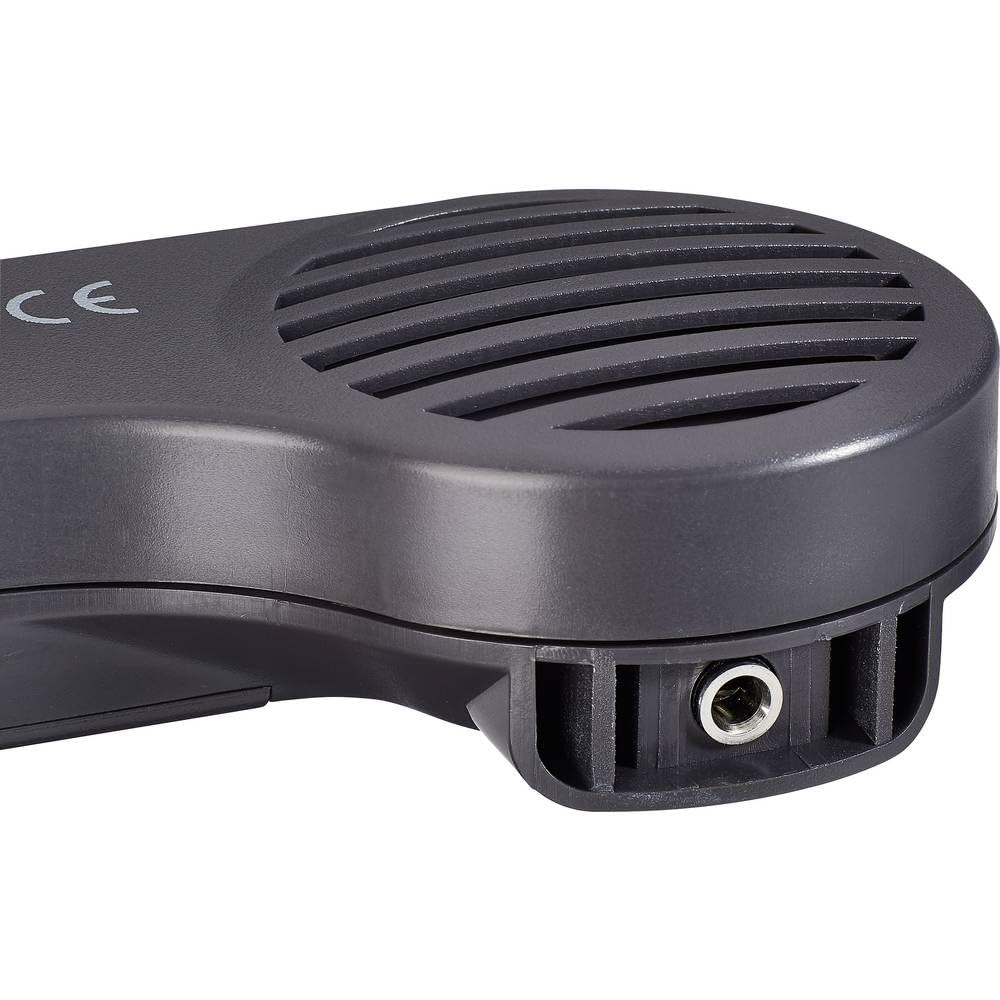
ภาพที่ 3: ภาพระยะใกล้ view of the LSG-4 probe, highlighting its speaker and input jack.
5. การตั้งค่า
5.1 การติดตั้งแบตเตอรี่
The LSG-4 is battery-powered. Open the battery compartment on the back of the DMM unit and the probe unit. Insert the required batteries, ensuring correct polarity. Close the compartment securely.
5.2 Connecting Test Leads (for Multimeter Functions)
For multimeter measurements, insert the red test lead into the VΩmA jack and the black test lead into the COM jack on the DMM unit.
5.3 Connecting Tone Generator (for Wire Tracking)
To use the wire tracking function, connect the tone generator output from the DMM unit to the cable you wish to trace:
- การเชื่อมต่อ RJ11: Plug the RJ11 cable into the dedicated RJ11 port on the DMM unit and the other end into the network or telephone jack of the cable to be traced.
- คลิปจระเข้: Attach the crocodile clips to the tone generator output on the DMM unit, then securely clip them to the bare ends of the wire to be traced.
6. คู่มือการใช้งาน
6.1 Wire Tracking and Signal Tracing
- Connect the tone generator to the cable as described in Section 5.3.
- Turn on the DMM unit and select the 'Tone' function.
- Turn on the LSG-4 probe.
- Adjust the sensitivity of the probe using its control dial to optimize signal detection.
- Move the tip of the probe along the suspected path of the cable. The probe will emit an audible tone when it detects the signal from the tone generator.
- Follow the strongest signal to accurately trace the cable's route.
6.2 ฟังก์ชันของมัลติมิเตอร์
The LSG-4 offers standard multimeter functions. To use these:
- เชื่อมต่อสายทดสอบตามที่อธิบายไว้ในหัวข้อ 5.2
- Turn on the DMM unit and select the desired measurement function (e.g., VAC, วีDC, Ω, Cont).
- Touch the test probes to the circuit or component you wish to measure.
- อ่านค่าการวัดบนจอแสดงผล
- Use the 'Hold' button to freeze the current reading on the display.
- The 'MAX' button can be used to capture the maximum measured value.
7. การบำรุงรักษา
- การทำความสะอาด: ทำความสะอาดอุปกรณ์ด้วยผ้านุ่มและแห้ง ห้ามใช้น้ำยาทำความสะอาดหรือสารละลายที่มีฤทธิ์กัดกร่อน
- การเปลี่ยนแบตเตอรี่: ควรเปลี่ยนแบตเตอรี่เมื่อไฟแสดงสถานะแบตเตอรี่ต่ำปรากฏขึ้นบนหน้าจอ เพื่อให้ได้ค่าการวัดที่แม่นยำ
- พื้นที่จัดเก็บ: เก็บอุปกรณ์ไว้ในที่แห้งและเย็น หลีกเลี่ยงแสงแดดโดยตรงและอุณหภูมิที่สูงหรือต่ำเกินไป ถอดแบตเตอรี่ออกหากเก็บไว้นาน
- การสอบเทียบ: แนะนำให้ทำการสอบเทียบอย่างสม่ำเสมอโดยบุคลากรที่มีคุณสมบัติ เพื่อรักษาความแม่นยำในการวัด
8 การแก้ไขปัญหา
- ไม่มีจอแสดงผล/พลังงาน: ตรวจสอบการติดตั้งแบตเตอรี่และให้แน่ใจว่าแบตเตอรี่ได้รับการชาร์จแล้ว
- การอ่านค่าที่ไม่ถูกต้อง: Ensure test leads are properly connected and the correct function/range is selected. Replace batteries if low.
- Weak/No Signal during Tracing: Ensure the tone generator is connected correctly and active. Adjust probe sensitivity. Check for excessive interference from other electrical sources.
- Continuity Test Fails: Ensure the circuit is de-energized. Check test leads for damage.
9. ข้อมูลจำเพาะ
| คุณสมบัติ | ข้อมูลจำเพาะ |
|---|---|
| ยี่ห้อ | VOLTCRAFT |
| แบบอย่าง | VC-10906565 |
| แหล่งพลังงาน | ใช้พลังงานจากแบตเตอรี่ |
| สไตล์ | ดิจิตอล |
| ประเภทการวัด | Multimeter (Wire Tracker, Signal Tracer, Continuity Tester) |
| Cable Tracing Depth | Up to 15 cm in walls |
| การปฏิบัติตาม | ซีอี, โรเอชเอส |
| ประเทศต้นกำเนิด | จีน |
| GTIN | 04053199991488 |
10. การรับประกันและการสนับสนุน
VOLTCRAFT products are designed for reliability and performance. For warranty information, please refer to the documentation included with your purchase or visit the official VOLTCRAFT website. For technical support, troubleshooting assistance, or spare parts, please contact VOLTCRAFT customer service or your authorized dealer.
Note: Specifications are subject to change without notice. Always refer to the latest product documentation for the most accurate information.