
1. บทนำ
The Amcrest AMCPFA134-B Waterproof Junction Box is designed to provide a secure and weather-resistant enclosure for the wiring and connections of compatible Amcrest Bullet Cameras. This junction box helps protect cables from environmental elements and tampering, ensuring a clean and professional installation.
2. คุณสมบัติของผลิตภัณฑ์
- ความเข้ากันได้: Fits most Amcrest Bullet Cameras with a 1.3-inch / 3.5-inch diameter.
- การจัดการสายเคเบิล: Designed for hiding wires and connectors, offering rear and bottom access for cable routing.
- การออกแบบกันน้ำ: Provides a waterproof enclosure to protect internal connections.
- โครงสร้างทนทาน: Made from Aluminum and SECC for long-lasting performance.
3. เนื้อหาบรรจุภัณฑ์
ตรวจสอบว่าส่วนประกอบทั้งหมดมีอยู่ก่อนการติดตั้ง:
- Amcrest AMCPFA134-B Waterproof Junction Box
- สกรูยึดและปลั๊กผนัง
- ปะเก็นยาง
4. การตั้งค่าและการติดตั้ง
Follow these steps to properly install your Amcrest AMCPFA134-B Waterproof Junction Box with a compatible bullet camera.
- การตระเตรียม: Ensure the mounting surface is clean and capable of supporting the weight of the junction box and camera.
- การทำเครื่องหมายตำแหน่งรูเจาะ: Place the junction box on the desired mounting location. Use a pencil or marker to mark the positions for the mounting screws.
- การเจาะ: Drill pilot holes at the marked locations. If mounting on masonry or concrete, insert the provided wall plugs into the drilled holes.
- การเดินสายเคเบิล: Route the camera's cables through the designated cable entry points on the junction box (rear or bottom access).
- Mounting the Junction Box: Secure the junction box to the mounting surface using the provided screws. Ensure it is firmly attached.
- การเชื่อมต่อกล้อง: Connect the camera's cables inside the junction box. Ensure all connections are secure and properly insulated.
- การติดตั้งกล้อง: Mount the compatible Amcrest bullet camera onto the junction box. The junction box has pre-drilled holes designed to align with various Amcrest bullet camera bases. Secure the camera using its mounting screws.
- การปิดผนึก: Ensure the rubber gasket is properly seated between the junction box and the camera base to maintain a waterproof seal.
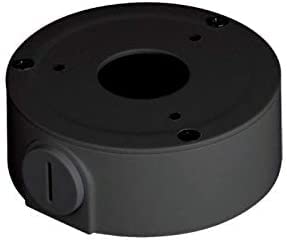
Image of the Amcrest AMCPFA134-B Waterproof Junction Box, designed for secure camera mounting and cable management.
5. คู่มือการใช้งาน
The AMCPFA134-B is a passive accessory designed to house and protect camera wiring. Once installed, it requires no direct operation. Its function is to provide a secure and waterproof environment for your camera's connections.
6. การบำรุงรักษา
To ensure the longevity and effectiveness of your junction box:
- การตรวจสอบเป็นระยะ: Annually inspect the junction box for any signs of wear, damage, or loose connections.
- การทำความสะอาด: Gently wipe the exterior of the junction box with a damp ผ้าสำหรับเช็ดสิ่งสกปรกหรือเศษสิ่งสกปรก หลีกเลี่ยงการใช้สารเคมีที่รุนแรง
- ความสมบูรณ์ของซีล: Check the rubber gasket for cracks or deterioration, especially in harsh weather conditions, to ensure the waterproof seal remains intact.
7 การแก้ไขปัญหา
If you experience issues with your camera system after installing the junction box, consider the following:
- No Power/Signal: Carefully open the junction box and verify that all cable connections are secure and correctly wired. Ensure no wires are pinched or damaged.
- การรั่วซึมของน้ำ: If moisture is found inside the box, check the rubber gasket for proper seating and any damage. Ensure all screws are tightened evenly to create a complete seal.
- การติดตั้งแบบหลวม: If the junction box feels loose, re-tighten the mounting screws. If the wall plugs are compromised, consider using new ones or relocating the box slightly.
8. ข้อมูลจำเพาะ
| คุณลักษณะ | รายละเอียด |
|---|---|
| หมายเลขรุ่น | AMCPFA134-B |
| ยี่ห้อ | แอมเครสต์ |
| วัสดุ | Aluminum & SECC |
| สี | สีดำ |
| ประเภทการเสร็จสิ้น | แมทต์ |
| ประเภทการติดตั้ง | สกรูเข้า |
| น้ำหนักสินค้า | 0.29 กิโลกรัม |
| ยูพีซี | 854088008256 |
| GTIN | 854088008256 |
9. การรับประกันและการสนับสนุน
การรับประกัน: This product comes with a 1-Year Warranty provided by Amcrest.
สนับสนุน: For technical assistance, troubleshooting, or warranty claims, please visit the official Amcrest support website or contact their customer service directly. Refer to the Amcrest webเว็บไซต์สำหรับข้อมูลติดต่อและทรัพยากรสนับสนุนล่าสุด