
1. บทนำ
The EPEVER Tracer-BN Series MPPT solar charge controller is designed for solar power systems, featuring advanced Maximum Power Point Tracking (MPPT) technology. This manual provides essential instructions for the Tracer3215BN model, ensuring efficient and safe operation of your solar charging system. It is suitable for 12V/24V battery systems and supports a maximum PV input voltage ของ 150V

ภาพ: ด้านหน้า view of the EPEVER MPPT Charge Controller Tracer3215BN.
2. คำแนะนำด้านความปลอดภัย
Observe the following safety guidelines during installation and operation to prevent damage to the controller or injury:
- Ensure proper wiring polarity for all connections (PV, battery, load).
- Do not exceed the maximum PV input voltagอี 150VDC
- Connect the battery first before connecting solar panels or loads.
- The controller features multiple electronic protections, including:
- การป้องกันไฟฟ้าลัดวงจร PV
- พีวีโอเวอร์โวลtagการป้องกันสัญญาณเตือนอิเล็กทรอนิกส์
- PV current limiting protection
- การป้องกันขั้วไฟฟ้าย้อนกลับ
- การป้องกันการชาร์จเกินแบตเตอรี่
- แบตเตอรี่ป้องกันการคายประจุ
- การป้องกันขั้วแบตเตอรี่กลับด้าน
- การป้องกันโหลดเกิน
- โหลดป้องกันการลัดวงจร
- ระบบป้องกันความร้อนสูงเกินไป
- Install the controller in a well-ventilated area to ensure adequate heat dissipation.
- Avoid exposing the controller to direct sunlight, moisture, or corrosive environments.
3. คุณสมบัติของผลิตภัณฑ์
The Tracer3215BN controller incorporates advanced features for optimal solar system performance:
- เทคโนโลยี MPPT ขั้นสูง: High tracking efficiency (≥ 99.5%) and peak conversion efficiency (98%).
- กระบวนการเร่งด่วน: Ultra-fast tracking speed and accurate Maximum Power Point (MPP) recognition.
- Wide MPP Operating Voltagอี ช่วง: Adapts to various solar panel configurations.
- PV Current Limiting: Reliable automatic PV current limiting function.
- การออกแบบที่ทนทาน: Die-cast aluminum housing for excellent heat dissipation and extended lifespan.
- ความเข้ากันได้ของแบตเตอรี่: Supports Sealed, Gel, Flooded, and User-defined battery types. Includes battery temperature compensation.
- Flexible Load Control: Multiple load working modes: Manual Control, Light ON/OFF, Light On+Timer, and Time Control.
- การติดตามข้อมูล: Real-time energy statistics and data monitoring.
- การสื่อสาร: RS485 port with industrial standard MODBUS open architecture for communication with MT50, APP, or PC software.
- อัพเกรดเฟิร์มแวร์: รองรับการอัปเกรดเฟิร์มแวร์เพื่อการปรับปรุงในอนาคต

Image: Visual summary of the Tracer-BN series features.
4. Components and Ports Identification
Familiarize yourself with the controller's external components and connection ports:
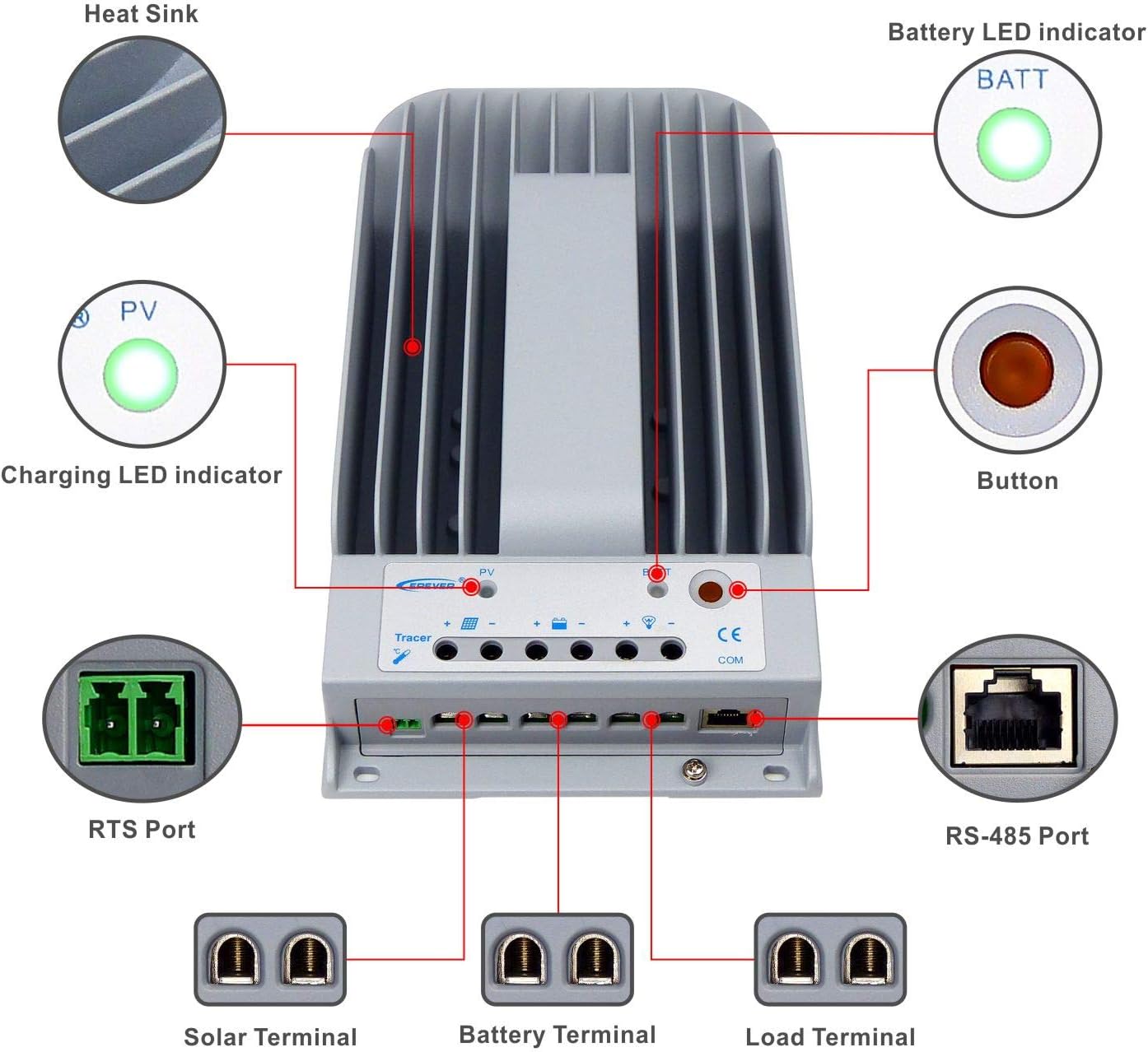
Image: Labeled diagram of the controller's external features.
| รายการ | ชื่อ | รายการ | ชื่อ |
|---|---|---|---|
| 1 | แผ่นระบายความร้อน | 6 | โหลดเทอร์มินัล |
| 2 | ไฟ LED แสดงสถานะการชาร์จ | 7 | พอร์ต RS-485 |
| 3 | พอร์ต RTS | 8 | ปุ่ม |
| 4 | เทอร์มินัลโซล่าเซลล์ | 9 | ไฟ LED แบตเตอรี่ |
| 5 | ขั้วแบตเตอรี่ |
คำอธิบาย:
- RTS Port (3): Connection for a Remote Temperature Sensor to remotely detect battery temperature.
- RS-485 Port (7): Used to monitor the controller via PC and update controller software using an RS485 (RJ45 Interface) connection.
5. การตั้งค่าและการติดตั้ง
Follow these steps for proper installation of your Tracer3215BN controller:
- การติดตั้ง: Mount the controller vertically on a flat surface in a well-ventilated indoor area, away from direct sunlight, high temperatures, and moisture. Ensure sufficient space around the heat sink for air circulation. The mounting dimensions are 130mm x 204mm with Φ4.7 mounting holes.
- ลำดับการเดินสายไฟ: Connect the system components in the following sequence to ensure safety and proper operation:
- Step 1: Connect the Battery: Connect the battery to the controller's battery terminals. Ensure correct polarity. The controller will detect the system voltage (12V/24V auto work).
- Step 2: Connect the Solar Panel: Connect the solar panel array to the controller's solar terminals. Ensure correct polarity.
- Step 3: Connect the Load: เชื่อมต่อโหลด DC เข้ากับขั้วต่อโหลดของตัวควบคุม ตรวจสอบให้แน่ใจว่าขั้วถูกต้อง
- ขนาดสายเคเบิล: Use appropriate cable sizes. For the Tracer3215BN, a power cable size of 6AWG (16mm²) is recommended.
- การต่อลงดิน: The controller features common negative grounding. Ensure proper grounding according to local electrical codes.
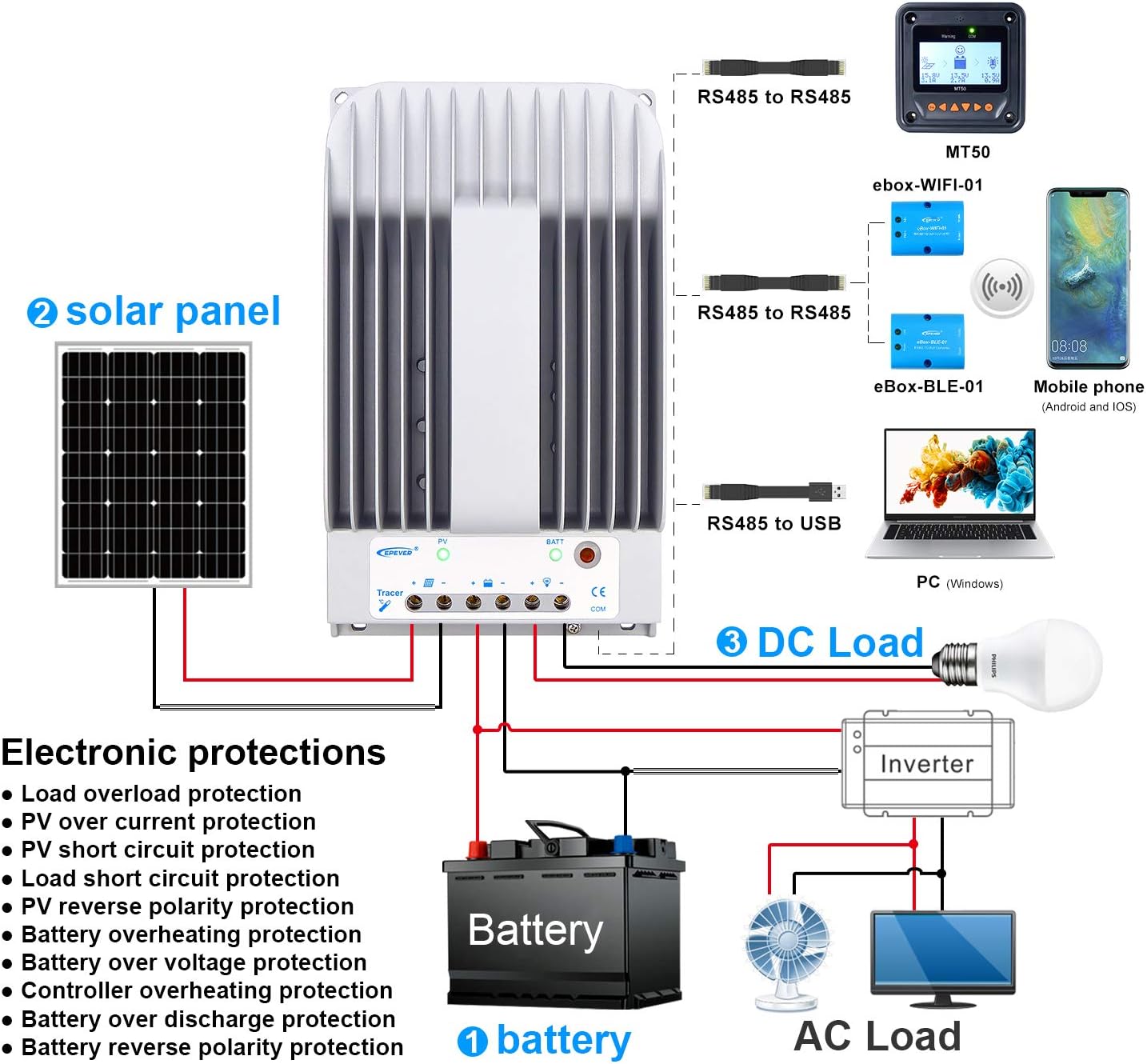
Image: Wiring diagram illustrating connections for battery, solar panel, and DC load.

Image: Controller dimensions for mounting reference.
6. คู่มือการใช้งาน
Once installed, the controller operates automatically. However, you can configure settings and monitor performance:
- การเลือกประเภทแบตเตอรี่: The controller supports Sealed, Gel, Flooded, and User-defined battery types. Select the appropriate type through the controller's interface (if available) or via external monitoring tools (MT50, APP, PC software) to ensure correct charging parameters.
- Load Working Modes: Configure the DC load output behavior using the available modes:
- ควบคุมด้วยมือ: Turn the load ON/OFF manually.
- เปิด/ปิดไฟ: Load turns ON at dusk and OFF at dawn.
- Light On+Timer: Load turns ON at dusk and stays ON for a set duration.
- การควบคุมเวลา: Load operates during specified time periods.
- การตรวจสอบและการกำหนดค่า: Use the optional MT50 remote meter, mobile application, or PC software connected via the RS485 port to monitor real-time data, view energy statistics, and adjust parameters.
7. การบำรุงรักษา
Regular maintenance ensures the longevity and optimal performance of your charge controller:
- ตรวจสอบการเชื่อมต่อ: Periodically check all wiring connections (PV, battery, load) for tightness and corrosion. Loose connections can cause overheating and damage.
- ตัวควบคุมที่สะอาด: Keep the controller's exterior clean and free from dust and debris. Ensure the heat sink fins are clear for effective cooling.
- การระบายอากาศ : Verify that the installation area remains well-ventilated and free from obstructions that could impede airflow around the controller.
- ประสิทธิภาพการทำงานของจอภาพ: Regularly check the controller's display or monitoring software for any error codes or unusual readings.
- สุขภาพแบตเตอรี่: Ensure your battery bank is properly maintained according to the battery manufacturer's guidelines.
8 การแก้ไขปัญหา
If you encounter issues with your Tracer3215BN controller, consider the following:
- ไม่มีการชาร์จ:
- Check PV panel connections and ensure correct polarity.
- ตรวจสอบแรงดันไฟฟ้าขาเข้า PVtage is within the controller's operating range (Max 150VDC).
- Ensure sufficient sunlight on the solar panels.
- โหลดไม่ทำงาน:
- ตรวจสอบการเชื่อมต่อโหลดและตรวจสอบให้แน่ใจว่าขั้วถูกต้อง
- ตรวจสอบปริมาณแบตเตอรี่tage อยู่เหนือระดับต่ำtagเกณฑ์การตัดการเชื่อมต่อ
- ตรวจสอบโหมดการทำงานของโหลดที่เลือกไว้
- Ensure the load current does not exceed the rated discharge current (30A).
- ตัวควบคุมร้อนเกินไป:
- ตรวจสอบให้แน่ใจว่ามีการระบายอากาศที่เพียงพอรอบๆ ตัวควบคุม
- Reduce the load or PV input if consistently operating at maximum capacity in high ambient temperatures.
- รหัสข้อผิดพลาด: Refer to the controller's display or monitoring software for specific error codes and consult the EPEVER official documentation for their meaning and resolution.
9. ข้อมูลจำเพาะทางเทคนิค
Key technical data for the Tracer3215BN MPPT Charge Controller:

ภาพ: ตารางข้อมูลจำเพาะทางเทคนิคโดยละเอียด
| พารามิเตอร์ | ค่า |
|---|---|
| ระบบที่กำหนดฉบับที่tage | 12VDC / 24VDC Auto work |
| กระแสไฟชาร์จที่กำหนด | 30เอ |
| จัดอันดับการปลดปล่อยปัจจุบัน | 30เอ |
| แม็กซ์ อินพุตพลังงานแสงอาทิตย์Voltage | 150VDC |
| กำลังไฟฟ้าขาเข้าสูงสุดจากแผงโซลาร์เซลล์ (แบตเตอรี่ 12V) | 390วัตต์ |
| กำลังไฟฟ้าขาเข้าสูงสุดจากแผงโซลาร์เซลล์ (แบตเตอรี่ 24V) | 780วัตต์ |
| Self-consumption (12V) | ≤60มิลลิแอมป์ |
| Self-consumption (24V) | ≤30มิลลิแอมป์ |
| มิติการติดตั้ง | 130มม. x 204มม. |
| ขนาดรูยึด | Φ4.7 |
| สายไฟ | 6AWG (16 มม.²) |
| มิติ | 281มม. x 160มม. x 60มม. |
| น้ำหนัก | 2.3กก. |
| อุณหภูมิสภาพแวดล้อมการทำงาน | -35℃ ~ +55℃ |
| ความชื้นสัมพัทธ์ | ≤95% (NC) |
| สิ่งที่แนบมา | IP30 |
| การต่อลงดิน | เชิงลบทั่วไป |
| พอร์ตการสื่อสาร | RS485 / RJ45 Interface |
10. ข้อมูลการรับประกัน
For detailed warranty terms and conditions, please refer to the product packaging, the official EPEVER website, or contact your authorized dealer. Warranty coverage typically includes defects in materials and workmanship under normal use.
11. การสนับสนุน
Should you require technical assistance, have questions regarding installation, operation, or troubleshooting, please contact:
- EPEVER Customer Service: Refer to the official EPEVER webเว็บไซต์สำหรับรายละเอียดการติดต่อ
- Authorized Sales Agent: GolandCentury (as mentioned in product information).
When contacting support, please have your product model (Tracer3215BN) and any relevant error codes or observations ready.