
1. สินค้าหมดview
The VENTION USB 3.0 Hub (Model CHL) is a compact and portable 4-port USB splitter designed to expand the connectivity of your laptop or PC. It offers high-speed data transfer and broad compatibility with various USB devices.
คุณสมบัติหลัก:
- การขยายพอร์ต 4 พอร์ต: Provides four additional USB ports for connecting multiple peripherals simultaneously.
- การถ่ายโอนข้อมูลความเร็วสูง: Utilizes USB 3.0 technology for data sync speeds up to 5Gbps, which is up to 10 times faster than USB 2.0.
- ปลั๊กแอนด์เพลย์: Requires no driver installation for immediate use.
- External Power Support: Includes a micro USB port for optional external power supply when connecting power-hungry devices. Avoid power adapters exceeding 5V/2A.
- ขนาดกะทัดรัดและพกพาสะดวก: Ultra-slim and lightweight design for easy transport and use on the go.
- ความเข้ากันได้กว้าง: Supports Windows 10/8/7/Vista/XP, Mac OS x 10.6-10.12 or later, and Linux 2.6.14 or later.
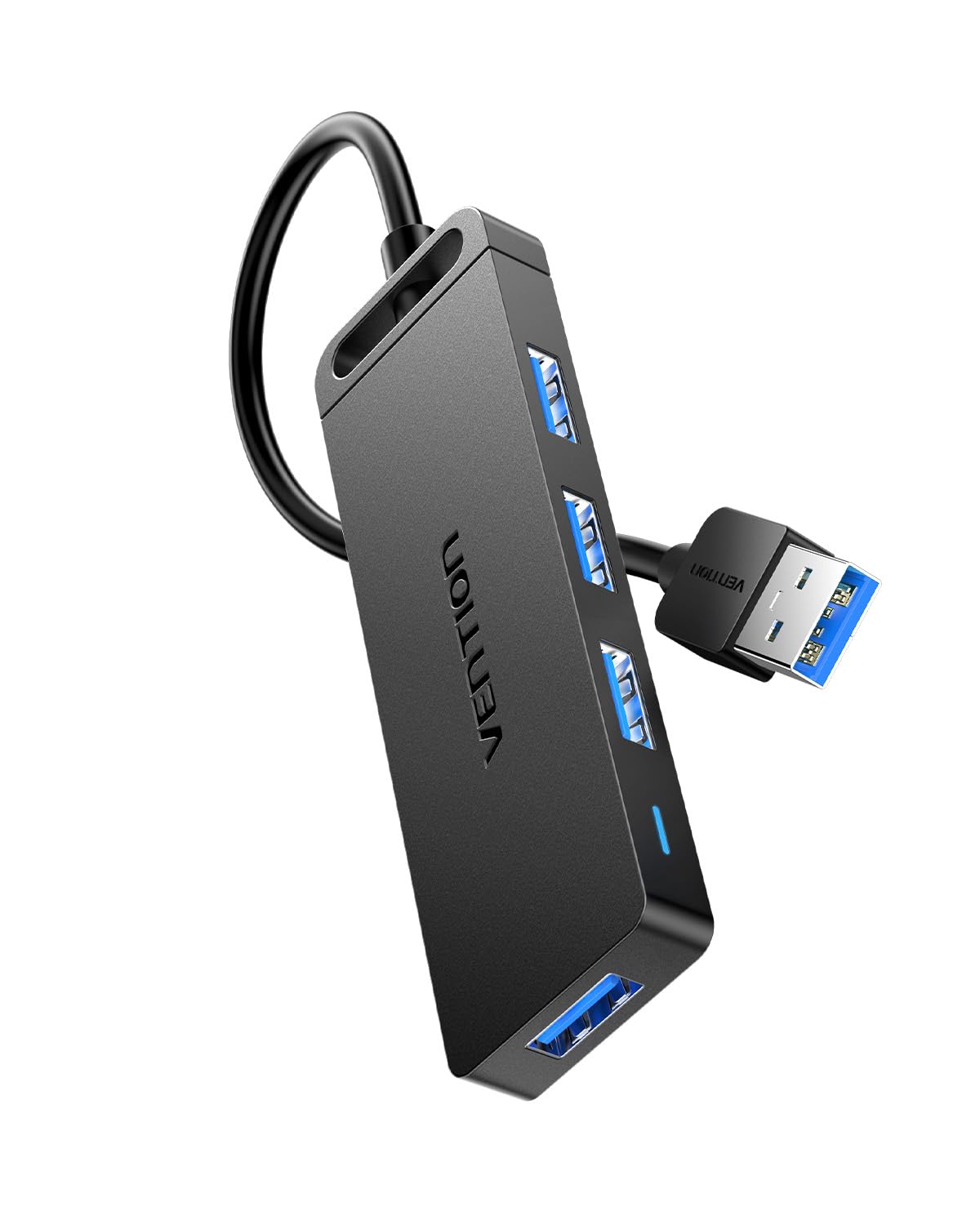
Figure 1: VENTION USB 3.0 Hub (Model CHL)
2. คำแนะนำในการตั้งค่า
Follow these steps to set up your VENTION USB 3.0 Hub:
- เชื่อมต่อกับอุปกรณ์โฮสต์: Plug the USB-A connector of the VENTION USB 3.0 Hub into an available USB 3.0 port on your laptop, PC, or other compatible host device. The hub is plug-and-play, so no additional drivers are required.
- สังเกตไฟแสดงสถานะ: Once connected, a blue indicator light on the hub will illuminate, signifying that the device is powered and operational.
- แหล่งจ่ายไฟภายนอกเสริม: If you plan to connect power-hungry devices such as external hard drives, connect a micro USB power adapter (not included) to the micro USB port on the hub. Ensure the power adapter does not exceed 5V/2A to prevent damage.

Figure 2: Connecting the USB Hub to a laptop.
Video 1: Demonstrates connecting the VENTION USB 3.0 Hub to a laptop, showing the indicator light, internal chip, data transfer capabilities, and smart phone charging support.
3. คู่มือการใช้งาน
Once the hub is connected, you can begin using its ports:
- อุปกรณ์เชื่อมต่อ: Insert your USB devices (e.g., flash drives, external hard drives, mouse, keyboard, printer) into any of the four available USB 3.0 ports on the hub.
- การถ่ายโอนข้อมูล: The hub supports high-speed data transfer up to 5Gbps. This allows for quick transfer of large files, such as a 1GB file ในเวลาประมาณ 3 วินาที
- การชาร์จ: The USB 3.0 ports can also support charging for smart phones and other compatible devices, especially when the hub is connected to an external power source.
- ความเข้ากันได้แบบย้อนกลับ: The hub is backward compatible with USB 2.0 and USB 1.0 devices, ensuring versatility with older peripherals, though data transfer speeds will be limited to the device's capabilities.
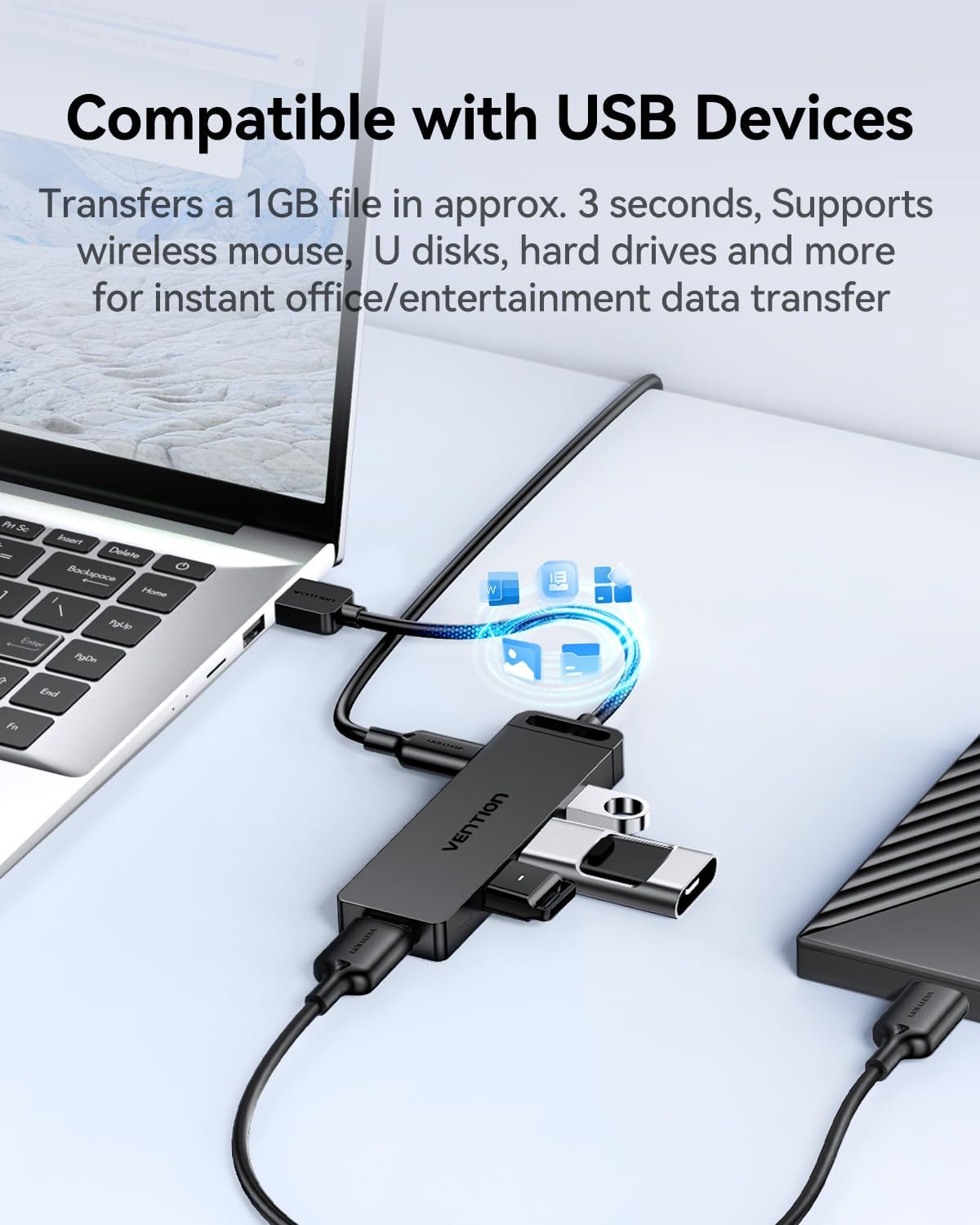
Figure 3: The VENTION USB 3.0 Hub connected to a laptop with multiple USB devices.

Figure 4: The 4-in-1 USB 3.0 Multiport Hub helps maintain a tidy workspace by consolidating connections.
Video 2: Shows the VENTION USB 3.0 Hub in use, connecting multiple devices to a tablet and demonstrating its utility.
4. การบำรุงรักษา
To ensure the longevity and optimal performance of your VENTION USB 3.0 Hub, follow these maintenance guidelines:
- การทำความสะอาด: Use a soft, dry cloth to wipe the exterior of the hub. Avoid liquid cleaners or abrasive materials that could damage the surface or internal components.
- พื้นที่จัดเก็บ: เมื่อไม่ได้ใช้งาน ให้เก็บฮับไว้ในที่แห้งและเย็น หลีกเลี่ยงแสงแดดโดยตรงและอุณหภูมิที่สูงหรือต่ำเกินไป
- การดูแลสายเคเบิล: Avoid bending or twisting the integrated USB cable excessively to prevent internal wire damage.
- การกระจายความร้อน: The hub features a durable, scratch-resistant ABS shell designed to improve heat dissipation. Ensure it is not covered or placed in an enclosed space during operation to allow for proper airflow.

Figure 5: The durable ABS shell of the VENTION USB 3.0 Hub is designed for effective heat dissipation.
5 การแก้ไขปัญหา
If you encounter issues with your VENTION USB 3.0 Hub, refer to the following common problems and solutions:
- ไม่รู้จักอุปกรณ์:
- ตรวจสอบให้แน่ใจว่าเสียบฮับเข้ากับพอร์ต USB ของคอมพิวเตอร์อย่างแน่นหนาแล้ว
- ลองเชื่อมต่อฮับเข้ากับพอร์ต USB อื่นบนคอมพิวเตอร์ของคุณ
- รีสตาร์ทคอมพิวเตอร์ของคุณและเชื่อมต่อฮับอีกครั้ง
- If connecting a power-hungry device (e.g., external HDD), ensure an external micro USB power adapter (5V/2A max) is connected to the hub.
- ความเร็วในการถ่ายโอนข้อมูลช้า:
- Verify that both the hub and your connected device support USB 3.0 for optimal speeds. If either is USB 2.0, speeds will be limited to USB 2.0 rates.
- Ensure the hub is connected to a USB 3.0 port on your computer (often identified by a blue interior).
- Avoid connecting too many power-hungry devices simultaneously without an external power supply.
- การเชื่อมต่อไม่ต่อเนื่อง:
- ตรวจสอบการเชื่อมต่อสายเคเบิลทั้งหมดว่าหลวมหรือไม่
- Ensure the USB cable of the hub is not damaged.
- Test with different USB devices to isolate if the issue is with a specific peripheral.
If these steps do not resolve the issue, please contact VENTION customer service for further assistance.
6. ข้อมูลจำเพาะ
| คุณสมบัติ | รายละเอียด |
|---|---|
| ยี่ห้อ | เวนชั่น |
| หมายเลขรุ่น | CHL |
| ขนาดสินค้า | 3.9 x 1.2 x 0.4 นิ้ว |
| น้ำหนักสินค้า | 1.38 ออนซ์ |
| ฮาร์ดแวร์อินเตอร์เฟซ | ยูเอสบี 3.0 |
| ความเร็วในการถ่ายโอนข้อมูล | สูงสุดถึง 5Gbps |
| คุณสมบัติพิเศษ | Fast Data Transfer, Heat Resistant, Indicator Light, Lightweight, Portable |
| อุปกรณ์ที่รองรับ | Computers, Laptops, Keyboards, Mouse, USB sound cards, Flash Drives, HDDs, Printers |
| แหล่งจ่ายไฟ | USB Bus-powered; Micro USB for optional external power (5V/2A max) |
| ระบบปฏิบัติการ | Windows 10/8/7/Vista/XP, Mac OS x 10.6-10.12+, Linux 2.6.14+ |
7. การรับประกันและการสนับสนุน
The VENTION USB 3.0 Hub (Model CHL) comes with a รับประกัน 1 ปี นับจากวันที่ซื้อ การรับประกันนี้ครอบคลุมข้อบกพร่องในการผลิต และรับรองว่าผลิตภัณฑ์เป็นไปตามมาตรฐานประสิทธิภาพที่กำหนดไว้ภายใต้การใช้งานปกติ
For any questions, technical support, or warranty claims, please contact VENTION customer service. You can typically find contact information on the product packaging or the official VENTION webเว็บไซต์.