
Thsinde TH053
Thsinde 19B Autoranging Digital Multimeter User Manual
รุ่น: TH053
การแนะนำ
The Thsinde 19B Autoranging Digital Multimeter is a high-performance, high-precision, and highly reliable battery-driven automatic digital multimeter. Designed for professional electrical engineers, hobbyists, and home users, it offers a wide range of measurement capabilities including AC/DC voltage, AC/DC current, resistance, capacitance, frequency, temperature, diode, and continuity tests. Its robust design, large LCD display with backlight, and advanced features like True RMS measurement make it an ideal tool for laboratories, factories, and general electrical troubleshooting.
ข้อมูลด้านความปลอดภัย
โปรดอ่านและทำความเข้าใจข้อมูลด้านความปลอดภัยทั้งหมดก่อนใช้งานมัลติมิเตอร์นี้ การไม่ปฏิบัติตามคำแนะนำเหล่านี้อาจส่งผลให้เกิดไฟฟ้าช็อต ไฟไหม้ หรือความเสียหายต่อมิเตอร์ได้
- ตรวจสอบให้แน่ใจเสมอว่าสายทดสอบเชื่อมต่ออย่างถูกต้องและสวิตช์ฟังก์ชันถูกตั้งค่าเป็นช่วงที่ถูกต้องก่อนที่จะทำการวัดใดๆ
- อย่าเกินค่าอินพุตสูงสุดสำหรับช่วงใดๆ
- ใช้ความระมัดระวังอย่างยิ่งเมื่อทำงานกับ voltages สูงกว่า 30V AC RMS, 42V peak หรือ 60V DC ปริมาตรเหล่านี้tagอาจทำให้เกิดอันตรายจากการช็อตได้
- ก่อนที่จะวัดกระแส ให้แน่ใจว่าวงจรถูกตัดพลังงานและมิเตอร์เชื่อมต่อแบบอนุกรมกับโหลด
- ควรตัดการเชื่อมต่อสายทดสอบออกจากวงจรทุกครั้งก่อนเปลี่ยนตำแหน่งสวิตช์ฟังก์ชัน
- ห้ามใช้มิเตอร์หากพบว่าชำรุด หรือสายวัดชำรุด
- เปลี่ยนแบตเตอรี่เมื่อไฟแสดงสถานะแบตเตอรี่อ่อนปรากฏขึ้นเพื่อให้แน่ใจว่าการอ่านค่าแม่นยำ
- The multimeter features a ceramic insurance tube for circuit protection. Do not attempt to bypass or modify this safety feature.
เนื้อหาแพ็คเกจ
ตรวจสอบว่ามีสินค้าทั้งหมดที่ระบุไว้ด้านล่างอยู่ในแพ็คเกจของคุณ:
- Thsinde 19B Digital Multimeter
- สายทดสอบ (สีแดงและสีดำ)
- 9V Battery (pre-installed or included)
- Temperature Probe (Thermocouple)
- Protective PVC Case / Carrying Pouch
- คู่มือการใช้งาน (เอกสารนี้)

Image: The Thsinde 19B Digital Multimeter shown with its included accessories, including the test leads, 9V battery, and a protective carrying case.
สินค้าเกินview
Familiarize yourself with the components of your Thsinde 19B Digital Multimeter.

Image: A detailed diagram labeling the various parts of the multimeter, including the Bright larger LCD, Range button, Hold/Light button, Select button, Function switch, 10A Jack, uA/mA Jack, COM Jack, Input Jack, Relative button, Hz/Duty button, Max/Min button, and Rubble sleeve.
- จอแสดงผล LCD: Large, clear, and backlit display for easy reading of measurements.
- สวิตช์ฟังก์ชั่น: Rotary dial to select the desired measurement function (e.g., Voltag(เช่น กระแสไฟฟ้า ความต้านทาน อุณหภูมิ)
- แจ็คอินพุต:
- คอม (Common) แจ็ค: สำหรับสายวัดทดสอบสีดำ
- แจ็ค VΩHz: สำหรับสายวัดสีแดงเมื่อทำการวัดปริมาตรtage, ความต้านทาน, ความถี่, ความจุ, ไดโอด และความต่อเนื่อง
- mAµA Jack: For the red test lead when measuring small currents (milliamperes, microampเอเรส)
- แจ็ค 10A: For the red test lead when measuring large currents (up to 10 Ampเอเรส)
- ปุ่ม:
- HOLD/Light: Freezes the current display reading; long press activates/deactivates backlight.
- พิสัย: Manually selects the measurement range (overrides autoranging).
- RELΔ (Relative): วัดความแตกต่างระหว่างค่าที่บันทึกไว้กับค่าที่อ่านได้ในปัจจุบัน
- เฮิรตซ์/%: Toggles between frequency and duty cycle measurement.
- สูงสุด/นาที: บันทึกค่าสูงสุดและค่าต่ำสุด
- เลือก: Toggles between different measurement types within a single function switch position (e.g., AC/DC voltage, ไดโอด/ความต่อเนื่อง)
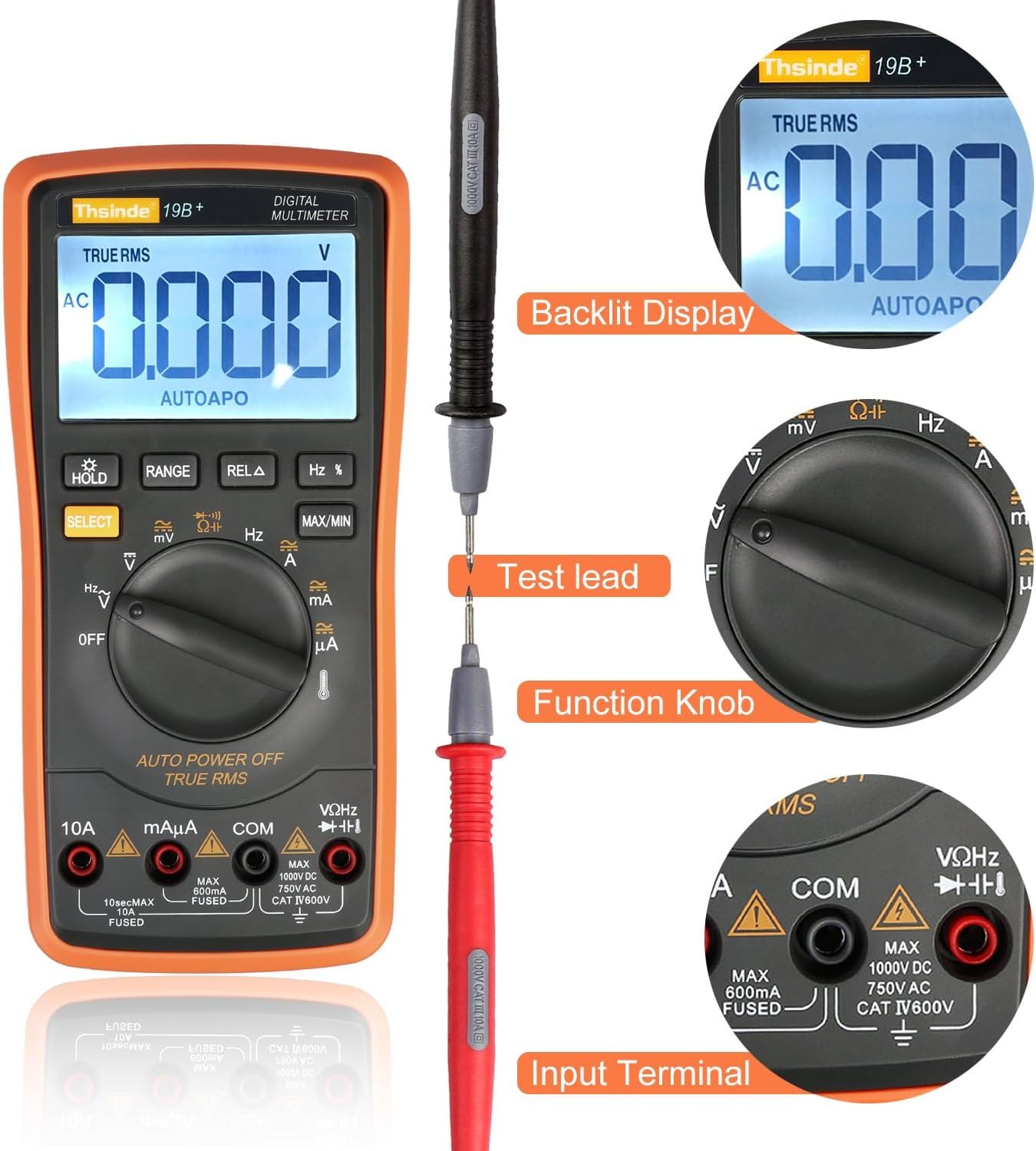
Image: This image highlights the backlit display, the connection of a test lead, the function knob, and the input terminals of the multimeter.

ภาพ: ภายใน view of the multimeter, revealing its double-sided gold plated PCB board, intelligence IC chips, electrolytic capacitors, high-precision manganese copper resistance, double explosion-proof ceramic tube, protection resistors, cell contact point, temperature sensing, and solid tester lead input receptacles.
การตั้งค่า
1. การติดตั้งแบตเตอรี่
The Thsinde 19B Multimeter typically comes with a 9V battery pre-installed or included. If not installed, follow these steps:
- ตรวจสอบให้แน่ใจว่ามัลติมิเตอร์ปิดอยู่
- ค้นหาฝาครอบช่องใส่แบตเตอรี่ที่ด้านหลังของมิเตอร์
- ใช้ไขควงถอดสกรูที่ยึดฝาครอบออก
- ถอดฝาครอบออกอย่างระมัดระวัง
- ต่อแบตเตอรี่ 9V เข้ากับคลิปหนีบแบตเตอรี่ โดยสังเกตขั้วให้ถูกต้อง (+ ต่อกับ + และ - ต่อกับ -)
- ใส่แบตเตอรี่ลงในช่องใส่
- ใส่ฝาปิดช่องใส่แบตเตอรี่และขันให้แน่นด้วยสกรู
2. การเชื่อมต่อสายทดสอบ
Always connect the black test lead to the COM (common) input jack. Connect the red test lead to the appropriate input jack based on the measurement you intend to make:
- สำหรับฉบับที่tage, Resistance, Capacitance, Frequency, Diode, and Continuity measurements: Connect the red lead to the VΩเฮิร์ตซ์ แจ็ค.
- For Current measurements (mA/µA): Connect the red lead to the มิลลิแอมป์ แจ็ค.
- For High Current measurements (10A): Connect the red lead to the 10เอ แจ็ค.
คำแนะนำการใช้งาน
This section provides detailed instructions for performing various measurements with your Thsinde 19B Digital Multimeter.
1. การวัดปริมาตร AC/DCtagอี (วี)
- เชื่อมต่อสายทดสอบสีดำเข้ากับ คอม แจ็คและการทดสอบสีแดงนำไปสู่ VΩเฮิร์ตซ์ แจ็ค.
- หมุนสวิตช์ฟังก์ชั่นไปที่ V~ (AC เล่มtagจ) หรือ V- (DC เล่มtage) position. If the symbol is combined, press the เลือก button to toggle between AC and DC.
- Connect the test probes in parallel across the component or circuit you wish to measure.
- อ่านเล่มที่tagค่า e บนจอ LCD
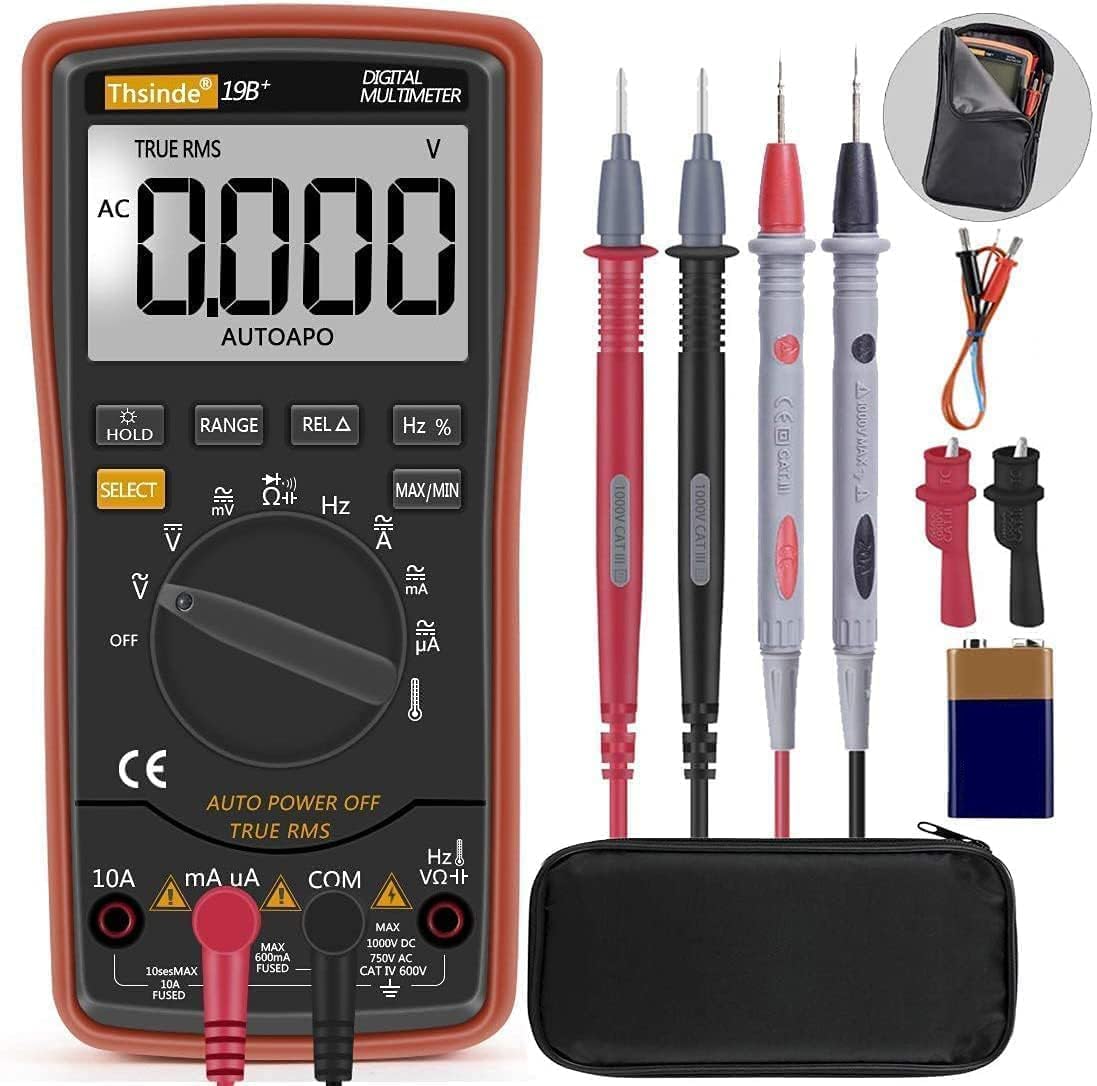
Image: The Thsinde 19B Multimeter displaying an AC voltage reading, demonstrating its capability to measure alternating current voltage.
2. Measuring AC/DC Current (A)
- สำคัญ: De-energize the circuit before connecting the meter.
- เชื่อมต่อสายทดสอบสีดำเข้ากับ คอม แจ็ค.
- สำหรับกระแสไฟฟ้าไม่เกิน 600mA ให้ต่อสายทดสอบสีแดงเข้ากับ... มิลลิแอมป์ แจ็ค สำหรับกระแสไฟไม่เกิน 10A ให้ต่อสายทดสอบสีแดงเข้ากับแจ็ค 10เอ แจ็ค.
- Turn the function switch to the appropriate A~ (กระแสไฟฟ้าสลับ) หรือ A- (DC Current) position. Use the เลือก ปุ่มหากจำเป็น
- ตัดวงจรและต่อโพรบทดสอบแบบอนุกรมเข้ากับโหลด
- เปิดวงจรอีกครั้งและอ่านค่ากระแสไฟฟ้าจากจอ LCD
3. การวัดความต้านทาน (Ω)
- เชื่อมต่อสายทดสอบสีดำเข้ากับ คอม แจ็คและการทดสอบสีแดงนำไปสู่ VΩเฮิร์ตซ์ แจ็ค.
- หมุนสวิตช์ฟังก์ชั่นไปที่ Ω ตำแหน่ง (ต้านทาน)
- Ensure the component is de-energized before measuring. Connect the test probes across the component.
- อ่านค่าความต้านทานบนจอ LCD
4. การทดสอบความต่อเนื่อง
- เชื่อมต่อสายทดสอบสีดำเข้ากับ คอม แจ็คและการทดสอบสีแดงนำไปสู่ VΩเฮิร์ตซ์ แจ็ค.
- หมุนสวิตช์ฟังก์ชั่นไปที่ Ω (Resistance) position and press เลือก จนกว่าสัญลักษณ์ความต่อเนื่อง (ไอคอนลำโพง) จะปรากฏขึ้น
- Connect the test probes across the circuit or component. A continuous beep indicates a good connection (low resistance).
5. การวัดความจุ (F)
- เชื่อมต่อสายทดสอบสีดำเข้ากับ คอม แจ็คและการทดสอบสีแดงนำไปสู่ VΩเฮิร์ตซ์ แจ็ค.
- หมุนสวิตช์ฟังก์ชั่นไปที่ ความจุ position (often shared with diode/continuity, use เลือก to cycle).
- Ensure the capacitor is fully discharged before testing. Connect the test probes across the capacitor terminals.
- อ่านค่าความจุบนจอ LCD
6. การวัดความถี่ (เฮิร์ตซ์)
- เชื่อมต่อสายทดสอบสีดำเข้ากับ คอม แจ็คและการทดสอบสีแดงนำไปสู่ VΩเฮิร์ตซ์ แจ็ค.
- หมุนสวิตช์ฟังก์ชั่นไปที่ Hz position (often shared with voltage หรือกระแส ใช้ เฮิร์ตซ์/% button to activate).
- Connect the test probes in parallel with the circuit where you want to measure frequency.
- อ่านค่าความถี่บนจอ LCD
7. การทดสอบไดโอด
- เชื่อมต่อสายทดสอบสีดำเข้ากับ คอม แจ็คและการทดสอบสีแดงนำไปสู่ VΩเฮิร์ตซ์ แจ็ค.
- หมุนสวิตช์ฟังก์ชั่นไปที่ ไดโอด position (often shared with continuity, use เลือก to cycle).
- เชื่อมต่อหัววัดสีแดงเข้ากับขั้วบวก และเชื่อมต่อหัววัดสีดำเข้ากับขั้วลบของไดโอด ปริมาตรไปข้างหน้าtage drop will be displayed. Reverse the probes; an open circuit (OL) indicates a good diode.
8. การวัดอุณหภูมิ
- เชื่อมต่อหัววัดอุณหภูมิ (เทอร์โมคัปเปิล) เข้ากับ VΩเฮิร์ตซ์ และ คอม jacks, observing polarity if indicated.
- หมุนสวิตช์ฟังก์ชั่นไปที่ อุณหภูมิ position (indicated by a thermometer symbol).
- The display will show the ambient temperature. Place the tip of the temperature probe on the object or in the environment you wish to measure.
- The multimeter can switch between Fahrenheit and Celsius.
- อ่านค่าอุณหภูมิจากหน้าจอ LCD

Image: The Thsinde 19B Multimeter actively measuring temperature, displaying "0022" degrees Celsius, with a range of -20°C to 1000°C (0°F to 1832°F) indicated.
การซ่อมบำรุง
การทำความสะอาด
เช็ดมิเตอร์asinจีกับโฆษณาamp ใช้ผ้าและผงซักฟอกอ่อนๆ เช็ดทำความสะอาด ห้ามใช้สารขัดถูหรือตัวทำละลาย รักษาช่องเสียบให้ปราศจากฝุ่นและสิ่งสกปรก
การเปลี่ยนแบตเตอรี่
When the low battery indicator appears on the display, replace the 9V battery as described in the "Battery Installation" section under Setup. Always use a fresh 9V battery.
พื้นที่จัดเก็บ
If the meter is not to be used for an extended period, remove the battery to prevent leakage and damage. Store the meter in its protective case in a cool, dry place, away from direct sunlight and extreme temperatures.
การแก้ไขปัญหา
| ปัญหา | สาเหตุที่เป็นไปได้ | สารละลาย |
|---|---|---|
| มิเตอร์ไม่ทำงาน | แบตเตอรี่เสียหรือติดตั้งไม่ถูกต้อง | Check battery installation; replace battery. |
| แสดงข้อความ "OL" (Overload) | ค่าที่วัดได้เกินช่วงที่เลือกหรือเกินความจุสูงสุดของมิเตอร์ | Switch to a higher range or ensure measurement is within meter's limits. |
| การอ่านที่ไม่ถูกต้อง | Low battery; incorrect function/range selected; poor test lead connection. | Replace battery; verify function/range; ensure secure connections. |
| ไม่มีเสียงบี๊บแสดงความต่อเนื่อง | Open circuit; meter not in continuity mode. | Check circuit; press SELECT to activate continuity mode. |
ข้อมูลจำเพาะ

Image: The Thsinde 19B Multimeter with overlaid dimensions, showing its height of 18.5cm (7.28 inches) and LCD screen dimensions of 6.5cm (2.56 inches) by 4cm (1.57 inches).
| คุณสมบัติ | รายละเอียด |
|---|---|
| ยี่ห้อ | ทซินเด |
| แบบอย่าง | 19B (TH053) |
| ประเภทการวัด | Multimeter (Autoranging) |
| แหล่งพลังงาน | แบตเตอรี่ 9V (รวมอยู่ด้วย) |
| แสดง | จอ LCD ขนาดใหญ่พร้อมแสงพื้นหลัง |
| Sampหลิงสปีด | 3 ครั้งต่อวินาที |
| ค่า RMS ที่แท้จริง | ใช่ |
| ระบบป้องกันการโอเวอร์โหลด | Ceramics Protection Circuit |
| ฉบับ ACtagอี เรนจ์ | สูงสุด 750V AC |
| DC ฉบับที่tagอี เรนจ์ | สูงถึง 1000V DC |
| ช่วงอุณหภูมิ | -20°C ถึง 1000°C (0°F ถึง 1832°F) |
| น้ำหนักสินค้า | 320 กรัม (ประมาณ 11.3 ออนซ์) |
| ขนาด | 8.78 x 6.38 x 2.44 นิ้ว (บรรจุภัณฑ์) |
| วัสดุ | ABS with PVC protective case |
การรับประกันและการสนับสนุน
Thsinde products are designed for reliability and performance. For any technical support or warranty inquiries, please contact Thsinde customer service through the retailer where the product was purchased or refer to the contact information provided on the product packaging or official Thsinde webเว็บไซต์.
โปรดเก็บหลักฐานการซื้อของคุณไว้เพื่อเรียกร้องการรับประกัน
Ask a question about this manual
Ask about setup, troubleshooting, compatibility, parts, safety, or missing instructions. Manuals+ will review the question and use this page’s manual context to help answer it.