
1. บทนำ
This manual provides detailed instructions for the IPEGA PG-SW023 Bluetooth Wireless Game Controller. This versatile controller is designed to enhance your gaming experience across multiple platforms, including N-S consoles, PlayStation 3 (PS3), Android devices, and personal computers running Windows 7, 8, or 10.
โปรดอ่านคู่มือนี้อย่างละเอียดก่อนใช้งานผลิตภัณฑ์ เพื่อให้มั่นใจได้ว่าผลิตภัณฑ์ใช้งานได้อย่างถูกต้องและใช้ประโยชน์จากคุณสมบัติทั้งหมดได้อย่างเต็มประสิทธิภาพ
2. คุณสมบัติของผลิตภัณฑ์
- ความเข้ากันได้กับหลายแพลตฟอร์ม: Suitable for gaming on N-S consoles, PS3, Android devices, and PCs (Windows 7/8/10).
- ประสบการณ์การเล่นเกมที่ได้รับการปรับปรุง: Supports vibration feedback and a six-axis gyroscope function for immersive gameplay and precise control.
- Customizable Macro Function: Rear buttons can be configured as common keys or combination keys for simplified actions.
- Continuous TURBO Function: Features a dedicated TURBO button for rapid-fire actions, compatible with N-S Pro gamepads.
- การออกแบบตามหลักสรีรศาสตร์: Engineered for comfort during extended gaming sessions, fitting securely in the palm.

Image: The IPEGA PG-SW023 Wireless Game Controller highlighting its key features: two vibrating motors, six-axis design, high-sensitive buttons, and Turbo function.
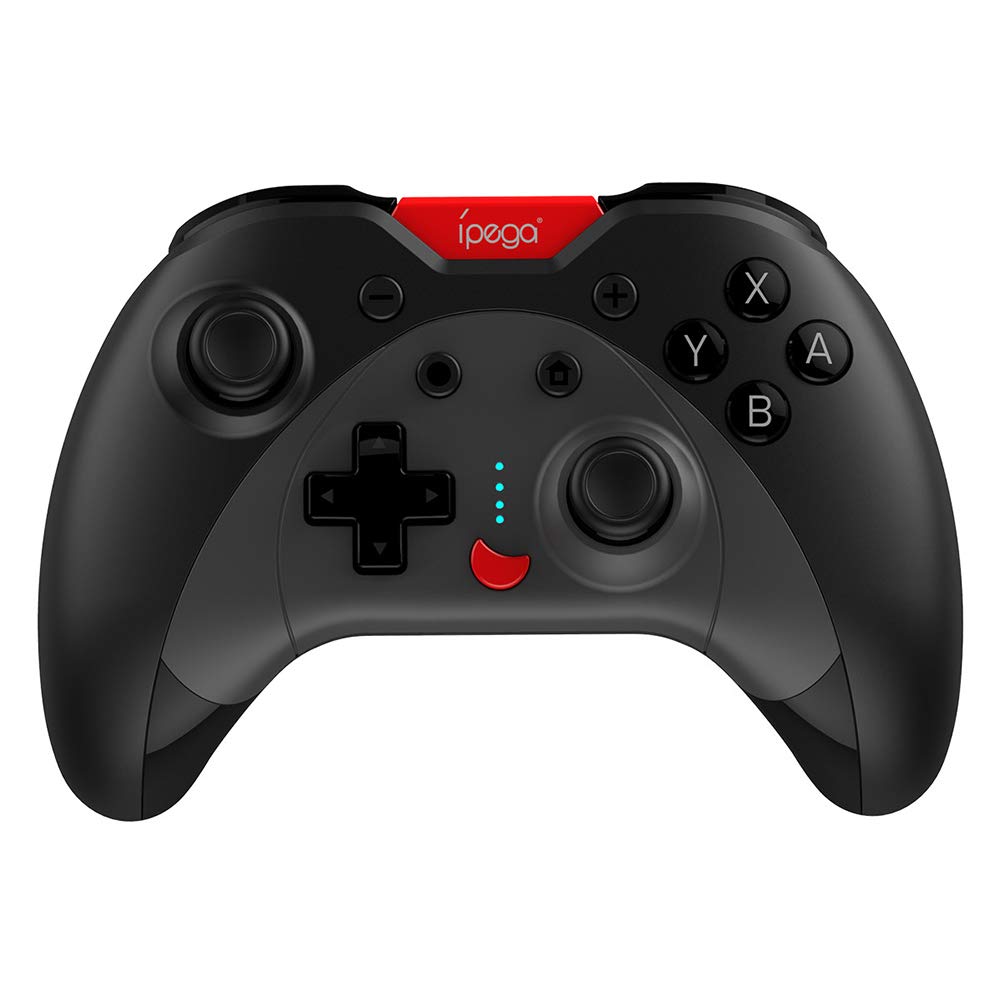
Image: A green IPEGA PG-SW023 controller illustrating its built-in six-axis gyroscope design for improved body feeling and accurate targeting.
3. เนื้อหาบรรจุภัณฑ์
โปรดตรวจสอบว่าสินค้าทั้งหมดมีอยู่ในแพ็คเกจ:
- 1 x IPEGA PG-SW023 Wireless Game Controller
- สายชาร์จ Type-C 1 เส้น
- 1 x คู่มือผู้ใช้
4. ข้อมูลจำเพาะ
| คุณสมบัติ | ข้อมูลจำเพาะ |
|---|---|
| ยี่ห้อ | อิเปก้า |
| แบบอย่าง | PG-SW023 |
| ตัวเลือกสี | Black, Green, Blue, Yellow |
| ปฏิบัติการฉบับที่tage | กระแสตรง 3.7 โวลต์ |
| กระแสไฟฟ้าที่ใช้งาน | <30มิลลิแอมป์ |
| แบบคงที่ปัจจุบัน | <20uA |
| เวลาเล่นต่อเนื่อง | ประมาณ 15 ชั่วโมง |
| อินพุต Voltagอี/ปัจจุบัน | กระแสตรง 5V/500mA |
| เวลาในการชาร์จ | ประมาณ 2 ชั่วโมง |
| เวอร์ชันบลูทูธ | 3.0 |
| ระยะการส่งข้อมูล | ≤8 เมตร |
| ความจุของแบตเตอรี่ | 400mAh |
| ขนาดสินค้า | 15 x 10 x 5.5 ซม. (5.91 x 3.94 x 2.17 นิ้ว) |
| น้ำหนักผลิตภัณฑ์ | ประมาณ 215 กรัม (7.58 ออนซ์) |
| อุปกรณ์ที่รองรับ | N-S Console, PS3, Android, PC (Win 7/8/10) |
| การเชื่อมต่อ | ไร้สาย (Bluetooth) |
| แหล่งพลังงาน | ใช้พลังงานจากแบตเตอรี่ |
5. การตั้งค่า
5.1 การชาร์จคอนโทรลเลอร์
- Connect the provided Type-C charging cable to the controller's charging port.
- ต่อปลายอีกด้านของสายเคเบิลเข้ากับแหล่งจ่ายไฟ USB (เช่น คอมพิวเตอร์, อะแดปเตอร์ติดผนัง USB)
- The indicator lights on the controller will show charging status. Once fully charged (approx. 2 hours), the lights will indicate completion or turn off.
5.2 การจับคู่กับอุปกรณ์
The pairing method varies slightly depending on the device. Ensure the controller is sufficiently charged before attempting to pair.

Image: A blue IPEGA PG-SW023 controller positioned in front of a Nintendo Switch, PlayStation 3, and a laptop, illustrating its multi-platform compatibility.
5.2.1 Pairing with N-S Console
- On your N-S console, go to the HOME Menu.
- เลือก 'คอนโทรลเลอร์' > 'เปลี่ยนด้ามจับ/ลำดับ'
- Press and hold the pairing button on the IPEGA controller (refer to controller diagram for exact location) until the indicator lights begin to flash rapidly.
- The console will detect the controller. Once paired, the indicator light will become solid.
5.2.2 Pairing with PS3
- เชื่อมต่อคอนโทรลเลอร์กับคอนโซล PS3 โดยใช้สายเคเบิล Type-C
- กดปุ่ม HOME บนตัวควบคุม
- Once recognized, you can disconnect the cable and the controller should remain paired wirelessly.
5.2.3 การจับคู่กับอุปกรณ์ Android
- เปิดใช้งาน Bluetooth บนอุปกรณ์ Android ของคุณ
- On the controller, press and hold the Android pairing button combination (refer to controller diagram or quick start guide for specific button combination, usually 'A' + HOME or 'X' + HOME) until the indicator lights flash rapidly.
- On your Android device, search for new Bluetooth devices and select 'IPEGA PG-SW023' (or similar name) from the list.
- Once paired, the indicator light on the controller will become solid.
5.2.4 การจับคู่กับพีซี (Windows 7/8/10)
- ตรวจสอบให้แน่ใจว่าพีซีของคุณเปิดใช้งานบลูทูธแล้ว
- Go to 'Settings' > 'Devices' > 'Bluetooth & other devices' and click 'Add Bluetooth or other device'.
- เลือก 'บลูทูธ'
- On the controller, press and hold the PC pairing button combination (refer to controller diagram or quick start guide for specific button combination, usually 'L1' + HOME or 'Y' + HOME) until the indicator lights flash rapidly.
- Select 'IPEGA PG-SW023' (or similar name) from the list of available devices on your PC.
- Once paired, the indicator light on the controller will become solid.
6. คู่มือการใช้งาน
6.1 ฟังก์ชันพื้นฐานของปุ่มต่างๆ
The controller features standard gaming buttons including directional pad, analog sticks, action buttons (A, B, X, Y), shoulder buttons (L1, R1), and triggers (L2, R2). Specific button mapping may vary by game and platform.

Image: Hands comfortably gripping a black IPEGA PG-SW023 controller, showcasing its ergonomic design for comfortable and convenient use.
6.2 ฟังก์ชันเทอร์โบ
The TURBO function allows for continuous rapid input of a selected button. This can be useful in games requiring fast, repeated button presses.
- To activate TURBO: Press and hold the desired action button (e.g., A, B, X, Y) and then press the TURBO button simultaneously. The button will now continuously input as long as it's held down.
- To deactivate TURBO: Repeat the same process (press the action button and TURBO button simultaneously).

Image: A yellow IPEGA PG-SW023 controller with its prominent TURBO button, shown with a Nintendo Switch console, illustrating the auto-fire feature.
6.3 ฟังก์ชั่นมาโคร
The macro function allows you to assign a sequence of button presses or a single common button to the programmable rear buttons. This can simplify complex in-game actions.
- Refer to the specific instructions provided in the quick start guide or on the manufacturer's website for detailed steps on programming macro buttons, as this process can vary.
6.4 Vibration and Gyroscope
The controller features dual motors for vibration feedback, providing tactile sensations that correspond to in-game events. The built-in six-axis gyroscope allows for motion control in supported games, offering a more immersive and precise aiming experience.

Image: A blue IPEGA PG-SW023 controller in use, with visual cues indicating its double motor vibrating design for immersive feedback during gameplay.
7. การบำรุงรักษา
การดูแลรักษาอย่างถูกวิธีจะช่วยยืดอายุการใช้งานของคอนโทรลเลอร์ของคุณ:
- การทำความสะอาด: ใช้ผ้านุ่มและแห้งเช็ดทำความสะอาดคอนโทรลเลอร์ สำหรับคราบสกปรกฝังแน่น ให้เช็ดเบาๆampชุบผ้าด้วยน้ำหรือน้ำยาทำความสะอาดอ่อนๆ หลีกเลี่ยงสารเคมีรุนแรง
- พื้นที่จัดเก็บ: เก็บตัวควบคุมไว้ในที่แห้งและเย็น ห่างจากแสงแดดโดยตรงและอุณหภูมิที่สูงหรือต่ำมาก
- หลีกเลี่ยงผลกระทบ: ห้ามทำตกหรือกระแทกตัวควบคุมอย่างรุนแรง เพราะอาจทำให้ชิ้นส่วนภายในเสียหายได้
- การสัมผัสของเหลว: เก็บคอนโทรลเลอร์ให้ห่างจากของเหลว หากคอนโทรลเลอร์สัมผัสกับของเหลว ให้ปิดเครื่องทันทีและปล่อยให้แห้งสนิทก่อนใช้งานอีกครั้ง
8 การแก้ไขปัญหา
If you encounter issues with your IPEGA PG-SW023 controller, try the following solutions:
- ตัวควบคุมไม่เชื่อมต่อ:
- ตรวจสอบให้แน่ใจว่าตัวควบคุมมีประจุไฟเต็ม
- ตรวจสอบว่าเปิดใช้งาน Bluetooth บนอุปกรณ์ของคุณแล้ว
- Try re-pairing the controller by following the setup instructions for your specific device.
- เลื่อนตัวควบคุมให้ใกล้กับอุปกรณ์มากขึ้นเพื่อให้แน่ใจว่าอยู่ในระยะการส่งสัญญาณ 8 เมตร
- รีสตาร์ททั้งคอนโทรลเลอร์และอุปกรณ์เล่นเกมของคุณ
- ปุ่มไม่ตอบสนอง:
- Check if the controller is properly connected and paired.
- ทดสอบคอนโทรลเลอร์กับเกมหรือแอปพลิเคชันอื่นเพื่อตัดปัญหาที่เกิดจากซอฟต์แวร์ออกไป
- ตรวจสอบให้แน่ใจว่าไม่มีเศษขยะติดอยู่ใต้ปุ่ม
- การสั่นสะเทือนไม่ทำงาน:
- Verify that the game or system settings have vibration enabled.
- เกมบางเกมอาจไม่รองรับระบบสั่นตอบสนอง
- อายุการใช้งานแบตเตอรี่สั้น:
- โปรดตรวจสอบให้แน่ใจว่าได้ชาร์จแบตเตอรี่คอนโทรลเลอร์จนเต็มก่อนใช้งาน
- Battery life can vary based on usage intensity (e.g., continuous vibration).
- หลีกเลี่ยงการชาร์จในสภาพแวดล้อมที่ร้อนหรือเย็นจัด
9. การรับประกันและการสนับสนุน
For warranty information, technical support, or service inquiries regarding your IPEGA PG-SW023 Bluetooth Wireless Game Controller, please refer to the product packaging or contact the manufacturer directly through their official webโปรดเก็บใบเสร็จรับเงินไว้เป็นหลักฐานการซื้อสำหรับกรณีที่มีการเรียกร้องการรับประกัน