
การแนะนำ
This manual provides comprehensive instructions for the Lexmark MS431dw Monochrome Laser Printer. It covers setup, operation, maintenance, and troubleshooting to ensure optimal performance and longevity of your device. The Lexmark MS431dw is designed for efficient monochrome printing, offering speeds up to 40 pages per minute and automatic duplex printing.

ภาพ: ด้านหน้าขวา view of the Lexmark MS431dw Monochrome Laser Printer.
การตั้งค่า
1. แกะเครื่องพิมพ์
Carefully remove the printer from its packaging. Ensure all packing materials, tapes, and protective films are removed from the exterior and interior of the printer. Retain the packaging for future transport if needed.
2. การติดตั้งตลับหมึก
- เปิดฝาครอบด้านหน้าของเครื่องพิมพ์
- นำตลับหมึกใหม่ออกจากบรรจุภัณฑ์แล้วเขย่าเบาๆ เพื่อกระจายผงหมึกให้ทั่ว
- ใส่ตลับหมึกเข้าไปในช่องที่กำหนดจนกระทั่งได้ยินเสียงคลิกเข้าที่
- ปิดฝาครอบด้านหน้า
3. การใส่กระดาษ
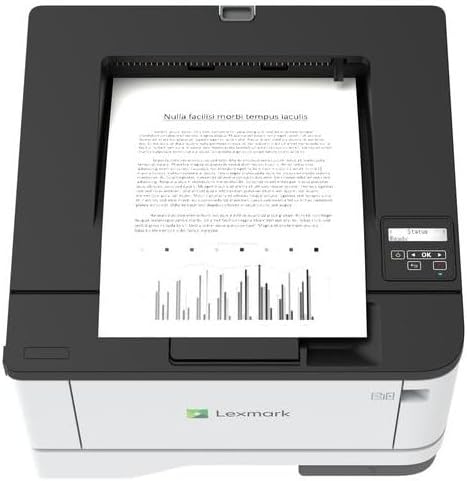
ภาพ: ด้านบน view of the Lexmark MS431dw with paper loaded in the input tray.
Open the paper tray and adjust the paper guides to fit the size of your paper. Load the paper stack into the tray, ensuring it is flat and below the maximum fill line. Close the paper tray. The printer supports various media types, including card stock.
4. การเชื่อมต่อพลังงาน
เชื่อมต่อสายไฟเข้ากับช่องเสียบสายไฟของเครื่องพิมพ์ แล้วจึงเสียบเข้ากับเต้ารับไฟฟ้าที่มีสายดิน
5. Connecting to a Network/Computer
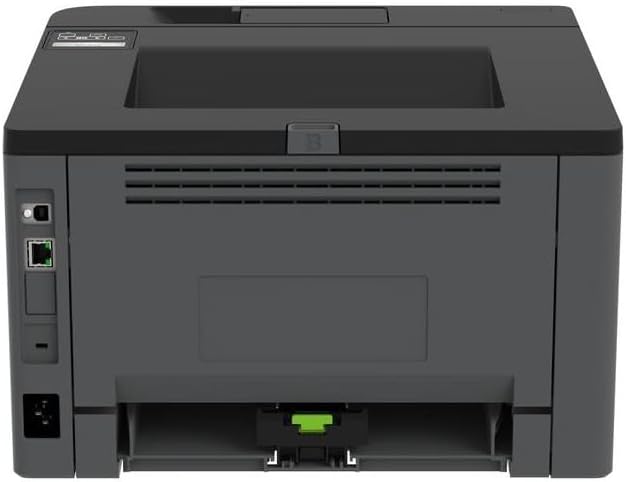
ภาพ: ด้านหลัง view of the Lexmark MS431dw, highlighting the Ethernet and power connection ports.
The Lexmark MS431dw supports Ethernet connectivity. Connect an Ethernet cable from your network router or switch to the Ethernet port on the back of the printer. For direct connection to a computer, use a USB cable (not included) if available, or configure network printing.
6. การติดตั้งไดร์เวอร์
Turn on the printer. Insert the driver CD (if provided) into your computer, or download the latest drivers from the official Lexmark support webเข้าไปที่เว็บไซต์ ทำตามคำแนะนำบนหน้าจอเพื่อทำการติดตั้งไดรเวอร์ให้เสร็จสมบูรณ์
คำแนะนำการใช้งาน
1. แผงควบคุมด้านบนview

ภาพ: ด้านบน view of the Lexmark MS431dw, showing the printer's control panel with display and buttons.
The control panel features a display screen and navigation buttons (Up, Down, OK, Back) to access printer settings, status, and functions. Refer to the on-screen menus for specific options.
2. การพิมพ์พื้นฐาน
- ตรวจสอบให้แน่ใจว่าเครื่องพิมพ์เปิดอยู่และเชื่อมต่อกับคอมพิวเตอร์หรือเครือข่ายของคุณแล้ว
- เปิดเอกสารที่คุณต้องการพิมพ์บนคอมพิวเตอร์ของคุณ
- เลือก พิมพ์ จากเมนูของแอปพลิเคชัน (เช่น File > พิมพ์).
- Choose the Lexmark MS431dw from the list of available printers.
- Adjust print settings as desired (e.g., number of copies, paper size).
- คลิก พิมพ์.
3. Automatic Duplex Printing
The MS431dw supports automatic two-sided (duplex) printing. To enable this feature:
- In the print dialog box on your computer, navigate to the printer properties or preferences.
- Look for an option related to "Two-sided printing" or "Duplex printing."
- เลือกตัวเลือกการพิมพ์สองด้านที่ต้องการ (เช่น การพิมพ์ด้านยาว การพิมพ์ด้านสั้น)
- ยืนยันการเลือกของคุณและดำเนินการพิมพ์ต่อ
การซ่อมบำรุง
1. Replacing the Toner Cartridge
When the toner level is low, the printer's display will indicate a warning. To replace the cartridge:
- ตรวจสอบให้แน่ใจว่าเครื่องพิมพ์เปิดอยู่
- เปิดฝาครอบด้านหน้า
- Remove the old toner cartridge by pulling it out.
- Unpack a new Lexmark-compatible toner cartridge and gently shake it.
- ใส่ตลับหมึกใหม่จนกระทั่งล็อคเข้าที่
- ปิดฝาครอบด้านหน้า
2. การทำความสะอาดเครื่องพิมพ์
การทำความสะอาดอย่างสม่ำเสมอช่วยรักษาคุณภาพการพิมพ์และยืดอายุการใช้งานของเครื่องพิมพ์
- ภายนอก: เช็ดพื้นผิวภายนอกด้วยผ้านุ่ม dampใช้ผ้าที่ไม่เป็นขุยเช็ด ห้ามใช้สารทำความสะอาดที่มีฤทธิ์กัดกร่อนหรือตัวทำละลาย
- ภายใน: Periodically open the front cover and gently remove any dust or paper debris from accessible areas using a dry, lint-free cloth. Avoid touching the fuser unit.
การแก้ไขปัญหา
This section addresses common issues you might encounter. For more detailed troubleshooting, refer to the Lexmark support webเว็บไซต์.
1. กระดาษติด
- If a paper jam occurs, the printer display will show an error message indicating the location of the jam.
- Carefully open the indicated covers or trays.
- ค่อยๆ ดึงกระดาษที่ติดอยู่ไปตามทิศทางของรางกระดาษ ระวังอย่าให้กระดาษฉีกขาด
- Close all covers and trays. The printer should resume printing.
2. คุณภาพการพิมพ์ไม่ดี
- ภาพพิมพ์ที่ซีดจาง: ตลับหมึกอาจเหลือน้อย เปลี่ยนตลับหมึกหากจำเป็น
- รอยด่างหรือจุด: Clean the printer's interior as described in the Maintenance section. Ensure the toner cartridge is properly seated.
- หน้าว่าง: Verify the toner cartridge is installed correctly and has toner. Check printer drivers and print settings.
3. ปัญหาการเชื่อมต่อ
- ไม่พบเครื่องพิมพ์: Ensure the Ethernet cable is securely connected to both the printer and the network. Verify network settings on the printer and computer.
- สถานะออฟไลน์: Check the printer's power and network connection. Restart both the printer and your computer.
ข้อมูลจำเพาะ
| คุณสมบัติ | รายละเอียด |
|---|---|
| หมายเลขรุ่น | 29S0110 |
| เทคโนโลยีการพิมพ์ | เลเซอร์ |
| เอาท์พุตเครื่องพิมพ์ | เอกรงค์ |
| ความเร็วในการพิมพ์สูงสุด (ขาวดำ) | สูงสุด 40 หน้าต่อนาที (ppm) |
| เทคโนโลยีการเชื่อมต่อ | อีเธอร์เน็ต |
| คุณสมบัติพิเศษ | Auto-Duplex (Automatic Two-sided Printing) |
| ความจุแผ่นอินพุตสูงสุด | 900 แผ่น |
| การสนับสนุนสื่อสิ่งพิมพ์ | Card stock, Plain paper |
| น้ำหนักสินค้า | 9300 กรัม (ประมาณ 20.5 ปอนด์) |
| วัดtage | 570 วัตต์ |
| ยูพีซี | 734646695558 |
หมายเหตุ: ข้อมูลจำเพาะอาจเปลี่ยนแปลงได้โดยไม่ต้องแจ้งให้ทราบล่วงหน้า
การรับประกันและการสนับสนุน
ข้อมูลการรับประกัน
Your Lexmark MS431dw printer is covered by a standard manufacturer's warranty. For specific terms, conditions, and duration of your warranty, please refer to the documentation included with your product or visit the official Lexmark webไซต์นี้ โปรดเก็บหลักฐานการซื้อไว้เพื่อใช้ยืนยันการรับประกัน
การสนับสนุนลูกค้า
For technical assistance, driver downloads, or further support, please visit the official Lexmark support portal.
Visit the Lexmark Store for Support