
1. บทนำ
1.1 ผลิตภัณฑ์เกินview
The Renkforce RF-HC-100 is a compact 16-megapixel trail camera designed for outdoor monitoring. It features a time-lapse function, night vision capabilities, and a durable, camouflage brown housing. This camera is suitable for wildlife observation, property surveillance, and other outdoor recording needs.
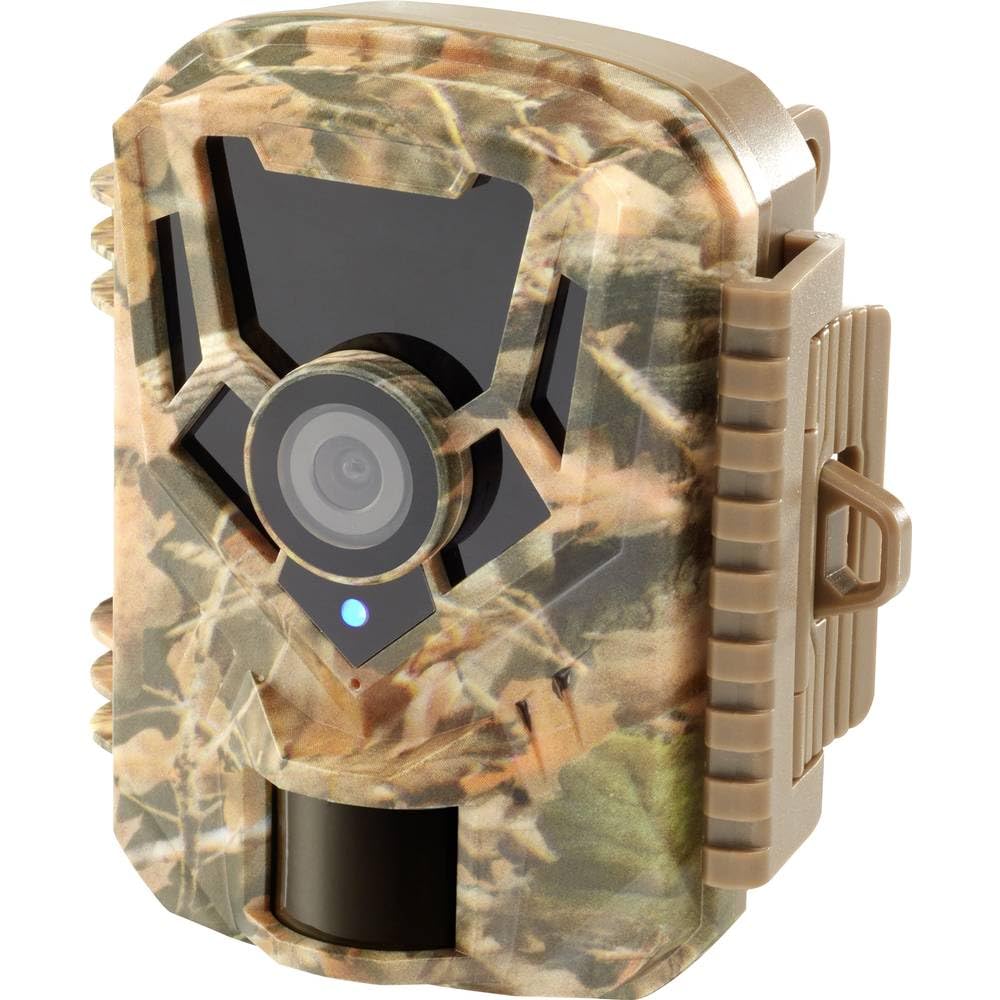
ภาพ: ด้านหน้า view of the Renkforce RF-HC-100 Trail Camera, showcasing its compact design and camouflage pattern.

ภาพ: ด้านหน้า view of the Renkforce RF-HC-100 Trail Camera, highlighting the main lens and motion sensor.
1.2 เนื้อหาบรรจุภัณฑ์
- 1 x Renkforce RF-HC-100 Trail Camera Unit
- Note: Additional accessories such as mounting straps, USB cables, or user manuals may be included depending on the specific package.
2. ข้อมูลด้านความปลอดภัย
- อ่านคำแนะนำทั้งหมดอย่างละเอียดก่อนใช้งานอุปกรณ์
- Do not expose the camera to extreme temperatures, direct sunlight for prolonged periods, or corrosive liquids.
- Ensure the battery compartment is properly sealed to maintain the IP65 weather resistance.
- ทิ้งแบตเตอรี่ตามระเบียบข้อบังคับของท้องถิ่น ห้ามทิ้งแบตเตอรี่เก่าและใหม่ปะปนกัน หรือแบตเตอรี่ต่างชนิดกัน
- เก็บอุปกรณ์ให้พ้นจากมือเด็ก
- ห้ามถอดประกอบหรือดัดแปลงกล้องโดยเด็ดขาด เพราะจะทำให้การรับประกันเป็นโมฆะและอาจทำให้เกิดความเสียหายได้
3. คุณสมบัติของผลิตภัณฑ์
The Renkforce RF-HC-100 Trail Camera offers the following key features:
- การถ่ายภาพความละเอียดสูง: 16 Megapixel effective capture resolution for clear photos and 1080p video recording.
- การมองเห็นตอนกลางคืน: Equipped with color night vision for monitoring in low-light conditions.
- ฟังก์ชันไทม์แลปส์: Capture images at set intervals to observe long-term events.
- ช่องเสียบการ์ด SD: Supports external SD cards for ampพื้นที่จัดเก็บรูปภาพและวิดีโอ
- ความทนทานต่อสภาพอากาศ: IP65 international protection rating ensures durability in various outdoor environments.
- การออกแบบที่กะทัดรัด: Miniature form factor with a camouflage brown finish for discreet placement.
- มุมกว้าง View: มุม 90 องศาของ view to cover a broad area.
- การเชื่อมต่อ: Features wired connectivity (USB, AV ports) and Wi-Fi protocol for data transfer and control via application.
- ตัวเลือกการติดตั้ง: Includes support for wall mounting.
4. การตั้งค่า
4.1 การติดตั้งแบตเตอรี่
- เปิดฝาครอบกล้องโดยปลดตัวล็อกด้านข้างออก
- ค้นหาช่องใส่แบตเตอรี่
- Insert the required number of AA batteries (not included) according to the polarity markings (+/-).
- ปิดช่องใส่แบตเตอรี่ให้แน่น
การติดตั้งการ์ด SD 4.2 ตัว
- เมื่อเปิดฝาครอบกล้องแล้ว ให้หาช่องเสียบการ์ด SD
- Insert a compatible SD card (up to 32GB, Class 10 recommended) into the slot with the metal contacts facing down until it clicks into place.
- ในการถอด ให้ดันการ์ด SD เข้าไปอีกครั้งจนกระทั่งมันเด้งออกมา

Image: The Renkforce RF-HC-100 Trail Camera with its housing open, revealing the control panel, USB, AV, and DC ports, and the ON/SETUP/OFF switch.
4.3 การติดตั้งกล้อง
The camera can be mounted using a strap or a wall mount bracket (if included or purchased separately).
- การติดตั้งสายรัด: Thread a mounting strap through the slots on the back of the camera and secure it to a tree or pole.
- การติดตั้งบนผนัง: Use the integrated mounting points or a compatible wall mount bracket to attach the camera to a flat surface. Ensure the camera is stable and pointed in the desired direction.
5. คู่มือการใช้งาน
5.1 การเปิด/ปิดเครื่องและการเลือกโหมด
Locate the ON/SETUP/OFF switch inside the camera housing.
- ปิด: ปิดกล้อง
- ติดตั้ง: Enters setup mode, allowing you to configure settings via the internal display.
- บน: Activates the camera for recording based on the configured settings.
5.2 การกำหนดค่าการตั้งค่า
In SETUP mode, use the navigation buttons (if available) to access the menu and adjust parameters such as:
- ความละเอียดภาพถ่าย/วิดีโอ
- ความไวของเซ็นเซอร์ PIR
- การตรวจจับความล่าช้า
- ช่วงเวลาล่วงเลย
- วันที่และเวลา
- Recording Mode (Photo, Video, Photo+Video, Time-Lapse)
5.3 การดึงข้อมูล
เพื่อเข้าถึงข้อมูลที่บันทึกไว้ files:
- ผ่านยูเอสบี: Connect the camera to a computer using a USB cable. The camera will appear as a removable disk.
- ผ่านการ์ด SD: Remove the SD card from the camera and insert it into a computer's card reader.
6. การบำรุงรักษา
- การทำความสะอาด: Use a soft, dry cloth to clean the camera lens and housing. For stubborn dirt, a slightly damp สามารถใช้ผ้าได้ แต่ต้องแน่ใจว่าไม่มีความชื้นเข้าไปในอุปกรณ์
- การเปลี่ยนแบตเตอรี่: ควรเปลี่ยนแบตเตอรี่เมื่อไฟแสดงสถานะแบตเตอรี่เหลือน้อยปรากฏขึ้น หรือเมื่อประสิทธิภาพการทำงานลดลง
- การจัดการการ์ด SD: Regularly format the SD card (after backing up important data) to maintain optimal performance and prevent errors.
- พื้นที่จัดเก็บ: เมื่อไม่ได้ใช้งานเป็นเวลานาน ควรถอดแบตเตอรี่ออกและเก็บกล้องไว้ในที่แห้งและเย็น หลีกเลี่ยงแสงแดดโดยตรง
7 การแก้ไขปัญหา
| ปัญหา | สาเหตุที่เป็นไปได้ | สารละลาย |
|---|---|---|
| กล้องไม่สามารถเปิดได้ | Low or dead batteries; incorrect battery installation; power switch in OFF position. | Replace batteries; ensure correct polarity; set switch to ON or SETUP. |
| คุณภาพรูปภาพ/วิดีโอไม่ดี | เลนส์สกปรก; สภาพแสงน้อย; การตั้งค่าความละเอียดไม่ถูกต้อง | Clean the lens; ensure adequate lighting or use night vision; adjust resolution settings. |
| กล้องไม่บันทึก | SD card full or faulty; incorrect mode selected; PIR sensor blocked. | Format or replace SD card; select appropriate recording mode; clear sensor path. |
| ไม่สามารถเชื่อมต่อกับคอมพิวเตอร์ | Faulty USB cable; camera not in correct mode; driver issues. | Try a different USB cable; ensure camera is in connection mode (if applicable); try another computer or card reader. |
8. ข้อมูลจำเพาะ
| ชื่อรุ่น | RF-HC-100 (RF-4466574) |
| Effective Capture Resolution | 16 ล้านพิกเซล |
| ความละเอียดวิดีโอ | 1080p |
| ขนาด (กว้าง x ยาว x สูง) | 21 x 12 x 9 ซม. (8.27 x 4.72 x 3.54 นิ้ว) |
| น้ำหนัก | 186 กรัม (0.41 ปอนด์) |
| เทคโนโลยีการเชื่อมต่อ | Wired (USB, AV), Wi-Fi Protocol (for control/transfer) |
| คุณสมบัติพิเศษ | Local Recording, Night Vision (Color Night Vision) |
| สภาพแวดล้อมการใช้งาน | กลางแจ้ง |
| การให้คะแนนการคุ้มครองระหว่างประเทศ | IP65 |
| แหล่งพลังงาน | Manual Operation (Battery-powered, batteries not included) |
| วัดtage | 1.5 วัตต์ |
| View มุม | 90 องศา |
| สี | Camouflage Brown |
| วัสดุ | Metal (internal) |
| ประเภทการติดตั้ง | ตัวยึดติดผนัง |
9. การรับประกันและการสนับสนุน
Renkforce provides support for its products. Spare parts availability is indicated for 1 year from the date of purchase. For technical assistance, troubleshooting beyond this manual, or warranty claims, please refer to the contact information provided with your product packaging or visit the official Renkforce webเว็บไซต์.