
SOMIC MS300
SOMIC MS300 Wireless Bluetooth Headphone User Manual
รุ่น : MS300
การแนะนำ
Thank you for choosing the SOMIC MS300 Wireless Bluetooth Headphones. This manual provides essential information for setting up, operating, and maintaining your headphones to ensure optimal performance and longevity. The MS300 headphones offer high-fidelity stereo sound, extended battery life, and versatile connectivity options for various devices.

Image: SOMIC MS300 Wireless Bluetooth Headphones in white, showcasing การออกแบบที่เพรียวบาง
เนื้อหาแพ็คเกจ
- SOMIC MS300 Wireless Bluetooth Headphones
- 3.5mm Audio Cable (with built-in line mic)
- สายชาร์จ (USB)
- คู่มือการใช้งาน (เอกสารนี้)
การตั้งค่า
การชาร์จหูฟัง
Before first use, fully charge your SOMIC MS300 headphones.
- Connect the charging cable to the charging port on the headphone.
- ต่อปลายอีกด้านของสายชาร์จเข้ากับแหล่งจ่ายไฟ USB (เช่น พอร์ต USB ของคอมพิวเตอร์ อะแดปเตอร์ติดผนัง USB)
- ไฟแสดงสถานะจะแสดงสถานะการชาร์จ (โปรดดูรายละเอียดในส่วนไฟแสดงสถานะ LED)
- A full charge provides up to 72 hours of playtime. For quick use, a 5-minute charge can provide approximately 2 hours of playtime.

Image: SOMIC MS300 headphones on a desk, demonstrating the fast charging capability with text overlays indicating "Charge for 5 minutes" and "Used for 2 hours".
การเปิด/ปิดเครื่อง
- To power on: Press and hold the Power Switch button until the indicator light illuminates.
- To power off: Press and hold the Power Switch button until the indicator light turns off.
คำแนะนำการใช้งาน
Bluetooth Pairing (Wireless Mode)
The SOMIC MS300 headphones utilize advanced Qualcomm Bluetooth 5.0 for stable and fast connections. They can connect to two devices simultaneously.
- ตรวจสอบให้แน่ใจว่าหูฟังปิดอยู่
- Press and hold the Power Switch button for approximately 5-7 seconds until the indicator light flashes blue and red alternately, indicating pairing mode.
- On your device (smartphone, tablet, laptop), enable Bluetooth and search for "SOMIC MS300" in the list of available devices.
- Select "SOMIC MS300" to connect. Once connected, the indicator light will turn solid blue or flash blue slowly.
- To connect a second device: After connecting the first device, disable Bluetooth on the first device. Put the headphones back into pairing mode. Connect the second device. Then, re-enable Bluetooth on the first device; the headphones should automatically reconnect to both.

Image: A person wearing the SOMIC MS300 headphones, highlighting their comfortable and lightweight design for extended use.
การเชื่อมต่อโหมดมีสาย
The headphones can be used in wired mode with the included 3.5mm audio cable, even when the battery is depleted.
- Insert one end of the 3.5mm audio cable into the 3.5mm jack on the headphone.
- Insert the other end into the 3.5mm audio output of your device (e.g., cellphone, PC, laptop).
- In wired mode, the headphones function as passive headphones, and the built-in line mic on the cable can be used for calls.
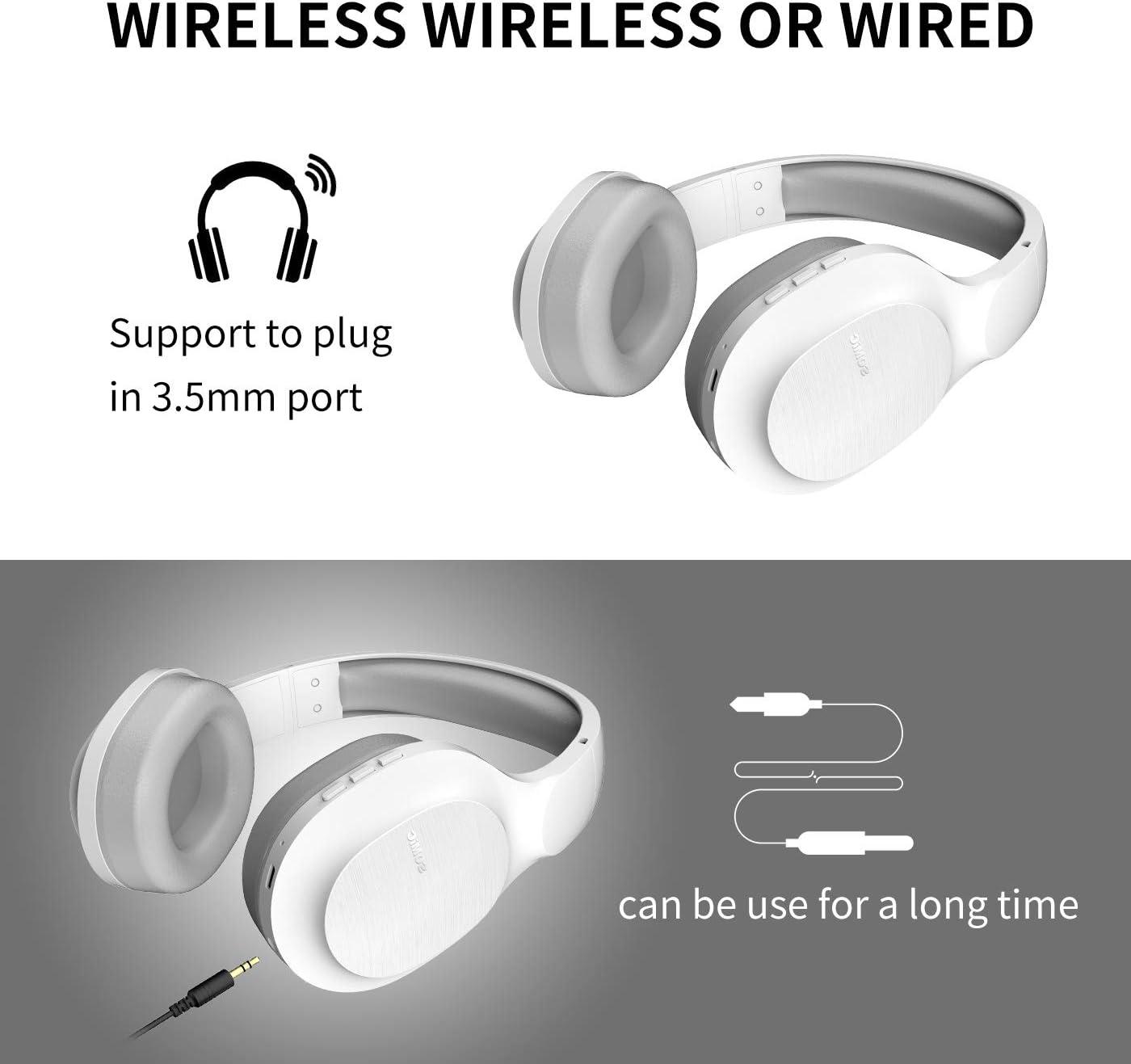
Image: SOMIC MS300 headphones demonstrating both wireless usage and the option to connect via a 3.5mm audio cable for wired listening.
การควบคุม
The functional controls are conveniently located on the ear cup.
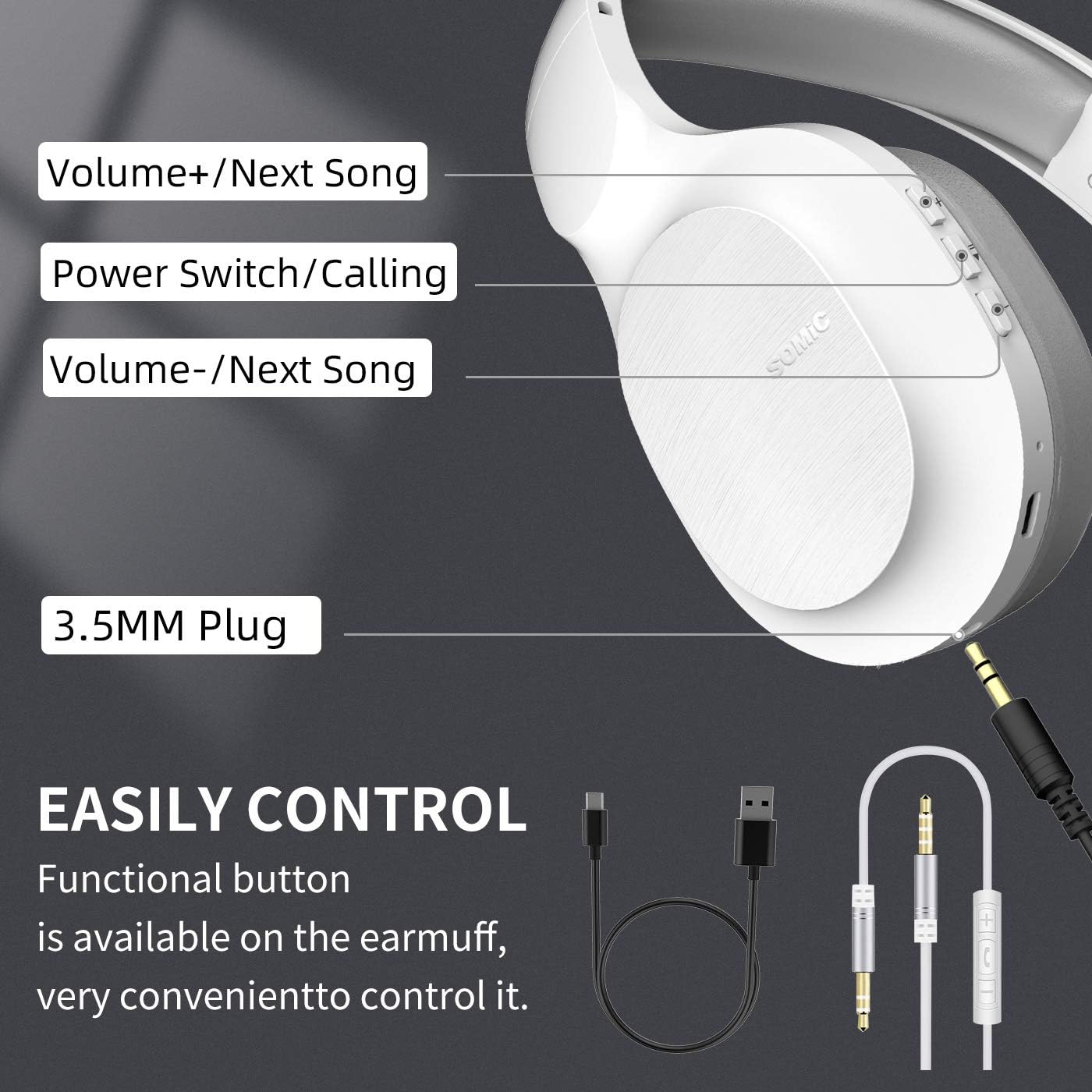
Image: A detailed diagram of the SOMIC MS300 headphone's right ear cup, labeling the Volume+/Next Song, Power Switch/Calling, Volume-/Previous Song buttons, and the 3.5mm plug.
- เพิ่มเสียง / เพลงถัดไป:
- กดสั้นๆ: เพิ่มระดับเสียง
- กดค้าง: ข้ามไปยังเพลงถัดไป
- Power Switch / Calling:
- กดสั้นๆ: เล่น/หยุดเพลง
- Short press (during call): Answer/End call.
- กดค้าง: เปิด/ปิดเครื่อง
- กดสองครั้ง: โทรซ้ำหมายเลขล่าสุด
- ระดับเสียง - / เพลงก่อนหน้า:
- กดสั้นๆ: ลดระดับเสียง
- Long press: Go to the previous song.
การซ่อมบำรุง
Proper maintenance ensures the longevity and optimal performance of your SOMIC MS300 headphones.
- การทำความสะอาด: ใช้ผ้าแห้งนุ่มเช็ดทำความสะอาดหูฟัง ห้ามใช้สารทำความสะอาดที่มีฤทธิ์กัดกร่อน แอลกอฮอล์ หรือสารเคมีใดๆ
- พื้นที่จัดเก็บ: เก็บหูฟังไว้ในที่แห้งและเย็น หลีกเลี่ยงแสงแดดโดยตรงและอุณหภูมิที่สูงหรือต่ำเกินไป
- การดูแลแบตเตอรี่ Avoid fully discharging the battery frequently. If storing for a long period, charge the headphones to about 50% every few months.
- หลีกเลี่ยงความชื้น: อย่าให้หูฟังโดนน้ำหรือความชื้นมากเกินไป
- จัดการด้วยความระมัดระวัง: หลีกเลี่ยงการทำหูฟังตกหรือได้รับแรงกระแทกรุนแรง
การแก้ไขปัญหา
| ปัญหา | สาเหตุที่เป็นไปได้ | สารละลาย |
|---|---|---|
| หูฟังไม่สามารถเปิดเครื่องได้ | แบตเตอรี่เหลือน้อยหรือหมด | ชาร์จหูฟังให้เต็ม |
| ไม่สามารถจับคู่ผ่านบลูทูธได้ | หูฟังไม่ได้อยู่ในโหมดจับคู่ อุปกรณ์ Bluetooth ปิดอยู่ ห่างจากอุปกรณ์มากเกินไป | ตรวจสอบให้แน่ใจว่าหูฟังอยู่ในโหมดจับคู่ (ไฟสีแดง/น้ำเงินกะพริบ) เปิดบลูทูธของอุปกรณ์ ขยับหูฟังให้ใกล้กับอุปกรณ์มากขึ้น (ภายในระยะ 10 เมตร) |
| ไม่มีเสียงในโหมดไร้สาย | ระดับเสียงเบาเกินไป; ไม่ได้เชื่อมต่อหูฟัง; เลือกเอาต์พุตเสียงไม่ถูกต้องบนอุปกรณ์ | Increase headphone and device volume. Re-pair headphones. Select "SOMIC MS300" as audio output on your device. |
| ไม่มีเสียงในโหมดใช้สาย | 3.5mm cable not fully inserted; cable damaged; device audio jack issue. | Ensure cable is fully inserted into both headphone and device. Try a different 3.5mm cable if available. Test with another device. |
| คุณภาพเสียงไม่ดี | แบตเตอรี่เหลือน้อย; สัญญาณรบกวน; คุณภาพเสียงต้นฉบับ | Charge headphones. Move away from other wireless devices. Try different audio source. |
ข้อมูลจำเพาะ
| คุณสมบัติ | รายละเอียด |
|---|---|
| ชื่อรุ่น | MS300 |
| เทคโนโลยีการเชื่อมต่อ | ไร้สาย (บลูทูธ 5.0), มีสาย (แจ็ค 3.5 มม.) |
| เวอร์ชันบลูทูธ | 5.0 (Qualcomm chip) |
| ประเภทไดร์เวอร์เสียง | ไดรเวอร์ไดนามิก (40 มม.) |
| ช่วงความถี่ | 20 เฮิรตซ์ - 20000 เฮิรตซ์ (20 กิโลเฮิร์ตซ์) |
| อายุการใช้งานแบตเตอรี่ | Up to 72 Hours (music/talking time) |
| เวลาในการชาร์จ (ชาร์จเร็ว) | ใช้เวลา 5 นาที ใช้งานได้นาน 2 ชั่วโมง |
| รูปทรงของหูฟัง | ครอบหู |
| วัสดุ | Plastic, Memory-Protein Earmuffs |
| ประเภทการควบคุม | Volume Control, Play/Pause, Call Answer/End, Track Skip |
| ขนาดสินค้า | 8.66 x 4.33 x 10.24 นิ้ว |
| น้ำหนักสินค้า | 15.5 ออนซ์ |
| ผู้ผลิต | SOMIC |

Image: SOMIC MS300 headphones from behind, emphasizing their strong endurance with a "72" hours playtime graphic.
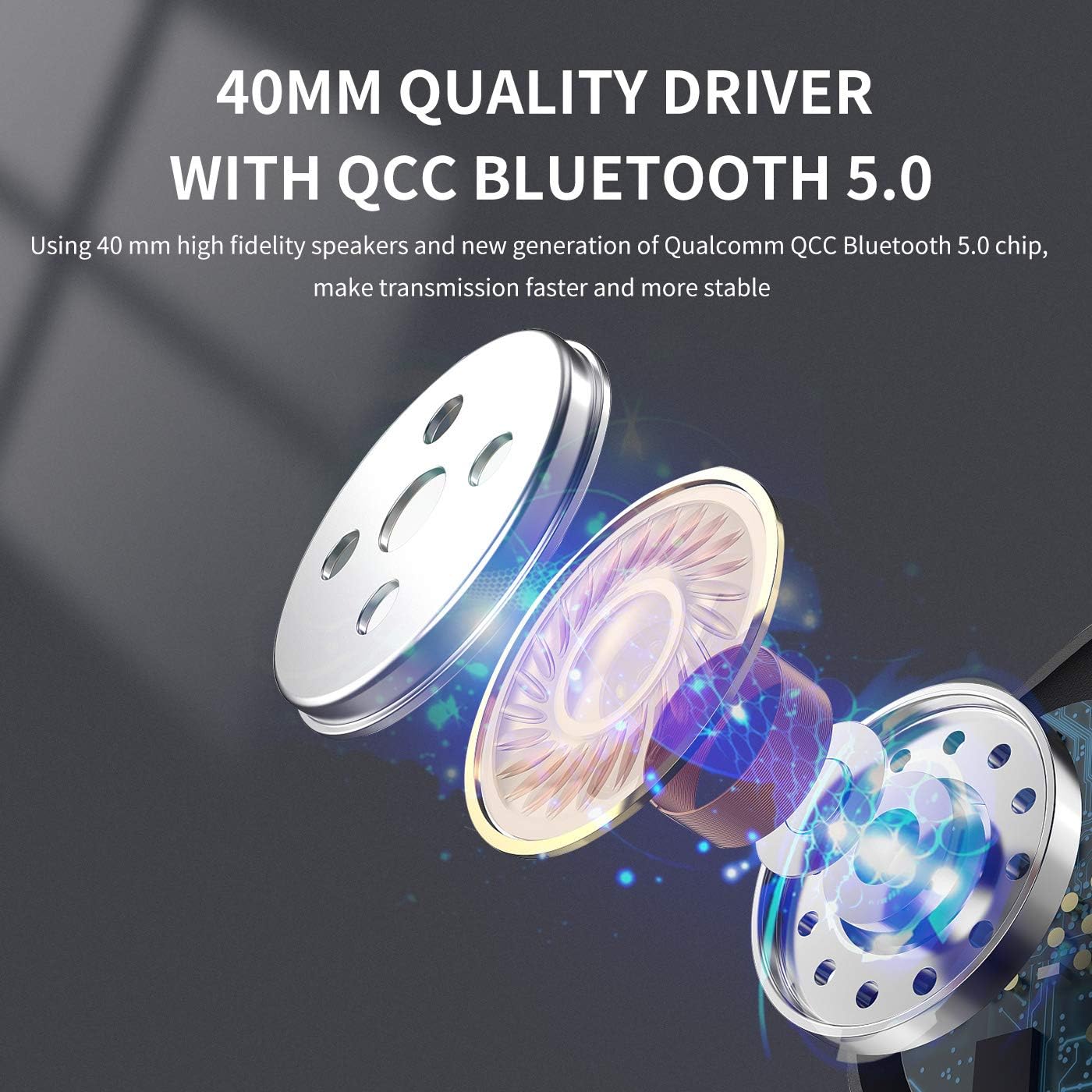
ภาพ: ระเบิด view diagram illustrating the 40mm high-fidelity speakers and Qualcomm QCC Bluetooth 5.0 chip inside the SOMIC MS300 headphones.
การรับประกันและการสนับสนุน
SOMIC provides a standard warranty for its products. Please refer to the warranty card included in your package for specific terms and conditions, or visit the official SOMIC webเว็บไซต์สำหรับข้อมูลการรับประกันล่าสุด
For technical support, troubleshooting assistance, or warranty claims, please contact SOMIC customer service through their official webไซต์หรือข้อมูลการติดต่อที่ให้ไว้บนบรรจุภัณฑ์ผลิตภัณฑ์
SOMIC Official Webเว็บไซต์: Visit SOMIC Store on Amazon
เอกสารที่เกี่ยวข้อง - MS300
 |
คู่มือผู้ใช้ชุดหูฟังสำหรับเล่นเกม SOMIC G951S - คุณสมบัติ ข้อมูลจำเพาะ การแก้ไขปัญหา คู่มือผู้ใช้ SOMIC G951S Gaming Headset แบบครอบคลุม เรียนรู้เกี่ยวกับคุณสมบัติของผลิตภัณฑ์ เนื้อหาในบรรจุภัณฑ์ ข้อมูลจำเพาะ คู่มือเริ่มต้นใช้งานฉบับย่อ และเคล็ดลับการแก้ไขปัญหาสำหรับ PC, PS4, PS5, Xbox One และ Nintendo Switch |
 |
คู่มือผู้ใช้ชุดหูฟังบลูทูธ SOMIC GS510 คู่มือผู้ใช้ที่ครอบคลุมสำหรับชุดหูฟังบลูทูธ SOMIC GS510 ครอบคลุมคุณสมบัติของผลิตภัณฑ์ เนื้อหาในแพ็คเกจ ข้อมูลจำเพาะโดยละเอียด การควบคุมชุดหูฟัง คู่มือเริ่มต้นฉบับย่อสำหรับการเชื่อมต่อบลูทูธและแบบมีสาย เคล็ดลับการแก้ไขปัญหา ข้อควรระวังที่สำคัญ ข้อมูลการรับประกัน และรายละเอียดของผู้ผลิต |
 |
คู่มือผู้ใช้ชุดหูฟังสำหรับเล่นเกม SOMIC G951 7.1 คู่มือผู้ใช้อย่างเป็นทางการสำหรับ SOMIC G951 7.1 Gaming Headset ซึ่งมีรายละเอียดคุณสมบัติของผลิตภัณฑ์ ข้อมูลจำเพาะ คู่มือเริ่มต้นอย่างรวดเร็ว การควบคุม และข้อมูลการรับประกัน |
 |
คู่มือผู้ใช้ชุดหูฟัง SOMiC GS510 Cat คู่มือครอบคลุมสำหรับ SOMiC GS510 Cat Headset ซึ่งมีรายละเอียดเกี่ยวกับคุณสมบัติ การตั้งค่า ความเข้ากันได้กับคอนโซลเกมและพีซี และคำแนะนำการใช้งานไมโครโฟนตัดเสียงรบกวนแบบยืดหดได้ |
 |
คู่มือผู้ใช้และคำแนะนำสำหรับชุดหูฟังสำหรับเล่นเกม SOMIC G760 คู่มือผู้ใช้อย่างเป็นทางการสำหรับชุดหูฟังเกมมิ่ง SOMIC G760 เรียนรู้เกี่ยวกับคุณสมบัติของผลิตภัณฑ์ เนื้อหาในบรรจุภัณฑ์ ข้อมูลจำเพาะโดยละเอียด การควบคุมชุดหูฟัง คู่มือเริ่มต้นใช้งานฉบับย่อสำหรับการจับคู่ การแก้ไขปัญหาทั่วไป และข้อมูลการรับประกัน |
 |
หูฟังเกมมิ่ง Somic G941 ANC - คู่มือผู้ใช้และข้อมูลจำเพาะ คู่มือผู้ใช้โดยละเอียดและข้อมูลจำเพาะทางเทคนิคสำหรับหูฟังเล่นเกม Somic G941 ANC ครอบคลุมถึงคุณสมบัติ ข้อควรระวัง การตั้งค่า และข้อมูลการรับประกัน |
Ask a question about this manual
Ask about setup, troubleshooting, compatibility, parts, safety, or missing instructions. Manuals+ will review the question and use this page’s manual context to help answer it.