
1. บทนำ
Thank you for choosing the Laney CUB-SUPER10 10-Watt Guitar Ampเครื่องฟอก นี้ amplifier is designed to deliver classic tube tone in a compact and portable package. Featuring a built-in boost function, a 3-band equalizer, and an effects loop, the CUB-SUPER10 offers versatile sound shaping for various musical styles. This manual will guide you through the features and functions of your new ampชีวิต.

รูปที่ 1 : ด้านหน้า view of the Laney CUB-SUPER10 10-Watt Guitar Ampชีวิต.
2. การตั้งค่า
Follow these steps to set up your CUB-SUPER10 ampเครื่องฟอก:
- การแกะกล่อง: นำไฟล์ ampแกะเครื่องขยายเสียงออกจากบรรจุภัณฑ์ เก็บวัสดุบรรจุภัณฑ์ทั้งหมดไว้สำหรับการขนส่งหรือจัดเก็บในอนาคต
- การจัดวาง: วาง ampวางเครื่องขยายเสียงบนพื้นผิวที่มั่นคงและเรียบ ตรวจสอบให้แน่ใจว่ามีการระบายอากาศที่เพียงพอรอบๆ ตัวเครื่อง
- การเชื่อมต่อไฟฟ้า: เชื่อมต่อสายไฟที่ให้มากับช่องเสียบไฟ AC ที่แผงด้านหลังของเครื่อง amplifier and then to a suitable mains power outlet. Ensure the power switch is in the 'OFF' (0) position before connecting.
- การเชื่อมต่อเครื่องมือ: Connect your guitar to the 'INPUT' jack on the front panel using a high-quality instrument cable.
- ลำโพงภายนอก (เลือกได้): If using an external speaker cabinet, connect it to the 'EXTERNAL SPEAKER' output on the rear panel. Ensure the impedance of the external cabinet matches the amplifier's output impedance (8-16 Ohms). Disconnecting the internal speaker is not required when using an external speaker.
- สวิตช์เท้าเหยียบ (อุปกรณ์เสริม): Connect a compatible footswitch (not included) to the 'FOOTSWITCH' jack on the rear panel to remotely control the Boost function.

Figure 2: Rear panel connections including power input, external speaker output, and footswitch jack.
3. คู่มือการใช้งาน
Familiarize yourself with the controls and functions of your CUB-SUPER10 ampเครื่องฟอก:
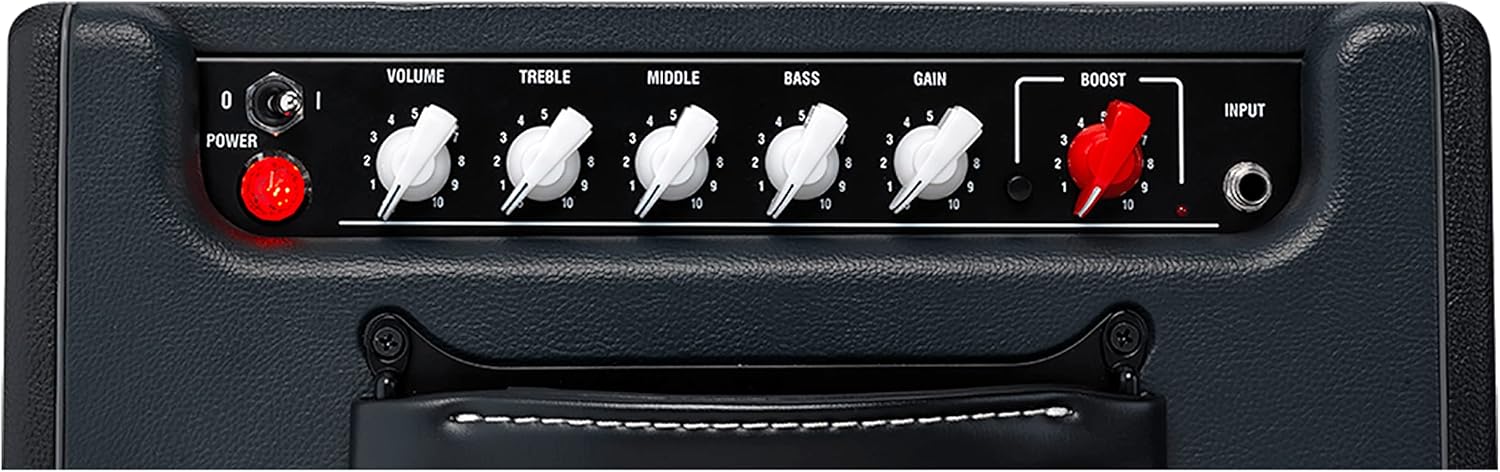
รูปที่ 3: ภาพระยะใกล้ของแผงควบคุมด้านหน้า
3.1 แผงควบคุมด้านหน้า
- สวิตช์เพาเวอร์: สลับไฟล์ amplifier ON (I) and OFF (0). Always ensure the volume is low before powering on or off.
- ปริมาณ: ควบคุมระดับเอาต์พุตโดยรวมของ ampชีวิต.
- เสียงแหลม: ปรับการตอบสนองความถี่สูงของ ampชีวิต.
- กลาง: ปรับการตอบสนองความถี่ช่วงกลาง
- เบส: ปรับการตอบสนองความถี่ต่ำ
- ได้รับ: ควบคุมปริมาณการพรีamp distortion. Higher settings produce more overdrive.
- บูสต์: Activates the built-in boost function, increasing the signal level to hit the preamp tubes harder for enhanced drive and sustain. This can also be controlled via an optional footswitch.
- อินพุต: หัวแจ็คขนาด 1/4 นิ้ว สำหรับเชื่อมต่อกีตาร์ของคุณ
3.2 การเชื่อมต่อแผงด้านหลัง
- ลูป FX (ส่ง/รับ): Allows connection of external effects pedals. Connect the 'SEND' to the input of your effects unit and the output of your effects unit to the 'RETURN'. This places time-based effects after the preamp section for optimal sound.
- ฟุตสวิตช์: 1/4" jack for connecting an optional footswitch to engage/disengage the Boost function.
- ลำโพงภายนอก: Output for connecting an external speaker cabinet (8-16 Ohms).
4. การบำรุงรักษา
การบำรุงรักษาที่เหมาะสมช่วยให้มีอายุการใช้งานยาวนานและประสิทธิภาพการทำงานที่เหมาะสมที่สุด ampเครื่องฟอก:
- การทำความสะอาด: ใช้ผ้าแห้งเนื้อนุ่มทำความสะอาดด้านนอกของตัวเครื่อง ampใช้สารเพิ่มความคมชัด หลีกเลี่ยงน้ำยาทำความสะอาดที่มีฤทธิ์กัดกร่อนหรือตัวทำละลาย
- การดูแลท่อ: As a tube amplifier, the CUB-SUPER10 contains vacuum tubes that have a finite lifespan. If you notice a decrease in performance or unusual noise, the tubes may need replacement. This should ideally be performed by a qualified technician.
- พื้นที่จัดเก็บ: จัดเก็บ amplifier in a dry, temperate environment, away from direct sunlight or extreme temperatures.
- การขนส่ง: เมื่อทำการขนย้าย amplifier, ensure it is powered off and disconnected from all cables. Use original packaging or a suitable protective case.
5 การแก้ไขปัญหา
If you encounter issues with your CUB-SUPER10, refer to the following common troubleshooting steps:
- ไม่มีไฟฟ้า: Check the power cable connection at both the amplifier and the wall outlet. Ensure the power switch is in the 'ON' (I) position. Verify the wall outlet is functional.
- ไม่มีเสียง:
- Ensure your guitar is properly connected to the 'INPUT' jack.
- Check that the 'VOLUME' control is turned up.
- Verify that your instrument cable is not faulty by testing with another cable.
- If using the FX Loop, ensure all connections are correct and any pedals in the loop are powered on and functioning. Try bypassing the FX Loop to isolate the issue.
- If using an external speaker, ensure it is correctly connected and its impedance is compatible.
- Distorted/Unwanted Noise:
- Reduce the 'GAIN' setting.
- ตรวจสอบสายเคเบิลหรือจุดเชื่อมต่อว่ามีปัญหาหรือไม่
- Ensure your guitar's volume and tone controls are set appropriately.
- Tubes may be worn out and require replacement.
If these steps do not resolve the issue, please contact Laney customer support or a qualified service technician.
6. ข้อมูลจำเพาะทางเทคนิค
| คุณสมบัติ | ข้อมูลจำเพาะ |
|---|---|
| ชื่อรุ่น | CUB-SUPER10 |
| เอาท์พุต วัดtage | 6 วัตต์ (RMS) |
| Amplifier ประเภท | Tube (Valve) |
| ขนาดลำโพง | 10 Inches (HH Custom) |
| Number of Bands (EQ) | 3 (Treble, Middle, Bass) |
| จำนวนช่องสัญญาณออก | 1 |
| ป้อนข้อมูล | แจ็ค 6.35 มม. |
| เอฟเอ็กซ์ ลูป | ใช่ (ส่ง/รับ) |
| อินพุต Footswitch | Yes (for Boost) |
| เอาต์พุตลำโพงภายนอก | Yes (8-16 Ohms) |
| ขนาด (กว้าง x ยาว x สูง) | 44.96 x 43.94 x 28.19 ซม. |
| น้ำหนัก | 9.6 กก. |
| วัสดุ | โลหะไม้ |

Figure 4: Dimensions of the Laney CUB-SUPER10 ampชีวิต.
7. ข้อมูลการรับประกัน
The Laney CUB-SUPER10 ampเครื่องขยายเสียงมาพร้อมกับ รับประกัน 1 ปี from the date of purchase. This warranty covers manufacturing defects and faulty components under normal use. It does not cover damage caused by misuse, accidents, unauthorized modifications, or normal wear and tear of consumable parts like vacuum tubes. Please retain your proof of purchase for warranty claims.
8. การสนับสนุนลูกค้า
For technical assistance, service, or warranty inquiries regarding your Laney CUB-SUPER10 amplifier, please contact Laney customer support through their official website or your authorized dealer. Provide your product model number (CUB-SUPER10) and serial number (if applicable) when seeking support.