
1. บทนำ
ขอบคุณสำหรับการซื้อasing the YESIDO YSP03 Sports Bluetooth In-Ear Earphones. This manual provides essential information for the safe and efficient use of your new earphones. Please read it thoroughly before use and retain it for future reference.
2. ข้อมูลด้านความปลอดภัย
- ห้ามให้หูฟังสัมผัสกับอุณหภูมิที่สูงหรือความชื้นสูง หรือสภาพแวดล้อมที่มีฤทธิ์กัดกร่อน
- Avoid dropping, impacting, or bending the earphones.
- ห้ามถอดประกอบหรือดัดแปลงหูฟัง เพราะอาจทำให้การรับประกันเป็นโมฆะและเกิดความเสียหายได้
- เก็บหูฟังให้ห่างจากเด็กและสัตว์เลี้ยง
- ใช้เฉพาะสายชาร์จที่ให้มาหรือที่เทียบเท่าที่ได้รับการรับรองเท่านั้น
- ฟังในระดับเสียงปานกลางเพื่อป้องกันความเสียหายต่อการได้ยิน
- อย่าใช้หูฟังขณะขับรถหรือในสถานการณ์ที่คุณจำเป็นต้องรับรู้ถึงสิ่งรอบข้าง
3. เนื้อหาบรรจุภัณฑ์
กรุณาตรวจสอบแพ็คเกจสำหรับรายการต่อไปนี้:
- YESIDO YSP03 Sports Bluetooth In-Ear Earphones
- สายชาร์จ USB
- คู่มือการใช้งาน
- Ear tips (various sizes, typically)
4. สินค้าหมดview
The YESIDO YSP03 earphones feature an in-ear design with a control unit for easy operation. They support Bluetooth wireless connectivity and also offer direct music playback via an SD card.
Control Unit and Ports
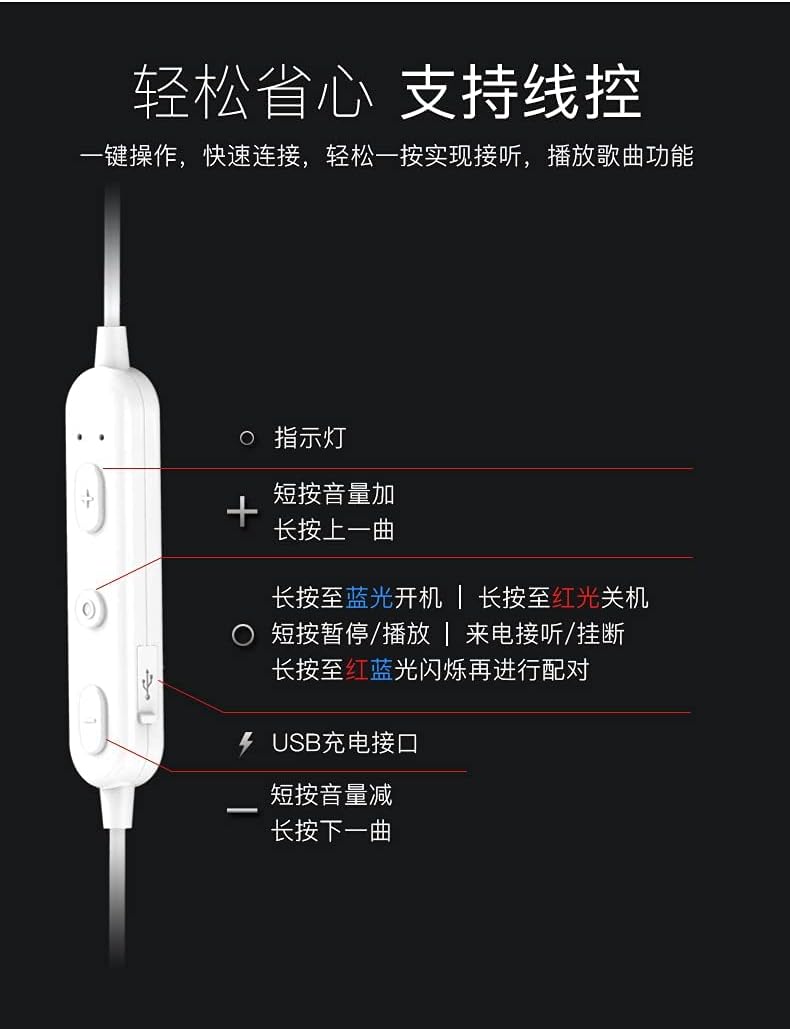
ภาพ: รายละเอียด view of the earphone control unit, showing the indicator light, volume/track buttons, multi-function button, and USB charging port.
- ไฟแสดงสถานะ: แสดงสถานะ (พลังงาน, การจับคู่, การชาร์จ)
- ปุ่ม '+': Short press for Volume Up; Long press for Previous Track.
- ปุ่มมัลติฟังก์ชัน (ตรงกลาง): Long press for Power On (blue light) / Power Off (red light); Short press for Play/Pause or Answer/Hang up calls; Long press until red and blue lights flash for Pairing Mode.
- '-' ปุ่ม: Short press for Volume Down; Long press for Next Track.
- พอร์ตชาร์จ USB: สำหรับเชื่อมต่อสายชาร์จ
ช่องเสียบการ์ด SD
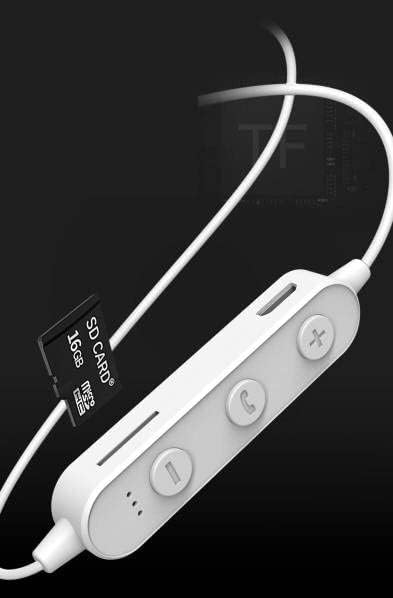
ภาพ: Close-up of the control unit showing the SD card slot, indicating direct music playback without a phone. A 64GB card can store approximately 15,000 songs.
The earphones feature an integrated SD card slot, allowing you to play music directly from a memory card without needing a connected device. This is ideal for sports or activities where carrying a phone is inconvenient.
5. การตั้งค่า
5.1 การชาร์จหูฟัง
- Connect the USB charging cable to the USB charging port on the earphone control unit.
- เชื่อมต่อปลายอีกด้านหนึ่งของสาย USB เข้ากับอะแดปเตอร์ไฟ USB (ไม่รวมอยู่ด้วย) หรือพอร์ต USB ของคอมพิวเตอร์
- The indicator light will typically show a red light during charging and turn off or change color when fully charged.
- ใช้เวลาประมาณ 1-2 ชั่วโมงในการชาร์จจนเต็ม
5.2 การจับคู่บลูทูธ
- ตรวจสอบให้แน่ใจว่าหูฟังปิดอยู่
- Press and hold the Multi-function Button (center button) for approximately 5-7 seconds until the indicator light flashes red and blue alternately. This indicates pairing mode.
- On your mobile phone or Bluetooth-enabled device, go to the Bluetooth settings and turn on Bluetooth.
- ค้นหา available devices. You should see "YESIDO YSP03" or a similar name in the list.
- Select "YESIDO YSP03" to connect. Once successfully paired, the indicator light will typically flash blue slowly or turn off.
- หากได้รับแจ้งให้ป้อนรหัสผ่าน ให้ป้อน "0000"
5.3 การใส่การ์ด SD
- Locate the SD card slot on the control unit.
- Gently insert a formatted Micro SD card (TF card) with the metal contacts facing down until it clicks into place.
- The earphones will automatically detect the card and switch to SD card playback mode if no Bluetooth device is connected or if Bluetooth is disconnected.
6. คู่มือการใช้งาน
6.1 เปิด/ปิดเครื่อง
- เปิดเครื่อง: Press and hold the Multi-function Button until the blue indicator light appears.
- หมดแรง: Press and hold the Multi-function Button until the red indicator light appears.
6.2 การเล่นเพลง (โหมดบลูทูธ)
- เล่น/หยุดชั่วคราว: กดปุ่มมัลติฟังก์ชั่นสั้นๆ
- ปรับระดับเสียงขึ้น: Short press the '+' Button.
- ลดเสียงลง: Short press the '-' Button.
- เพลงถัดไป: Long press the '-' Button.
- แทร็กก่อนหน้า: Long press the '+' Button.
6.3 การจัดการการโทร
- รับ/วางสาย: Short press the Multi-function Button when an incoming call is received.
- ปฏิเสธสาย: Long press the Multi-function Button when an incoming call is received.
- โทรซ้ำหมายเลขล่าสุด: กดปุ่มมัลติฟังก์ชั่นสองครั้ง
6.4 SD Card Playback
- Once an SD card is inserted and detected, the earphones will automatically begin playing music from the card.
- The same controls for Play/Pause, Volume, Next/Previous Track apply as in Bluetooth mode.
7. การบำรุงรักษา
- การทำความสะอาด: ใช้ผ้านุ่มและแห้งเช็ดทำความสะอาดหูฟัง ห้ามใช้สารเคมีรุนแรงหรือวัสดุที่มีฤทธิ์กัดกร่อน
- พื้นที่จัดเก็บ: เก็บหูฟังไว้ในที่แห้งและเย็น หลีกเลี่ยงแสงแดดโดยตรงและอุณหภูมิที่สูงหรือต่ำเกินไป
- การดูแลแบตเตอรี่ To prolong battery life, charge the earphones regularly, even if not in frequent use. Avoid fully discharging the battery for extended periods.
8 การแก้ไขปัญหา
| ปัญหา | สารละลาย |
|---|---|
| Earphones won't power on. | Ensure the earphones are fully charged. Press and hold the Multi-function Button for a longer duration. |
| ไม่สามารถจับคู่กับอุปกรณ์ได้ | Ensure earphones are in pairing mode (red and blue flashing light). Turn off and on Bluetooth on your device. Move closer to the earphones. Forget the device in your phone's Bluetooth settings and try pairing again. |
| ไม่มีเสียง. | Check volume levels on both earphones and your connected device. Ensure earphones are properly connected via Bluetooth or that the SD card is inserted correctly and contains playable files. |
| SD card not playing. | Ensure the SD card is inserted correctly and contains compatible audio files (e.g., MP3). Try re-inserting the card. Ensure no Bluetooth device is actively connected, as SD card playback might be prioritized when Bluetooth is disconnected. |
| คุณภาพเสียงไม่ดี | Ensure there are no obstructions between the earphones and your device. Move closer to your device. Try a different audio source or file. |
9. ข้อมูลจำเพาะ
| คุณสมบัติ | รายละเอียด |
|---|---|
| ยี่ห้อ | YESIDO |
| หมายเลขรุ่น | YSP03 |
| สี | สีขาว |
| การวางตำแหน่งหู | อินเอียร์ |
| เทคโนโลยีการเชื่อมต่อ | ไร้สาย (Bluetooth) |
| การควบคุมเสียงรบกวน | ไม่มี |
| อุปกรณ์ที่รองรับ | โทรศัพท์มือถือ |
| การใช้งานเฉพาะของผลิตภัณฑ์ | กีฬา |
| คุณสมบัติสายเคเบิล | ไร้สาย |
| ระดับความต้านทานต่อน้ำ | ไม่ทนน้ำ |
| ประเภทการควบคุม | การควบคุมด้วยเสียง |
| วิธีการควบคุม | App (Voice Control implies app integration for some functions) |
ประสิทธิภาพของแบตเตอรี่

ภาพ: Visual representation of battery performance metrics for the YESIDO YSP03 earphones.
- เวลาการเล่นเพลง: ประมาณ 9 ชั่วโมง
- Headphone Standby Time: ประมาณ 120 ชั่วโมง
- ระยะเวลาการโทร: ประมาณ 7.5 ชั่วโมง
*Note: These data are obtained from YESIDO laboratory tests, and slight deviations may occur due to changes in objective environment and usage patterns.
10. การรับประกันและการสนับสนุน
10.1 ข้อมูลการรับประกัน
This product is provided without an explicit warranty. Please refer to your retailer's return policy for any issues within the applicable return period.
10.2 การสนับสนุนลูกค้า
For further assistance or inquiries, please contact the retailer where you purchased the product. You may also visit the official YESIDO website for general product information and potential support resources.