
1. บทนำ
Thank you for choosing the QWORK Air Compressor Pressure Switch, Model WD3785. This device is designed to automatically regulate the pressure in your air compressor system, ensuring efficient and safe operation. This manual provides essential information for proper installation, operation, and maintenance of your pressure switch.
2. ข้อมูลด้านความปลอดภัย
Please read all safety instructions carefully before installation and operation to prevent injury or damage to the equipment.
- การตัดการเชื่อมต่อไฟฟ้า: Always ensure the power supply to the air compressor is completely disconnected before attempting any installation, maintenance, or adjustment.
- ความเข้ากันได้ของเกลียว: This unit is built with G1/4 BSP joints. It is ไม่เข้ากัน with NPT-threaded (U.S.) air systems. Attempting to force incompatible threads can cause leaks and damage.
- รอยต่อซีล: Use appropriate PTFE (Teflon) tape or thread sealant on all threaded connections to ensure an airtight seal and prevent leaks.
- สภาพแวดล้อม : Avoid installing or operating the switch in environments with heavy oil mist or excessive moisture, as this can affect performance and longevity.
- ขีด จำกัด ความดัน: ห้ามใช้แรงดันใช้งานเกิน 175 PSI

Image: G1/4 BSP Thread vs. NPT Thread. This image illustrates the difference between G1/4 BSP threads, which are compatible with this pressure switch, and NPT threads, which are not. Using the correct thread type is crucial for a secure and leak-free connection.
3. สินค้าหมดview
The QWORK Air Compressor Pressure Switch integrates several key components for comprehensive air pressure management.

ภาพ: ด้านหน้า view of the QWORK Air Compressor Pressure Switch. This image displays the main unit, including the pressure gauges, regulator knob, and the red on/off lever.
ภาพ: ด้านข้าง view highlighting the pressure regulator knob. This knob allows for adjustment of the output air pressure.

ภาพ: ด้านข้าง view showing the quick-connect coupler for attaching pneumatic tools.
4. ข้อมูลจำเพาะ
| คุณสมบัติ | ข้อมูลจำเพาะ |
|---|---|
| หมายเลขรุ่น | WD3785 |
| ยี่ห้อ | คิวเวิร์ค |
| เล่มที่tage | 240 โวลต์ |
| แหล่งพลังงาน | สายไฟ |
| การใช้ที่แนะนำ | Pressure Control in Air Compressor Systems |
| ประเภทเธรด | G1/4 BSP Female Thread |
| ความเข้ากันได้ | Suitable for single-phase or three-phase air compressor control systems. Not compatible with NPT-threaded compressors. |
| แรงดันการทำงานสูงสุด | แรงดัน 175 ปอนด์/ตารางนิ้ว |
| Pressure Switch Range | Cut-in 90 PSI, Cut-out 120 PSI |
| Recommended Compressor Power | 1-3 แรงม้า |
| อุณหภูมิในการทำงาน | 5°C–45°C (41°F–113°F) |
| ประเภทวัสดุ | Acrylonitrile Butadiene Styrene (ABS) cover with iron fittings |
| น้ำหนักสินค้า | 671 กรัม |
| คุณสมบัติพิเศษ | Precision Measurement, Portable |

Image: Product dimensions. This diagram provides key measurements of the pressure switch unit, useful for installation planning.
5. การตั้งค่าและการติดตั้ง
Proper installation is crucial for the safe and effective operation of your pressure switch. Always ensure the air compressor is unplugged and depressurized before beginning installation.
- ตรวจสอบความเข้ากันได้: Confirm that your air compressor system uses G1/4 BSP threads. This unit is not compatible with NPT threads.
- เตรียมการเชื่อมต่อ: Apply PTFE tape or thread sealant to all male threaded connections on the pressure switch and your compressor system to ensure a leak-free seal.
- เมานต์สวิตช์: Securely attach the pressure switch to the appropriate port on your air compressor. Ensure it is stable and free from excessive vibration.
- เชื่อมต่อสายการบิน: Connect your air lines and pneumatic tools to the quick-connect coupler and other ports as needed.
- สายไฟฟ้า: Refer to the wiring diagram provided in Section 6 for correct electrical connections. If you are unsure, consult a qualified electrician.
- ตรวจสอบรอยรั่ว: After installation, slowly repressurize the system and check all connections for air leaks using soapy water. Tighten any leaking connections.
Video: Air Compressor Pressure Switch Control Valve. This video provides a visual overview of the pressure switch, which may assist in understanding its components and installation points.
6. แผนภาพการเดินสายไฟ
The following diagram illustrates the internal wiring connections for the QWORK Air Compressor Pressure Switch. Ensure all electrical connections are made by a competent individual and comply with local electrical codes.

Image: Internal wiring diagram. This diagram shows the electrical connections within the pressure switch housing, including terminals for power input and motor connection.
7. คู่มือการใช้งาน
Once installed and wired correctly, the pressure switch operates automatically to maintain your desired air pressure.
- เปิด/ปิดเครื่อง: Use the red lever on the side of the switch to turn the compressor power ON or OFF.
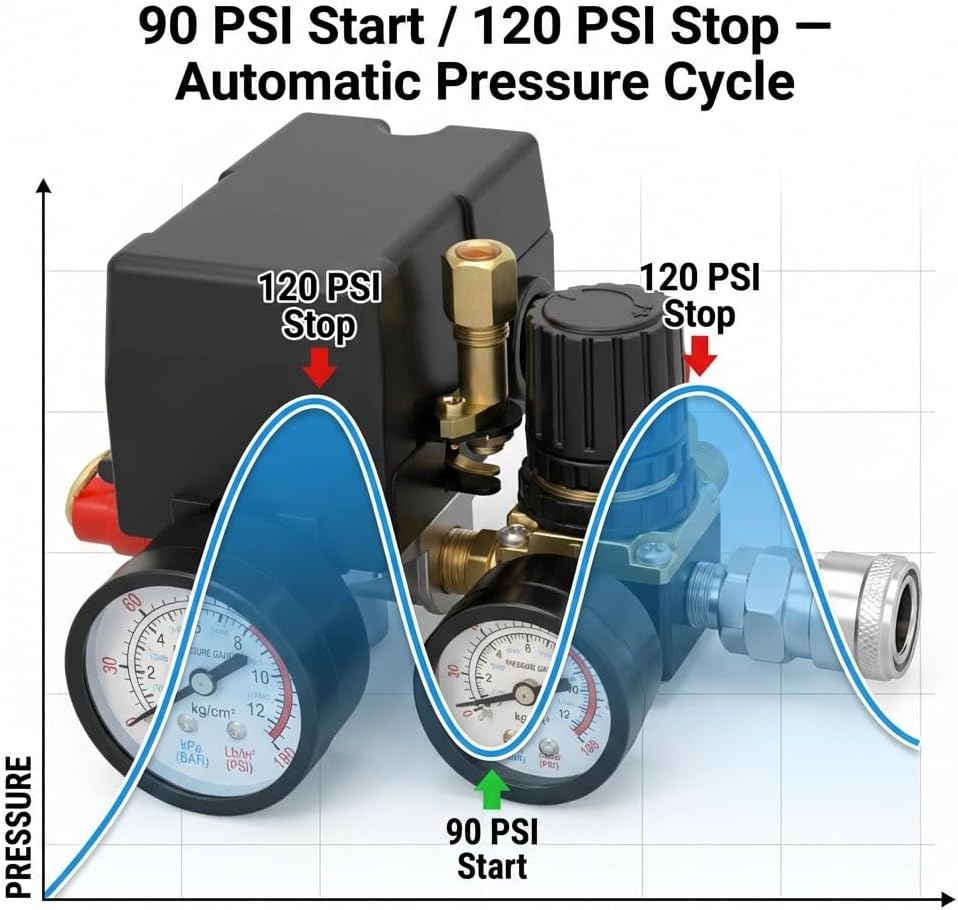
- Automatic Pressure Cycle: The switch is factory-set to activate the compressor when pressure drops to 90 PSI and stop it when pressure reaches 120 PSI. This automatic cycle maintains a consistent pressure range.
- Regulator Adjustment: The black knob on the regulator allows you to adjust the output air pressure to your tools. Turn clockwise to increase pressure, counter-clockwise to decrease. Monitor the output gauge while adjusting.

Image: Automatic Pressure Cycle. This graph visually represents how the pressure switch maintains air pressure by starting the compressor at 90 PSI and stopping it at 120 PSI.
8. การบำรุงรักษา
Regular maintenance helps ensure the longevity and reliable performance of your pressure switch.
- ตรวจสอบการรั่วไหล: Periodically check all air connections for leaks. Tighten fittings or reapply thread sealant as needed.
- หน่วยทำความสะอาด: Keep the exterior of the pressure switch clean and free from dust, dirt, and oil. Use a dry cloth for cleaning.
- ตรวจสอบการเชื่อมต่อไฟฟ้า: Ensure all electrical wiring remains secure and free from corrosion.
- การตรวจสอบสิ่งแวดล้อม: ตรวจสอบให้แน่ใจว่าสภาพแวดล้อมการทำงานยังคงอยู่ในช่วงอุณหภูมิและความชื้นที่กำหนด
9 การแก้ไขปัญหา
If you encounter issues with your QWORK Air Compressor Pressure Switch, refer to the following common troubleshooting steps:
- คอมเพรสเซอร์ไม่เริ่มทำงาน:
- Check if the red ON/OFF lever is in the 'ON' position.
- Verify the power supply to the compressor.
- Ensure the tank pressure is below the 90 PSI cut-in threshold.
- Inspect electrical wiring for loose connections or damage.
- Compressor Not Stopping:
- Check if the tank pressure has reached the 120 PSI cut-out threshold.
- Listen for air leaks in the system, which could prevent pressure from building up.
- The pressure switch mechanism may be faulty; consider professional inspection.
- การรั่วไหลของอากาศ:
- Apply soapy water to all connections to identify the source of the leak.
- Tighten loose fittings.
- If necessary, disassemble, reapply PTFE tape, and reassemble the leaking connection.
- การอ่านค่าความดันไม่ถูกต้อง:
- Ensure gauges are securely attached and not damaged.
- Compare readings with a known accurate pressure gauge if possible.
10. การรับประกันและการสนับสนุน
QWORK products are manufactured to high-quality standards. For warranty information, technical support, or assistance with parts, please contact QWORK customer service through the retailer where the product was purchased or visit the official QWORK website. Please have your model number (WD3785) and purchase date available when contacting support.