
PowerPac PPFS212B 2-in-1 Dual-Usage Stand Fan Instruction Manual
Model: PPFS212B
1. ข้อมูลด้านความปลอดภัยที่สำคัญ
โปรดอ่านคำแนะนำทั้งหมดอย่างละเอียดก่อนใช้งานเครื่องใช้ไฟฟ้านี้ และเก็บคำแนะนำไว้เพื่อใช้อ้างอิงในอนาคต การไม่ปฏิบัติตามคำแนะนำเหล่านี้อาจส่งผลให้เกิดไฟฟ้าช็อต ไฟไหม้ หรือบาดเจ็บสาหัสได้
- ให้แน่ใจว่าปริมาตรtage ที่ระบุบนฉลากระดับแรงดันไฟฟ้าตรงกับปริมาณไฟฟ้าหลักของคุณtage.
- ห้ามจุ่มพัดลม ปลั๊ก หรือสายไฟลงในน้ำหรือของเหลวอื่นๆ
- Unplug the fan from the power outlet before cleaning, assembling, or disassembling parts.
- อย่าเอามือ ดินสอ หรือวัตถุอื่นใดเข้าไปในช่องตะแกรงพัดลมขณะที่พัดลมกำลังทำงาน
- ห้ามใช้งานพัดลมหากสายไฟหรือปลั๊กชำรุด โปรดติดต่อช่างผู้ชำนาญการเพื่อทำการซ่อมแซม
- This appliance is equipped with thermal fuse protection against overheating. If the fan stops working unexpectedly, unplug it and allow it to cool before attempting to restart.
- เครื่องใช้ไฟฟ้าตัวนี้ไม่ได้มีวัตถุประสงค์เพื่อให้บุคคล (รวมทั้งเด็ก) ที่มีความบกพร่องทางร่างกาย ทางประสาทสัมผัส หรือทางจิตใจ หรือขาดประสบการณ์และความรู้ ใช้งาน เว้นแต่จะมีการดูแลหรือคำแนะนำเกี่ยวกับการใช้เครื่องใช้ไฟฟ้าโดยบุคคลที่รับผิดชอบด้านความปลอดภัยของบุคคลดังกล่าว
2. สินค้าหมดview
The PowerPac PPFS212B is a versatile 2-in-1 dual-usage stand fan designed for efficient cooling in indoor environments. It features 7 blades for maximum airflow, 3-speed settings, and an oscillation function for wider air distribution. The fan is equipped with thermal fuse protection for enhanced safety.
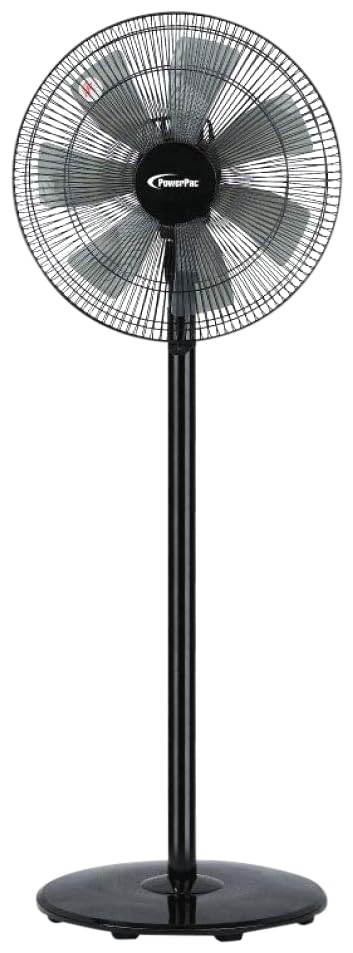
Image: PowerPac PPFS212B 2-in-1 Dual-Usage Stand Fan, showcasing its black finish and stand configuration.
3. เนื้อหาบรรจุภัณฑ์
Please check the package contents upon opening to ensure all parts are present and undamaged:
- 1 x PowerPac PPFS212B Stand Fan (includes fan head, stand pole, and base)
4. คำแนะนำในการประกอบ
Follow these steps to assemble your PowerPac PPFS212B fan:
- แกะส่วนประกอบทั้งหมดออกจากบรรจุภัณฑ์อย่างระมัดระวัง
- Attach the stand pole to the fan base. Ensure it is securely fastened according to the markings or locking mechanism.
- Mount the fan head assembly onto the top of the stand pole. Align the connection points and secure it firmly.
- Ensure all screws and fasteners are tightened to prevent wobbling during operation.
- วางพัดลมที่ประกอบเสร็จแล้วบนพื้นผิวที่มั่นคงและเรียบ
Image: Illustrative diagram of the PowerPac PPFS212B fan assembly, showing the base, stand, and fan head components.
5. คู่มือการใช้งาน
To operate your PowerPac PPFS212B fan:
- เสียบสายไฟเข้ากับเต้ารับไฟฟ้าที่เหมาะสม
- เปิด/ปิดเครื่อง: Press the 'ON/OFF' button (or corresponding button) on the control panel to turn the fan on or off.
- การปรับความเร็ว: Press the 'SPEED' button repeatedly to cycle through the 3 available speed settings (Low, Medium, High).
- ฟังก์ชันการสั่น: Press the 'OSC' button (or corresponding button) to activate or deactivate the oscillation feature, which allows the fan head to sweep from side to side.
- When finished, press the 'ON/OFF' button to turn off the fan and unplug it from the power outlet.
6. การบำรุงรักษาและการทำความสะอาด
Regular cleaning and maintenance will help ensure optimal performance and longevity of your fan:
- ถอดปลั๊กพัดลมออกจากแหล่งจ่ายไฟทุกครั้งก่อนทำความสะอาด
- ใช้แบบนุ่มๆamp cloth to wipe the exterior surfaces of the fan. Do not use abrasive cleaners, solvents, or harsh chemicals.
- To clean the fan blades, carefully remove the front grille (if detachable) according to the product design. Wipe the blades with a soft cloth. Ensure all parts are dry before reassembling.
- อย่าให้น้ำหยดเข้าไปในตัวเรือนมอเตอร์
- ควรเก็บพัดลมไว้ในที่แห้งและเย็นเมื่อไม่ได้ใช้งานเป็นเวลานาน
7 การแก้ไขปัญหา
If you encounter issues with your fan, refer to the following table for common problems and solutions:
| ปัญหา | สาเหตุที่เป็นไปได้ | สารละลาย |
|---|---|---|
| พัดลมไม่เปิด | ไม่มีแหล่งจ่ายไฟ Thermal fuse activated. | ตรวจสอบว่าปลั๊กเสียบเข้ากับเต้าเสียบอย่างแน่นหนาหรือไม่ ตรวจสอบให้แน่ใจว่าเต้ารับไฟฟ้าทำงานได้ Unplug and allow the fan to cool down for 30 minutes before restarting. |
| การไหลเวียนของอากาศอ่อนหรือไม่มีเลย | ตั้งความเร็วพัดลมไว้ต่ำเกินไป ใบพัดลมสกปรก | เพิ่มการตั้งค่าความเร็วพัดลม Unplug the fan and clean the blades as per maintenance instructions. |
| พัดลมไม่แกว่ง | ฟังก์ชั่นการสั่นปิดอยู่ | Press the 'OSC' button to activate oscillation. |
| เสียงรบกวนที่ผิดปกติระหว่างการทำงาน | ชิ้นส่วนหลวม. สิ่งกีดขวาง | Unplug the fan and check for any loose components or obstructions around the blades or motor. Tighten any loose parts. |
หากปัญหายังคงมีอยู่หลังจากพยายามแก้ไขปัญหาเหล่านี้แล้ว โปรดติดต่อฝ่ายสนับสนุนลูกค้า
8. ข้อมูลจำเพาะ
| คุณสมบัติ | ข้อมูลจำเพาะ |
|---|---|
| ยี่ห้อ | พาวเวอร์แพ็ก |
| หมายเลขรุ่น | PPFS212B |
| พิมพ์ | 2-in-1 Dual-Usage Stand Fan |
| จำนวนใบมีด | 7 |
| จำนวนความเร็ว | 3 |
| แหล่งพลังงาน | สายไฟ |
| วัดtage | 50 วัตต์ |
| วิธีการควบคุม | ปุ่มกด |
| คุณสมบัติพิเศษ | Oscillating, Thermal Fuse Protection |
| วัสดุ | พลาสติก |
| การใช้งานภายใน/ภายนอกอาคาร | ในร่ม |
| สี | สีดำ |
9. การรับประกันและการสนับสนุน
This PowerPac PPFS212B fan comes with a รับประกัน 2 ปี นับจากวันที่ซื้อ การรับประกันนี้ครอบคลุมข้อบกพร่องจากการผลิตภายใต้เงื่อนไขการใช้งานปกติ
For warranty claims, technical support, or any inquiries regarding your product, please contact PowerPac customer service. Keep your proof of purchase for warranty validation.