
1. สินค้าหมดview
The Cello C2220FSDE is a compact 22-inch Full HD LED television designed for versatile use. It features an integrated DVD player and a triple tuner (DVBT2/S2) for comprehensive signal reception. Its sleek design makes it suitable for various environments, including guest rooms, motorhomes, caravans, trucks, or boats.
Key features include HDMI and USB inputs for connecting external devices like game consoles and hard drives. The USB functionality also supports recording live television and playing stored media. This TV can also function as a monitor for laptops or desktop computers.

ภาพที่ 1.1: The integrated DVD player allows for direct playback of DVDs without additional devices.

ภาพที่ 1.2: Experience clear and detailed images with Full HD 1080p resolution.
2. การตั้งค่าและการติดตั้ง
2.1 การแกะกล่องและเนื้อหา
นำส่วนประกอบทั้งหมดออกจากบรรจุภัณฑ์อย่างระมัดระวัง ตรวจสอบให้แน่ใจว่ามีส่วนประกอบต่อไปนี้:
- 1 x Cello 22-inch LED TV
- สายไฟ
- รีโมทคอนโทรล
- คู่มือเริ่มต้นอย่างรวดเร็ว
- แบตเตอรี่ AAA 2 ก้อน
- แท่นวางทีวี
2.2 การติดตั้งขาตั้ง
Place the TV screen face down on a soft, clean surface to prevent scratches. Align the stand with the mounting holes on the bottom of the TV and secure it using the provided screws.
2.3 Connecting Power and Antenna
- เชื่อมต่อสายไฟเข้ากับช่องรับไฟของทีวี จากนั้นจึงเชื่อมต่อกับเต้ารับที่ผนัง
- Connect your TV aerial cable to the 'TV Aerial' input on the back of the TV.
- For satellite reception, connect a satellite dish cable (not supplied) to the 'DVB-S2' input.

ภาพที่ 2.1: หลัง view of the TV showing power, antenna, and other connectivity ports.
2.4 การเชื่อมต่ออุปกรณ์ภายนอก
ทีวีมีพอร์ตต่างๆ สำหรับเชื่อมต่ออุปกรณ์ภายนอก:
- ช่องต่อ HDMI: เชื่อมต่ออุปกรณ์ความละเอียดสูง เช่น เครื่องเล่นบลูเรย์ เครื่องเล่นเกม หรือกล่องรับสัญญาณทีวี
- ยูเอสบี: เชื่อมต่ออุปกรณ์จัดเก็บข้อมูล USB เพื่อเล่นหรือบันทึกสื่อ
- VGA: เชื่อมต่อคอมพิวเตอร์เพื่อใช้เป็นจอภาพ
- เอาต์พุตเสียง 3.5 มม.: เชื่อมต่อหูฟังหรือลำโพงภายนอก

ภาพที่ 2.2: Illustration of HDMI and USB ports for connecting various devices.

ภาพที่ 2.3: The integrated satellite tuner allows connection to a satellite dish for satellite TV reception.
3. คู่มือการใช้งาน
3.1 การเปิดเครื่องครั้งแรกและการสแกนช่องสัญญาณ
- ใส่แบตเตอรี่ AAA เข้าไปในรีโมทคอนโทรล
- กดปุ่มเปิด/ปิดบนรีโมทคอนโทรลหรือบนทีวีเพื่อเปิด
- Follow the on-screen instructions for initial setup, including language selection and automatic channel scanning for DVB-T2 (terrestrial) and DVB-S2 (satellite) signals.
3.2 ฟังก์ชั่นทีวีพื้นฐาน
- การเลือกช่อง: Use the 'CH+' / 'CH-' buttons or the numeric keypad on the remote control.
- การควบคุมระดับเสียง: Use the 'VOL+' / 'VOL-' buttons.
- การเลือกแหล่งที่มา: Press the 'SOURCE' button to switch between inputs (TV, HDMI, USB, DVD).
- การนำทางเมนู: Use the 'MENU' button to access settings and navigation arrows to browse.
3.3 Integrated DVD Player Operation
- ตรวจสอบให้แน่ใจว่าทีวีเปิดอยู่และตั้งค่าแหล่งสัญญาณเข้าเป็น 'DVD'
- Gently insert a DVD disc into the slot on the side of the TV, label side facing the mirror side (as indicated on the slot).
- The DVD should load automatically. Use the remote control for playback functions (Play, Pause, Stop, Skip).
3.4 USB Recording and Media Playback
- การเล่นสื่อ: Insert a USB storage device into the USB port. Select 'USB' as the input source. Navigate through your file(รูปภาพ เพลง วิดีโอ) โดยใช้รีโมทคอนโทรล
- USB Recording (PVR): While watching live TV, insert a USB storage device. Press the 'RECORD' button on the remote to start recording. You can also use the 'PAUSE' function for time-shifting live TV.
3.1 วิดีโอ: This video demonstrates the physical controls on the TV and the various input/output ports available on the back and side of the unit, including the DVD slot, USB, HDMI, and antenna connections.
4. การบำรุงรักษา
4.1 การทำความสะอาดทีวี
- ควรถอดปลั๊กทีวีออกจากเต้ารับไฟฟ้าทุกครั้งก่อนทำความสะอาด
- ใช้ผ้านุ่มและแห้งเช็ดหน้าจอและตู้ สำหรับคราบฝังแน่น ให้เช็ดเบาๆampชุบผ้าด้วยน้ำหรือน้ำยาทำความสะอาดหน้าจอชนิดอ่อนโยนที่ไม่ทำให้เกิดรอยขีดข่วน
- ห้ามใช้แอลกอฮอล์ เบนซีน ทินเนอร์ หรือสารระเหยอื่นๆ เนื่องจากอาจทำให้หน้าจอหรือพื้นผิวเสียหายได้
4.2 DVD Player Care
- Keep the DVD slot free from dust and debris.
- Only insert clean, undamaged discs.
5 การแก้ไขปัญหา
If you encounter issues with your Cello TV, refer to the following common problems and solutions:
| ปัญหา | สาเหตุที่เป็นไปได้ | สารละลาย |
|---|---|---|
| ไม่มีไฟฟ้า | Power cord not connected; power outlet faulty | Check power cord connection; try a different outlet |
| ไม่มีภาพแต่มีเสียง | เลือกแหล่งสัญญาณเข้าไม่ถูกต้อง การเชื่อมต่อสายเคเบิลมีปัญหา | Press 'SOURCE' to select correct input; check HDMI/VGA cable connections |
| ไม่มีเสียงแต่มีภาพ | Volume too low or muted; external audio device issue | Increase volume; check mute status; ensure external audio devices are connected correctly |
| คุณภาพของภาพไม่ดี (ช่องทีวี) | Weak antenna signal; incorrect antenna connection | Adjust antenna position; check antenna cable connection; perform a channel rescan |
| ดีวีดีเล่นไม่ได้ | Disc inserted incorrectly; dirty or damaged disc; incorrect source selected | Re-insert disc correctly; clean or replace disc; select 'DVD' source |
| รีโมตคอนโทรลไม่ทำงาน | Batteries depleted or inserted incorrectly; obstruction between remote and TV | Replace batteries; ensure correct polarity; remove obstructions; point remote directly at TV sensor |
For further assistance, please refer to the support section or the full instruction manual available online.
6. ข้อมูลจำเพาะ
Below are the detailed technical specifications for the Cello C2220FSDE 22-inch Full HD LED TV:
| คุณสมบัติ | ข้อมูลจำเพาะ |
|---|---|
| ขนาดหน้าจอ | 22 นิ้ว (เส้นทแยงมุม 54.6 ซม.) |
| ยี่ห้อ | เชลโล่ |
| เทคโนโลยีการแสดงผล | นำ |
| ปณิธาน | 1080p (Full HD, 1920 x 1080 พิกเซล) |
| อัตราการรีเฟรช | 60 เฮิรตซ์ |
| คุณสมบัติพิเศษ | Integrated DVD Player |
| เทคโนโลยีการเชื่อมต่อ | HDMI, USB, VGA |
| อัตราส่วนภาพ | 16:9 น. |
| ขนาดสินค้า (ลึก x กว้าง x สูง) | ขนาด 5P x 50.4W x 34.2H ซม. |
| น้ำหนักสินค้า | 2.55 กิโลกรัม |
| อัตราส่วนคอนทราสต์ | 600:1 น. |
| ความสว่างสูงสุด | 180 NIT Coating |
| รองรับ HDR | HDR10 |
| เวลาตอบสนอง | 10 มิลลิวินาที |
| ประเภทจูนเนอร์ | DVB-C, DVB-S2, DVB-T2 |
| โหมดเอาต์พุตเสียง | สเตอริโอ |
| คำอธิบายลำโพง | 2 x 3 W Pitch Perfect Sound |
| การใช้พลังงาน | 21 กิโลวัตต์ชั่วโมง |
| เล่มที่tage | 230 Volts (100-240 V AC 50-60 Hz) |
| มาตรฐาน VESA Mount | 100 x 100 มม. |
| รุ่นปี | 2023 |
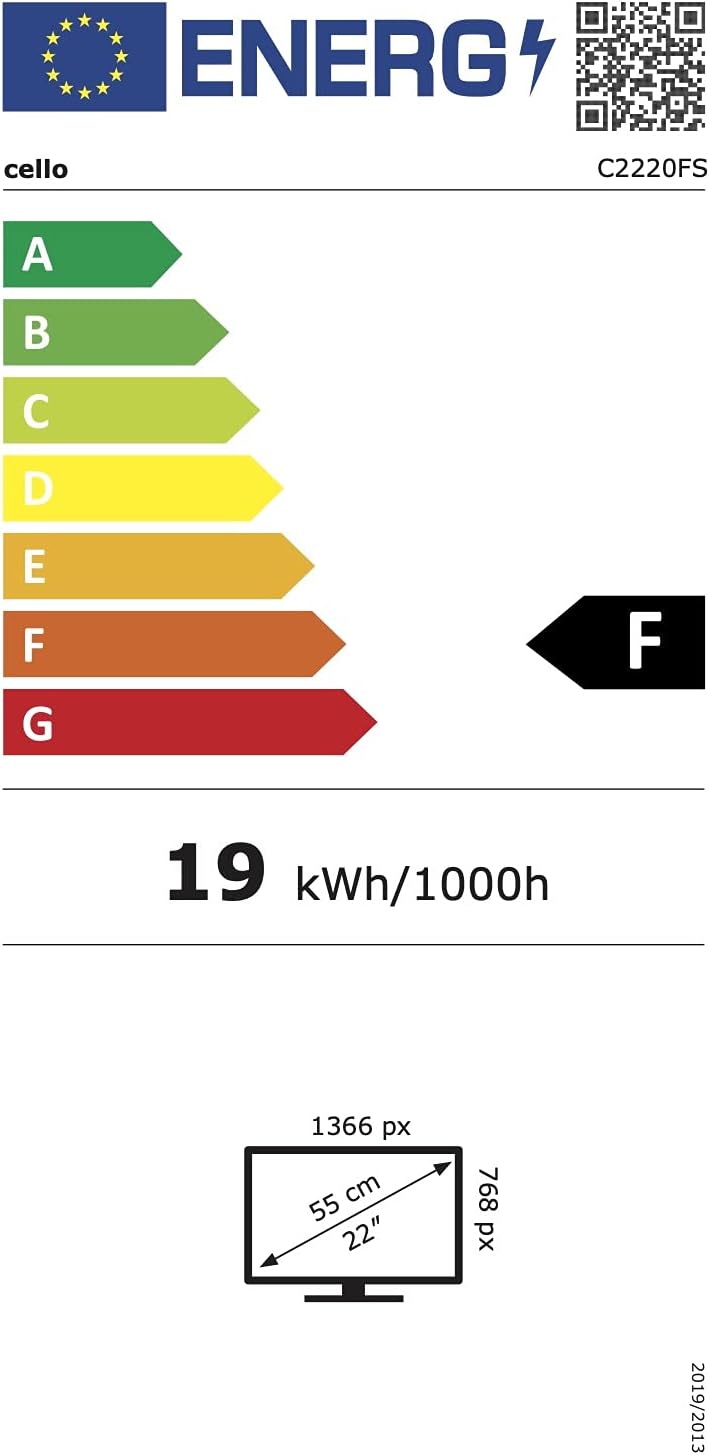
ภาพที่ 6.1: Energy efficiency label for the Cello C2220FSDE TV. For more details, visit ฐานข้อมูล EPREL.

ภาพที่ 6.2: Detailed product information sheet. For more details, visit ฐานข้อมูล EPREL.
7. การรับประกันและการสนับสนุน
7.1 ข้อมูลการรับประกัน
This Cello TV comes with a รับประกันจำกัด 1 ปีโปรดเก็บหลักฐานการซื้อไว้เพื่อใช้เรียกร้องการรับประกัน
7.2 การสนับสนุนลูกค้า
For technical support or customer service, please contact Cello Electronics:
- Webเว็บไซต์: www.celloelectronics.de
- อีเมล: consumersupport@celloelectronics.com
- โทรศัพท์: 03334330312
- ที่อยู่: Dovecot Hills, Bishop Auckland, DL14 6XW Durham, United Kingdom
You can also download the full instruction manual for your device in your preferred language from the official Cello webเว็บไซต์: https://celloelectronics.de/instruction-books/.