
สกายลอง จีเค61
คู่มือผู้ใช้คีย์บอร์ดเกมมิ่งเชิงกล SKYLOONG GK61/SK61
Comprehensive guide for your SKYLOONG 60% Mechanical Gaming Keyboard.
1. บทนำ
The SKYLOONG GK61/SK61 is a compact 60% mechanical gaming keyboard designed for performance and customization. Featuring 61 keys, RGB illumination, and Gateron Optical Brown Switches, it offers a responsive and tactile typing experience. This keyboard is wired, programmable, and built with durability in mind, including waterproof capabilities.

รูปที่ 1: เกินview of the SKYLOONG GK61/SK61 Mechanical Gaming Keyboard with its vibrant RGB backlighting.
2. เนื้อหาบรรจุภัณฑ์
โปรดตรวจสอบว่าสินค้าทั้งหมดมีอยู่ในแพ็คเกจของคุณ:
- SKYLOONG GK61/SK61 Mechanical Gaming Keyboard
- สายเคเบิล USB Type-C
- ตัวดึงกุญแจ
- ตัวดึงสวิตช์
- คู่มือการใช้งาน (เอกสารนี้)

Figure 2: Contents typically found in the SKYLOONG GK61/SK61 keyboard retail box, showing the keyboard, USB cable, and included tools.
3. คู่มือการติดตั้ง
3.1 การเชื่อมต่อคีย์บอร์ด
The SKYLOONG GK61/SK61 keyboard connects via a detachable USB Type-C cable, ensuring a stable and reliable connection for gaming and typing.
- ค้นหาพอร์ต USB Type-C ที่ด้านหลังของแป้นพิมพ์
- ต่อปลายด้านหนึ่งของสาย USB Type-C ที่ให้มาเข้ากับพอร์ตของคีย์บอร์ด
- เสียบปลายอีกด้านของสาย USB เข้ากับพอร์ต USB ที่ว่างอยู่บนคอมพิวเตอร์ของคุณ (PC หรือ Mac)
- The keyboard will be automatically recognized by your operating system, and the RGB backlighting will illuminate.

Figure 3: The USB Type-C interface for connecting the keyboard to your computer.
3.2 การติดตั้งซอฟต์แวร์ (ไม่บังคับสำหรับคุณสมบัติขั้นสูง)
For full customization, including advanced RGB lighting effects, key remapping, and macro programming, download the official SKYLOONG software (often referred to as GK6XPlus driver). This software is compatible with Windows and macOS.
- Visit the official SKYLOONG webไซต์เพื่อดาวน์โหลดซอฟต์แวร์เวอร์ชันล่าสุด
- ติดตั้งซอฟต์แวร์โดยทำตามคำแนะนำบนหน้าจอ
- Launch the software to access customization options.
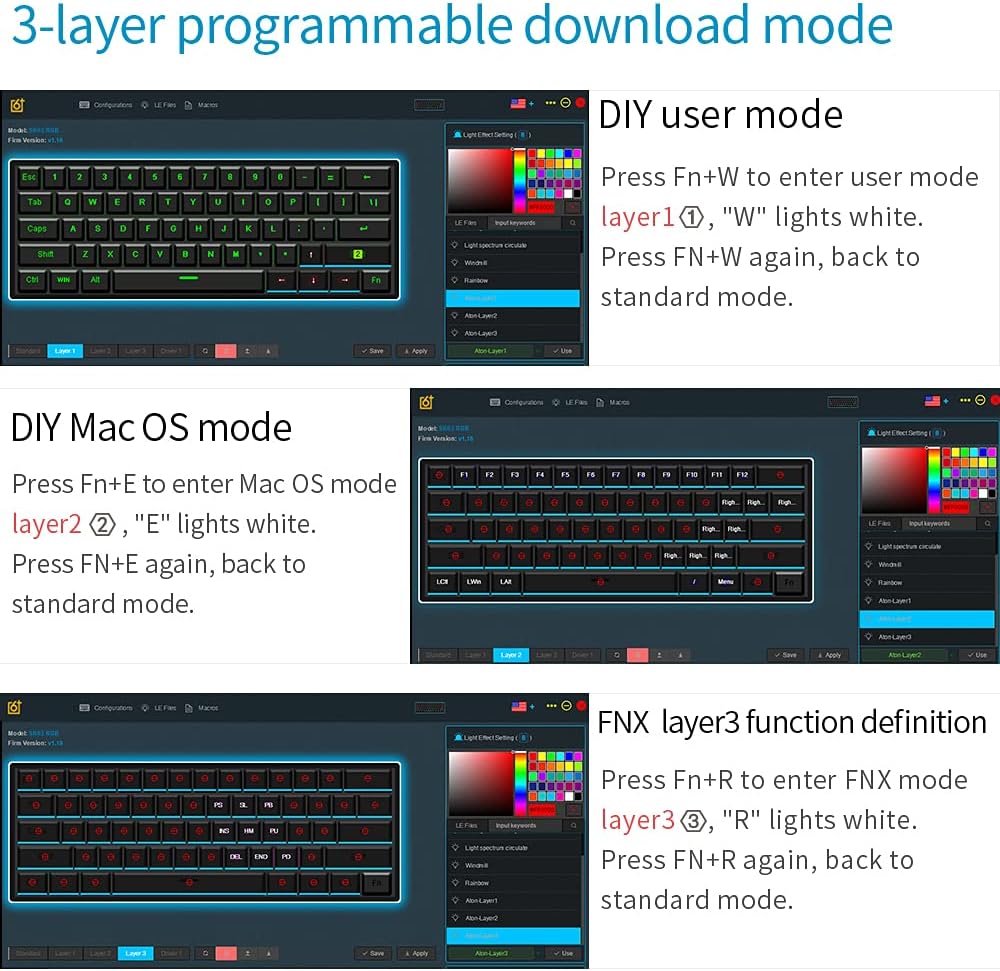
Figure 4: The software interface for managing the keyboard's programmable layers and lighting effects.
4. คู่มือการใช้งาน
4.1 Basic Functions and Fn Layer
The GK61/SK61 is a 60% keyboard, meaning some functions are accessed via a Function (Fn) layer. The Fn key is typically located on the bottom right of the keyboard.
| การผสมผสาน | การทำงาน |
|---|---|
| Fn + 1! - 0) | F1 - F10 |
| Fn + -= | เอฟ11 |
| Fn + [+={ | เอฟ12 |
| เอฟเอ็น+คิว | Layer 1 (User Mode) |
| Fn + อี | Layer 2 (Mac OS Mode) |
| Fn + ร | Layer 3 (FNX Mode) |
| Fn + ว | Switch between User Mode and Standard Mode |
| Fn + Spacebar | Change RGB lighting effects |
| Fn + Alt (Right) | Adjust RGB brightness |
4.2 การควบคุมไฟแบ็คไลท์ RGB
The keyboard features 16.8 million color RGB backlighting with multiple adjustable modes. Use the following combinations to control the lighting:
- Fn + Spacebar: สลับไปมาระหว่างเอฟเฟกต์แสง RGB ต่างๆ
- ปุ่ม Fn + ปุ่ม Alt ขวา: Adjust the brightness of the backlighting.
- Fn + Ctrl ขวา: เปลี่ยนความเร็วของเอฟเฟกต์แสงแบบไดนามิก
4.3 ปุ่มที่ตั้งโปรแกรมได้และมาโคร
The SKYLOONG GK61/SK61 supports full key programmability and on-the-fly macro recording through its 3-layer programmable download mode. This allows for extensive customization of key functions and complex command sequences.
- โหมดผู้ใช้แบบ DIY (เลเยอร์ 1): กด Fn + ว เพื่อเข้าสู่ระบบ ปุ่ม 'W' จะสว่างเป็นสีขาว กด Fn + ว again to return to standard mode. This layer is for user-defined key mappings.
- โหมด DIY Mac OS (เลเยอร์ 2): กด Fn + อี เพื่อเข้าใช้งาน ปุ่ม 'E' จะสว่างเป็นสีขาว กด Fn + อี again to return to standard mode. This layer is optimized for macOS specific functions.
- คำจำกัดความฟังก์ชันเลเยอร์ 3 ของ FNX (เลเยอร์ 3): กด Fn + ร เพื่อเข้าใช้งาน ปุ่ม 'R' จะสว่างเป็นสีขาว กด Fn + ร again to return to standard mode. This layer allows for advanced function definitions.
Detailed programming instructions are available within the GK6XPlus software.
5. การบำรุงรักษา
5.1 การทำความสะอาดแป้นพิมพ์
การทำความสะอาดเป็นประจำจะช่วยรักษาประสิทธิภาพและรูปลักษณ์ของแป้นพิมพ์
- ถอดแป้นพิมพ์ออกจากคอมพิวเตอร์ของคุณก่อนทำความสะอาด
- ใช้แปรงขนนุ่มหรือลมอัดเพื่อขจัดฝุ่นและเศษต่างๆ ออกจากระหว่างปุ่มต่างๆ
- For surface cleaning, gently wipe the keycaps and chassis with a slightly dampผ้าที่ไม่เป็นขุย หลีกเลี่ยงความชื้นมากเกินไป
- The keyboard has an IP68 waterproof rating, offering protection against spills. However, it is recommended to clean up any liquid spills immediately to prevent long-term damage.

Figure 5: The keyboard's waterproof design, allowing for enhanced durability against spills.
5.2 Switch Replacement (Hot-Swap Feature)
The SKYLOONG GK61/SK61 features hot-swappable Gateron Optical Switches, allowing you to easily change switches without soldering. This is only compatible with other Gateron Optical Switches.
- ใช้เครื่องมือถอดคีย์แคปที่ให้มา ถอดคีย์แคปที่ต้องการออกอย่างระมัดระวัง
- Insert the switch puller around the top and bottom clips of the switch.
- บีบคลิปเบาๆ และดึงสวิตช์ขึ้นตรงๆ เพื่อถอดออกจาก PCB
- Align the pins of the new Gateron Optical Switch with the holes on the PCB.
- Press the new switch firmly into place until it clicks. Ensure it is seated properly.
- เปลี่ยนปุ่มคีย์แคป

Figure 6: The hot-swap capability of the Gateron optical switches, allowing for easy replacement.
6 การแก้ไขปัญหา
If you encounter issues with your SKYLOONG GK61/SK61 keyboard, please refer to the following common solutions:
- แป้นพิมพ์ไม่ตอบสนอง:
- ตรวจสอบให้แน่ใจว่าสาย USB Type-C เชื่อมต่อกับคีย์บอร์ดและคอมพิวเตอร์อย่างแน่นหนา
- ลองเชื่อมต่อคีย์บอร์ดกับพอร์ต USB อื่นบนคอมพิวเตอร์ของคุณ
- ทดสอบแป้นพิมพ์บนคอมพิวเตอร์เครื่องอื่นเพื่อตัดปัญหาเฉพาะระบบ
- ไฟ RGB ไม่ทำงานหรือค้าง:
- กด Fn + Spacebar เพื่อหมุนเวียนผ่านโหมดแสงสว่าง
- กด Fn + ขวา Alt เพื่อปรับความสว่าง
- Ensure the keyboard is not in a specific programmable layer that might override lighting settings.
- If using the software, check lighting settings within the application.
- คีย์ไม่ลงทะเบียนหรือพิมพ์ซ้ำ:
- Carefully remove the keycap and switch (if hot-swappable) for the affected key. Check for any debris or obstruction.
- Re-seat the switch firmly. If the issue persists, consider replacing the switch.
- ตรวจสอบให้แน่ใจว่าเฟิร์มแวร์ของคีย์บอร์ดได้รับการอัปเดตผ่านซอฟต์แวร์อย่างเป็นทางการแล้ว
- Programmable functions not working:
- Ensure you are in the correct programmable layer (Fn + W, Fn + E, or Fn + R).
- Verify your settings within the GK6XPlus software.
- Make sure the software is running and properly communicating with the keyboard.
7. ข้อมูลจำเพาะ
| คุณสมบัติ | รายละเอียด |
|---|---|
| แบบอย่าง | จีเค61 / เอสเค61 |
| เค้าโครง | 60% (61 คีย์) |
| ประเภทสวิตซ์ | Gateron Optical Brown (Hot-swappable for optical switches only) |
| การเชื่อมต่อ | ต่อสาย (สาย USB Type-C แบบถอดได้) |
| การแบ็คไลท์ | RGB (16.8 ล้านสี โหมดต่างๆ) |
| ความสามารถในการตั้งโปรแกรมได้ | Full keys programmable, 3-layer download mode, on-the-fly macro recording |
| ความทนทาน | IP68 Waterproof/Dustproof/Anti-Corrosion, 100 million keystrokes lifetime |
| ปุ่มกด | ABS dual-color |
| ความเข้ากันได้ | Windows 2000/XP/Vista/Win7/Win8/Win10, Mac OS |
| ขนาด | Approx. 292mm x 104mm (Refer to Figure 2 for visual) |
| น้ำหนัก | ประมาณ 1.32 ปอนด์ (0.6 กก.) |

Figure 7: Ergonomic design of the keyboard, featuring a five-level height arc surface for comfortable typing.

Figure 8: Internal hardware architecture, highlighting the 32-bit M3 MCU, 8M Flash memory, and 3 channels 256 professional level RGB color management chip.
8. การรับประกันและการสนับสนุน
SKYLOONG products are designed for reliability and performance. For warranty information, technical support, or service inquiries, please refer to the official SKYLOONG webหรือติดต่อผู้ค้าปลีกของคุณ เก็บหลักฐานการซื้อไว้เพื่อใช้ในการเรียกร้องการรับประกัน
For the latest drivers and software, please visit the official SKYLOONG support page.