
ELECDER D19
คู่มือผู้ใช้หูฟังไร้สาย ELECDER D19 True Wireless Earbuds
รุ่น: D19 | ยี่ห้อ: ELECDER
1. บทนำ
หูฟังไร้สาย ELECDER D19 ออกแบบมาเพื่อมอบประสบการณ์เสียงที่เหนือกว่าด้วยคุณสมบัติขั้นสูง เช่น การเชื่อมต่อ Bluetooth 5.0 การตัดเสียงรบกวน และมาตรฐานกันน้ำ IPX7 คู่มือนี้ให้คำแนะนำอย่างละเอียดเกี่ยวกับการตั้งค่า การใช้งาน และการบำรุงรักษาหูฟังของคุณ เพื่อให้มั่นใจถึงประสิทธิภาพสูงสุดและอายุการใช้งานที่ยาวนาน
คุณสมบัติหลัก:
- Bluetooth 5.0: การส่งสัญญาณไร้สายที่รวดเร็วและเสถียร พร้อมระบบตัดเสียงรบกวน CVC8.0 เพื่อการโทรที่คมชัด
- ระบบเสียงสเตอริโอไฮไฟระดับพรีเมียม: ระบบเสียง APTX สำหรับการส่งสัญญาณแบบไม่สูญเสียคุณภาพ ให้เสียงที่สมจริง คมชัด และมีเบสที่หนักแน่น
- IPX7 กันน้ำ: ทนทานต่อเหงื่อ น้ำ และฝน เหมาะสำหรับออกกำลังกายและกิจกรรมกลางแจ้ง
- การออกแบบตามหลักสรีรศาสตร์: น้ำหนักเบา (5 กรัมต่อหูฟังข้างละ 5 กรัม) พร้อมครีบหูซิลิโคนยืดหยุ่น และจุกหูฟังขนาด S/M/L เพื่อความกระชับและสวมใส่สบาย
- เทคโนโลยีการจับคู่ด่วน: เปิดเครื่องและจับคู่โดยอัตโนมัติเมื่อนำออกจากกล่องชาร์จ
- การชาร์จเร็วผ่าน USB และการชาร์จไร้สาย: สามารถฟังเพลงได้นานสูงสุด 4.5 ชั่วโมงต่อการชาร์จหนึ่งครั้ง และใช้งานได้เพิ่มอีก 18 ชั่วโมงจากเคสชาร์จ รองรับทั้งการชาร์จผ่าน USB และการชาร์จไร้สาย
2. สินค้าหมดview

ภาพที่ 2.1: หูฟังไร้สาย ELECDER D19 ในกล่องชาร์จ หูฟังมีสีดำ ดีไซน์เรียบหรู และออกแบบมาสำหรับการใช้งานแบบใส่ในหู ในขณะที่กล่องชาร์จขนาดกะทัดรัดก็มีสีดำและพื้นผิวเรียบเช่นกัน
อะไรอยู่ในกล่อง:
- หูฟังไร้สาย ELECDER D19 (ซ้ายและขวา)
- เคสชาร์จไฟ
- สายชาร์จ USB
- จุกหูฟัง (ขนาด S/M/L)
- คู่มือการใช้งาน (เอกสารนี้)
3. คู่มือการติดตั้ง
3.1 การชาร์จหูฟังและเคส
ก่อนใช้งานครั้งแรก โปรดชาร์จหูฟังและเคสชาร์จให้เต็ม เคสชาร์จรองรับทั้งการชาร์จผ่านสาย USB และการชาร์จไร้สาย
- การชาร์จ USB: เชื่อมต่อสาย USB ที่ให้มากับพอร์ตชาร์จบนเคส และเสียบปลายอีกด้านหนึ่งเข้ากับแหล่งจ่ายไฟ USB (เช่น คอมพิวเตอร์ อะแดปเตอร์ติดผนัง) ไฟแสดงสถานะบนเคสจะแสดงสถานะการชาร์จ
- การชาร์จแบบไร้สาย: วางเคสชาร์จลงบนแท่นชาร์จไร้สายที่ใช้งานร่วมกันได้ ไฟแสดงสถานะจะกะพริบเพื่อยืนยันการชาร์จ

รูปที่ 3.1: เคสชาร์จ ELECDER D19 กำลังชาร์จแบบไร้สายบนแท่นชาร์จ พร้อมทั้งแสดงพอร์ต Micro USB สำหรับการชาร์จแบบมีสาย ภาพนี้เน้นให้เห็นถึงความสามารถในการชาร์จแบบคู่ของเคส
การชาร์จหูฟังจนเต็มจะให้เวลาใช้งานฟังเพลงประมาณ 4.5 ชั่วโมง และเคสชาร์จจะให้พลังงานเพิ่มเติมอีก 18 ชั่วโมง
3.2 การจับคู่กับอุปกรณ์ของคุณ
หูฟังไร้สาย ELECDER D19 มาพร้อมเทคโนโลยีการจับคู่ที่รวดเร็วเพื่อการเชื่อมต่อที่ราบรื่น
- ขั้นตอนที่ 1: เปิดกล่องชาร์จและนำหูฟังทั้งสองข้างออกมา หูฟังจะเปิดและจับคู่กันโดยอัตโนมัติ
- ขั้นตอนที่ 2: บนสมาร์ทโฟนหรืออุปกรณ์ที่รองรับ Bluetooth ของคุณ ให้ไปที่การตั้งค่า Bluetooth
- ขั้นตอนที่ 3: ค้นหา ตรวจสอบอุปกรณ์ที่มีอยู่และเลือก "Electer D19" จากรายการเพื่อเชื่อมต่อ
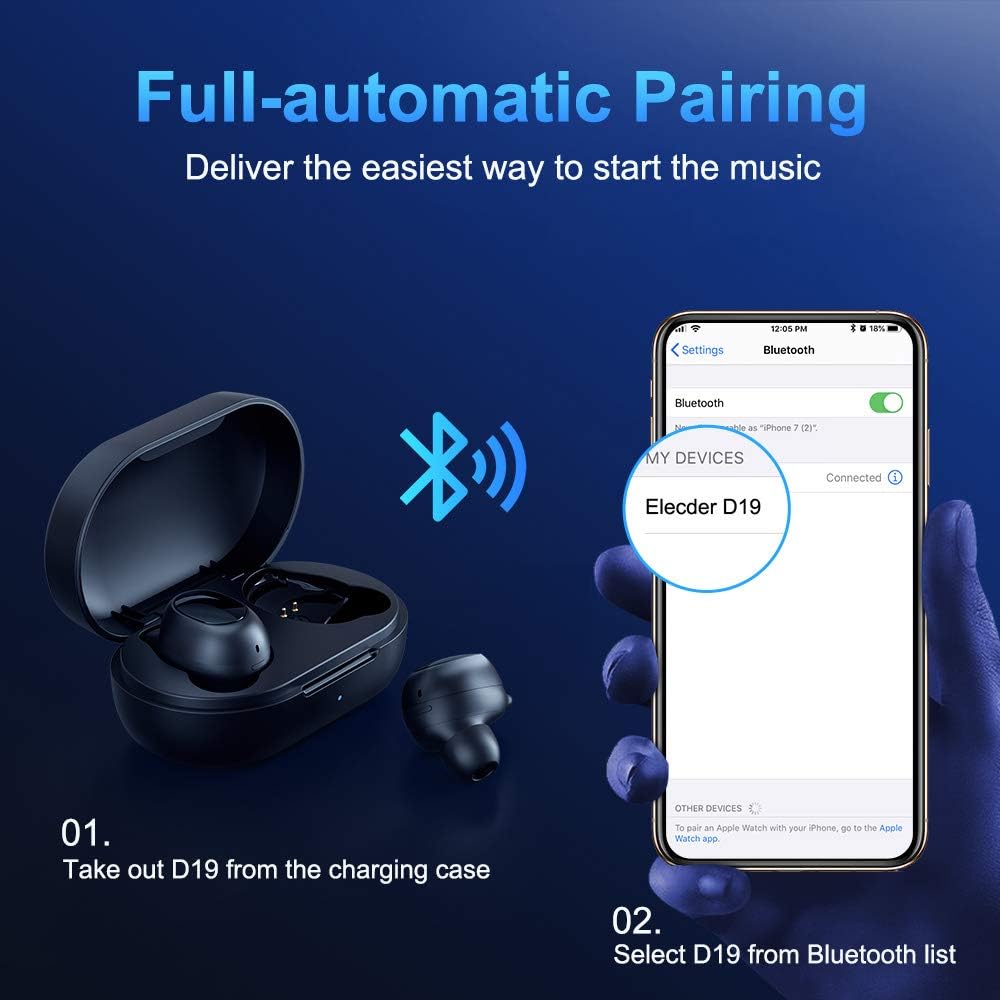
รูปที่ 3.2: ภาพประกอบแสดงขั้นตอนการจับคู่โดยอัตโนมัติ ภาพแสดงให้เห็นหูฟังถูกนำออกจากเคส จากนั้นตัวเลือก "Electer D19" จะปรากฏขึ้นในเมนูการตั้งค่าบลูทูธของสมาร์ทโฟนเพื่อทำการเชื่อมต่อ
หลังจากจับคู่ครั้งแรกแล้ว หูฟังจะเชื่อมต่อกับอุปกรณ์ที่จับคู่ล่าสุดโดยอัตโนมัติเมื่อนำออกจากกล่องชาร์จ

รูปที่ 3.3: ภาพประกอบแสดงการเชื่อมต่อบลูทูธที่เสถียรระหว่างหูฟัง ELECDER D19 กับอุปกรณ์อัจฉริยะต่างๆ รวมถึงสมาร์ทโฟนและแท็บเล็ต
4. คู่มือการใช้งาน
4.1 การสวมหูฟัง
เพื่อคุณภาพเสียงและความสบายที่ดีที่สุด โปรดเลือกจุกหูฟังที่พอดีกับหูของคุณ หูฟังมีให้เลือก 3 ขนาด คือ S, M และ L สอดหูฟังเข้าไปในหูแล้วหมุนเบาๆ เพื่อหาขนาดที่กระชับและสบาย การออกแบบครีบหูตามหลักสรีรศาสตร์ช่วยให้หูฟังมีความเสถียรขณะเคลื่อนไหว
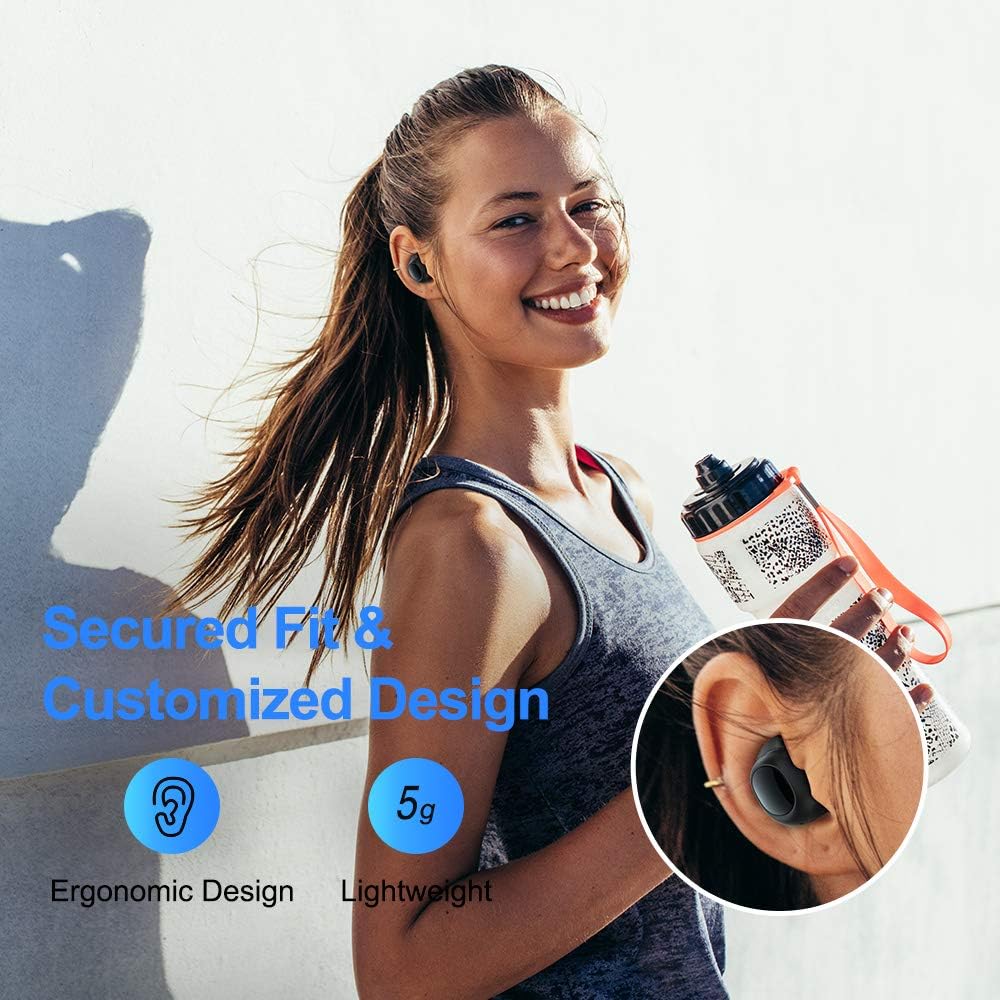
รูปที่ 4.1: บุคคลสวมหูฟัง ELECDER D19 ระหว่างออกกำลังกาย แสดงให้เห็นถึงความกระชับและสวมใส่สบายด้วยการออกแบบตามหลักสรีรศาสตร์และจุกหูฟังที่ปรับแต่งได้
4.2 การควบคุมสื่อ
หูฟังไร้สาย ELECDER D19 มีปุ่มกดจริงสำหรับควบคุมสื่อ ฟังก์ชั่นของปุ่มอาจแตกต่างกันเล็กน้อยขึ้นอยู่กับอุปกรณ์และระบบปฏิบัติการ แต่ปุ่มควบคุมทั่วไปได้แก่:
- เล่น/หยุดชั่วคราว: กดที่หูฟังข้างใดข้างหนึ่งเพียงครั้งเดียว
- เพลงถัดไป: กดที่หูฟังด้านขวาสองครั้ง
- แทร็กก่อนหน้า: กดสองครั้งที่หูฟังด้านซ้าย
- ปรับระดับเสียงขึ้น: กดสามครั้งที่หูฟังด้านขวา
- ลดเสียงลง: กดสามครั้งที่หูฟังด้านซ้าย
4.3 การจัดการการโทร
จัดการสายเรียกเข้าของคุณได้โดยตรงจากหูฟัง:
- รับ/วางสาย: กดที่หูฟังข้างใดข้างหนึ่งเพียงครั้งเดียว
- ปฏิเสธสาย: กดเอียร์บัดข้างใดข้างหนึ่งค้างไว้ 2 วินาที
- เปิดใช้งาน Voice Assistant: กดหูฟังข้างใดข้างหนึ่งค้างไว้ 3 วินาที (เช่น ใช้กับ Siri หรือ Google Assistant)
5. การบำรุงรักษาและการดูแล
การดูแลรักษาอย่างถูกวิธีจะช่วยให้หูฟัง ELECDER D19 ของคุณมีอายุการใช้งานยาวนานและทำงานได้อย่างมีประสิทธิภาพสูงสุด
5.1 การทำความสะอาด
- ทำความสะอาดหูฟังและกล่องชาร์จเป็นประจำด้วยผ้าแห้งนุ่มที่ไม่เป็นขุย
- ถอดปลายหูออกแล้วทำความสะอาดด้วยสบู่ชนิดอ่อนและน้ำ จากนั้นเช็ดให้แห้งสนิทก่อนใส่กลับเข้าไปอีกครั้ง
- ใช้สำลีพันก้านหรือแปรงขนาดเล็กทำความสะอาดจุดสัมผัสการชาร์จทั้งบนหูฟังและเคสอย่างเบามือ
- หลีกเลี่ยงการใช้สารกัดกร่อน แอลกอฮอล์ หรือสารเคมีทำความสะอาด
5.2 ความต้านทานน้ำ (IPX7)
หูฟังไร้สาย ELECDER D19 กันน้ำระดับ IPX7 หมายความว่าสามารถทนต่อการจุ่มน้ำได้ลึกถึง 1 เมตร นาน 30 นาที จึงเหมาะสำหรับการป้องกันเหงื่อ ฝน และการกระเด็นของน้ำโดยไม่ตั้งใจ

รูปที่ 5.1: หูฟังไร้สาย ELECDER D19 แสดงให้เห็นหยดน้ำบนหูฟัง ซึ่งแสดงให้เห็นถึงมาตรฐานกันน้ำ IPX7 ที่ปกป้องหูฟังจากเหงื่อ ฝน และน้ำกระเด็น
บันทึก: เคสชาร์จไม่กันน้ำ โปรดตรวจสอบให้แน่ใจว่าหูฟังแห้งสนิทก่อนใส่กลับเข้าไปในเคสชาร์จ
5.3 พื้นที่จัดเก็บ
เมื่อไม่ใช้งาน ให้เก็บหูฟังไว้ในกล่องชาร์จเพื่อป้องกันและรักษาระดับพลังงาน เก็บกล่องไว้ในที่แห้งและเย็น หลีกเลี่ยงอุณหภูมิที่สูงหรือแสงแดดโดยตรง
6 การแก้ไขปัญหา
หากคุณพบปัญหาใดๆ กับหูฟัง ELECDER D19 โปรดดูวิธีแก้ไขปัญหาทั่วไปต่อไปนี้:
| ปัญหา | สาเหตุที่เป็นไปได้ | สารละลาย |
|---|---|---|
| หูฟังไม่จับคู่กับอุปกรณ์ | บลูทูธปิดอยู่บนอุปกรณ์; หูฟังไม่ได้อยู่ในโหมดจับคู่; อุปกรณ์ที่เคยจับคู่ไว้ก่อนหน้านี้กำลังรบกวนการทำงาน | ตรวจสอบให้แน่ใจว่าได้เปิดใช้งานบลูทูธแล้ว ใส่หูฟังกลับเข้าไปในเคส จากนั้นหยิบออกมาเพื่อเข้าสู่โหมดจับคู่ใหม่ ลบ "Electer D19" ออกจากรายการบลูทูธของอุปกรณ์ของคุณ แล้วจับคู่ใหม่อีกครั้ง |
| มีหูฟังใช้งานได้แค่ข้างเดียว | หูฟังทั้งสองข้างไม่ได้เชื่อมต่อกัน; แบตเตอรี่เหลือน้อยในหูฟังข้างหนึ่ง | ใส่หูฟังทั้งสองข้างกลับเข้าไปในกล่องชาร์จ ปิดฝา รอสักครู่ แล้วเปิดฝาและนำหูฟังออกมาอีกครั้ง ตรวจสอบให้แน่ใจว่าหูฟังทั้งสองข้างชาร์จเต็มแล้ว |
| ไม่มีเสียงหรือเสียงเบา | ระดับเสียงของอุปกรณ์ต่ำเกินไป; จุกหูฟังปิดไม่สนิท; มีเศษสิ่งสกปรกอยู่ในรูหูฟัง | เพิ่มระดับเสียงบนอุปกรณ์ของคุณ ปรับตำแหน่งของหูฟัง หรือลองใช้จุกหูฟังขนาดต่างๆ เพื่อให้แนบสนิทกับหูมากขึ้น ทำความสะอาดปลายหูฟัง |
| เคสชาร์จไม่ชาร์จ | สายเคเบิล/ที่ชาร์จมีปัญหา; วางบนแท่นชาร์จไร้สายไม่ถูกวิธี | ลองใช้สาย USB และอะแดปเตอร์แปลงไฟอันอื่นดู ตรวจสอบให้แน่ใจว่าวางเคสบนแท่นชาร์จไร้สายในตำแหน่งที่ถูกต้อง |
| การเชื่อมต่อบลูทูธไม่เสถียร | สัญญาณรบกวน; ระยะห่างจากอุปกรณ์; แบตเตอรี่หูฟังเหลือน้อย | ลดระยะห่างระหว่างหูฟังและอุปกรณ์ หลีกเลี่ยงสภาพแวดล้อมที่มีสัญญาณ Wi-Fi หรือบลูทูธแรง และตรวจสอบให้แน่ใจว่าหูฟังชาร์จเต็มแล้ว |
7. ข้อมูลจำเพาะ
รายละเอียดคุณสมบัติทางเทคนิคของหูฟังไร้สาย ELECDER D19 True Wireless Earbuds:
| คุณสมบัติ | รายละเอียด |
|---|---|
| ชื่อรุ่น | ELECDER D19 |
| เทคโนโลยีการเชื่อมต่อ | ไร้สาย (บลูทูธ 5.0) |
| ช่วงบลูทูธ | 33 ฟุต |
| การวางตำแหน่งหู | ในหู |
| ฟอร์มแฟกเตอร์ | ในหู |
| การควบคุมเสียงรบกวน | ระบบตัดเสียงรบกวนแบบแอคทีฟ (CVC8.0) |
| ไมโครโฟน | รวมอยู่ด้วย |
| ระดับความต้านทานต่อน้ำ | กันน้ำระดับ IPX7 |
| อายุการใช้งานแบตเตอรี่ (หูฟัง) | ฟังเพลงได้นานสูงสุด 4.5 ชั่วโมง / โทรได้นานสูงสุด 4 ชั่วโมง |
| เคสชาร์จไฟ เพิ่มเวลาเล่นเพิ่มเติม | 18 ชั่วโมง |
| เวลาในการชาร์จ | ประมาณ 2 ชั่วโมง |
| อินเตอร์เฟซการชาร์จ | ไมโคร USB, การชาร์จไร้สาย |
| น้ำหนักสินค้า | 1.92 ออนซ์ (รวม) / 5 กรัม (หูฟังแต่ละข้าง) |
| ขนาดสินค้า | 3.89 x 3.89 x 1.65 นิ้ว |
| อุปกรณ์ที่รองรับ | สมาร์ทโฟน iOS และ Android |
| วัสดุ | ซิลิโคน (จุกหูฟัง) |
| สี | สีดำ |

รูปที่ 7.1: ภาพอินโฟกราฟิกแสดงรายละเอียดอายุการใช้งานแบตเตอรี่ของหูฟัง ELECDER D19 และเคสชาร์จ โดยแสดงให้เห็นว่าสามารถใช้งานสำหรับการโทรได้ 4 ชั่วโมง ฟังเพลงได้ 4.5 ชั่วโมง และใช้งานได้รวม 18 ชั่วโมงเมื่อใช้ร่วมกับเคสชาร์จขนาด 500mAh
8. การรับประกันและการสนับสนุน
ผลิตภัณฑ์ของ ELECDER ผลิตขึ้นตามมาตรฐานคุณภาพสูง สำหรับข้อมูลเกี่ยวกับการรับประกัน การสนับสนุนทางเทคนิค หรือข้อสงสัยด้านบริการ โปรดดูข้อมูลติดต่อที่ให้ไว้ในบรรจุภัณฑ์ของผลิตภัณฑ์ หรือเยี่ยมชมเว็บไซต์อย่างเป็นทางการของ ELECDER webเว็บไซต์.
หากต้องการความช่วยเหลือเพิ่มเติม คุณสามารถติดต่อร้านค้าที่คุณซื้อสินค้าได้เช่นกัน
Ask a question about this manual
Ask about setup, troubleshooting, compatibility, parts, safety, or missing instructions. Manuals+ will review the question and use this page’s manual context to help answer it.