
สินค้าเกินview
The MaedHawk Bluetooth Transmitter TX4 is a compact and versatile device designed to add Bluetooth connectivity to your non-Bluetooth audio sources. It allows you to wirelessly transmit audio from devices such as TVs, PCs, Nintendo Switch, PSP, PS5, Xbox controllers, and MP3/MP4 players to Bluetooth-enabled headphones or speakers. Featuring aptX Low Latency technology, it aims to minimize audio delay for a synchronized listening experience.

Image: MaedHawk Bluetooth Transmitter TX4, showcasing its rotatable 3.5mm audio jack and compact design. The device is silver and black with indicator lights for SBC, LL, and APTX codecs, and a multi-function button.
เนื้อหาแพ็คเกจ
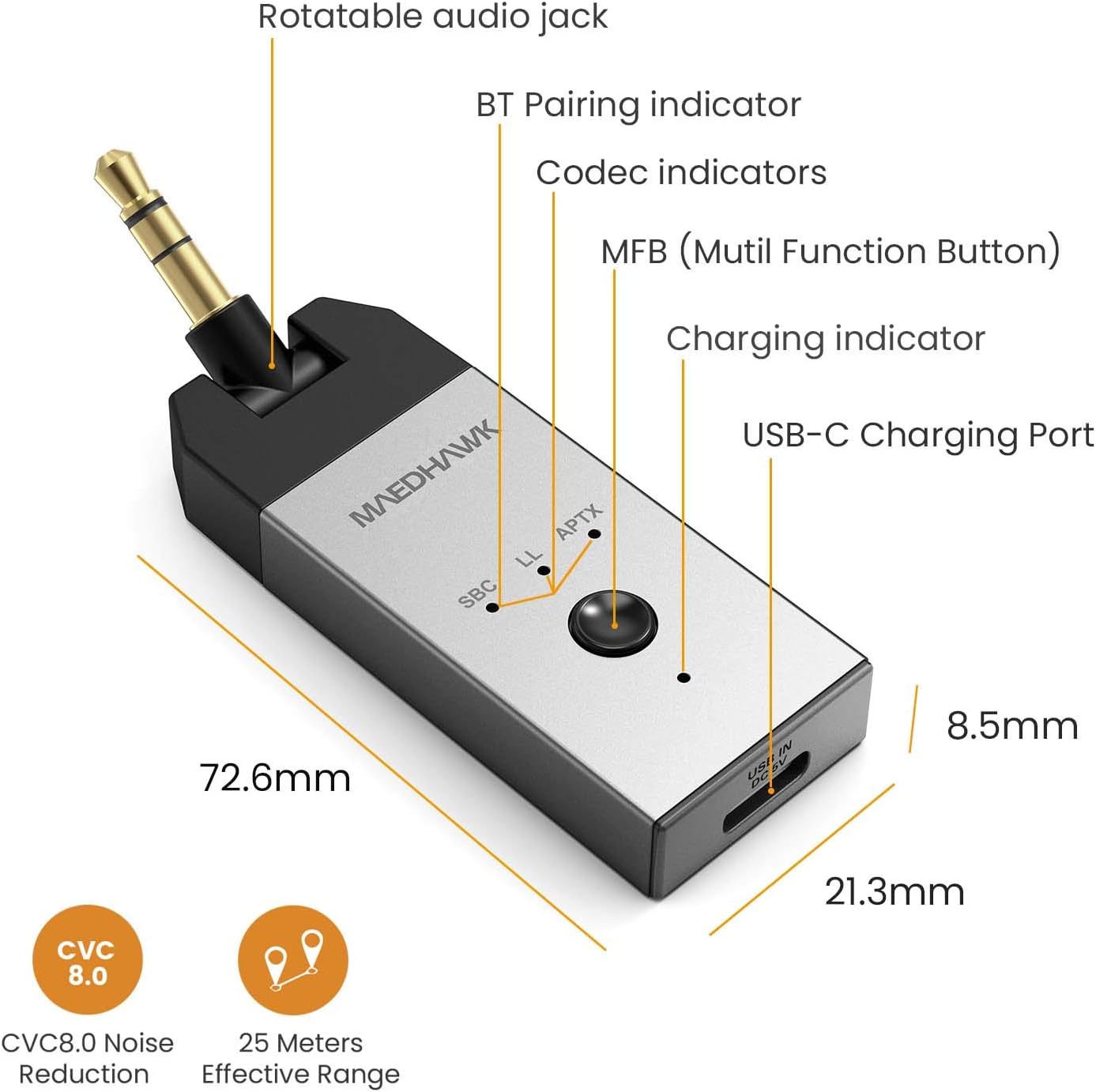
Image: Diagram showing the package contents, including the TX4 Bluetooth transmitter, a USB-C charging cable, a 3.5mm male-female adapter audio cable, a user manual, and a warranty card.
- 1 x MaedHawk Bluetooth Transmitter TX4
- สายชาร์จ 1 x USB-C
- 1 x 3.5mm Male-Female Audio Cable
- 1 x คู่มือผู้ใช้
- ใบรับประกัน 1 ใบ
ส่วนประกอบของอุปกรณ์

Image: Detailed diagram of the MaedHawk TX4 highlighting its components: Rotatable audio jack, BT Pairing indicator, Codec indicators (SBC, LL, APTX), MFB (Multi-Function Button), Charging indicator, and USB-C Charging Port. Dimensions are also shown.
- Rotatable Audio Jack: 3.5mm jack for connecting to audio sources, designed to rotate 180° for convenience.
- ปุ่มมัลติฟังก์ชัน (MFB): Used for power on/off, pairing, and other controls.
- Codec Indicators (SBC, LL, APTX): LEDs indicating the active audio codec.
- BT Pairing Indicator: LED to show Bluetooth pairing status.
- ไฟแสดงสถานะการชาร์จ: LED to show charging status.
- พอร์ตชาร์จ USB-C: สำหรับการชาร์จอุปกรณ์
คู่มือการติดตั้ง
การชาร์จอุปกรณ์
Before first use, fully charge the MaedHawk TX4. Connect the supplied USB-C charging cable to the TX4's USB-C port and the other end to a USB power source (e.g., computer USB port, USB wall adapter). The charging indicator will illuminate during charging and turn off when fully charged. A full charge takes approximately 2 hours and provides up to 9 hours of battery life.
The device can be charged directly while playing music. However, if you connect the USB-C cable while the device is already transmitting audio, you may need to restart the unit for it to continue transmitting. This is because connecting the cable can sometimes reset the Bluetooth connection.

Image: The MaedHawk TX4 connected via its USB-C port for charging, with an arrow pointing to the charging LED. Text indicates that the unit may need to be restarted when the charging cable is connected.
การเชื่อมต่อกับแหล่งสัญญาณเสียง
The TX4 connects to your audio source via its 3.5mm audio jack. The rotatable design allows for flexible positioning.
- For TVs, Game Consoles (Switch, PS5, Xbox controllers), MP3/MP4 Players: Plug the 3.5mm audio jack of the TX4 directly into the headphone output or audio out port of your device. If the port is recessed or difficult to access, use the provided 3.5mm male-female adapter cable.
- สำหรับพีซี: You can connect the TX4 to your PC in two ways:
- Plug the 3.5mm audio jack into the PC's audio output port.
- Connect the TX4 to your PC using the USB-C cable. The TX4 can function as a USB audio device, receiving audio digitally from the PC without needing the 3.5mm jack. This also charges the device simultaneously.

Image: The MaedHawk TX4 connected to a TV's audio output, transmitting sound to a soundbar, demonstrating how to make a TV Bluetooth enabled.

Image: The MaedHawk TX4 plugged into a Nintendo Switch, enabling wireless audio for gaming with Bluetooth headphones.

Image: The MaedHawk TX4 connected to a desktop PC via its USB-C port, illustrating how it can add Bluetooth functionality to a PC while charging.
คำแนะนำการใช้งาน
การจับคู่กับหูฟัง/ลำโพง Bluetooth
- เปิดเครื่อง: Press and hold the Multi-Function Button (MFB) for approximately 3 seconds until the BT Pairing indicator starts flashing, indicating it's in pairing mode.
- Activate Pairing Mode on Receiving Device: Put your Bluetooth headphones or speakers into pairing mode. Refer to your audio device's manual for specific instructions.
- เชื่อมต่อ: The TX4 will automatically search for and connect to nearby Bluetooth devices in pairing mode. Once connected, the BT Pairing indicator will stop flashing and remain solid. The corresponding codec indicator (SBC, LL, or APTX) will also light up.
- เพลิดเพลินไปกับเสียง: Ensure your audio source (TV, PC, etc.) is playing sound. The audio will now be transmitted wirelessly to your paired Bluetooth device.

Image: A person playing a Nintendo Switch with the MaedHawk TX4 connected, emphasizing the aptX Low Latency feature for synchronized gaming audio.
Understanding aptX Low Latency
The MaedHawk TX4 supports aptX Low Latency (aptX LL) codec, which significantly reduces audio delay, making it ideal for watching videos or playing games where audio-visual synchronization is crucial. For aptX LL to function, your Bluetooth headphones or speakers must also support the aptX Low Latency codec. If your receiving device does not support aptX LL, the TX4 will default to another compatible codec like aptX or SBC, which may result in a slightly higher audio delay.

Image: A blurred image of a street with a bus, overlaid with text "Minimum audio delay BY APTX LOW LATENCY", visually representing speed and efficiency of the codec.
การซ่อมบำรุง
To ensure the longevity and optimal performance of your MaedHawk Bluetooth Transmitter TX4, please follow these maintenance guidelines:
- การทำความสะอาด: ใช้ผ้านุ่มและแห้งเช็ดทำความสะอาดอุปกรณ์ ห้ามใช้น้ำยาทำความสะอาดหรือสเปรย์
- พื้นที่จัดเก็บ: เก็บอุปกรณ์ไว้ในที่แห้งและเย็น หลีกเลี่ยงแสงแดดโดยตรงและอุณหภูมิที่สูงหรือต่ำเกินไป
- การจัดการ: Avoid dropping the device or subjecting it to strong impacts. Do not attempt to disassemble or modify the device, as this will void the warranty.
- ความชื้น: เก็บอุปกรณ์ให้ห่างจากน้ำและความชื้นสูง
การแก้ไขปัญหา
If you encounter issues with your MaedHawk Bluetooth Transmitter TX4, please refer to the following common problems and solutions:
| ปัญหา | สาเหตุที่เป็นไปได้ / วิธีแก้ไข |
|---|---|
| อุปกรณ์ไม่เปิดเครื่อง |
|
| ไม่สามารถเชื่อมต่อกับหูฟัง/ลำโพงบลูทูธได้ |
|
| ไม่มีเสียงหรือเสียงเบา |
|
| Audio delay/latency is noticeable. |
|
| Device stops transmitting when charging cable is connected. |
|
ข้อมูลจำเพาะ
| คุณสมบัติ | รายละเอียด |
|---|---|
| หมายเลขรุ่น | TX4 |
| ยี่ห้อ | MaedHawk |
| ขนาดสินค้า | 0.84 x 0.35 x 2.86 นิ้ว (72.6 x 21.3 x 8.5 มม.) |
| น้ำหนักสินค้า | 0.441 ออนซ์ (12.5 กรัม) |
| ฮาร์ดแวร์อินเตอร์เฟซ | บลูทูธ, บลูทูธ 5 |
| โปรโตคอลการเชื่อมโยงข้อมูล | บลูทูธ, ยูเอสบี |
| อัตราการถ่ายโอนข้อมูล | 3 เมกะบิตต่อวินาที |
| สี | Metal Silver |
| แบตเตอรี่ | แบตเตอรี่ลิเธียมไอออน 1 ก้อน (รวมอยู่ด้วย) |
| อายุการใช้งานแบตเตอรี่ | สูงสุด 9 ชั่วโมง (โดยประมาณ) |
| เวลาในการชาร์จ | ประมาณ 2 ชั่วโมง |
| ระยะที่มีประสิทธิภาพ | สูงสุด 25 เมตร (โดยประมาณ) |
| ตัวแปลงสัญญาณที่รองรับ | aptX เวลาแฝงต่ำ, aptX, SBC |

Image: A close-up of a microchip labeled "Bluetooth 5.0 CSR8670", indicating the advanced Bluetooth technology used in the device.
การรับประกันและการสนับสนุน
MaedHawk products are designed and manufactured to the highest quality standards. This product is covered by a limited warranty from the date of purchase. Please refer to the warranty card included in your package for specific terms and conditions.
For technical support, troubleshooting assistance, or warranty claims, please contact MaedHawk customer service through the retailer where you purchased the product or visit the official MaedHawk webเว็บไซต์สำหรับข้อมูลการติดต่อ
สำคัญ: Keep your proof of purchase (receipt or order confirmation) for warranty purposes.